Dashboard
dacli dashboard is the local, read-only projection over the same durable
workspace used by the CLI and MCP server. It does not keep a second database,
authorize transitions, or mutate tasks. Its job is narrower: make the current
delivery state understandable at a glance, then link an operator to the exact
evidence behind it.
dacli dashboard
# or pin the loopback port
dacli dashboard --port 8787
The command prints the local URL and serves only on loopback. Keep the terminal open while using the page; press Ctrl+C to stop it.
Navigate the workspace console
The dashboard opens at #/overview and exposes six stable read-only areas:
- Overview keeps the first decision compact: blocked work, pending events, live-agent/task totals, and project summaries.
- Work shows searchable task identities grouped by their truthful status counts, plus the selected project's burndown, without building its dependency graph.
- Agents starts with the selected project's durable loop operation—state, phase, wave, token reservations, routing, capacity, verification, and preflight evidence—then compares delivery outcomes across adjacent windows, shows measured token intensity, and ends with current run evidence.
- Team shows role authority, routing, model/runtime policy, scope, skills, WIP capacity, and the live agents occupying each role.
- Activity is a newest-first, typed projection of the append-only journal: refusals, findings, owner asks, review verdicts, reconciliation, handoffs, ownership, and delivery evidence. It can observe and filter records but cannot sync, dismiss, approve, or reconcile them.
- Delivery combines the selected project's dependency graph with a task-selected, attempt-level delivery waterfall.
Project and exact task selection are shareable, for example
#/work?project=core&task=t-01TASK935 or
#/delivery?project=core&task=t-01.... Role
inspection is shareable too: #/team?role=frontend-engineer opens that exact
authority record. Unsafe identities and unknown paths are rejected without
loading hidden workspace data. Back, Forward, reload, and direct links all read
from the URL rather than a private browser-side stack.
Scope an investigation
The observation strip keeps investigation context visible across routes. Its controls are URL-backed, so a filtered view can be shared and browser Back/Forward restores it exactly:
#/agents?filter_role=frontend-engineer&runtime=codex&state=acting&range=24h
Overview and Delivery currently apply exact project scope. Work applies project scope plus task identity/title/owner/priority/status search. Agents apply search, role, runtime, state, and the 24-hour/7-day/30-day window to complete live-agent observations; the window also bounds the displayed burn series. Team applies search, role, runtime, and model. Activity sends exact project, task, event kind, actor, pending/applied state, time range, and stable cursor to the server; the result count describes only that bounded page. Disabled controls and the “preserved for another route” note make each route boundary visible instead of silently discarding or pretending to apply a filter.
The count at the left of the strip states filtered versus observed records. Pause freezes automatic local observations, aborts in-flight reads, and keeps the last good snapshot on screen. Resume restarts only the surfaces required by the current route. Pausing the dashboard does not pause dacli, an agent, GitHub, or any provider; the freshness label continues to age.
Operator pulse
The Overview panel answers three lightweight questions before a focused area is opened:
- Where is work moving? The first active/open project and its counts.
- What needs attention globally? Blocked tasks and pending durable events.
- What is moving? Running-agent, active-task, open-task, and project totals.
“No recorded blockers” means the observed signals are within their recorded overview contract. It is not a guarantee that route-specific burn, agent, role, delivery, GitHub, or provider evidence is healthy.
Work and Delivery
The project cards and Work board show status and estimated work. The board loads one bounded task-row projection for the selected project, keeps the server's total in every column, and filters exact id/title/owner/priority text without turning a filtered count into the total. It never fetches detail once per row.
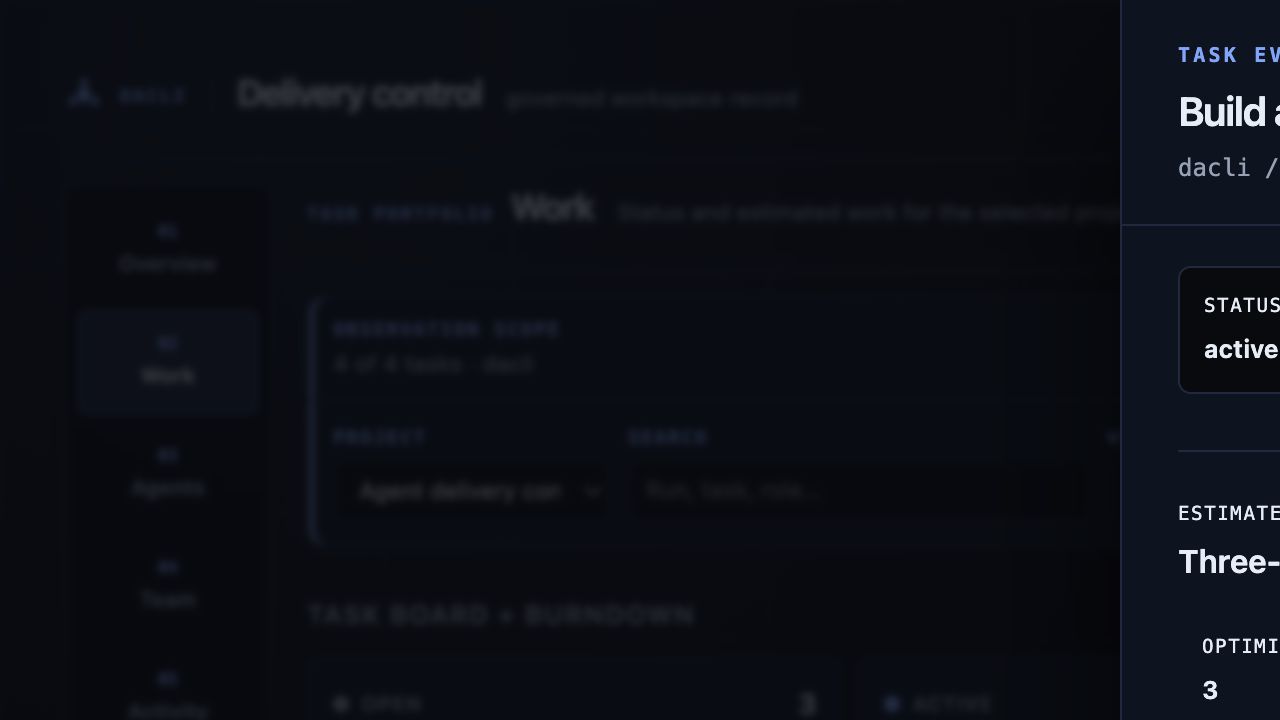
Selecting a board row or visible dependency node opens the same read-only task
sheet keyed by exact task id. It lazy-loads /api/task and the task-scoped
/api/events page and shows status/priority/owner, the full three-point
estimate, narrative, acceptance boxes, typed resolved or dangling dependencies,
parent, newest-first task log, and recent durable events. Parent and dependency
links remain inside this inspection model. Missing or ambiguous records never
substitute another task; stale detail stays visible with its failed surface
named. The sheet exposes no transition, priority, acceptance, or dependency
mutation.
Activity evidence
#/activity requests /api/events directly; it does not reuse the task
inspector's task-scoped page or download the complete journal. The server
applies the URL filters, emits at most 500 records (50 by default), and returns
an exclusive next_cursor. Opening an older page therefore cannot duplicate a
record if a newer event arrives concurrently. truncated, partial, the
number of unreadable records, and the observation timestamp remain separate
facts.
The vertical evidence spine uses text labels as authority: Policy refusal,
Review finding, Owner ask, Review verdict, Reconciliation,
Owner handoff, and Delivery event. Color only reinforces that label.
Task and agent identities deep-link to their exact Work or Agents record. The
Overview pending-event attention link opens #/activity?event_state=pending
rather than an unfiltered feed.
Event bodies are untrusted input. The server applies the public-safe redaction policy and a UTF-8-safe 2,000-byte bound; the client renders the result only as plain text. It never interprets event HTML, fetches embedded URLs, or exposes a control that changes the journal. A malformed event makes the page explicitly partial, a failed first read is unavailable, and a failed refresh keeps the last observation visible with a Stale activity snapshot warning.
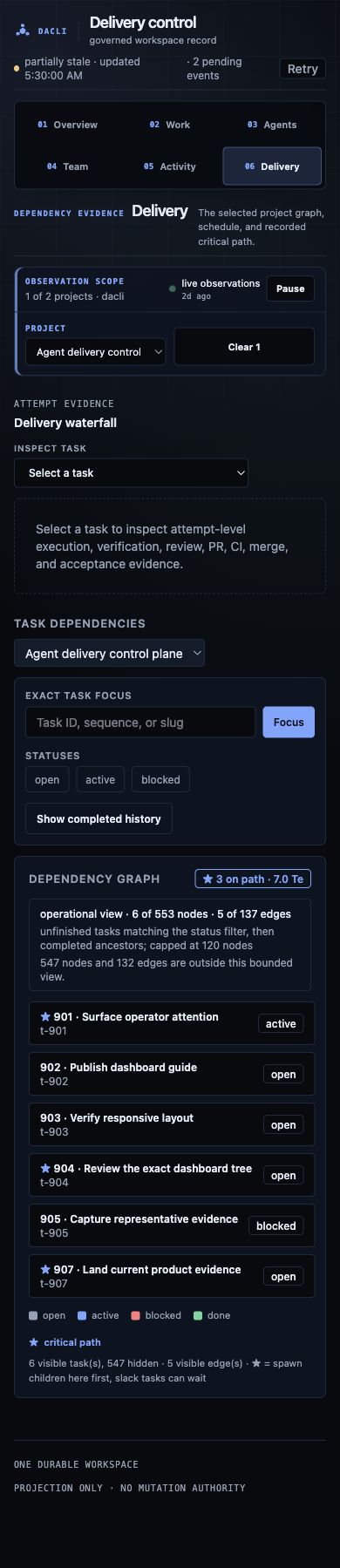
Delivery owns the heavier dependency graph. Both routes carry the same selected project in the URL, but loading Work does not request or construct the graph. The default operational view is selected on the server: unfinished tasks matching the status filter, followed by only the completed ancestors needed to explain those dependencies, capped at 120 nodes. The panel always states the exact rule and visible/hidden node and edge totals; a bounded view is never labelled as the complete history.
Exact task focus requests that task plus at most two predecessor/successor hops
and caps the neighborhood at 80 nodes. Show completed history is a separate
server-side projection, ordered deterministically in pages of at most 100
nodes. Status changes, focus, and page navigation re-fetch only /api/graph;
they do not transfer a full DAG and hide it in the browser. A missing or invalid
focus is an explicit 404/400, not an empty graph.
Every visible graph node is keyboard-focusable and opens task detail. On narrow screens the same bounded result is a readable ordered task list before the SVG canvas. The graph retains recorded critical-path markings, deterministic layout, and its unscheduled/cycle note; edges are emitted only when both visible endpoints exist, so an omitted node cannot produce a misleading dangling line.
Selecting a task in Delivery opens delivery-attempt-timeline/v1. Each run is
kept as a separate attempt and each phase is bound to current task generation,
run, commit/tree, and PR-generation identity where that evidence exists. The
desktop waterfall supports arrow, Home, and End navigation with exact evidence
tooltips; mobile renders the same spans as a compact ordered list. Missing
timestamps say unknown duration, never zero. Pending, failed, stale,
malformed, or skipped evidence is never promoted to green, and a corrupt phase
journal produces a visible refusal.
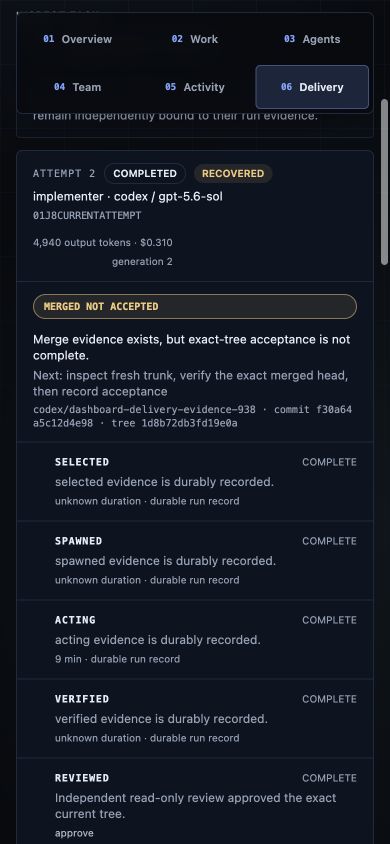
The projection exposes runtime/model choice, provider-reported usage, durable phase source/freshness, verification contract, recovery state, and stable next action. Exact-tree independent-review verdicts and bounded correction count come from the review transaction; CI state comes from typed exact-head external verification, where skipped, superseded, unobservable, stale-head, or failed checks visibly refuse the phase. Current and superseded PR generations remain separate. An unconsumed owner handoff and a merged-but-unaccepted task name the next owner action instead of pretending the loop is merely idle. A terminal run resumed from the durable phase journal is marked Recovered.
Every current attempt also carries one stable delivery diagnosis: pending, policy refusal, external/API unknown, failed, merged—not accepted, or accepted on current tree. The final class is strict: the task generation must be at the accepted checkpoint, every criterion must be complete, and acceptance-grade verification must match the canonical task branch plus the exact recorded commit and tree. An older merged or green PR generation can remain visible as history, but can never prove the current one. Each attempt links directly to its bounded local diff and task-filtered review events; GitHub links carry the durable PR generation/merge observation rather than implying a fresh remote read.
The exact-task Delivery route retains the versioned delivery-attention/v1
compatibility projection from /api/delivery-attention. The Overview route now
uses the broader operator-attention/v1 queue described below, so policy,
budget, critical-path, verification, review, CI, recovery, and handoff risks can
be ranked together instead of showing only one delivery diagnosis. Both
endpoints scan workspace records only. They never turn the dashboard heartbeat
into a GitHub poll; when GitHub evidence is absent or unreadable the UI says
external/API unknown and points to the bounded CLI diagnosis instead of
inferring green.
The projection deliberately excludes prompt and transcript contents, private review findings, secrets, local paths, and hidden reasoning. Arbitrary handoff and check labels pass through the public-safe sanitizer before rendering. Deep links return to the task, agent, activity, or exact delivery selection without adding browser-side workflow authority.
Agents and spend
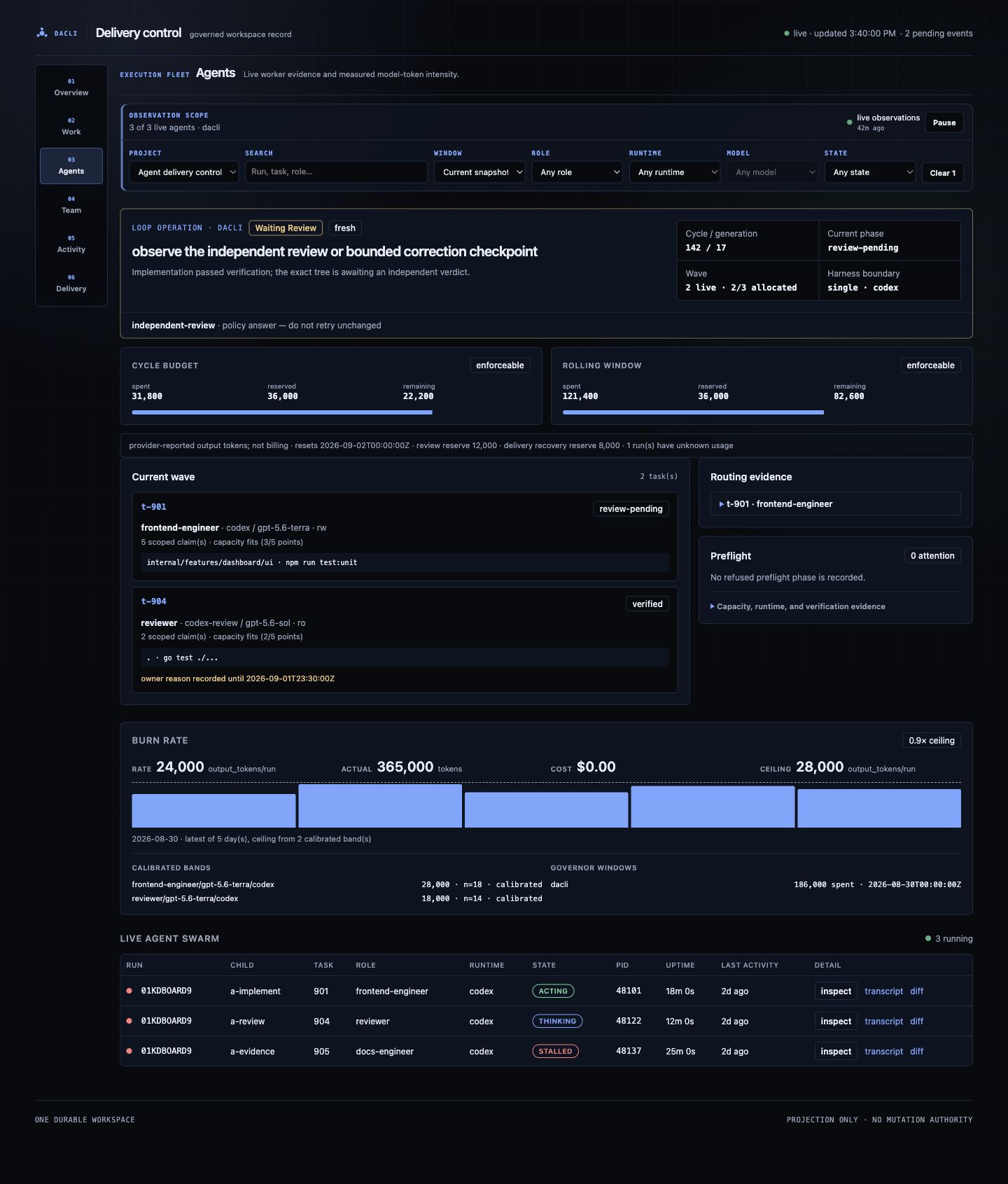
The first panel on #/agents?project=<slug> is the read-only
loop-operation/v1 projection. It reads the same loop status, recovery
checkpoint, phase journal, complete-cycle preflight, token-reservation ledger,
operating profile, and sourced routing evidence as the CLI. It distinguishes
not started, running, idle, sleeping budget, waiting review,
waiting CI, waiting owner, halted policy, external unknown,
completed, and corrupt. Fresh, stale, partial, missing, and corrupt are
separate evidence states; none is silently relabelled healthy.
Cycle and rolling-window budgets report spent, reserved, and remaining tokens,
plus live-run, reviewer, and delivery-recovery reserves. Remaining is numeric
only when the persisted mode is enforceable; advisory or unknown accounting
says not enforceable. Usage is provider-reported output-token evidence, not
a provider invoice or billing claim. Unknown usage survives restart and is
named rather than converted to zero.
Current-wave rows expose task/run identity, phase, role/runtime/model/grant, claim count, capacity verdict, time-bounded owner override, and repository- relative verification working directory/command. They never expose claim paths, prompts, transcripts, secrets, private findings, or absolute local paths. Routing candidates are filtered through the persisted harness boundary: a single-Codex profile cannot advertise Claude as an automatic fallback. Policy refusals say not to retry unchanged; external uncertainty may be retried only after the named evidence changes.
This surface polls the selected project every 10 seconds and reads local
durable records only. It does not launch a worker, refresh GitHub, retry a
provider, approve a review, change a budget, or resume a loop. Use
dacli loop status --project <slug> --json and
dacli explain --project <slug> --json as the automation contracts; the
dashboard is their operator-facing projection.
The next panel is the versioned outcome-analytics/v1 projection from
/api/outcomes?project=<slug>&range=7d|30d|90d. One bounded server-side index
joins tasks, current-generation runs, exact-tree verification, independent
review transactions, and provider usage. It compares the selected window with
the immediately preceding window and carries sample size, eligible population,
coverage, provenance, freshness, and a bounded exact task/run evidence set for
every metric. Clicking a metric reveals that membership; it does not issue one
request per row.
The panel covers accepted throughput, queue and execution time, current-tree acceptance, first-pass review, retries, review corrections, reopen/regression signals, tokens, and provider-reported USD. Task size, project, role/runtime/model route, verification contract, and failure taxonomy remain separate cohorts. Route/model comparisons are labelled descriptive until both adjacent windows contain at least three tasks of a known comparable size; the dashboard never ranks individual agents or claims that a model caused the result.
Unknown evidence stays unknown. Missing cost_usd is excluded rather than
counted as $0; provider cost is not called billing. Historical verification
from before a reopen cannot prove the current generation. First-pass
verification, first-pass landing, and ready-to-merged remain explicit unknowns
where the durable records do not contain every attempt or a ready timestamp.
The API will not substitute task creation or a first run for that absent event.
The response caps drill-down identities at 100, series at the selected window,
and handler cache entries at eight with a five-second TTL; its performance
block reports tasks/runs scanned, build time, series points, cache disposition,
and the evidence cap.
Burn compares measured run intensity with the calibrated ceiling. The swarm view shows each recorded worker's task, role, runtime, state, last activity, and resource observations. Transcript and diff links are read-only evidence views backed by that run's durable record.
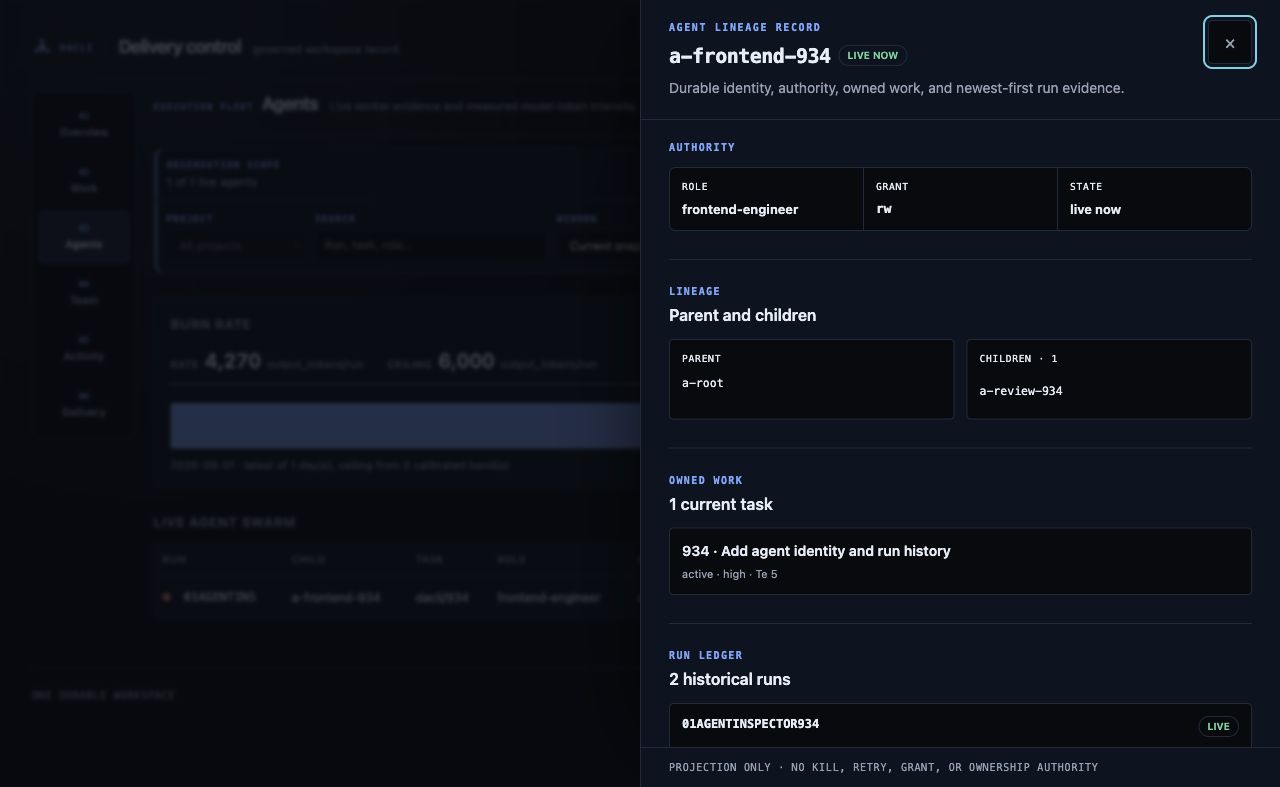
Every live row and mobile card has an explicit Inspect agent control. The
URL-owned sheet (#/agents?agent=<id>) lazy-loads only that exact durable agent
record—never one request per row—and shows role/grant authority, parent and
child lineage, current task ownership, and newest-first live/dead run history
with runtime, PID, start time, transcript, and diff evidence. Parent and child
identities stay inside the same inspection model; role and task references link
to their dashboard areas.
If a selected worker leaves the live swarm, its durable identity and history remain visible as retired or no longer live. A failed refresh retains the last good detail with a stale warning; a cold 400, 404, or server failure names the exact unavailable record and can be retried independently. The sheet has no kill, resume, grant, retry-run, or ownership controls.
blocked, stalled, and silent agents appear in the attention summary. The
dashboard does not kill, retry, or replace them. Use the CLI or MCP workflow so
the action remains governed and recorded.
Team
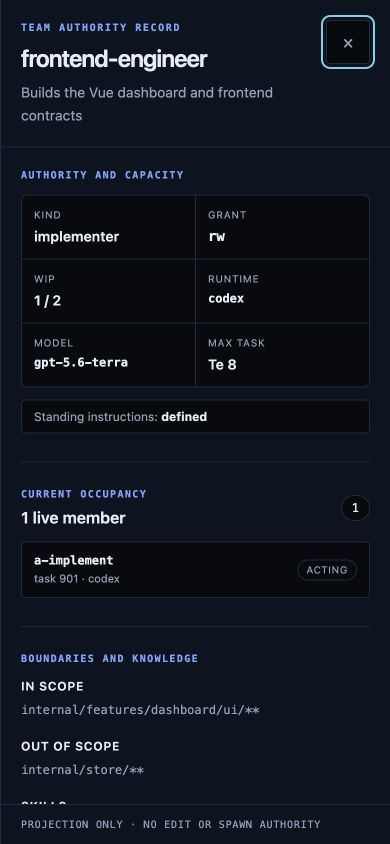
The roster answers who may perform work: grant, runtime, model, scope, skills, active workers, and WIP policy. Every row has an explicit Inspect control. It opens a read-only authority sheet with the role's summary, phase kind, grant, runtime/model, occupancy and cap, maximum task size, scope exclusions, skills, shortcuts, escalation targets, standing-prompt status, and the live agents assigned to that exact role. If a deep-linked role disappears, the sheet names the missing identity instead of silently substituting another role.
The sheet is a labelled modal dialog: Escape closes it, keyboard focus stays inside while it is open, and focus returns to the Inspect control that opened it. On narrow screens it becomes a full-width sheet. A role at its cap is an explanation for why a new worker should not be scheduled, not an invitation to bypass the cap in the browser; the inspector has no edit, spawn, or override action.
Freshness and failure states
The Vue page polls independent local API surfaces chosen by the active route.
Overview never fetches agent rows, burn history, outcome analytics, the roster,
or a graph. Agents fetches overview/projects/the selected project's loop
operation/outcome analytics/agents/burn and
one agent detail only while selected; Team only overview/roles/agents, Work only
overview/projects/the selected project's task rows plus one selected task/event detail, and Delivery only overview/projects/the selected graph plus
the selected task's bounded timeline. Graph focus/status/history changes are
server-side projections within that one selected graph surface.
Leaving a route aborts its pending requests and late responses are ignored. The
legacy fallback still consumes the combined /api/state compatibility
snapshot.
The header reports whether the collection of surfaces is loading, live, partially stale, or unavailable:
- Loading — no complete snapshot has arrived yet.
- Live — every required surface has a successful current observation.
- Partially stale — at least one surface retained its last good value after a failed or still-pending refresh; healthy sections remain live and usable.
- Unavailable — no trustworthy snapshot can be shown.
A stale snapshot on one surface keeps its last good value and names its own error; it does not blank or disable unrelated sections. The generated timestamp is the newest successful observation time, not proof that GitHub, a provider, or a worker has not changed since then.
Authority and security boundary
The HTTP server binds to 127.0.0.1 and accepts GET requests from recognized
loopback hosts. The API exposes workspace projections and bounded run evidence;
it has no write route. Use dacli capabilities --json to negotiate the live
CLI/MCP surface before an agent relies on a command.
The dashboard does not replace:
dacli explain --project <slug> --jsonfor sourced routing and next-action evidence;dacli loop status --project <slug> --jsonfor durable recovery state and the versioned cycle outcome/phase-failure classification;dacli pr diagnose --task <ref> --jsonfor current GitHub/CI diagnosis; or- the explicit verify, review, accept, and ship gates.
Responsive and accessible use
Desktop uses a compact command bar and persistent six-area left rail, keeping
the route title and observation scope close to the viewport top. Below 1024px
the rail becomes an explicit grid; at 390px it is two rows of three 44px
targets rather than a hidden horizontal scroller. aria-current names the
selected area and route changes move focus to the new heading.
Live-agent and role evidence becomes stacked mobile cards below 768px. The cards carry the same identity, state, runtime/model, task/scope, freshness/WIP, and Inspect links as the desktop tables; they do not hide evidence merely to fit. Task/status and graph surfaces keep their bounded card/list fallbacks. All status colors have text labels, the page honors reduced-motion preferences, and no route may widen the page at 390px. Use the skip link to move directly to dashboard content.
Burn, landed-points, and outcome pulse charts share one investigation contract. Each names its definition, unit, exact time window, durable source, freshness, coverage, comparison, state, and textual summary. Every visual point is a keyboard-focusable evidence URL with an exact accessible name; activating it retains the project and day/metric selection and opens the bounded task/run identities that produced the point. An accessible table provides the same values and links without forcing keyboard users through every visual mark. Missing values render as Missing, never zero. Stale/partial/error text does not rely on color.
The Overview route also exposes the versioned operator-attention/v1 queue
from GET /api/attention (optionally scoped with ?project=<slug>). It derives
alerts from the same canonical loop, reservation, preflight, review,
verification, GitHub, handoff, task, and dependency records used by the CLI.
Each item names its stable code, severity, affected identities, first/last
observation, recurrence, freshness, retryability, confidence, deterministic
rank reason, evidence URLs, and next safe action. Repeated sources collapse by
alert identity without erasing their duration or evidence list.
The queue has no acknowledge, retry, dismiss, or override action. An alert resolves only when a fresh read observes that its canonical condition changed. Unknown GitHub or malformed recovery state remains visible; absent data is never interpreted as healthy. Severity, critical-path impact, age, confidence, and stable identity define ordering in that sequence. Every severity and state is written as text, every item and disclosure is keyboard reachable, and the single-column 390px layout retains all evidence rather than hiding columns.
Long daily histories show at most 90 marks. The bounded projection retains the first, last, minimum, and maximum, then evenly samples the remaining dates and states how many intermediate points were hidden. This resolution limit never widens the independent task/run evidence cap.
Troubleshooting
- The page is empty: run the command from a repository adopted into the intended dacli workspace and inspect the printed URL.
- The page is stale: keep the last snapshot as evidence, inspect the error in the header, and retry. Do not treat stale data as launch authority.
- A run link returns 404: the run may have been reconciled or its durable record may be unavailable. Use the CLI's run and journal views.
- The released binary shows the legacy page: release builds embed the Vue bundle. Source builds that skip the frontend build can fall back to the legacy self-contained page; see the frontend README.
The desktop loop-operation, bounded-graph/task-explorer, and 390px screenshots on the landing page use the representative test fixture state from the repository. They demonstrate route layout, bounded density, and states—not production usage metrics.
Open the interactive representative evidence surface to inspect that same fixture through the real dashboard bundle. The persistent fixture label distinguishes it from live workspace evidence; production dashboard commands never expose or select this build entry.
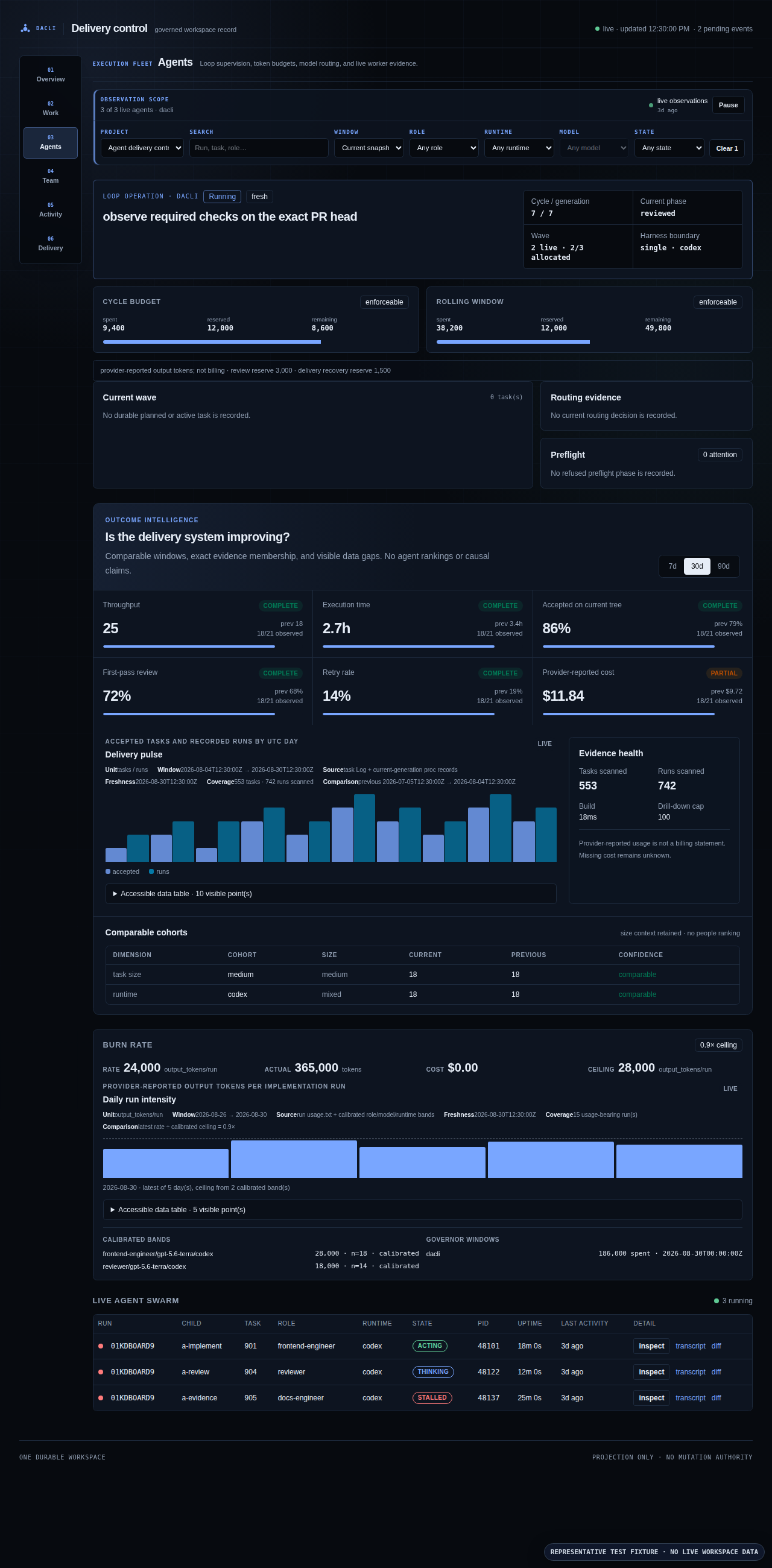
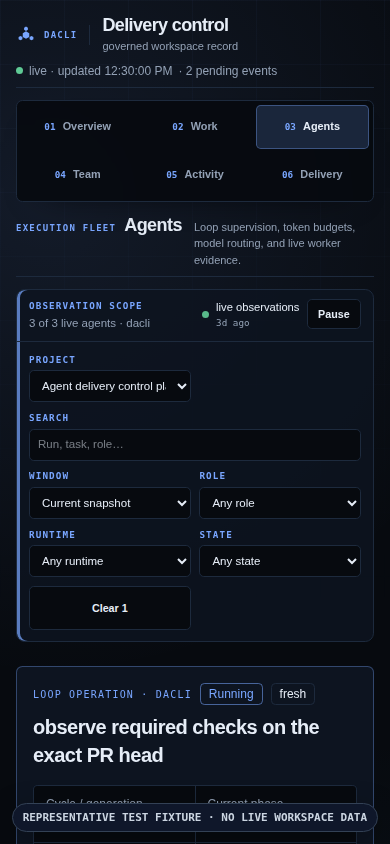
The outcome view pairs every comparison with sample size, coverage, provenance, freshness, and exact task/run drill-downs. The screenshot is representative fixture evidence, not production performance or a provider billing statement. The exact 390×844 analytics capture verifies the compact route hierarchy and scoped controls before the outcome cards continue below the fold.
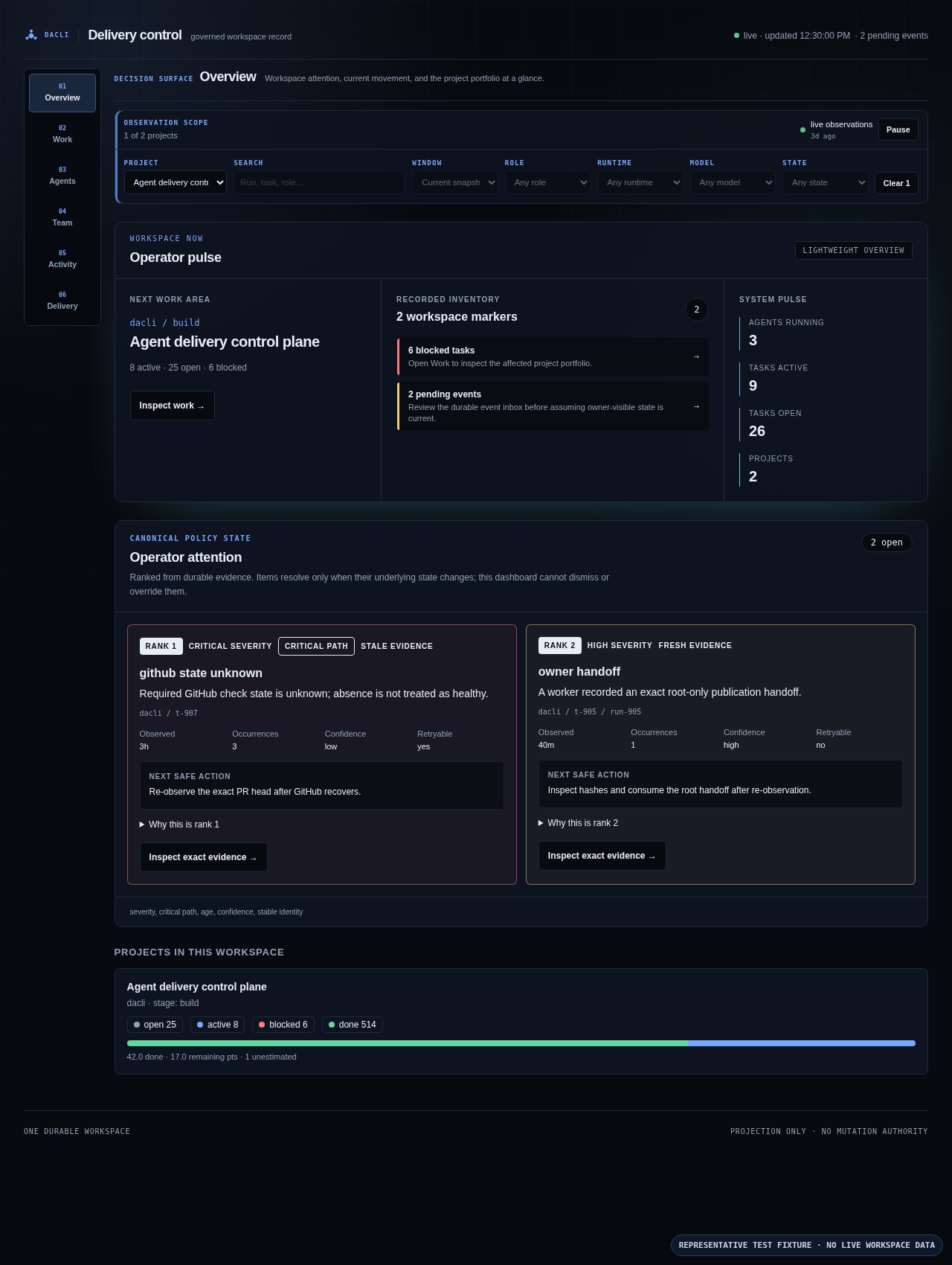
The queue keeps unknown GitHub state, stale observations, and owner handoffs visibly distinct and explains both deterministic rank and next safe action. The exact 390×844 attention capture keeps the same route, observation scope, and policy-state ordering without horizontal overflow.
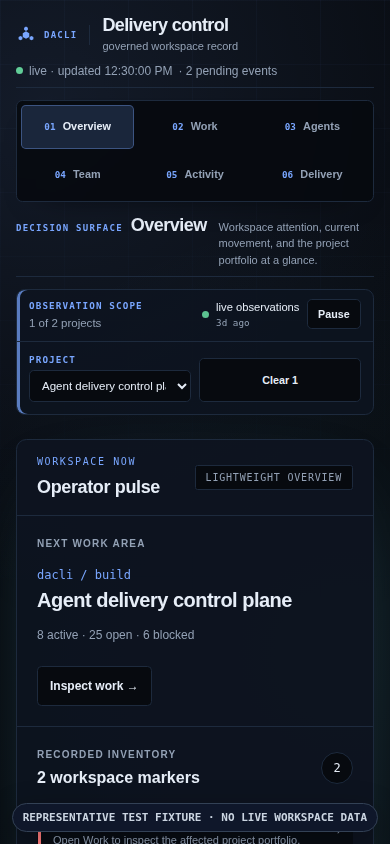
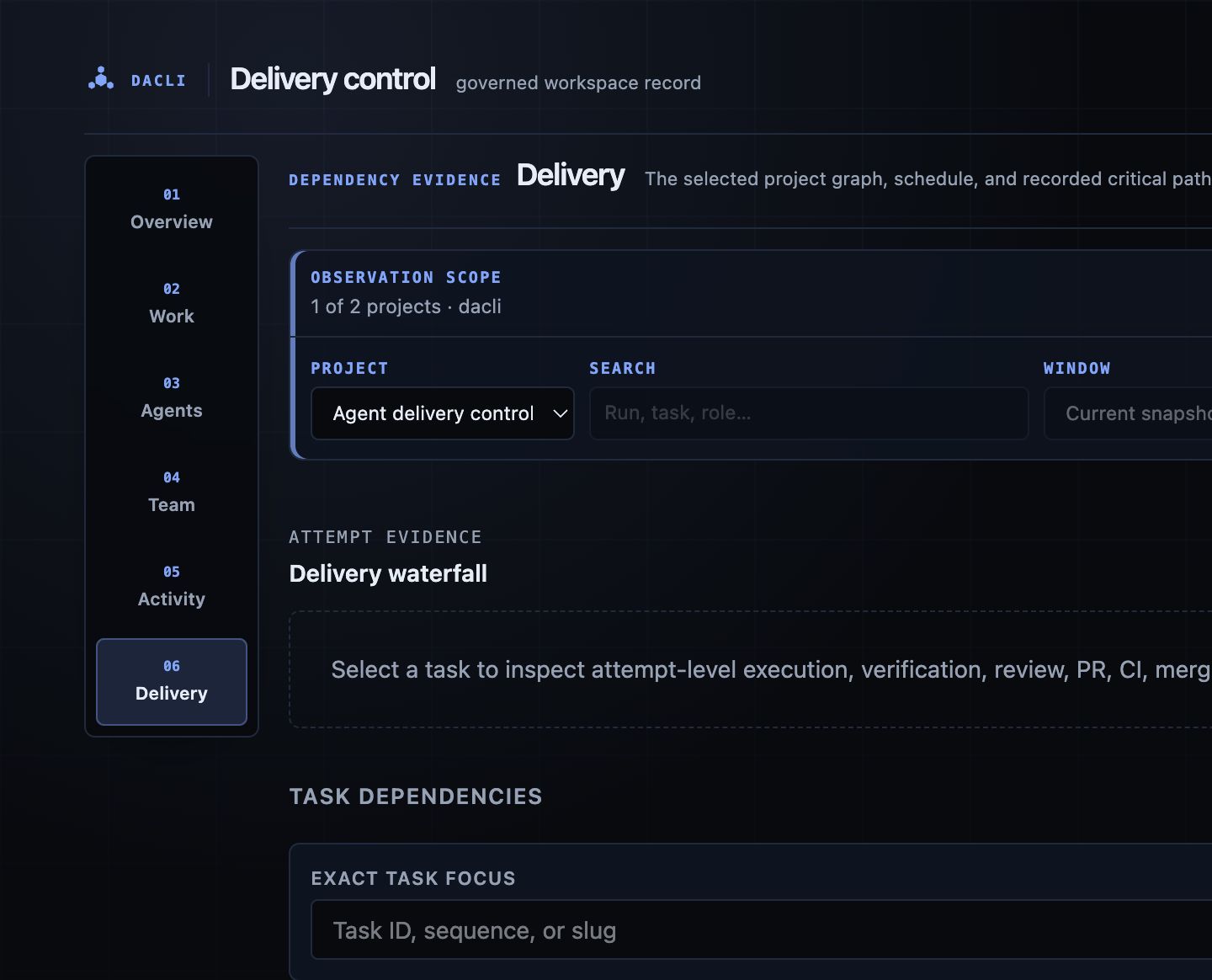
The retained agent lineage and 390px role authority captures document the other inspection surfaces; the current 390px dependency list documents the graph's mobile fallback.
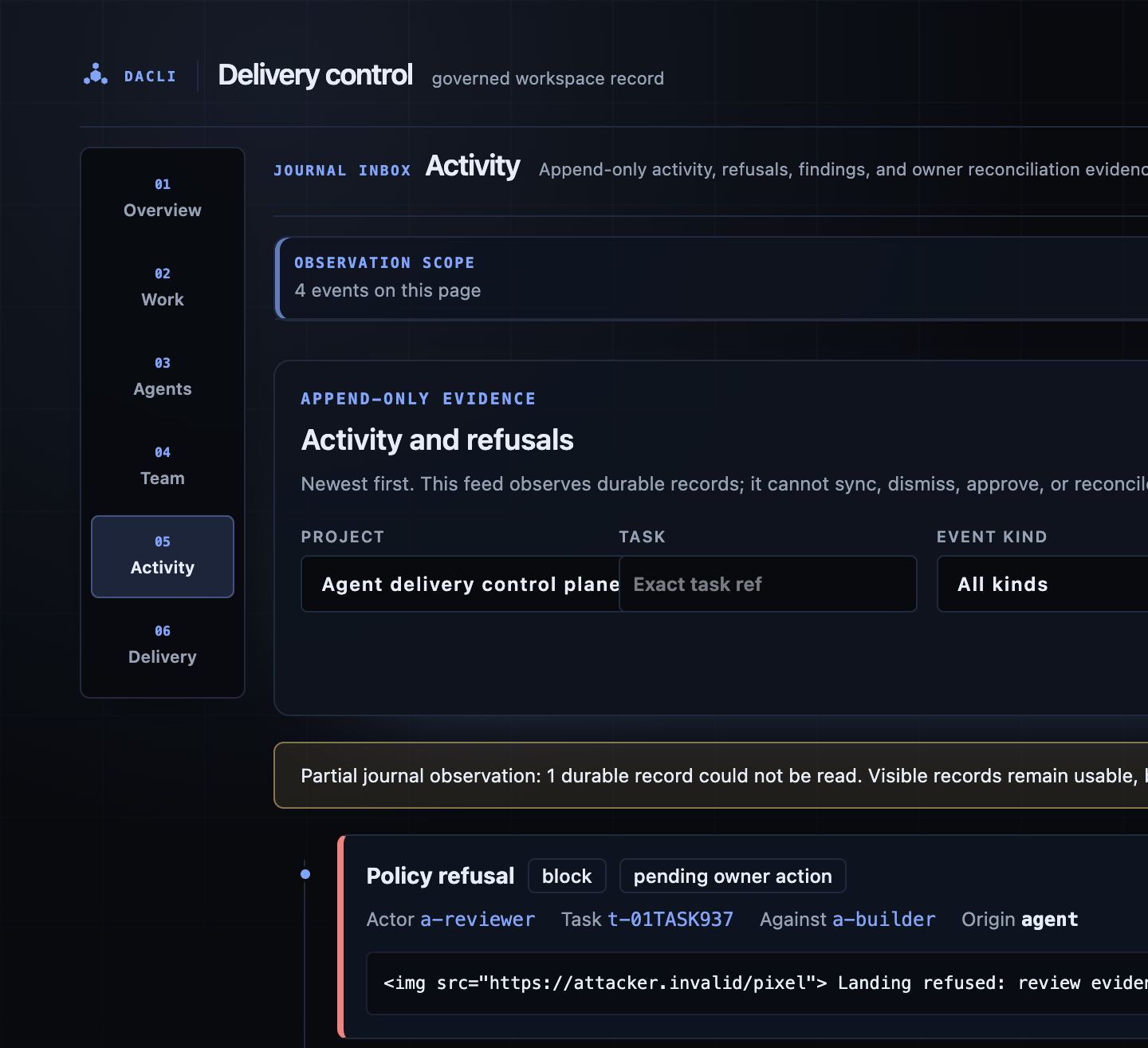
The 390px activity evidence spine retains every label, identity link, untrusted plain-text body, partial-state warning, filter, and pagination control without horizontal overflow.

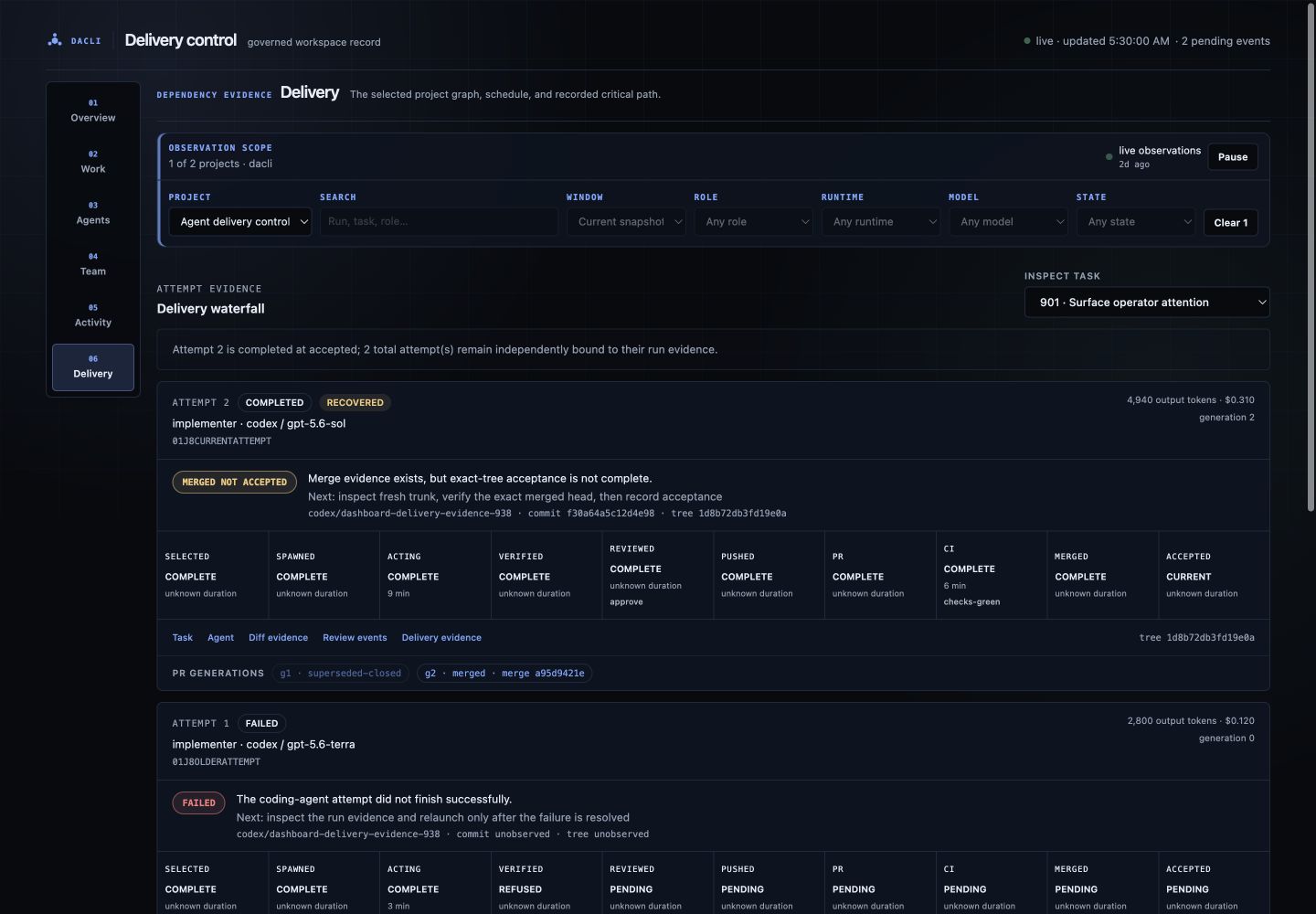
The 390px delivery waterfall preserves the same diagnosis, canonical branch/commit/tree identity, source/freshness, PR-generation state, and next action as the desktop view.