 JAX Pathways
You have a promising training curve. Can you explain which data, model, seed and settings produced it, repeat the run, and decide whether your change helped? In this workshop you will turn one idea into a small, inspectable experiment rather than a collection of unnamed notebooks.
Your artifact: a six-run experiment with saved inputs, real CSV histories, optional TensorBoard/W&B/MLflow records, paired comparisons, explained figures and a Markdown research notebook. Three learner-owned functions enforce the scientific contracts; supplied Flax and process code connects them into a working system. CPU reference execution and public checks are practice evidence. GPU/TPU performance and independent learner review require separate qualification.
Before starting: understand Flax NNX model/state, compiled training and evaluation, and random keys. Read project structure and CLI preparation if these folders are unfamiliar. The MLflow lesson supplies the tracking and lineage bridge. You can complete the required workshop locally without an account or accelerator.
1. Open the workspace and find the responsibilities
Download this project's ZIP from its project page and extract it. Open a terminal in the extracted root, the folder containing projects/, not inside solution/. The commands below use a Bash-compatible shell on macOS/Linux; Windows learners can use WSL. A full repository checkout has the same relative paths.
projects/reproducible-experiments/
  README.md                      this workshop
  requirements.txt               minimal pinned CPU environment
  requirements-loggers.txt       optional local tracker dependencies
  configs/workshop.json          hypothesis, decision rule and run matrix
  experiment.py                  plan, run, job and analyze entry points
  model.py                       supplied Flax NNX model and update
  loggers.py                     CSV and optional tracker adapters
  analysis.py                    evidence checks, plots and notebook generation
  starter/workflow.py            three functions for you to implement
  solution/workflow.py           instructor reference
  my_workflow.py                 your copy, created below
  tests/check.py                 cumulative contracts and real CPU workflow
  tests/loggers_check.py          read actual optional tracker histories back
  reference/suite/                recorded instructor CPU experiment
runs/                             your experiments, created outside source
Source explains how a computation works. Configurations record the choices for a question. A suite is a declared collection of runs. An attempt is one process execution of a run; a retry preserves the earlier attempt. Reports interpret evidence without replacing it.
Create an isolated environment and your editable file:
python3 -m venv .venv
.venv/bin/python -m pip install -r projects/reproducible-experiments/requirements.txt
cp projects/reproducible-experiments/starter/workflow.py projects/reproducible-experiments/my_workflow.py
.venv/bin/python projects/reproducible-experiments/experiment.py --help
Expected: CLI help lists plan, run, job and analyze. The underlying worker is an implementation detail. Install failures should be repaired in the selected environment before running experiments. The pins above describe the CPU reference environment, not a GPU/TPU installer. Add your run directory to .gitignore and preserve selected evidence separately; ignoring a file does not back it up.
2. Write the question before executing it
Open configs/workshop.json. Our question is narrow: does learning rate 0.04 beat 0.01 after 40 full-batch updates, with the same architecture, fixed split and paired initialization seeds 11, 23 and 37? The declared decision rule requires a negative candidate-minus-baseline validation error for every pair. This is a teaching rule, not a universal significance test.
The two-feature fixture follows a noisy sine-plus-linear relationship. There are 64 training examples and 32 validation examples, drawn once using data_seed. The model has two inputs, eight tanh hidden units and one scalar output. We use FP32 and SGD without momentum. Training seeds change initialization only; there is no dropout or minibatch sampling in this recipe. The data seed is separate so a model seed cannot quietly change the evaluation set.
For predictions and targets , the metric is:
Here counts examples in the selected split. If two validation squared errors are 1 and 9, MSE is 5. A logged sum of 10 is a different metric even if both dashboards call it “loss.” Our histories contain the full-split MSE after the completed update, plus an initial observation at step zero.
Stage 1 implementation: in my_workflow.py, complete resolve_config(value). Require the exact schema shown in the starter contract, return a copy, reject nonfinite rates and bool-as-integer values, and sort the selected logger names. A missing backend must not mean “use whichever device is available.” This bounded lab accepts FP32; precision experiments belong in the existing precision lessons.
.venv/bin/python projects/reproducible-experiments/tests/check.py \
  --implementation projects/reproducible-experiments/my_workflow.py --stage 1
Expected: PASS stage 1. If steps=true passes, remember that Python treats booleans as integers unless you explicitly distinguish them. If a new undocumented key passes, a misspelled hyperparameter may go unnoticed.
3. See one complete reference, then implement logging contracts
The instructor implementation lets you inspect the finished artifact before completing your own functions. From the workspace root:
.venv/bin/python projects/reproducible-experiments/experiment.py plan \
  --config projects/reproducible-experiments/configs/workshop.json \
  --suite runs/reference-first
.venv/bin/python projects/reproducible-experiments/experiment.py run \
  --suite runs/reference-first --workers 1 --timeout 120
.venv/bin/python projects/reproducible-experiments/experiment.py analyze \
  --suite runs/reference-first --output runs/reference-first/report
The default implementation for this reference walk-through is solution. Planning prints Prepared 6 runs ...; no training has run. Running should finish with 6/6 jobs completed. Analysis saves RESEARCH_NOTEBOOK.md, comparison.json, comparison.csv and two figures. Inspect each stage before moving on. Existing suites, jobs and report folders are protected against accidental replacement.
Planning freezes the numerical worker, adapters, analysis and selected workflow implementation into source/, saves resolved per-run JSON configurations, and snapshots the fixture as data.npz. Jobs execute the frozen worker, and analysis executes the frozen analyzer. Editing the original model afterward therefore cannot silently alter an existing suite. Make a new plan for the change. Hashes detect accidental edits; they are not authenticated provenance or proof of when an idea was invented.
Each run has one directory per attempt:
runs/reference-first/
  manifest.json                  question, seeds, split/metric identity and hashes
  source/                        frozen Python files actually used
  configs/baseline-s11.json       resolved choices, including backend and loggers
  data.npz                       exact training and validation arrays
  jobs.sh                        inspectable per-run launch commands
  runs/baseline-s11/
    job.json                     statuses, commands, exit codes and attempts
    attempt-01/
      config.json
      environment.json           resolved packages and actual JAX backend/device
      metrics.csv
      checkpoint.npz             final model weights and validation predictions
      summary.json               identities, metric and artifact hashes
      stdout.txt
      stderr.txt
  report/RESEARCH_NOTEBOOK.md
CSV is mandatory. Open metrics.csv: expect steps 0, 5, 10, through 40, with a final observation even if your cadence does not divide the step count. gradient_norm describes the gradient used for the preceding update. At step zero there is no preceding gradient or update duration, so these cells are empty, not invented zeros.
Stage 2 implementation: complete validate_history(rows, config). Derive expected steps from the configuration, require exact column names, unique ordered observations, finite nonnegative metrics and the documented initial-row boundary. Try steps 3 and cadence 2: the expected list is 0, 2, 3, not just 0 and 2.
.venv/bin/python projects/reproducible-experiments/tests/check.py \
  --implementation projects/reproducible-experiments/my_workflow.py --stage 2
Logging happens on the Python side after synchronized device results return. File writes inside jit could happen during tracing rather than once per update. The warmup uses a cloned model; a check confirms that it did not train the real initial state. Update timings exclude validation and tracker writes but include the update and post-update training loss. Training wall time also includes validation and logging. Neither is a cold-start or request-latency measurement. Connect this distinction to honest benchmarking.
4. Log the same observations to real tools
CSV and the research report are sufficient for the required workflow. Optional adapters are implemented, not just suggested. Install the extra dependencies in the same environment:
.venv/bin/python -m pip install -r projects/reproducible-experiments/requirements-loggers.txt
.venv/bin/python projects/reproducible-experiments/experiment.py plan \
  --config projects/reproducible-experiments/configs/workshop.json \
  --suite runs/tracked --loggers csv,tensorboard,wandb,mlflow
.venv/bin/python projects/reproducible-experiments/experiment.py run \
  --suite runs/tracked --timeout 120
.venv/bin/python projects/reproducible-experiments/tests/loggers_check.py
The optional verifier runs actual small Flax training, then reads the CSV, TensorBoard scalar events, offline W&B event history and SQLite MLflow metric history back and compares the completed steps and values. A successful file creation alone would not establish correct logging.
| Tool | What the adapter writes | How to inspect it |
|---|---|---|
| CSV | Named post-update observations with step numbers | Open metrics.csv; analysis uses and verifies these records |
| TensorBoard | Real scalar event files under each attempt's tensorboard/ |
Run .venv/bin/tensorboard --logdir runs/tracked/runs --port 6006, then open localhost port 6006 |
| W&B | An explicitly offline run with config, identities and metric history | Inspect the saved offline directory and verifier result; a hosted dashboard would require a separate deliberate upload |
| MLflow | A local SQLite database, parameters, identity tags, metrics and model/config/environment artifacts | Inspect the run ID in summary.json; open the local UI using the command below |
From the workspace root, inspect one MLflow attempt with:
.venv/bin/mlflow ui \
  --backend-store-uri sqlite:///runs/tracked/runs/baseline-s11/attempt-01/mlflow.db \
  --host 127.0.0.1 --port 5000
Open localhost port 5000. Each attempt deliberately owns its database and artifact directory. The workshop's comparison report joins runs; this is not a shared MLflow server or registry. W&B is forced offline, does not require login, and the workshop never calls wandb sync. Its SDK still needs a local background service and IPC permissions. A sandbox that blocks that service can reject the adapter even without internet access; use CSV or an environment permitting local IPC. Missing SDKs or logger failures produce failed attempts, not a claimed successful tracking run. See the existing MLflow integration project when you need registry and release workflows.
Predict and compare: keep all training choices fixed but change log_every from 5 to 1 in a new plan. Metric density and wall time can change, while the actual SGD update sequence should remain the same on the same tested runtime. Compare only matching step numbers. A smaller logging interval is not a model improvement.
5. Run a matrix, retain failures and distinguish device parallelism
A suite contains independent experimental runs. Within each run, this workshop uses one process and the first local device. Two CPU workers can run independent jobs concurrently:
.venv/bin/python projects/reproducible-experiments/experiment.py plan \
  --config projects/reproducible-experiments/configs/workshop.json --suite runs/retry-practice
.venv/bin/python projects/reproducible-experiments/experiment.py run \
  --suite runs/retry-practice --workers 2 --timeout 120 \
  --retries 1 --fail-first baseline-s11
Expected: the first baseline-s11 attempt fails intentionally after one update. attempt-01/failure.json and its logs remain; attempt-02 starts again from initialization and completes. job.json records both statuses and the failure injection. This is a fresh retry, not checkpoint continuation. Learn numerical continuation in complete-state recovery. The final weight artifact here supports inference reload, not arbitrary optimizer/data-iterator resumption.
Try a tiny timeout in a new suite. The launcher terminates the process group on POSIX, reaps the process and retains timeout diagnostics. It does not delete a cloud VM. An analysis of an incomplete suite writes an inventory and notebook explaining why comparison was withheld, then exits nonzero. It must not rank the surviving seeds as if the matrix were complete.
For missing jobs, launch only the declared run ID into its unused directory:
.venv/bin/python projects/reproducible-experiments/experiment.py job \
  --suite runs/YOUR_SUITE --run-id candidate-s37 --timeout 120
Replace YOUR_SUITE with your prepared suite. Completed or failed job directories are never overwritten; start a new suite if you need a new attempt after the declared retry budget is exhausted. jobs.sh records all per-run job commands for review and external scheduling. The script locates its own suite and uses the frozen worker, so it survives moving the whole suite. On macOS/Linux, set PYTHON to the selected environment interpreter and run sh runs/YOUR_SUITE/jobs.sh from any working folder. It launches the matrix sequentially; external scheduling requires assigning one declared job to each approved allocation.
On an approved GPU or TPU allocation with the supported JAX runtime installed, make a separate plan using --backend gpu or --backend tpu, then run with --workers 1. The worker checks the actual backend and records the device kind. If unavailable, it fails instead of substituting CPU. CPU qualification does not establish accelerator correctness, speed or availability.
For several GPUs, use your scheduler or separate allocations to assign one independent job command to each allocation; for a GPU process, CUDA visibility must be set before JAX imports. For TPUs, use the existing TPU workflow lessons to stage the workspace, launch the commands and retrieve evidence. Do not launch competing processes over an entire shared TPU slice by copying the CPU --workers 2 command. The workshop deliberately rejects concurrent accelerator runs in its local runner.
Distributing one model's arrays and gradients across devices is another task. Continue into sharded training and communication checks. pmap or shard_map does not schedule a learning-rate sweep; it parallelizes work within a computation. Current JAX documentation recommends shard_map for new manual parallelism.
6. Compare matched pairs, then explain the figures
Stage 3 implementation: complete paired_summary(records, expected_seeds). Require one baseline and one candidate for every declared seed. Reject duplicates, unexpected seeds, nonfinite errors and missing pairs. For each seed , define:
Negative differences favor the candidate. For three differences , the mean is and sample standard deviation is . Sample SD divides squared deviations by ; it is not a confidence interval and is not the standard error of the mean. Pairing reduces one source of comparison noise by matching initialization, while the nonlinear trajectories can still diverge.
.venv/bin/python projects/reproducible-experiments/tests/check.py \
  --implementation projects/reproducible-experiments/my_workflow.py --stage 3
The recorded instructor reference uses the default six-run plan and includes one retained intentional failure/retry. The plots below come from actual saved CSV histories.
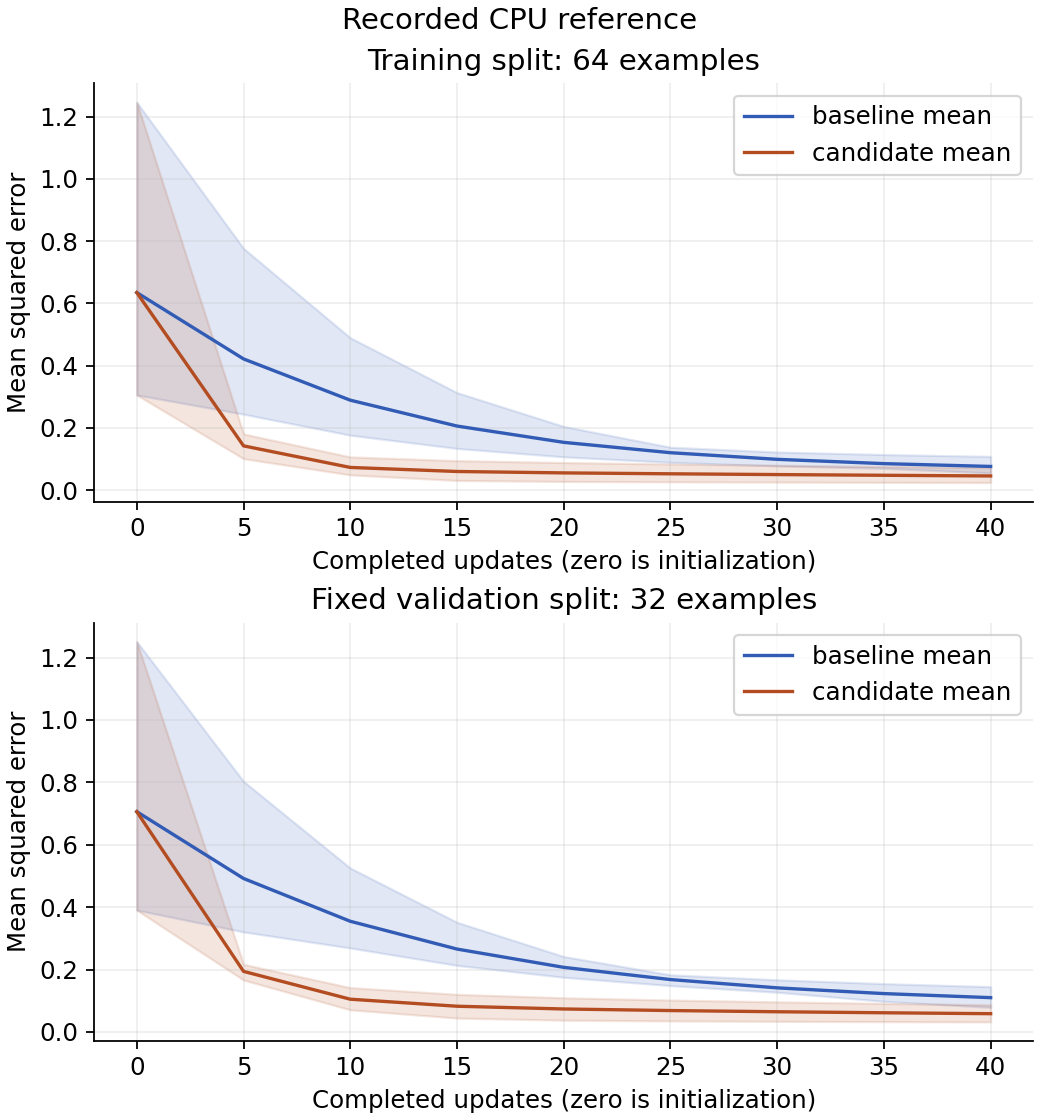
Read the curves: the horizontal axis counts completed updates, beginning with initialization at zero. The upper panel uses the 64 training examples; the lower panel uses the fixed 32 validation examples. Blue is learning rate 0.01, orange 0.04. Lines average the three initialization seeds, while shaded bands span their minimum and maximum at each step. These bands describe this small seed set, not confidence in a population mean. Both colors start at the same mean and range because the paired seeds initialize identical weights before the different learning rates take effect. In this reference, the orange mean drops faster, becomes nearly flat after about 15 updates, and finishes lower in both panels. Blue continues decreasing over the remaining budget. A faster decrease per update is not a measured wall-clock speedup. Lower training error alone would not establish a better validation result; inspect the lower panel separately.
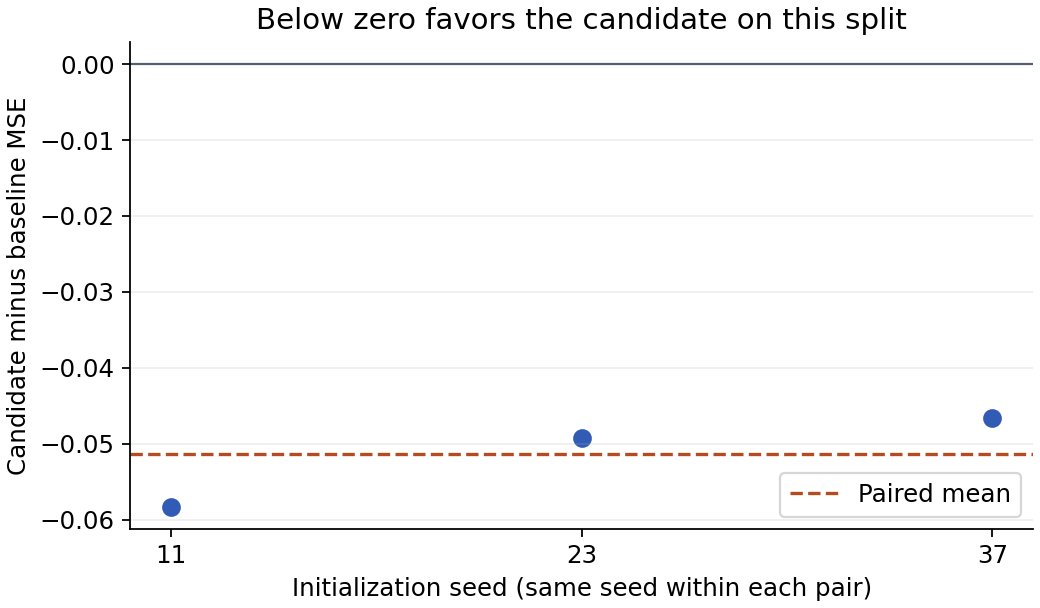
Read the paired plot: the horizontal categories are initialization seeds. The vertical axis subtracts baseline MSE from candidate MSE on the same validation set. All three points lie below zero in this reference. The mean is approximately minus 0.0514, with sample SD about 0.00613. The spread shows that the improvement size depends on initialization even though its direction agrees across these pairs. This supports the declared rule on this fixture; it does not show that 0.04 is universally preferable or that a real dataset will behave similarly.
The analyzer verifies source, data, config, environment, metric and artifact identities before computing a summary. It refuses to pool incompatible widths, update counts, precision policies, loggers, package versions or device kinds. It includes missing, timed-out and invalid runs in its inventory. The recorded research notebook, instructor interpretation and the ZIP's reference/suite/ preserve the underlying observations and links.
Changed-condition exercise: use two new seeds and a different width in a new plan, changing the hypothesis to match that question before training. Keep the fixed data seed. Do all paired differences retain their sign? Compare within the new suite, and explain why automatically pooling the two architectures would obscure the experimental question. A stronger claim about data variation requires repeating over data splits or independent datasets too, not just adding initialization seeds.
7. Produce your own research notebook and decision
Stage 4: run the complete checker with your implementation, then prepare a new suite using your file:
.venv/bin/python projects/reproducible-experiments/tests/check.py \
  --implementation projects/reproducible-experiments/my_workflow.py --stage all
.venv/bin/python projects/reproducible-experiments/experiment.py plan \
  --config projects/reproducible-experiments/configs/workshop.json --suite runs/my-study \
  --implementation projects/reproducible-experiments/my_workflow.py
.venv/bin/python projects/reproducible-experiments/experiment.py run \
  --suite runs/my-study --workers 2 --timeout 120
.venv/bin/python projects/reproducible-experiments/experiment.py analyze \
  --suite runs/my-study --output runs/my-study/report
Expected: four cumulative stages pass, with independent NumPy gradient/update checks, exact integer-step histories, saved-weight reload, fresh-process replay, retained retries, timeout and corruption rejection. The new suite uses your copied contract functions. A prepared suite or a good-looking plot alone does not pass this stage.
Open runs/my-study/report/RESEARCH_NOTEBOOK.md in your editor. The notebook is Markdown, not an interactive Python kernel. It contains the predeclared question, decision rule, complete run inventory, identities, figures, descriptive paired statistics and relative links to metrics, configs, environments and checkpoints. Move the whole suite to preserve those links. Reports do not overwrite older notebooks: analyze into a new output folder when evidence changes.
The generated “Your interpretation” section is intentionally yours to write. Explain one seed pair and one visible feature of the learning curves, decide against the original rule, and state the next experiment before running it. A generator can assemble evidence; it cannot supply an honest scientific judgment for you. There is no final held-out test evaluation in this workshop, so label the conclusion as validation-based model selection.
Failure to diagnose: someone edits a CSV to remove the worst run or lowers one final error by hand. Analysis should mark invalid evidence or withhold comparison, rather than produce an improved average. Inspect checksums and missing-run rows. Start a new experiment to test an idea; do not rewrite the observations from the old one.
Keep the full suite, your implementation, checker output and a completed interpretation. Explain the difference between a fresh retry and numerical resume, a seed range and a confidence interval, a tracker and an evaluator, and independent jobs and distributed computation. Those distinctions are the reusable research process this workshop is designed to teach.