Getting started
This page gets you from a fresh checkout to a working curl
round-trip against the on-device server.
Requirements
| Android device | Phone or tablet on Android 10+ (API 29). Tested on Pixel-class hardware; should run on any device with ~6 GB free storage (model + kernel cache). |
| JDK | 17 (AGP 8.7 requires it; sourceCompatibility is 11). Temurin works well. |
| Android SDK | API 35 installed. local.properties should contain sdk.dir=/path/to/Android/sdk. |
| Disk | ~3 GB free per model. The Gemma 4 E2B .litertlm is 2.6 GB; XNNPACK kernel cache adds ~800 MB after the first inference. |
| Network | First-time model download is ~2.6 GB from HuggingFace. Subsequent runs are fully offline. |
Build the app
git clone https://github.com/mlnomadpy/localllm.git
cd localllm
echo "sdk.dir=$HOME/Library/Android/sdk" > local.properties  # adjust path
./gradlew :app:assembleDebug
Output APK: app/build/outputs/apk/debug/app-debug.apk.
Grab app-debug.apk from the latest
GitHub Release.
It's signed with Android's debug key — fine for sideloading, not
for the Play Store.
Install on a device
adb install -r app/build/outputs/apk/debug/app-debug.apk
adb shell am start -n com.localllm.app/.MainActivity
On Android 13+ the app asks for POST_NOTIFICATIONS on first launch
— grant it, otherwise the foreground service notification (and the
Stop action on it) won't show.
The app's five tabs (plus Documents)
Once installed, the app exposes six tabs:
- Catalog — download a built-in model, import a
.litertlmfile from your device, set the default, or delete to free space. The AICore status card lives at the top. - Dashboard — live queue, in-flight request, per-client summaries, history (cap 50), cumulative stats, and an AICore benchmark button.
- Console — searchable in-memory log buffer (200 entries) with level filters, tag chips, and copy-on-long-press.
- Chat — a usable test harness against the local server, with streaming, a Stop button that actually cancels, a system-prompt sheet, sample prompts, and long-press copy on every message.
- Documents — RAG ingest, list, delete, and k-NN search against
the local ObjectBox HNSW store. Tenant-scoped by
X-Client-IdorUser-Agent. - Settings — server, inference, security, background efficiency, request limits, startup, and custom model URLs.
Pick a model
You have two paths:
AICore (Gemini Nano). No download. Use the magic model id
gemini-nano-aicore. Requires Pixel 8+ with the AICore Developer
Preview enrolled. On Pixel 10 Pro XL (mustang) it works end-to-end;
on Pixel 10 Frankel (53061FDCR000XR) AICore is installed but Gemini
Nano feature 646 isn't provisioned yet (ErrorCode 606 FEATURE_NOT_FOUND).
Keep LocalLLM in the foreground while a request is in flight or
AICore returns ErrorCode 30 ("Background usage is blocked").
LiteRT-LM. Open the Catalog tab and tap Download on either
Gemma 4 E2B IT (2.6 GB, faster) or Gemma 4 E4B IT (~4 GB, more
accurate). The catalog also lists the eight NPU-compiled Gemma 3 1B
variants — one per SoC (Qualcomm SM8550/8650/8750/8850, MediaTek
MT6989/6991/6993, Google Tensor G5). The catalog badges the variant
that matches your device's Build.SOC_MODEL.
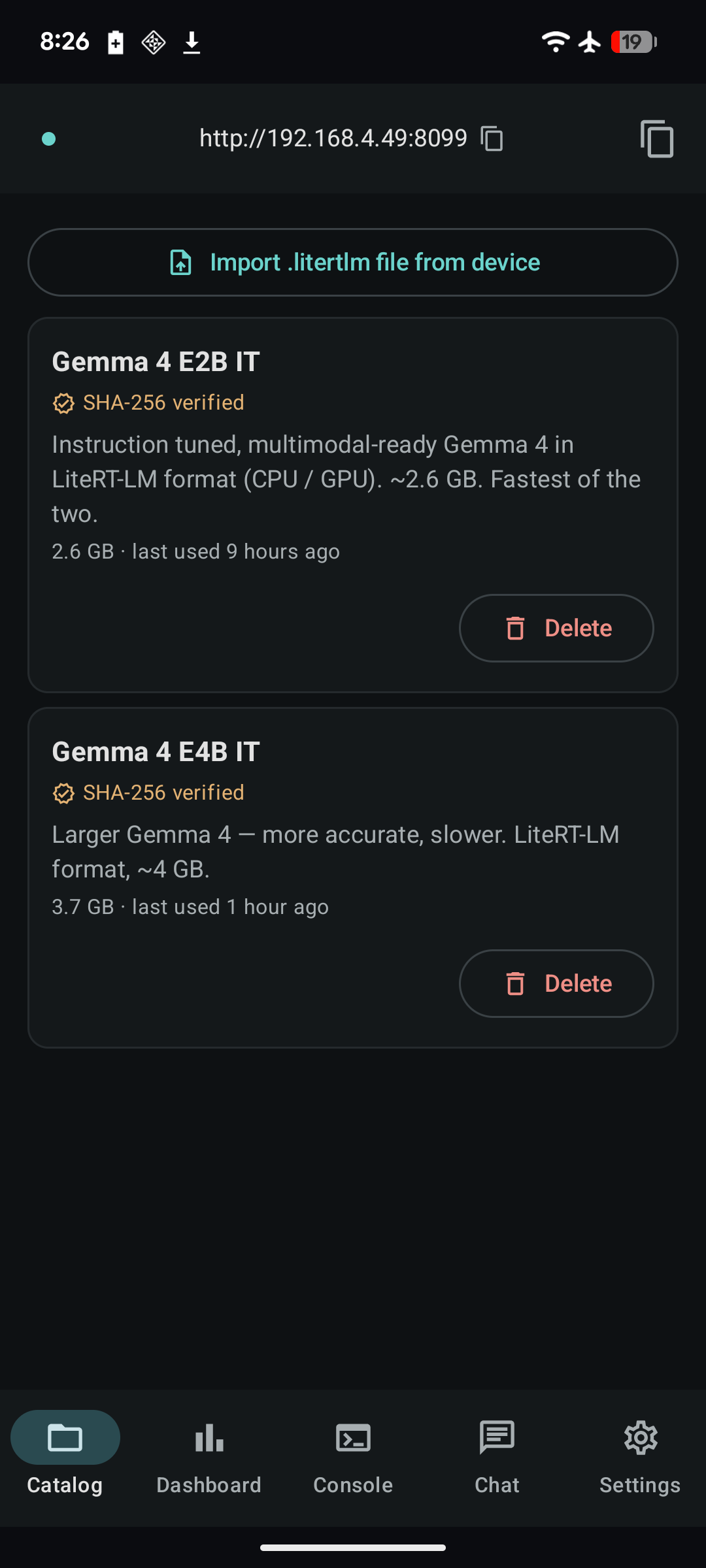
The download runs via Android's DownloadManager and is verified
against the catalog's SHA-256 once it finishes. A mismatched download
is deleted automatically and you'll see a toast. (NPU variants
currently ship without a hash — verified opportunistically as users
report successful runs.)
For custom models, use Settings → Custom model URLs, one URL per
line, ending in .litertlm. They show up in the Catalog tab and
bypass SHA-256 verification (bring-your-own integrity).
Talk to the server
Once a model is on disk and the foreground service is running (the header bar shows LIVE • http://<ip>:<port>), point a client at it.
from openai import OpenAI

client = OpenAI(
    base_url="http://localhost:8080/v1",
    api_key="not-needed"  # set Settings → API key on the device if you want auth
)

resp = client.chat.completions.create(
    model="gemma-4-e2b",
    messages=[{"role": "user", "content": "Hi."}],
    stream=False,
)
print(resp.choices[0].message.content)
Enable Settings → Allow CORS on the device first.
Reaching the server from another device
By default the server binds to 127.0.0.1 — only the phone itself
can reach it. Two ways to widen that:
adb forward for a USB-connected dev machine:
LAN binding if you want any device on the same Wi-Fi to use it:
- Settings → Bind to LAN → enable.
- Stop / Start the server (toggle in Settings) to rebind.
- The header bar now shows
http://<phone-ip>:<port>. Hit that URL from any device on the same Wi-Fi.
Don't expose this to the internet
The server has no per-IP rate limiting and the bearer-token auth is a single shared secret. Fine for trusted LANs; not fine for public networks. If you must, run a real reverse proxy in front and don't rely on the app's CORS toggle for cross-origin policy.
Verify it's actually working
{
  "status": "ok",
  "service": "localllm-android",
  "version": "1.0",
  "queue_depth": 0,
  "engines_loaded": 1,
  "engines": [
    {
      "key": "gemma-4-e2b_model_LITERT_CPU",
      "backend": "LITERT_CPU",
      "attempts": [
        {"backend": "NPU-primer", "result": "expected-fail: no vendor delegate", "duration_ms": 312},
        {"backend": "LITERT_CPU", "result": "ok", "duration_ms": 3168}
      ]
    }
  ]
}
engines[].backend is the catalog-declared backend that the engine
initialized on. engines[].attempts records the single init attempt
(plus the one-shot Tensor NPU-primer on Pixel 6/9/10) with outcome
and duration. AICore requests don't appear in the engines list —
they run inside the AICore system service and don't go through the
LiteRT engine cache. To verify AICore, send a request to
gemini-nano-aicore, watch the Console tab, or hit
GET /v1/aicore/status for a detailed readiness probe.
Next up: the full HTTP API surface.