 JAX Pathways
Phase 19 / TPU Setup: Provisioning & Runtime Verification
Select a TPU slice and provision your Cloud TPU VM
Revision v0.5.3 · Updated since your last visit. Review the changes; your progress is saved.
Lesson · about 25 minutes · CPU practice
Choose a single-host TPU topology, create a Cloud TPU VM with gcloud (or connect to a Colab TPU), verify SSH access, and rehearse clean VM deletion.
Phase study guide: preparation, milestones and project evidence
Before you start
Before this: Setup & first steps
Hardware: CPU topology planner; Cloud TPU VM or Colab TPU for target provisioning
Setup help: Python, notebook, or Cloud TPU VM
Use the tested CPU packages (the recorded environment uses Python 3.14.3). Other Python versions and accelerator environments require separate checks. The optional Cloud TPU specialization explains the target-specific execution boundaries. Logical CPU devices practice partitioning; they do not simulate TPU performance.
Download the repository ZIP or use your existing checkout. Extract it and open a terminal in the folder containing requirements-cpu.txt. The beginner ZIP is separate; these lessons use the full repository folder.
python3 -m venv .venv
source .venv/bin/activate
python -m pip install -r requirements-cpu.txtpy -3 -m venv .venv
.\.venv\Scripts\python.exe -m pip install -r requirements-cpu.txtAfter activation, run the complete worked example from that same folder:
python phases/19-tpu/01-get-a-tpu-running-and-verify-the-runtime/code/main.py.\.venv\Scripts\python.exe phases/19-tpu/01-get-a-tpu-running-and-verify-the-runtime/code/main.pyFor an incremental build, create main.py in your own practice folder, append each build block in order, and run python main.py with this environment active. Keep that file separate from the downloaded reference solution.
Download this lesson’s notebook. Open it with a Python kernel using the course environment. Run cells from the top after restarting the kernel; experiments depend on earlier definitions.
For local Jupyter, first install the course requirements using the Local Python steps, then use your environment’s Python to start Jupyter:
python -m pip install jupyterlab
python -m jupyter lab.\.venv\Scripts\python.exe -m pip install jupyterlab
.\.venv\Scripts\python.exe -m jupyter labSelect the downloaded tpu-01.ipynb file in JupyterLab. The notebook contains reference solutions; make your prediction and attempt each practice task before opening them. Restart the kernel before changing logical device setup.
The worked reference for this lesson is CPU-validated. Some references explicitly configure logical CPU devices; setting JAX_PLATFORMS does not adapt them to a TPU. Follow the execution matrix and reviewed multi-host example before attempting a target run.
For accelerator preparation, study TPU setup, observed runtime receipts, checkpointed jobs and precision and retained traces. These target paths remain unqualified on physical TPU hardware until an actual receipt is recorded. Cloud provisioning is optional for CPU learning.
Check: Prints a JSON runtime receipt with contract_ok: true, observed_backend, device_count, pmap_sum_of_squares: 140.0 (on 1 local device), and the single-host TPU slice HBM totals.
Revisit the guided CPU setup · Open 19: TPU Setup. Package instructions are CPU instructions; Windows and accelerator environments need their own validation.
What you will be able to do
- Choose between a free notebook TPU (Colab/Kaggle) and a single-host Google Cloud TPU VM (
v5litepod-4orv6e-4). - Provision a Cloud TPU VM using
gcloud compute tpus tpu-vm createor a Flex-start instance group, then connect over SSH. - Create an isolated
.venvon the TPU VM, installjax[tpu], and validatejax.default_backend(),jax.device_count(), and a synchronizedjax.pmapcomputation. - Delete the Cloud TPU VM and confirm with
gcloud compute tpus tpu-vm listthat zero active TPU nodes remain.
The problem
Before you run a Transformer, sharded step, Pallas kernel, or distributed workload on a TPU, you need a working TPU runtime and a repeatable receipt that proves JAX actually discovered TPU chips—and you need a teardown habit so an idle Cloud TPU VM never keeps billing.
The idea
Getting a TPU running separates into four explicit boundaries: choosing an access route (free Colab/Kaggle TPU vs single-host Google Cloud TPU VM via on-demand or Flex-start), creating the TPU VM in a supported zone, installing jax[tpu] inside an isolated .venv on the TPU VM host, and recording a machine-checkable runtime receipt before deleting the VM.
Why a TPU VM is a host computer attached to accelerator chips
When you create a Cloud TPU VM, Google Cloud allocates a Linux host machine directly attached over PCIe/ICI to the TPU chips on that board—for example, a v5litepod-4 VM is one Linux host attached to TPU v5e chips (16 GiB HBM each). Your SSH session lands on that Linux host, not inside a chip.
Because your commands run on the TPU VM's Linux host, standard Linux environment rules still apply: you create a Python virtual environment (.venv), install jax[tpu] from the libtpu wheel index, and run Python scripts there. When Python imports jax, libtpu initializes the attached TPU chips and jax.default_backend() reports 'tpu'.
Every Cloud TPU VM bills while it exists (READY or STOPPED), even if no Python process is running. Therefore, a complete TPU workflow always pairs creation (tpu-vm create) and verification with artifact retrieval (tpu-vm scp) and verified deletion (tpu-vm delete followed by tpu-vm list).
End-to-end Cloud TPU VM lifecycle from create to verified teardown
Predict: Where does Python execute when you SSH into a Cloud TPU VM, and when does billing stop?
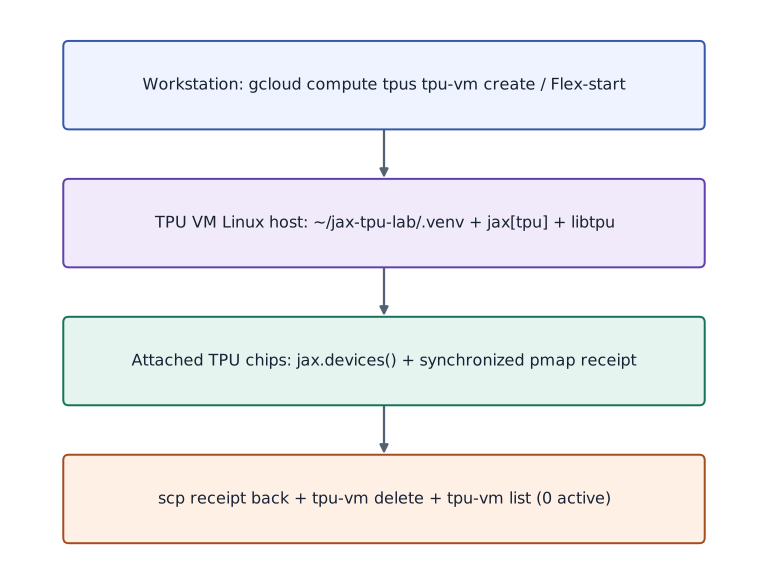
Read top to bottom: your workstation runs gcloud to allocate the Cloud TPU VM, SSH starts Python inside ~/jax-tpu-lab/.venv on the TPU VM host, libtpu dispatches XLA programs to the attached TPU chips, scp retrieves the runtime receipt, and tpu-vm delete releases the resource.
1. Choose how to get a TPU: Colab/Kaggle vs Google Cloud TPU VM
You can complete every TPU verification in this course using either a hosted notebook TPU or a Google Cloud TPU VM:
- Route 1 — Hosted Notebook TPU (Google Colab or Kaggle): Fastest zero-CLI start. In Google Colab, open Runtime → Change runtime type → Hardware accelerator → TPU (such as TPU v5e-1 or TPU v2-8). Skip
gcloudprovisioning and run the Python runtime-receipt verifier directly inside a notebook cell. - Route 2A — Direct Cloud TPU VM (
gcloud compute tpus tpu-vm create): Best when you want direct SSH andscpaccess to a single-hostv5litepod-4(4chips) orv6e-4(4chips) VM in your own GCP project. - Route 2B — Flex-start Queued Provisioning (
gcloud beta compute instance-groups managed create): Recommended when on-demand TPU capacity in a zone is busy or you want a bounded--max-run-durationthat automatically terminates the instance when the lease expires.
2. Authenticate gcloud, enable the TPU API, and check quota
On your local workstation (or inside Google Cloud Shell), set your project ID, zone, and TPU name, enable tpu.googleapis.com, and inspect the available accelerator types in your chosen zone before requesting hardware. Using a single-host slice such as v5litepod-4 (4 chips on 1 host) avoids multi-host coordination while still letting you run real jax.pmap and mesh sharding across TPU devices.
Configure project, zone, and enable the Cloud TPU API
# Configure project, zone, and enable the Cloud TPU API
export PROJECT_ID="your-gcp-project-id"
export ZONE="us-west1-c"
export TPU_NAME="jax-tpu-course"
export ACCELERATOR_TYPE="v5litepod-4"
export RUNTIME_VERSION="v2-alpha-tpuv5-lite"

gcloud auth login
gcloud config set project "$PROJECT_ID"
gcloud services enable tpu.googleapis.com
gcloud compute tpus accelerator-types list --zone="$ZONE"
Expected:
Lists the TPU accelerator types supported in $ZONE, including v5litepod-1, v5litepod-4, and v5litepod-8.
3. Create the Cloud TPU VM (Direct or Flex-start) and verify READY state
Run either the direct tpu-vm create command (add --spot if you are using Spot quota) or the Flex-start template + managed instance group commands below. Wait until describe reports state: READY.
Route 2A: Create a single-host Cloud TPU v5e-4 VM directly
# Route 2A: Create a single-host Cloud TPU v5e-4 VM directly
gcloud compute tpus tpu-vm create "$TPU_NAME" \
  --zone="$ZONE" \
  --accelerator-type="$ACCELERATOR_TYPE" \
  --version="$RUNTIME_VERSION"

gcloud compute tpus tpu-vm describe "$TPU_NAME" \
  --zone="$ZONE" \
  --format="value(state,acceleratorType,networkEndpoints[0].ipAddress)"
Expected:
Outputs READY, v5litepod-4, and the internal IP address of the newly provisioned TPU VM.
Route 2B: Alternative Flex-start queued provisioning with automatic 4-hour termination
# Route 2B: Alternative Flex-start queued provisioning with automatic 4-hour termination
gcloud beta compute instance-templates create tpu-course-flex-tmpl \
  --machine-type=ct5lp-hightpu-4t \
  --provisioning-model=FLEX_START \
  --max-run-duration=4h \
  --instance-termination-action=DELETE \
  --reservation-affinity=none

gcloud beta compute instance-groups managed create tpu-course-mig \
  --zone="$ZONE" --template=tpu-course-flex-tmpl --size=0

gcloud beta compute instance-groups managed resize-requests create tpu-course-mig \
  --zone="$ZONE" --resize-request=req-tpu-1 --resize-by=1
Expected:
Creates a Flex-start request for a 4-chip TPU v5e instance that automatically deletes after 4 hours.
4. SSH into the TPU VM, create .venv, and install jax[tpu]
Once the TPU VM is READY, bootstrap a clean virtual environment on the remote host and install jax[tpu] from the official libtpu wheel index. Keeping this .venv at ~/jax-tpu-lab/.venv gives every subsequent lesson in the course a known interpreter path.
Bootstrap ~/jax-tpu-lab/.venv with jax[tpu] on the TPU VM
# Bootstrap ~/jax-tpu-lab/.venv with jax[tpu] on the TPU VM
gcloud compute tpus tpu-vm ssh "$TPU_NAME" --zone="$ZONE" --command="
  set -euo pipefail
  mkdir -p ~/jax-tpu-lab
  python3 -m venv ~/jax-tpu-lab/.venv
  source ~/jax-tpu-lab/.venv/bin/activate
  pip install -U pip
  pip install 'jax[tpu]' -f https://storage.googleapis.com/jax-releases/libtpu_releases.html
  pip install flax optax orbax-checkpoint numpy matplotlib
  python -c 'import jax; print(\"BACKEND:\", jax.default_backend(), \"COUNT:\", jax.device_count(), \"DEVICES:\", jax.devices())'
"
Expected:
Prints BACKEND: tpu COUNT: 4 and lists 4 TpuDevice objects (for v5litepod-4).
5. Run the runtime contract check and always delete the TPU VM when finished
Before claiming a TPU runtime is ready—or before starting a long run—execute a script that checks both the requested backend/device count and a synchronized computation across all local devices, writes a JSON receipt, copies the receipt back to your laptop, and deletes the TPU VM when your session is finished.
Copy back any receipts and delete the Cloud TPU VM to stop billing
# Copy back any receipts and delete the Cloud TPU VM to stop billing
gcloud compute tpus tpu-vm delete "$TPU_NAME" --zone="$ZONE" --quiet
gcloud compute tpus tpu-vm list --zone="$ZONE"
Expected:
Deletes the TPU VM and confirms Listed 0 items so no idle TPU resource remains.
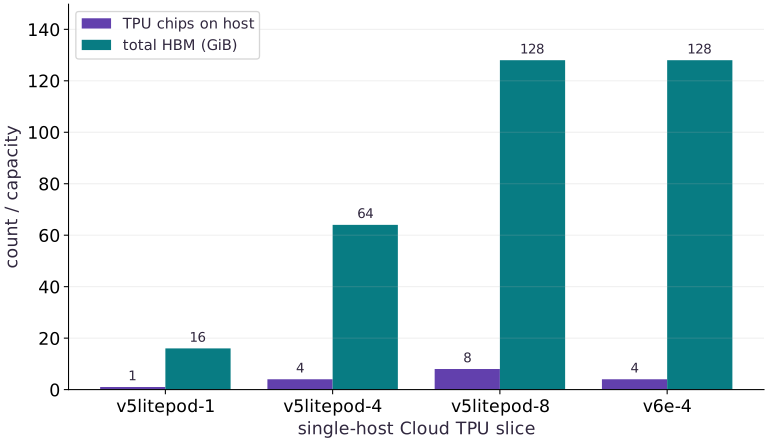
Single-host Cloud TPU slice chip counts and total HBM capacity
Predict before looking: How does total HBM scale across v5litepod-1, v5litepod-4, v5litepod-8, and v6e-4 single-host TPU VMs?
Read the figure
The horizontal axis lists four single-host Cloud TPU VM slice types. The two bars per slice show the number of attached TPU chips on that single Linux host and the total High Bandwidth Memory (HBM in GiB) across those chips.
Connect it to the computation
Moving from v5litepod-1 (16 GiB) to v5litepod-4 (64 GiB) or v6e-4 (128 GiB) multiplies HBM capacity while keeping a single VM host, so you can test jax.pmap and NamedSharding across 4 or 8 chips from one SSH command.
Open full-size figureDownload data and provenance
The notebook contains the data experiment, plotting code, and recorded figure output. Rerun it to test your changes.
Where to put & run this code: Work in phases/19-tpu/01-get-a-tpu-running-and-verify-the-runtime/code/main.py (or downloaded exercises/tpu-01.py / exercises/tpu-01.ipynb) and execute from the repository root with python3 phases/19-tpu/01-get-a-tpu-running-and-verify-the-runtime/code/main.py.
1 Write the runtime contract and synchronized pmap verifier
Create main.py with verify_runtime_contract so the same function validates CPU locally and TPU on your Cloud TPU VM.
# Step 1 — Write the runtime contract and synchronized pmap verifier: The verifier checks both device discovery and a synchronized pmap...
# Import hashlib for this computation.
import hashlib
import json
import os
import platform
import jax
import jax.numpy as jnp
import numpy as np


# Function `verify_runtime_contract(expected_backend, min_devices)` implementing this stage's computation:
def verify_runtime_contract(expected_backend=None, min_devices=1):
    # Check which hardware backend (`cpu`, `gpu`, or `tpu`) JAX selected for `backend`.
    backend = jax.default_backend()
    # Query the active JAX devices into `devices`.
    devices = jax.devices()
    # Query the active JAX devices into `local_devices`.
    local_devices = jax.local_devices()
    # Compute `target` from `expected_backend or backend`
    target = expected_backend or backend
    # Create evenly spaced index values in `x`.
    x = jnp.arange(len(local_devices) * 8, dtype=jnp.float32).reshape(len(local_devices), 8)
    # Reduce across the target axis to summarize `per_device`.
    per_device = jax.pmap(lambda row: jnp.sum(row * row))(x)
    # Synchronize host execution until asynchronous device computation completes.
    total = float(jax.block_until_ready(jnp.sum(per_device)))
    # Create evenly spaced index values in `expected_total`.
    expected_total = float(np.sum(np.arange(len(local_devices) * 8, dtype=np.float64) ** 2))
    # Evaluate the compound expression for `contract_ok`.
    contract_ok = (
        backend == target
        and len(devices) >= min_devices
        and np.isclose(total, expected_total)
    )
    # Construct dictionary `receipt` with the structured fields for this stage.
    receipt = {
        "python": platform.python_version(),
        "jax": jax.__version__,
        "expected_backend": target,
        "observed_backend": backend,
        "device_count": len(devices),
        "local_device_count": len(local_devices),
        "device_kinds": [str(d.device_kind) for d in devices],
        "pmap_sum_of_squares": total,
        "expected_sum_of_squares": expected_total,
        "contract_ok": bool(contract_ok),
    }
    # Read or serialize artifact data on disk (`receipt['receipt_sha256']`).
    receipt["receipt_sha256"] = hashlib.sha256(
        json.dumps(receipt, sort_keys=True, separators=(",", ":")).encode()
    ).hexdigest()[:16]
    # Return `receipt` to the caller.
    return receipt
Code building blocks in this step
jnp.arange(n, dtype=...)— Creates a 1-D JAX array of evenly spaced values[0, 1, ..., n-1]on the target device.array.reshape(new_shape)— Reorganizes tensor axes without changing the total element count (array.size).x.sum(axis=...) / x.mean(axis=..., keepdims=...)— Reduces values along the namedaxis(the axis you name is collapsed unlesskeepdims=True).Mesh + PartitionSpec + NamedSharding— Maps logical tensor axes onto physical device mesh axes for SPMD data, tensor, or pipeline parallelism.
The verifier checks both device discovery and a synchronized pmap reduction across all local devices, then hashes the receipt.
2 Compare single-host TPU slice topologies and emit the receipt
Append the slice topology table and runtime receipt check to main.py.
# Step 2 — Compare single-host TPU slice topologies and emit the receipt: Calculating total chips and HBM per slice makes the hardware...
topologies = [
    {"slice": "v5litepod-1", "hosts": 1, "chips_per_host": 1, "hbm_gib_per_chip": 16},
    {"slice": "v5litepod-4", "hosts": 1, "chips_per_host": 4, "hbm_gib_per_chip": 16},
    {"slice": "v5litepod-8", "hosts": 1, "chips_per_host": 8, "hbm_gib_per_chip": 16},
    {"slice": "v6e-4", "hosts": 1, "chips_per_host": 4, "hbm_gib_per_chip": 32},
]
# Iterate over `spec` to step through the computation:
for spec in topologies:
    # Compute `spec["total_chips"]` from `spec["hosts"] * spec["chips_per_host"]`
    spec["total_chips"] = spec["hosts"] * spec["chips_per_host"]
    # Compute `spec["total_hbm_gib"]` from `spec["total_chips"] * spec["hbm_gib_per_chip"]`
    spec["total_hbm_gib"] = spec["total_chips"] * spec["hbm_gib_per_chip"]

# Check which hardware backend (`cpu`, `gpu`, or `tpu`) JAX selected for `receipt`.
receipt = verify_runtime_contract(expected_backend=jax.default_backend(), min_devices=1)
# Assert invariant `receipt["contract_ok"] is True` holds
assert receipt["contract_ok"] is True
# Print the observed values to compare against the expected result.
print("Verified runtime receipt:", json.dumps(receipt, sort_keys=True))
# Print diagnostic summary of the computed outputs.
print("Single-host TPU slice HBM totals (GiB):", {t["slice"]: t["total_hbm_gib"] for t in topologies})
Code building blocks in this step
backend(...)— Callbackendwith your updated parameters or inputs from this lesson's workspace.verify_runtime_contract(...)— Callverify_runtime_contractwith your updated parameters or inputs from this lesson's workspace.assert condition— Verify that the observed output shape, status, or numerical value satisfies the contract.
Calculating total chips and HBM per slice makes the hardware capacity concrete before you provision a Cloud TPU VM.
3 Step 3: Verify invariants on the completed state
Run the final shape and numerical assertions to confirm the state built in Steps 1 and 2.
receipt = verify_runtime_contract(expected_backend=jax.default_backend(), min_devices=1)
assert receipt["contract_ok"] is True
Code building blocks in this step
verify_runtime_contract(...)— Callverify_runtime_contractwith your updated parameters or inputs from this lesson's workspace.jax.default_backend(...)— Calljax.default_backendwith your updated parameters or inputs from this lesson's workspace.assert condition— Verify that the observed output shape, status, or numerical value satisfies the contract.
Checking these invariants confirms the computation is ready for the full worked experiment.
View the cumulative build in main.py
These blocks append in order to the same file.
# Step 1 — Write the runtime contract and synchronized pmap verifier: The verifier checks both device discovery and a synchronized pmap...
# Import hashlib for this computation.
import hashlib
import json
import os
import platform
import jax
import jax.numpy as jnp
import numpy as np


# Function `verify_runtime_contract(expected_backend, min_devices)` implementing this stage's computation:
def verify_runtime_contract(expected_backend=None, min_devices=1):
    # Check which hardware backend (`cpu`, `gpu`, or `tpu`) JAX selected for `backend`.
    backend = jax.default_backend()
    # Query the active JAX devices into `devices`.
    devices = jax.devices()
    # Query the active JAX devices into `local_devices`.
    local_devices = jax.local_devices()
    # Compute `target` from `expected_backend or backend`
    target = expected_backend or backend
    # Create evenly spaced index values in `x`.
    x = jnp.arange(len(local_devices) * 8, dtype=jnp.float32).reshape(len(local_devices), 8)
    # Reduce across the target axis to summarize `per_device`.
    per_device = jax.pmap(lambda row: jnp.sum(row * row))(x)
    # Synchronize host execution until asynchronous device computation completes.
    total = float(jax.block_until_ready(jnp.sum(per_device)))
    # Create evenly spaced index values in `expected_total`.
    expected_total = float(np.sum(np.arange(len(local_devices) * 8, dtype=np.float64) ** 2))
    # Evaluate the compound expression for `contract_ok`.
    contract_ok = (
        backend == target
        and len(devices) >= min_devices
        and np.isclose(total, expected_total)
    )
    # Construct dictionary `receipt` with the structured fields for this stage.
    receipt = {
        "python": platform.python_version(),
        "jax": jax.__version__,
        "expected_backend": target,
        "observed_backend": backend,
        "device_count": len(devices),
        "local_device_count": len(local_devices),
        "device_kinds": [str(d.device_kind) for d in devices],
        "pmap_sum_of_squares": total,
        "expected_sum_of_squares": expected_total,
        "contract_ok": bool(contract_ok),
    }
    # Read or serialize artifact data on disk (`receipt['receipt_sha256']`).
    receipt["receipt_sha256"] = hashlib.sha256(
        json.dumps(receipt, sort_keys=True, separators=(",", ":")).encode()
    ).hexdigest()[:16]
    # Return `receipt` to the caller.
    return receipt

# Step 2 — Compare single-host TPU slice topologies and emit the receipt: Calculating total chips and HBM per slice makes the hardware...
topologies = [
    {"slice": "v5litepod-1", "hosts": 1, "chips_per_host": 1, "hbm_gib_per_chip": 16},
    {"slice": "v5litepod-4", "hosts": 1, "chips_per_host": 4, "hbm_gib_per_chip": 16},
    {"slice": "v5litepod-8", "hosts": 1, "chips_per_host": 8, "hbm_gib_per_chip": 16},
    {"slice": "v6e-4", "hosts": 1, "chips_per_host": 4, "hbm_gib_per_chip": 32},
]
# Iterate over `spec` to step through the computation:
for spec in topologies:
    # Compute `spec["total_chips"]` from `spec["hosts"] * spec["chips_per_host"]`
    spec["total_chips"] = spec["hosts"] * spec["chips_per_host"]
    # Compute `spec["total_hbm_gib"]` from `spec["total_chips"] * spec["hbm_gib_per_chip"]`
    spec["total_hbm_gib"] = spec["total_chips"] * spec["hbm_gib_per_chip"]

# Check which hardware backend (`cpu`, `gpu`, or `tpu`) JAX selected for `receipt`.
receipt = verify_runtime_contract(expected_backend=jax.default_backend(), min_devices=1)
# Assert invariant `receipt["contract_ok"] is True` holds
assert receipt["contract_ok"] is True
# Print the observed values to compare against the expected result.
print("Verified runtime receipt:", json.dumps(receipt, sort_keys=True))
# Print diagnostic summary of the computed outputs.
print("Single-host TPU slice HBM totals (GiB):", {t["slice"]: t["total_hbm_gib"] for t in topologies})

receipt = verify_runtime_contract(expected_backend=jax.default_backend(), min_devices=1)
assert receipt["contract_ok"] is True
Run the example
python3 phases/19-tpu/01-get-a-tpu-running-and-verify-the-runtime/code/main.pyAbout this command
This shortcut uses an activated macOS/Linux course environment in the repository folder. For Windows, use the explicit interpreter command in “Setup help” above. The script includes worked examples and reference solutions.
Inspect the complete assembled example
# Step 1 — Write the runtime contract and synchronized pmap verifier: The verifier checks both device discovery and a synchronized pmap...
# Import hashlib for this computation.
import hashlib
import json
import os
import platform
import jax
import jax.numpy as jnp
import numpy as np


# Function `verify_runtime_contract(expected_backend, min_devices)` implementing this stage's computation:
def verify_runtime_contract(expected_backend=None, min_devices=1):
    # Check which hardware backend (`cpu`, `gpu`, or `tpu`) JAX selected for `backend`.
    backend = jax.default_backend()
    # Query the active JAX devices into `devices`.
    devices = jax.devices()
    # Query the active JAX devices into `local_devices`.
    local_devices = jax.local_devices()
    # Compute `target` from `expected_backend or backend`
    target = expected_backend or backend
    # Create evenly spaced index values in `x`.
    x = jnp.arange(len(local_devices) * 8, dtype=jnp.float32).reshape(len(local_devices), 8)
    # Reduce across the target axis to summarize `per_device`.
    per_device = jax.pmap(lambda row: jnp.sum(row * row))(x)
    # Synchronize host execution until asynchronous device computation completes.
    total = float(jax.block_until_ready(jnp.sum(per_device)))
    # Create evenly spaced index values in `expected_total`.
    expected_total = float(np.sum(np.arange(len(local_devices) * 8, dtype=np.float64) ** 2))
    # Evaluate the compound expression for `contract_ok`.
    contract_ok = (
        backend == target
        and len(devices) >= min_devices
        and np.isclose(total, expected_total)
    )
    # Construct dictionary `receipt` with the structured fields for this stage.
    receipt = {
        "python": platform.python_version(),
        "jax": jax.__version__,
        "expected_backend": target,
        "observed_backend": backend,
        "device_count": len(devices),
        "local_device_count": len(local_devices),
        "device_kinds": [str(d.device_kind) for d in devices],
        "pmap_sum_of_squares": total,
        "expected_sum_of_squares": expected_total,
        "contract_ok": bool(contract_ok),
    }
    # Read or serialize artifact data on disk (`receipt['receipt_sha256']`).
    receipt["receipt_sha256"] = hashlib.sha256(
        json.dumps(receipt, sort_keys=True, separators=(",", ":")).encode()
    ).hexdigest()[:16]
    # Return `receipt` to the caller.
    return receipt


# Step 2 — Compare single-host TPU slice topologies and emit the receipt: Calculating total chips and HBM per slice makes the hardware...
topologies = [
    {"slice": "v5litepod-1", "hosts": 1, "chips_per_host": 1, "hbm_gib_per_chip": 16},
    {"slice": "v5litepod-4", "hosts": 1, "chips_per_host": 4, "hbm_gib_per_chip": 16},
    {"slice": "v5litepod-8", "hosts": 1, "chips_per_host": 8, "hbm_gib_per_chip": 16},
    {"slice": "v6e-4", "hosts": 1, "chips_per_host": 4, "hbm_gib_per_chip": 32},
]
# Iterate over `spec` to step through the computation:
for spec in topologies:
    # Compute `spec["total_chips"]` from `spec["hosts"] * spec["chips_per_host"]`
    spec["total_chips"] = spec["hosts"] * spec["chips_per_host"]
    # Compute `spec["total_hbm_gib"]` from `spec["total_chips"] * spec["hbm_gib_per_chip"]`
    spec["total_hbm_gib"] = spec["total_chips"] * spec["hbm_gib_per_chip"]

# Check which hardware backend (`cpu`, `gpu`, or `tpu`) JAX selected for `receipt`.
receipt = verify_runtime_contract(expected_backend=jax.default_backend(), min_devices=1)
# Assert invariant `receipt["contract_ok"] is True` holds
assert receipt["contract_ok"] is True
# Print the observed values to compare against the expected result.
print("Verified runtime receipt:", json.dumps(receipt, sort_keys=True))
# Print diagnostic summary of the computed outputs.
print("Single-host TPU slice HBM totals (GiB):", {t["slice"]: t["total_hbm_gib"] for t in topologies})
Expected result: Prints a JSON runtime receipt with contract_ok: true, observed_backend, device_count, pmap_sum_of_squares: 140.0 (on 1 local device), and the single-host TPU slice HBM totals.
Recorded reference execution
Reference output captured from executing the complete lesson script (code/main.py) and its assertions in the course CPU environment.
Verified runtime receipt: {"contract_ok": true, "device_count": 1, "device_kinds": ["cpu"], "expected_backend": "cpu", "expected_sum_of_squares": 140.0, "jax": "0.9.2", "local_device_count": 1, "observed_backend": "cpu", "pmap_sum_of_squares": 140.0, "python": "3.14.3", "receipt_sha256": "4ddc0cbb323fe3bd"}
Single-host TPU slice HBM totals (GiB): {'v5litepod-1': 16, 'v5litepod-4': 64, 'v5litepod-8': 128, 'v6e-4': 128}
Verified runtime receipt: {"contract_ok": true, "device_count": 1, "device_kinds": ["cpu"], "expected_backend": "cpu", "expected_sum_of_squares": 140.0, "jax": "0.9.2", "local_device_count": 1, "observed_backend": "cpu", "pmap_sum_of_squares": 140.0, "python": "3.14.3", "receipt_sha256": "4ddc0cbb323fe3bd"}
Single-host TPU slice HBM totals (GiB): {'v5litepod-1': 16, 'v5litepod-4': 64, 'v5litepod-8': 128, 'v6e-4': 128}
Mismatch contract_ok: False observed: cpu devices: 1
Requires --worker=all and jax.distributed.initialize(): {'v5litepod-1': False, 'v5litepod-4': False, 'v5litepod-8': False, 'v5litepod-16': True}
Checked receipt sha256: 4ddc0cbb323fe3bd v5litepod-4 chips: 4 HBM GiB: 64
Slices fitting 48 GiB: ['v5litepod-4', 'v5litepod-8', 'v6e-4']
Expected 4-device pmap sum of squares: 10416.0
PASS: tpu-01
Download execution record · The notebook includes executed cells and figure outputs. Compare your run with these values; timings depend on the machine.
Reject a mismatched backend or missing TPU devices immediately
# Experiment — Reject a mismatched backend or missing TPU devices immediately: Failing the contract check explicitly prevents a script from...
mismatch = verify_runtime_contract(expected_backend="tpu", min_devices=4)
# Print the observed values to compare against the expected result.
print("Mismatch contract_ok:", mismatch["contract_ok"], "observed:", mismatch["observed_backend"], "devices:", mismatch["device_count"])
# Assert that `mismatch["contract_ok"] == (jax.default_backend() == "tpu" and jax.device_count() >= 4)`.
assert mismatch["contract_ok"] == (jax.default_backend() == "tpu" and jax.device_count() >= 4)
Expected: On CPU, mismatch['contract_ok'] is False while still recording the observed backend and device count.
Failing the contract check explicitly prevents a script from silently running on CPU when you intended to benchmark or train on a TPU VM.
Verify single-host vs multi-host process counts
# Experiment — Verify single-host vs multi-host process counts: Single-host TPU VMs attach all chips to one Linux VM; multi-host...
slice_hosts = {"v5litepod-1": 1, "v5litepod-4": 1, "v5litepod-8": 1, "v5litepod-16": 4}
# Compute `needs_multi_host` from `{k: (v > 1) for k, v in slice_hosts.items()}`
needs_multi_host = {k: (v > 1) for k, v in slice_hosts.items()}
# Print the observed values to compare against the expected result.
print("Requires --worker=all and jax.distributed.initialize():", needs_multi_host)
# Assert that `needs_multi_host["v5litepod-4"] is False and needs_multi_host["v5litepod-16"] is True`.
assert needs_multi_host["v5litepod-4"] is False and needs_multi_host["v5litepod-16"] is True
Expected: v5litepod-1, v5litepod-4, and v5litepod-8 run on 1 host (False); v5litepod-16 spans 4 hosts (True).
Single-host TPU VMs attach all chips to one Linux VM; multi-host slices attach chips across multiple Linux VMs that must all launch the Python process.
Make it yours
Where to put your code: Append your solution at the bottom of phases/19-tpu/01-get-a-tpu-running-and-verify-the-runtime/code/main.py (or inside the Make it yours cell of exercises/tpu-01.ipynb) and run python3 phases/19-tpu/01-get-a-tpu-running-and-verify-the-runtime/code/main.py to verify your prediction before opening the reference solution.
Call verify_runtime_contract for the active backend with min_devices=1, then compute how many v5litepod-4 chips and total GiB of HBM are available on that single-host slice and assert both values.
Show a writing guide and starter scaffold
How to write this exercise code: step-by-step recipe & starter scaffold
1. Key functions & syntax to use:
verify_runtime_contract(...)— Callverify_runtime_contractwith your updated parameters or inputs from this lesson's workspace.jax.default_backend(...)— Calljax.default_backendwith your updated parameters or inputs from this lesson's workspace.assert condition— Verify that the observed output shape, status, or numerical value satisfies the contract.
2. Step-by-step implementation plan:
- Run
nextto computev5e4. - Print the observed values to compare against the expected result.
- Assert that
checked["contract_ok"] is True and v5e4["total_chips"] == 4 and v5e4["total_hbm_gib"] == 64.
# Exercise solution: Call verify_runtime_contract for the active backend with...
checked = verify_runtime_contract(...)  # TODO: compute checked
# Run `next` to compute `v5e4`.
v5e4 = next(...)  # TODO: compute v5e4
# Print the observed values to compare against the expected result.
print("Checked receipt sha256:", checked["receipt_sha256"], "v5litepod-4 chips:", v5e4["total_chips"], "HBM GiB:", v5e4["total_hbm_gib"])
# Assert that `checked["contract_ok"] is True and v5e4["total_chips"] == 4 and v5e4["total_hbm_gib"] == 64`.
assert checked["contract_ok"] is True  # TODO: complete assertion check
Reveal the reference solution
# Exercise solution: Call verify_runtime_contract for the active backend with...
checked = verify_runtime_contract(expected_backend=jax.default_backend(), min_devices=1)
# Run `next` to compute `v5e4`.
v5e4 = next(t for t in topologies if t["slice"] == "v5litepod-4")
# Print the observed values to compare against the expected result.
print("Checked receipt sha256:", checked["receipt_sha256"], "v5litepod-4 chips:", v5e4["total_chips"], "HBM GiB:", v5e4["total_hbm_gib"])
# Assert that `checked["contract_ok"] is True and v5e4["total_chips"] == 4 and v5e4["total_hbm_gib"] == 64`.
assert checked["contract_ok"] is True and v5e4["total_chips"] == 4 and v5e4["total_hbm_gib"] == 64
Check whether a model state fits on a single-host TPU slice
Foundations
Given a training state requiring GiB of HBM, determine which slices in topologies have at least GiB of total HBM.
Show a writing guide and starter scaffold
How to write this practice solution: step-by-step recipe & starter scaffold
1. Key functions & syntax to use:
slice(...)— Callslicewith your updated parameters or inputs from this lesson's workspace.assert condition— Verify that the observed output shape, status, or numerical value satisfies the contract.
2. Step-by-step implementation plan:
- Check whether a model state fits on a single-host TPU slice (Foundations): A single v5litepod-1 chip has 16 GiB HBM, whereas...
- Print the observed values to compare against the expected result.
- Assert invariant
fitting_slices == ["v5litepod-4"holds
# Check whether a model state fits on a single-host TPU slice (Foundations): A single v5litepod-1 chip has 16 GiB HBM, whereas...
fitting_slices = ...  # TODO: compute fitting_slices
# Print the observed values to compare against the expected result.
print("Slices fitting 48 GiB:", fitting_slices)
# Assert invariant `fitting_slices == ["v5litepod-4"` holds
assert fitting_slices  # TODO: complete assertion check
Show a hint
Filter topologies by t['total_hbm_gib'] >= 48.
Reveal reference solution and reasoning
# Check whether a model state fits on a single-host TPU slice (Foundations): A single v5litepod-1 chip has 16 GiB HBM, whereas...
fitting_slices = [t["slice"] for t in topologies if t["total_hbm_gib"] >= 48]
# Print the observed values to compare against the expected result.
print("Slices fitting 48 GiB:", fitting_slices)
# Assert invariant `fitting_slices == ["v5litepod-4"` holds
assert fitting_slices == ["v5litepod-4", "v5litepod-8", "v6e-4"]
A single v5litepod-1 chip has 16 GiB HBM, whereas v5litepod-4 (64 GiB), v5litepod-8 (128 GiB), and v6e-4 (128 GiB) fit a 48 GiB sharded state on a single host.
Verify the pmap sum-of-squares formula for 4 TPU devices
Transfer / diagnosis
Compute the exact sum of squares that verify_runtime_contract expects when len(local_devices) == 4 (32 elements 0..31).
Show a writing guide and starter scaffold
How to write this practice solution: step-by-step recipe & starter scaffold
1. Key functions & syntax to use:
x.sum(axis=...) / x.mean(axis=..., keepdims=...)— Reduces values along the namedaxis(the axis you name is collapsed unlesskeepdims=True).Mesh + PartitionSpec + NamedSharding— Maps logical tensor axes onto physical device mesh axes for SPMD data, tensor, or pipeline parallelism.
2. Step-by-step implementation plan:
- Aggregate array values to compute
four_device_expected. - Print the observed values to compare against the expected result.
- Assert invariant
four_device_expected == 10416.0holds
# Verify the pmap sum-of-squares formula for 4 TPU devices (Transfer / diagnosis): On a 4-chip TPU VM (v5litepod-4 or v6e-4), x has shape (4,...
# Aggregate array values to compute `four_device_expected`.
four_device_expected = float(...)  # TODO: compute four_device_expected
# Print the observed values to compare against the expected result.
print("Expected 4-device pmap sum of squares:", four_device_expected)
# Assert invariant `four_device_expected == 10416.0` holds
assert four_device_expected  # TODO: complete assertion check
Show a hint
Sum np.arange(32, dtype=np.float64) ** 2.
Reveal reference solution and reasoning
# Verify the pmap sum-of-squares formula for 4 TPU devices (Transfer / diagnosis): On a 4-chip TPU VM (v5litepod-4 or v6e-4), x has shape (4,...
# Aggregate array values to compute `four_device_expected`.
four_device_expected = float(np.sum(np.arange(4 * 8, dtype=np.float64) ** 2))
# Print the observed values to compare against the expected result.
print("Expected 4-device pmap sum of squares:", four_device_expected)
# Assert invariant `four_device_expected == 10416.0` holds
assert four_device_expected == 10416.0
On a 4-chip TPU VM (v5litepod-4 or v6e-4), x has shape (4, 8) and the synchronized sum of squares across the 4 chips is 10416.0.
Diagnose the result
If gcloud compute tpus tpu-vm create fails with RESOURCE_EXHAUSTED, switch zones or use Flex-start (Route 2B). If jax.default_backend() prints cpu on the TPU VM, confirm that jax[tpu] was installed from libtpu_releases.html inside the active .venv and that no other process holds /dev/accel* or /dev/vfio/*.
Carry forward
- A Cloud TPU VM is a Linux host directly attached to TPU chips; you SSH into the host and run Python inside a
.venvwithjax[tpu]. - Single-host slices (
v5litepod-1,v5litepod-4,v5litepod-8,v6e-4) let you run 1 to 8 TPU chips from a single SSH command without multi-host coordination. - Always pair
tpu-vm createwith a saved runtime receipt andtpu-vm deleteverified bytpu-vm list.
Keep your evidence
Keep the slice HBM capacity table, single-host vs Pod classification, and gcloud create/describe/delete command log.
Save your modified code, its output, and an explanation of your prediction. Checkpoint answers and exercise evidence are tracked separately.
Saved in this browser. Export or back up your portfolio anytime in My learning.
Verified on local CPU. Stage to a Cloud TPU VM via Cloud TPU setup to record accelerator execution receipts (TODO: add automated Cloud TPU CI execution receipts).