 JAX Pathways
Phase 07 / Transformers & language models
Attention from small pieces
Revision v0.7.0 · Updated since your last visit. Review the changes; your progress is saved.
Lesson · about 90 minutes · CPU practice
Implement scaled dot-product attention and test its output shape.
Phase study guide: preparation, milestones and project evidence
Before you start
Before this: Data & checkpoint recovery
Hardware: CPU
Setup help: Python, notebook, or Cloud TPU VM
Use the tested CPU packages (the recorded environment uses Python 3.14.3). Other Python versions and accelerator environments require separate checks. The optional Cloud TPU specialization explains the target-specific execution boundaries. Logical CPU devices practice partitioning; they do not simulate TPU performance.
Download the repository ZIP or use your existing checkout. Extract it and open a terminal in the folder containing requirements-cpu.txt. The beginner ZIP is separate; these lessons use the full repository folder.
python3 -m venv .venv
source .venv/bin/activate
python -m pip install -r requirements-cpu.txtpy -3 -m venv .venv
.\.venv\Scripts\python.exe -m pip install -r requirements-cpu.txtAfter activation, run the complete worked example from that same folder:
python phases/07-transformers/01-attention-from-small-pieces/code/main.py.\.venv\Scripts\python.exe phases/07-transformers/01-attention-from-small-pieces/code/main.pyFor an incremental build, create main.py in your own practice folder, append each build block in order, and run python main.py with this environment active. Keep that file separate from the downloaded reference solution.
Download this lesson’s notebook. Open it with a Python kernel using the course environment. Run cells from the top after restarting the kernel; experiments depend on earlier definitions.
For local Jupyter, first install the course requirements using the Local Python steps, then use your environment’s Python to start Jupyter:
python -m pip install jupyterlab
python -m jupyter lab.\.venv\Scripts\python.exe -m pip install jupyterlab
.\.venv\Scripts\python.exe -m jupyter labSelect the downloaded transformers-01.ipynb file in JupyterLab. The notebook contains reference solutions; make your prediction and attempt each practice task before opening them. Restart the kernel before changing logical device setup.
The worked reference for this lesson is CPU-validated. Some references explicitly configure logical CPU devices; setting JAX_PLATFORMS does not adapt them to a TPU. Follow the execution matrix and reviewed multi-host example before attempting a target run.
For accelerator preparation, study TPU setup, observed runtime receipts, checkpointed jobs and precision and retained traces. These target paths remain unqualified on physical TPU hardware until an actual receipt is recorded. Cloud provisioning is optional for CPU learning.
Check: Uniform weights ; both output rows .
Revisit the guided CPU setup · Open 19: TPU Setup. Package instructions are CPU instructions; Windows and accelerator environments need their own validation.
What you will be able to do
- Track query, key and value axes
- Derive the uniform-query result
- Scale scores and keep softmax stable
- Test relationships that should survive a change
The problem
When a model reads a sequence, how can one position use information from another? We’ll build a single attention head as a weighted average. Start with a query whose answer we know, then change the query and watch which values it emphasizes. Small arrays let us see every part of the calculation.
The idea
Attention uses queries and keys to determine weights, then combines values using those weights. Scores describe compatibility; values provide the content being mixed. The attention matrix is an intermediate computation rather than the model's complete output.
Calculate one weighted value mixture
Suppose one query gives weights and to values and . The mixture is . The weights sum to one, but output coordinates need not sum to one or lie between zero and one.
Read one heatmap row as a query's distribution over eligible keys, after confirming the axes. Scaling affects concentration, and a mask determines which keys can participate.
Hold the weights fixed and change a value vector: the output changes while the heatmap does not. Conversely, redundant values can make different weight patterns produce the same mixture. Use a hand-computed row to connect the heatmap to the actual value multiplication.
Track query, key and value axes
has two query rows with two features each; has three key rows with the same feature dimension. produces a score matrix: one row per query and one column per key. has three value rows, so the weighted sum returns two output rows. Its value-feature dimension need not equal the key-feature dimension.
Softmax acts along the last axis because a query chooses among keys. A softmax over queries instead would normalize a different problem. Check a rectangular example first: equal query and key counts can hide transposed-axis errors.
Q (Tq, Dk) @ Kᵀ (Dk, Tk) → scores (Tq, Tk)
softmax over Tk → weights (Tq, Tk)
weights @ V (Tk, Dv) → output (Tq, Dv)
Derive the uniform-query result
Every dot product with a zero query is zero. Softmax of is , so each output is the mean of the three value rows. Our values sum to ; both queries therefore produce . This known answer checks score normalization and value mixing without using another attention implementation.
The output is a weighted average, not a selected row. With finite unmasked scores, multiple keys can contribute. More concentrated weights can approximate retrieval but do not create a discrete index operation.
Scale scores and keep softmax stable
Dividing by sqrt(Dk) moderates dot-product scale as the feature dimension grows under common initialization assumptions. It is a design convention, not a proof that arbitrary query/key values cannot saturate. The independent NumPy reference below subtracts each row maximum before exponentiating to avoid overflow.
JAX softmax performs a stable normalization. Adding the same finite constant to every score in a row leaves its weights unchanged. Extremely large or infinite inputs can still require diagnosis; a stable formula does not make invalid inputs meaningful.
Test relationships that should survive a change
Adding a constant value vector c to every value row shifts every output by c because each weight row sums to one. Permuting keys and their corresponding values together leaves the result unchanged. Permuting only values changes what each score retrieves.
These tests examine the mechanism under changed conditions rather than merely duplicating the implementation. The unmasked head allows every key to contribute; interpreting it as a next-token model would leak future information. That boundary belongs in the next lesson.
Read attention as matching, then mixing
Let’s give each symbol a job. contains queries, contains keys, and contains the values we want to mix. The feature count sets the score scale. Each row of contains nonnegative weights that sum to one. For a zero query, all scores match, so three values each receive weight . Their average is the output. You can check that case before thinking about learned projections.
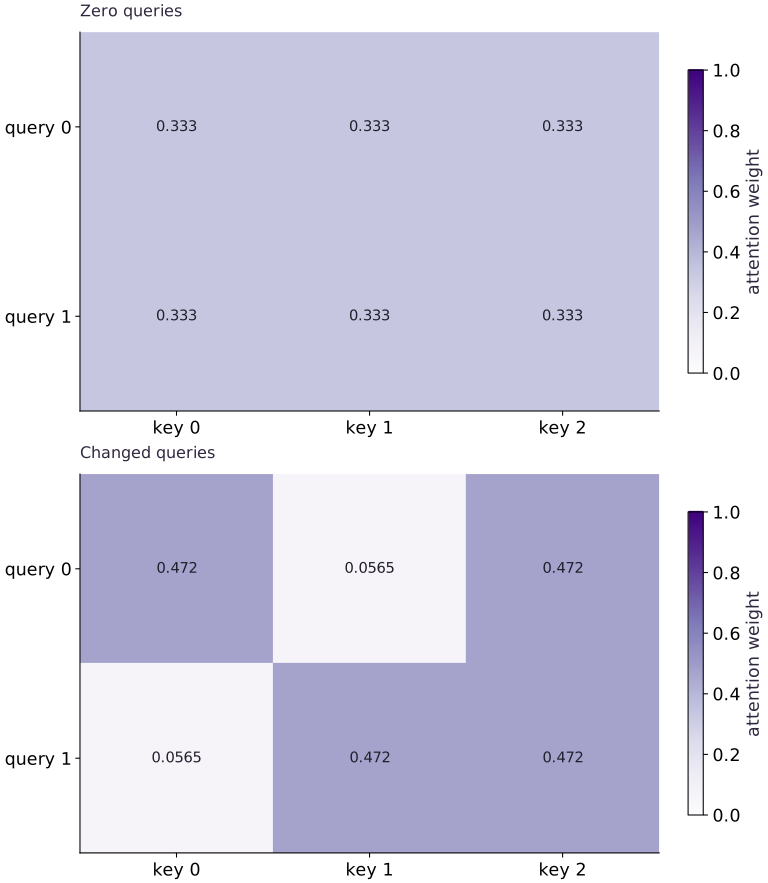
Each query distributes one unit of attention
Predict before looking: Why do the initial rows have equal weights?
Read the figure
Rows are queries and columns are keys. Each cell gives the attention weight assigned to that key by that query. Both panels use the same color range from to , so their shades are directly comparable. Read across one row at a time; its weights sum to .
With zero queries, all scores are equal and every key receives weight . With changed queries, the first row becomes approximately , while the second becomes . Each row favors two tied keys, not a single winning key.
Connect it to the computation
The changed queries are and ; the keys are , , and . The third key matches the active coordinate of either query, explaining why it ties for the highest weight in both rows. Softmax converts these relative scores into normalized, positive weights.
The weights mix the value vectors; they are not the output vectors themselves. In the uniform panel, averaging the values , , and produces for each query. To understand a changed output, first read its row of weights, then form that weighted sum.
Open full-size figureDownload data and provenance
The notebook contains the data experiment, plotting code, and recorded figure output. Rerun it to test your changes.
Where to put & run this code: Work in phases/07-transformers/01-attention-from-small-pieces/code/main.py (or downloaded exercises/transformers-01.py / exercises/transformers-01.ipynb) and execute from the repository root with python3 phases/07-transformers/01-attention-from-small-pieces/code/main.py.
1 Prepare the experiment
In the CPU environment from setup, create main.py and add this block. Write down the dimensions and the known result before continuing.
# Step 1 — 1. Prepare the experiment: These imports provide JAX array transformations and NumPy...
import jax
import jax.numpy as jnp
import numpy as np
These imports provide JAX array transformations and NumPy reference calculations. Define the numerical functions next; the final build block supplies the concrete fixture and checks.
2 Implement the mechanism
Append this block in the same file. Follow the shape diagram above and identify each reduction or state transition.
# Step 2 — 2. Implement the mechanism: Multiplying Q\in\mathbb{R}^{T_q\times D_k} by...
def attend(q, k, v):
    scores = q @ k.T / jnp.sqrt(q.shape[-1])
    # Apply nonlinear activation or probability normalization to compute `weights`.
    weights = jax.nn.softmax(scores, axis=-1)
    return weights @ v, weights
Code building blocks in this step
attend(...)— Callattendwith your updated parameters or inputs from this lesson's workspace.jnp.sqrt(...)— Calljnp.sqrtwith your updated parameters or inputs from this lesson's workspace.
Multiplying by gives scores of shape . Softmax normalizes each query’s weights across the keys. Multiplying by then gives an output of shape .
3 Run and check
Append this block and run python main.py. Compare its output with your prediction. An assertion failure means a stated contract needs investigation.
# Step 3 — 3. Run and check: Uniform weights 1/3; both output rows [2, 2].
q = jnp.zeros((2, 2))
k = jnp.array([[1., 0.], [0., 1.], [1., 1.]])
v = jnp.array([[2., 0.], [0., 4.], [4., 2.]])
output, weights = attend(q, k, v)
print("Weights / output:", weights, output)
assert jnp.allclose(weights, jnp.full((2, 3), 1/3))
assert jnp.allclose(output, jnp.array([[2., 2.], [2., 2.]]))
assert jnp.allclose(jnp.sum(weights, axis=-1), 1.)
Code building blocks in this step
jnp.array(values, dtype=...)— Constructs an immutable device-backed JAX array from Python/NumPy values.jnp.zeros / jnp.ones(shape, dtype=...)— Allocates a tensor of the givenshapeinitialized with constants.x.sum(axis=...) / x.mean(axis=..., keepdims=...)— Reduces values along the namedaxis(the axis you name is collapsed unlesskeepdims=True).jnp.allclose(actual, expected, rtol=..., atol=...)— Checks that two arrays match elementwise within floating-point tolerance.
Uniform weights ; both output rows .
View the cumulative build in main.py
These blocks append in order to the same file.
# Step 1 — 1. Prepare the experiment: These imports provide JAX array transformations and NumPy...
import jax
import jax.numpy as jnp
import numpy as np

# Step 2 — 2. Implement the mechanism: Multiplying Q\in\mathbb{R}^{T_q\times D_k} by...
def attend(q, k, v):
    scores = q @ k.T / jnp.sqrt(q.shape[-1])
    # Apply nonlinear activation or probability normalization to compute `weights`.
    weights = jax.nn.softmax(scores, axis=-1)
    return weights @ v, weights

# Step 3 — 3. Run and check: Uniform weights 1/3; both output rows [2, 2].
q = jnp.zeros((2, 2))
k = jnp.array([[1., 0.], [0., 1.], [1., 1.]])
v = jnp.array([[2., 0.], [0., 4.], [4., 2.]])
output, weights = attend(q, k, v)
print("Weights / output:", weights, output)
assert jnp.allclose(weights, jnp.full((2, 3), 1/3))
assert jnp.allclose(output, jnp.array([[2., 2.], [2., 2.]]))
assert jnp.allclose(jnp.sum(weights, axis=-1), 1.)
Run the example
python3 phases/07-transformers/01-attention-from-small-pieces/code/main.pyAbout this command
This shortcut uses an activated macOS/Linux course environment in the repository folder. For Windows, use the explicit interpreter command in “Setup help” above. The script includes worked examples and reference solutions.
Inspect the complete assembled example
# Step 1 — 1. Prepare the experiment: These imports provide JAX array transformations and NumPy...
import jax
import jax.numpy as jnp
import numpy as np

# Step 2 — 2. Implement the mechanism: Multiplying Q\in\mathbb{R}^{T_q\times D_k} by...
def attend(q, k, v):
    scores = q @ k.T / jnp.sqrt(q.shape[-1])
    # Apply nonlinear activation or probability normalization to compute `weights`.
    weights = jax.nn.softmax(scores, axis=-1)
    return weights @ v, weights

# Step 3 — 3. Run and check: Uniform weights 1/3; both output rows [2, 2].
q = jnp.zeros((2, 2))
k = jnp.array([[1., 0.], [0., 1.], [1., 1.]])
v = jnp.array([[2., 0.], [0., 4.], [4., 2.]])
output, weights = attend(q, k, v)
print("Weights / output:", weights, output)
assert jnp.allclose(weights, jnp.full((2, 3), 1/3))
assert jnp.allclose(output, jnp.array([[2., 2.], [2., 2.]]))
assert jnp.allclose(jnp.sum(weights, axis=-1), 1.)
Expected result: Uniform weights ; both output rows .
Recorded reference execution
Reference output captured from executing the complete lesson script (code/main.py) and its assertions in the course CPU environment.
Weights / output: [[0.33333334 0.33333334 0.33333334]
 [0.33333334 0.33333334 0.33333334]] [[2. 2.]
 [2. 2.]]
Weights / output: [[0.33333334 0.33333334 0.33333334]
 [0.33333334 0.33333334 0.33333334]] [[2. 2.]
 [2. 2.]]
PASS: transformers-01
Download execution record · The notebook includes executed cells and figure outputs. Compare your run with these values; timings depend on the machine.
Compare a nonzero query with NumPy
# Experiment — Compare a nonzero query with NumPy: A separate NumPy calculation checks nonuniform weighting and the...
q_new = jnp.array([[2., 0.]])
actual, w_new = attend(q_new, k, v)
# Convert `scores_np` to a host NumPy array for inspection or verification.
scores_np = np.asarray(q_new) @ np.asarray(k).T / np.sqrt(2)
# Reduce along axis=-1 to compute `raw`.
raw = np.exp(scores_np - scores_np.max(axis=-1, keepdims=True))
# Reduce along axis=-1 to compute `reference_w`.
reference_w = raw / raw.sum(axis=-1, keepdims=True)
np.testing.assert_allclose(w_new, reference_w, rtol=1e-6, atol=1e-6)
# Convert `` to a host NumPy array for inspection or verification.
np.testing.assert_allclose(actual, reference_w @ np.asarray(v), rtol=1e-6, atol=1e-6)
Expected: Keys and receive equal larger weights than key .
A separate NumPy calculation checks nonuniform weighting and the output axis.
Shift every value vector
# Experiment — Shift every value vector: Row-normalized attention preserves a shared value translation.
shift = jnp.array([5., -2.])
shifted, _ = attend(q_new, k, v + shift)
assert jnp.allclose(shifted, actual + shift)
Expected: Each output shifts by .
Row-normalized attention preserves a shared value translation.
Make it yours
Where to put your code: Append your solution at the bottom of phases/07-transformers/01-attention-from-small-pieces/code/main.py (or inside the Make it yours cell of exercises/transformers-01.ipynb) and run python3 phases/07-transformers/01-attention-from-small-pieces/code/main.py to verify your prediction before opening the reference solution.
Permute the three key/value pairs together, then permute only values. Verify invariance for the paired permutation and a changed result for the mismatched pairing.
Show a writing guide and starter scaffold
How to write this exercise code: step-by-step recipe & starter scaffold
1. Key functions & syntax to use:
jnp.array(values, dtype=...)— Constructs an immutable device-backed JAX array from Python/NumPy values.jnp.allclose(actual, expected, rtol=..., atol=...)— Checks that two arrays match elementwise within floating-point tolerance.
2. Step-by-step implementation plan:
- Set up the changed input or configuration parameters requested in the prompt.
- Run the target function or transformation and assert that the output matches your prediction.
# Exercise solution: Permute the three key/value pairs together, then permute only values.
order = jnp.array(...)  # TODO: compute order
paired, _ = attend(...)  # TODO: compute paired, _
mismatched, _ = attend(...)  # TODO: compute mismatched, _
assert jnp.allclose(paired, actual)  # TODO: complete assertion check
assert not jnp.allclose(mismatched, actual)  # TODO: complete assertion check
Reveal the reference solution
# Exercise solution: Permute the three key/value pairs together, then permute only values.
order = jnp.array([2, 0, 1])
paired, _ = attend(q_new, k[order], v[order])
mismatched, _ = attend(q_new, k, v[order])
assert jnp.allclose(paired, actual)
assert not jnp.allclose(mismatched, actual)
Use a different value dimension
Transfer / diagnosis
Make each value a single scalar . Check the output shape and zero-query mean.
Show a writing guide and starter scaffold
How to write this practice solution: step-by-step recipe & starter scaffold
1. Key functions & syntax to use:
jnp.array(values, dtype=...)— Constructs an immutable device-backed JAX array from Python/NumPy values.jnp.allclose(actual, expected, rtol=..., atol=...)— Checks that two arrays match elementwise within floating-point tolerance.
2. Step-by-step implementation plan:
- Check tensor shape invariant:
scalar_out.shape == (2, 1)
# Use a different value dimension (Transfer / diagnosis): Queries and keys share Dk; values may have an independent...
scalar_v = jnp.array(...)  # TODO: compute scalar_v
scalar_out, _ = attend(...)  # TODO: compute scalar_out, _
# Check tensor shape invariant: `scalar_out.shape == (2, 1)`
assert scalar_out.shape  # TODO: complete assertion check
assert jnp.allclose(scalar_out, 6.)  # TODO: complete assertion check
Show a hint
The score matrix does not depend on Dv.
Reveal reference solution and reasoning
# Use a different value dimension (Transfer / diagnosis): Queries and keys share Dk; values may have an independent...
scalar_v = jnp.array([[3.], [6.], [9.]])
scalar_out, _ = attend(q, k, scalar_v)
# Check tensor shape invariant: `scalar_out.shape == (2, 1)`
assert scalar_out.shape == (2, 1)
assert jnp.allclose(scalar_out, 6.)
Queries and keys share ; values may have an independent feature dimension.
Expose a wrong softmax axis
Transfer / diagnosis
Normalize zero scores along axis and compare row sums with the intended contract. Repair the axis.
Show a writing guide and starter scaffold
How to write this practice solution: step-by-step recipe & starter scaffold
1. Key functions & syntax to use:
jnp.zeros / jnp.ones(shape, dtype=...)— Allocates a tensor of the givenshapeinitialized with constants.x.sum(axis=...) / x.mean(axis=..., keepdims=...)— Reduces values along the namedaxis(the axis you name is collapsed unlesskeepdims=True).jnp.allclose(actual, expected, rtol=..., atol=...)— Checks that two arrays match elementwise within floating-point tolerance.
2. Step-by-step implementation plan:
- Set up the changed input or configuration parameters requested in the prompt.
- Run the target function or transformation and assert that the output matches your prediction.
# Expose a wrong softmax axis (Transfer / diagnosis): A legal operation can normalize the wrong axis.
wrong_w = jax.nn.softmax(...)  # TODO: compute wrong_w
assert jnp.allclose(wrong_w.sum(axis=-1), 1.5)  # TODO: complete assertion check
right_w = jax.nn.softmax(...)  # TODO: compute right_w
assert jnp.allclose(right_w.sum(axis=-1), 1.)  # TODO: complete assertion check
Show a hint
Two queries and three keys make the incorrect result visible.
Reveal reference solution and reasoning
# Expose a wrong softmax axis (Transfer / diagnosis): A legal operation can normalize the wrong axis.
wrong_w = jax.nn.softmax(jnp.zeros((2, 3)), axis=0)
assert jnp.allclose(wrong_w.sum(axis=-1), 1.5)
right_w = jax.nn.softmax(jnp.zeros((2, 3)), axis=-1)
assert jnp.allclose(right_w.sum(axis=-1), 1.)
A legal operation can normalize the wrong axis. Rectangular shapes expose the mismatch.
Diagnose the result
If weights sum to rather than , inspect the softmax axis on the score matrix. If paired key/value permutation changes the output, check that the same order was applied to both arrays. Repair the axis or pairing, then rerun the independent NumPy and translation checks.
Carry forward
- A separate NumPy calculation checks nonuniform weighting and the output axis.
- Row-normalized attention preserves a shared value translation.
Keep your evidence
Save the Q/K/V axis diagram, uniform hand calculation, NumPy nonuniform reference, paired permutation check, and wrong-axis repair.
Save your modified code, its output, and an explanation of your prediction. Checkpoint answers and exercise evidence are tracked separately.
Saved in this browser. Export or back up your portfolio anytime in My learning.
Verified on local CPU. Stage to a Cloud TPU VM via Cloud TPU setup to record accelerator execution receipts (TODO: add automated Cloud TPU CI execution receipts).