 JAX Pathways
Phase 00 / Setup & first steps
Move your experiment to a TPU
Revision v0.7.0 · Updated since your last visit. Review the changes; your progress is saved.
Lesson · about 45 minutes · CPU practice
Provision a hosted TPU runtime or single-host Cloud TPU VM, launch an explicit TPU target path over SSH that fails when TPU is unavailable, verify the device of a completed prediction against NumPy, and set up parallel TPU execution for the rest of the course.
Phase study guide: preparation, milestones and project evidence
Before you start
Before this: Practice with four virtual CPU devices
Hardware: CPU reference; hosted TPU notebook or single-host Google Cloud TPU VM
Setup help: Python, notebook, or Cloud TPU VM
Use the tested CPU packages (the recorded environment uses Python 3.14.3). Other Python versions and accelerator environments require separate checks. The optional Cloud TPU specialization explains the target-specific execution boundaries. Logical CPU devices practice partitioning; they do not simulate TPU performance.
Download the repository ZIP or use your existing checkout. Extract it and open a terminal in the folder containing requirements-cpu.txt. The beginner ZIP is separate; these lessons use the full repository folder.
python3 -m venv .venv
source .venv/bin/activate
python -m pip install -r requirements-cpu.txtpy -3 -m venv .venv
.\.venv\Scripts\python.exe -m pip install -r requirements-cpu.txtAfter activation, run the complete worked example from that same folder:
python phases/00-welcome/03-move-your-experiment-to-a-tpu/code/main.py.\.venv\Scripts\python.exe phases/00-welcome/03-move-your-experiment-to-a-tpu/code/main.pyFor an incremental build, create main.py in your own practice folder, append each build block in order, and run python main.py with this environment active. Keep that file separate from the downloaded reference solution.
Download this lesson’s notebook. Open it with a Python kernel using the course environment. Run cells from the top after restarting the kernel; experiments depend on earlier definitions.
For local Jupyter, first install the course requirements using the Local Python steps, then use your environment’s Python to start Jupyter:
python -m pip install jupyterlab
python -m jupyter lab.\.venv\Scripts\python.exe -m pip install jupyterlab
.\.venv\Scripts\python.exe -m jupyter labSelect the downloaded welcome-03.ipynb file in JupyterLab. The notebook contains reference solutions; make your prediction and attempt each practice task before opening them. Restart the kernel before changing logical device setup.
The worked reference for this lesson is CPU-validated. Some references explicitly configure logical CPU devices; setting JAX_PLATFORMS does not adapt them to a TPU. Follow the execution matrix and reviewed multi-host example before attempting a target run.
For accelerator preparation, study TPU setup, observed runtime receipts, checkpointed jobs and precision and retained traces. These target paths remain unqualified on physical TPU hardware until an actual receipt is recorded. Cloud provisioning is optional for CPU learning.
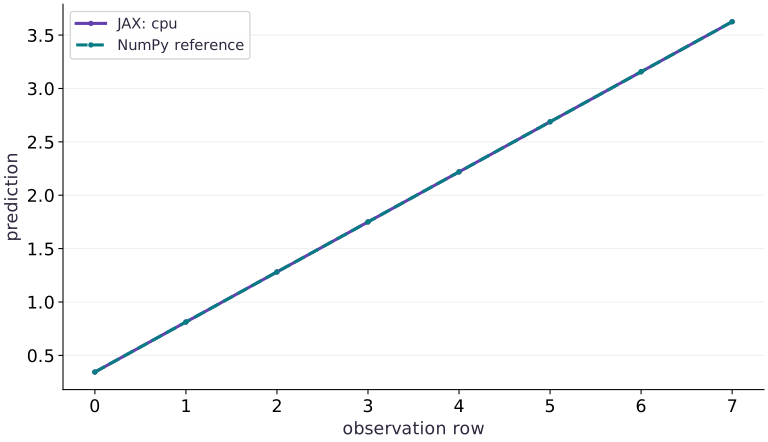
Check: The recorded CPU reference predicts [0.34375, 0.8125, 1.28125, 1.75, 2.21875, 2.6875, 3.15625, 3.625]. Its report names the actual output device. There is no recorded TPU result.
Revisit the guided CPU setup · Open 19: TPU Setup. Package instructions are CPU instructions; Windows and accelerator environments need their own validation.
What you will be able to do
- Verify the device of a completed prediction and its independent numerical reference.
- Provision a hosted TPU notebook or single-host Google Cloud TPU VM and verify device discovery.
- Launch an explicit TPU target path over SSH that fails when TPU is unavailable, then clean up the resource.
- Run subsequent course lessons and companion labs on TPU in parallel with local CPU practice.
The problem
Your notebook imports JAX successfully, but is the prediction actually running on a TPU? We will build a portable device check with an independent numerical answer, then require the requested backend so an unavailable accelerator cannot silently become a successful CPU demonstration.
The idea
Moving an experiment to a TPU gives us two questions: did it calculate the intended result, and did it actually execute on the requested device? We answer the first with an independent numerical reference and the second with an observed device receipt.
Check arithmetic and placement separately
Consider a prediction that adds a scalar bias after a dot product. Reducing the bias by should reduce every prediction by , whatever compatible device performs the computation. That is a numerical invariant you can derive before running.
Now inspect where the completed result resides. A correct NumPy comparison on CPU does not show that a TPU was selected. Conversely, a TPU device label does not show that the formula or input data was correct. Keep both checks.
Wait for the result before recording completion or timing. A returned array handle can precede finished device work. Preserve the requested platform, observed platform, environment and error tolerance alongside the values.
Carry a prediction, not just an installation
We will move one small function between runtimes: a matrix-vector prediction with a scalar bias. Each row is an observation; three columns are three features. The weights are fixed so we can calculate the answer independently. For the first row, , the prediction is . A working package import is useful, but it is separate from where this computation finished.
Establish the CPU reference first
Save the assembled code as main.py in your course workspace and run it in a fresh process. By default COURSE_EXPECT_PLATFORM is cpu. The program selects that backend explicitly, places both inputs on its first device and waits for the compiled prediction to finish. NumPy independently calculates the same arithmetic. Keep the environment report and predictions.
The tolerance allows small floating-point differences; a successful comparison means this prediction agrees within that tolerance. It is separate from accuracy for a larger model. We use float32 inputs deliberately. Implicit dtype changes and reduced-precision matrix multiplication should be separate experiments after the placement check.
Run the CPU reference
# Run run the cpu reference using the course Python environment
python main.py
Expected:
The report names cpu, shape [8], float32, a completed output device and a small maximum absolute error. The first prediction is 0.34375.
Get a TPU running: hosted notebook or Google Cloud TPU VM
You do not need to wait until the end of the course to use a TPU. There are two practical ways to get a TPU running right now so you can run experiments alongside the course:
- Hosted notebook TPU (Google Colab or Kaggle): open Runtime -> Change runtime type, select a TPU accelerator (such as TPU v5e-1 or v6e-1), and restart the kernel before importing JAX so the process does not lock in a CPU backend.
- Google Cloud single-host TPU VM: install the Google Cloud CLI on your laptop, authenticate with
gcloud auth login, and create a single-host TPU VM (such asv5litepod-1,v5litepod-4orv6e-1) in an approved project and zone. Wait until the VM state isREADY. Remember that a Cloud TPU VM is a billable machine whose lifetime is separate from your Python process: when Python exits, the VM keeps running until you delete it or its bounded max-run-duration expires.
From your laptop: provision a single-host Cloud TPU VM and check READY state
# From your laptop: provision a single-host Cloud TPU VM and check READY state
export PROJECT_ID="REPLACE_WITH_YOUR_PROJECT"
export ZONE="us-central1-a"
export TPU_NAME="jax-course-tpu-01"
gcloud compute tpus tpu-vm create "$TPU_NAME" \
  --project="$PROJECT_ID" --zone="$ZONE" \
  --accelerator-type="v5litepod-1" --version="v2-alpha-tpuv5-lite"
gcloud compute tpus tpu-vm describe "$TPU_NAME" \
  --project="$PROJECT_ID" --zone="$ZONE" --format="value(state)"
Expected:
The Cloud TPU VM is created in your project/zone and describe prints READY. For bounded Flex-start templates or queued resources, see the TPU and Google Cloud practical guide.
Inside the TPU VM or hosted TPU runtime: install JAX for TPU and verify devices
# Run inside the tpu vm or hosted tpu runtime: install jax for tpu and verify devices using the course Python environment
python3 -m venv .venv
.venv/bin/python -m pip install --upgrade "jax[tpu]" numpy
.venv/bin/python -c "import jax; print(jax.default_backend(), jax.devices('tpu'))"
Expected:
The TPU environment installs compatible JAX and libtpu packages and prints tpu with the visible TpuDevice list. Record the resolved versions; installation alone is not the execution check.
Launch the experiment on TPU, retrieve the receipt, and delete the VM
Once your TPU environment is ready, copy main.py to the TPU host, launch it in a fresh process with COURSE_EXPECT_PLATFORM=tpu and JAX_PLATFORMS=tpu, and copy the output report back to your laptop. The call to jax.devices(expected) requests TPU explicitly and fails immediately if the TPU backend is unavailable.
This is a single-controller, single-device placement check even if the runtime exposes four or eight chips. Multi-chip sharding on one host and multi-host launches with jax.distributed.initialize() are covered in the virtual-CPU and distributed lessons. As soon as you copy your evidence back to your laptop, delete the Cloud TPU VM and verify that the instance list is empty.
Require TPU execution inside an active TPU session
# Require TPU execution inside an active TPU session
COURSE_EXPECT_PLATFORM=tpu JAX_PLATFORMS=tpu python main.py
Expected:
On a functioning TPU runtime the report names tpu and all assertions pass. An unavailable TPU must raise an error instead of producing a CPU success report.
From your laptop: copy main.py, launch over SSH, copy back evidence, and delete the TPU VM
# From your laptop: copy main.py, launch over SSH, copy back evidence, and delete the TPU VM
gcloud compute tpus tpu-vm scp main.py "$TPU_NAME:~/main.py" --project="$PROJECT_ID" --zone="$ZONE"
gcloud compute tpus tpu-vm ssh "$TPU_NAME" --project="$PROJECT_ID" --zone="$ZONE" \
  --command="COURSE_EXPECT_PLATFORM=tpu JAX_PLATFORMS=tpu .venv/bin/python ~/main.py | tee ~/tpu-report.txt"
gcloud compute tpus tpu-vm scp "$TPU_NAME:~/tpu-report.txt" ./tpu-report.txt --project="$PROJECT_ID" --zone="$ZONE"
gcloud compute tpus tpu-vm delete "$TPU_NAME" --project="$PROJECT_ID" --zone="$ZONE" --quiet
gcloud compute tpus tpu-vm list --project="$PROJECT_ID" --zone="$ZONE"
Expected:
The remote command runs on the TPU VM, writes tpu-report.txt locally, deletes the TPU VM, and confirms no running TPU VM remains.
Run the rest of the course on TPU in parallel
Use this same launch pattern in parallel with every phase that follows. Every authored lesson in the course provides a standalone script under exercises/<lesson-id>.py (and a notebook under exercises/<lesson-id>.ipynb). As you work through Arrays (Phase 01), Transforms (Phase 02), State (Phase 03), Optimization (Phase 04), Networks (Phase 05) and Recovery (Phase 06), run the CPU reference locally first, then upload the workspace or script to your TPU runtime and run it with JAX_PLATFORMS=tpu.
In parallel with the early phases, work through the two standalone TPU guides included in the course workspace (jax-tpu-gcp.zip): use resources/tpu-gcp/launch.py to practice supervised TPU job lifecycles and checkpoint recovery, and use resources/tpu-gcp/precision_profile.py to measure BF16/INT8 numerical error and capture XProf device traces before you scale up to full Transformers and distributed training.
Run any course lesson script and the companion TPU labs on a TPU host
# Run any course lesson script and the companion TPU labs on a TPU host
JAX_PLATFORMS=tpu .venv/bin/python exercises/arrays-01.py
.venv/bin/python resources/tpu-gcp/launch.py --platform tpu --run-dir runs/tpu-first --steps 8 --timeout 180
.venv/bin/python resources/tpu-gcp/precision_profile.py --platform tpu --run-dir runs/precision-tpu --steps 20 --trace
Expected:
The lesson script and companion TPU labs run on the TPU backend, writing verifiable device receipts, checkpoints, numerical error reports and XProf trace files.
Diagnose the boundary that failed
If import fails, check the interpreter and installation. If explicit backend selection fails, check whether you are in the intended runtime and whether its TPU service is available. If device placement succeeds but the independent comparison fails, inspect shapes, dtype, precision and the arithmetic. Do not widen tolerance just to hide a large error.
An old notebook kernel may retain an initialized CPU backend or stale variables. Restart it, set runtime choices before the first device operation and run every cell. A CPU plot from the recorded course run remains a CPU plot when viewed on a machine that happens to have TPU access; only a fresh recorded execution supplies new evidence.
The same prediction checked two ways
Predict before looking: Should the JAX line overlap the independent NumPy points, and would overlap alone prove TPU execution?
Read the figure
The horizontal axis is the observation row index, starting at . The vertical axis is the scalar prediction. The two series use the same inputs and weights: one comes from the completed JAX array, the other from NumPy. They overlap in this recorded CPU example. The first value is ; the constant rise of follows from increasing every feature by while the weights sum to .
Connect it to the computation
The line is a check of arithmetic and ordering for these eight observations. Read the printed platform report to determine placement; a curve cannot identify the device that produced it. The changed-bias exercise translates this line downward, while row reversal changes the order. This recorded figure comes from the CPU path and carries no TPU timing or correctness claim.
Open full-size figureDownload data and provenance
The notebook contains the data experiment, plotting code, and recorded figure output. Rerun it to test your changes.
Where to put & run this code: Work in phases/00-welcome/03-move-your-experiment-to-a-tpu/code/main.py (or downloaded exercises/welcome-03.py / exercises/welcome-03.ipynb) and execute from the repository root with python3 phases/00-welcome/03-move-your-experiment-to-a-tpu/code/main.py.
1 Choose the requested platform
Add this block to main.py after the preceding block. Run the assembled file in a fresh process.
# Step 1 — Choose the requested platform: Keep the requested backend, observed output placement and...
import os
import json
import platform
import numpy as np
import jax
import jax.numpy as jnp
Keep the requested backend, observed output placement and independent arithmetic check together in the final report.
2 Place inputs and compare a completed prediction
Add this block to main.py after the preceding block. Run the assembled file in a fresh process.
# Step 2 — Place inputs and compare a completed prediction: Keep the requested backend, observed output placement and...
expected = os.environ.get('COURSE_EXPECT_PLATFORM', 'cpu')
# Guard input contract (`expected not in {'cpu', 'tpu'}`) and fail fast if violated.
if expected not in {'cpu', 'tpu'}:
    raise ValueError('COURSE_EXPECT_PLATFORM must be cpu or tpu')
# Selecting a requested backend must fail when it is unavailable.
devices = jax.devices(expected)
assert devices and all(d.platform == expected for d in devices)
# Construct and reshape `x_host` into the target tensor dimensions.
x_host = np.arange(24, dtype=np.float32).reshape(8, 3) / 8
w_host = np.array([0.5, -0.25, 1.0], dtype=np.float32)
# Place `x` explicitly onto the target JAX device.
x = jax.device_put(x_host, devices[0])
# Place `w` explicitly onto the target JAX device.
w = jax.device_put(w_host, devices[0])
# Wrap with `jax.jit` (`predict`) so XLA traces and compiles the function.
predict = jax.jit(lambda a, b: a @ b + jnp.float32(0.125))
y = predict(x, w)
# Synchronize host execution until asynchronous device computation completes.
y.block_until_ready()
reference = x_host @ w_host + np.float32(0.125)
# Convert `` to a host NumPy array for inspection or verification.
np.testing.assert_allclose(np.asarray(y), reference, rtol=1e-5, atol=1e-5)
assert {d.platform for d in y.devices()} == {expected}
# Convert `report` to a host NumPy array for inspection or verification.
report = dict(expected=expected, output_devices=[str(d) for d in y.devices()],
              platform=next(iter(y.devices())).platform, jax=jax.__version__,
              python=platform.python_version(), shape=list(y.shape), dtype=str(y.dtype),
              max_absolute_error=float(np.max(np.abs(np.asarray(y)-reference))),
              process_index=jax.process_index(), process_count=jax.process_count())
print(json.dumps(report, indent=2))
print('Completed prediction:', np.asarray(y).tolist())
Code building blocks in this step
array.reshape(new_shape)— Reorganizes tensor axes without changing the total element count (array.size).jnp.allclose(actual, expected, rtol=..., atol=...)— Checks that two arrays match elementwise within floating-point tolerance.jax.jit(fn) / @jax.jit— Tracesfnwith abstract shapes and compiles a fused XLA executable cached by input shape and dtype.Mesh + PartitionSpec + NamedSharding— Maps logical tensor axes onto physical device mesh axes for SPMD data, tensor, or pipeline parallelism.
Keep the requested backend, observed output placement and independent arithmetic check together in the final report.
3 Step 3: Verify invariants on the completed state
Run the final shape and numerical assertions to confirm the state built in Steps 1 and 2.
# Assert that the device output matches the NumPy reference and print the portability report:
assert report["max_absolute_error"] < 1e-6
print(json.dumps(report, indent=2))
print("Completed prediction:", np.asarray(y).tolist())
Code building blocks in this step
json.dumps(...)— Calljson.dumpswith your updated parameters or inputs from this lesson's workspace.np.asarray(...)— Callnp.asarraywith your updated parameters or inputs from this lesson's workspace.assert condition— Verify that the observed output shape, status, or numerical value satisfies the contract.
Checking these invariants confirms the computation is ready for the full worked experiment.
View the cumulative build in main.py
These blocks append in order to the same file.
# Step 1 — Choose the requested platform: Keep the requested backend, observed output placement and...
import os
import json
import platform
import numpy as np
import jax
import jax.numpy as jnp

# Step 2 — Place inputs and compare a completed prediction: Keep the requested backend, observed output placement and...
expected = os.environ.get('COURSE_EXPECT_PLATFORM', 'cpu')
# Guard input contract (`expected not in {'cpu', 'tpu'}`) and fail fast if violated.
if expected not in {'cpu', 'tpu'}:
    raise ValueError('COURSE_EXPECT_PLATFORM must be cpu or tpu')
# Selecting a requested backend must fail when it is unavailable.
devices = jax.devices(expected)
assert devices and all(d.platform == expected for d in devices)
# Construct and reshape `x_host` into the target tensor dimensions.
x_host = np.arange(24, dtype=np.float32).reshape(8, 3) / 8
w_host = np.array([0.5, -0.25, 1.0], dtype=np.float32)
# Place `x` explicitly onto the target JAX device.
x = jax.device_put(x_host, devices[0])
# Place `w` explicitly onto the target JAX device.
w = jax.device_put(w_host, devices[0])
# Wrap with `jax.jit` (`predict`) so XLA traces and compiles the function.
predict = jax.jit(lambda a, b: a @ b + jnp.float32(0.125))
y = predict(x, w)
# Synchronize host execution until asynchronous device computation completes.
y.block_until_ready()
reference = x_host @ w_host + np.float32(0.125)
# Convert `` to a host NumPy array for inspection or verification.
np.testing.assert_allclose(np.asarray(y), reference, rtol=1e-5, atol=1e-5)
assert {d.platform for d in y.devices()} == {expected}
# Convert `report` to a host NumPy array for inspection or verification.
report = dict(expected=expected, output_devices=[str(d) for d in y.devices()],
              platform=next(iter(y.devices())).platform, jax=jax.__version__,
              python=platform.python_version(), shape=list(y.shape), dtype=str(y.dtype),
              max_absolute_error=float(np.max(np.abs(np.asarray(y)-reference))),
              process_index=jax.process_index(), process_count=jax.process_count())
print(json.dumps(report, indent=2))
print('Completed prediction:', np.asarray(y).tolist())

# Assert that the device output matches the NumPy reference and print the portability report:
assert report["max_absolute_error"] < 1e-6
print(json.dumps(report, indent=2))
print("Completed prediction:", np.asarray(y).tolist())
Run the example
python3 phases/00-welcome/03-move-your-experiment-to-a-tpu/code/main.pyAbout this command
This shortcut uses an activated macOS/Linux course environment in the repository folder. For Windows, use the explicit interpreter command in “Setup help” above. The script includes worked examples and reference solutions.
Inspect the complete assembled example
# Step 1 — Choose the requested platform: Keep the requested backend, observed output placement and...
import os
import json
import platform
import numpy as np
import jax
import jax.numpy as jnp

# Step 2 — Place inputs and compare a completed prediction: Keep the requested backend, observed output placement and...
expected = os.environ.get('COURSE_EXPECT_PLATFORM', 'cpu')
# Guard input contract (`expected not in {'cpu', 'tpu'}`) and fail fast if violated.
if expected not in {'cpu', 'tpu'}:
    raise ValueError('COURSE_EXPECT_PLATFORM must be cpu or tpu')
# Selecting a requested backend must fail when it is unavailable.
devices = jax.devices(expected)
assert devices and all(d.platform == expected for d in devices)
# Construct and reshape `x_host` into the target tensor dimensions.
x_host = np.arange(24, dtype=np.float32).reshape(8, 3) / 8
w_host = np.array([0.5, -0.25, 1.0], dtype=np.float32)
# Place `x` explicitly onto the target JAX device.
x = jax.device_put(x_host, devices[0])
# Place `w` explicitly onto the target JAX device.
w = jax.device_put(w_host, devices[0])
# Wrap with `jax.jit` (`predict`) so XLA traces and compiles the function.
predict = jax.jit(lambda a, b: a @ b + jnp.float32(0.125))
y = predict(x, w)
# Synchronize host execution until asynchronous device computation completes.
y.block_until_ready()
reference = x_host @ w_host + np.float32(0.125)
# Convert `` to a host NumPy array for inspection or verification.
np.testing.assert_allclose(np.asarray(y), reference, rtol=1e-5, atol=1e-5)
assert {d.platform for d in y.devices()} == {expected}
# Convert `report` to a host NumPy array for inspection or verification.
report = dict(expected=expected, output_devices=[str(d) for d in y.devices()],
              platform=next(iter(y.devices())).platform, jax=jax.__version__,
              python=platform.python_version(), shape=list(y.shape), dtype=str(y.dtype),
              max_absolute_error=float(np.max(np.abs(np.asarray(y)-reference))),
              process_index=jax.process_index(), process_count=jax.process_count())
print(json.dumps(report, indent=2))
print('Completed prediction:', np.asarray(y).tolist())
Expected result: The recorded CPU reference predicts [0.34375, 0.8125, 1.28125, 1.75, 2.21875, 2.6875, 3.15625, 3.625]. Its report names the actual output device. There is no recorded TPU result.
Recorded reference execution
Reference output captured from executing the complete lesson script (code/main.py) and its assertions in the course CPU environment.
{
  "expected": "cpu",
  "output_devices": [
    "TFRT_CPU_0"
  ],
  "platform": "cpu",
  "jax": "0.9.2",
  "python": "3.14.3",
  "shape": [
    8
  ],
  "dtype": "float32",
  "max_absolute_error": 0.0,
  "process_index": 0,
  "process_count": 1
}
Completed prediction: [0.34375, 0.8125, 1.28125, 1.75, 2.21875, 2.6875, 3.15625, 3.625]
{
  "expected": "cpu",
  "output_devices": [
    "TFRT_CPU_0"
  ],
  "platform": "cpu",
  "jax": "0.9.2",
  "python": "3.14.3",
  "shape": [
    8
  ],
  "dtype": "float32",
  "max_absolute_error": 0.0,
  "process_index": 0,
  "process_count": 1
}
Completed prediction: [0.34375, 0.8125, 1.28125, 1.75, 2.21875, 2.6875, 3.15625, 3.625]
{
  "expected": "cpu",
  "output_devices": [
    "TFRT_CPU_0"
  ],
  "platform": "cpu",
  "jax": "0.9.2",
  "python": "3.14.3",
  "shape": [
    8
  ],
  "dtype": "float32",
  "max_absolute_error": 0.0,
  "process_index": 0,
  "process_count": 1
}
Completed prediction: [0.34375, 0.8125, 1.28125, 1.75, 2.21875, 2.6875, 3.15625, 3.625]
Mismatched platform report rejected.
Changed bias, first prediction: -0.03125
Row reversal preserved values and requested placement.
PASS: welcome-03
Download execution record · The notebook includes executed cells and figure outputs. Compare your run with these values; timings depend on the machine.
Reject a mismatched report
# Experiment — Reject a mismatched report: Numerical agreement and requested placement are separate...
def verify_report(record, required):
    # Guard input contract (`record['platform'] != required or record['expected'] != required`) and fail fast if violated.
    if record['platform'] != required or record['expected'] != required:
        raise ValueError('requested and observed platform disagree')
    # Guard input contract (`record['shape'] != [8] or record['dtype'] != 'float32'`) and fail fast if violated.
    if record['shape'] != [8] or record['dtype'] != 'float32':
        raise ValueError('prediction contract changed')
    return True
assert verify_report(report, expected)
wrong = {**report, 'platform': 'cpu' if expected == 'tpu' else 'tpu'}
# Run the boundary check and catch the expected exception:
try:
    verify_report(wrong, expected)
except ValueError:
    print('Mismatched platform report rejected.')
else:
    raise AssertionError('a mismatched report was accepted')
Expected: The deliberately inconsistent report raises ValueError; the actual report passes.
Numerical agreement and requested placement are separate requirements. This experiment tests report validation; the main program performs the actual backend selection and array-placement check.
Make it yours
Where to put your code: Append your solution at the bottom of phases/00-welcome/03-move-your-experiment-to-a-tpu/code/main.py (or inside the Make it yours cell of exercises/welcome-03.ipynb) and run python3 phases/00-welcome/03-move-your-experiment-to-a-tpu/code/main.py to verify your prediction before opening the reference solution.
Predict the effect of replacing the bias by minus one quarter. Run a second compiled prediction on the selected device. Compare against the original prediction plus the expected constant shift and an independent NumPy calculation.
Show a writing guide and starter scaffold
How to write this exercise code: step-by-step recipe & starter scaffold
1. Key functions & syntax to use:
jnp.allclose(actual, expected, rtol=..., atol=...)— Checks that two arrays match elementwise within floating-point tolerance.jax.jit(fn) / @jax.jit— Tracesfnwith abstract shapes and compiles a fused XLA executable cached by input shape and dtype.jax.block_until_ready(output)— Synchronizes with the accelerator/CPU device so asynchronous dispatch finishes before wall-clock timing.
2. Step-by-step implementation plan:
- Wrap with
jax.jit(changed_predict) so XLA traces and compiles the function. - Synchronize host execution until asynchronous device computation completes.
- Convert
to a host NumPy array for inspection or verification. - Convert
to a host NumPy array for inspection or verification.
# Exercise solution: Predict the effect of replacing the bias by minus one quarter.
# Wrap with `jax.jit` (`changed_predict`) so XLA traces and compiles the function.
changed_predict = jax.jit(...)  # TODO: compute changed_predict
changed = changed_predict(...)  # TODO: compute changed
# Synchronize host execution until asynchronous device computation completes.
changed.block_until_ready()
# Convert `` to a host NumPy array for inspection or verification.
np.testing.assert_allclose(np.asarray(changed), reference - 0.375, atol=1e-5, rtol=1e-5)
# Convert `` to a host NumPy array for inspection or verification.
np.testing.assert_allclose(np.asarray(changed), x_host @ w_host - 0.25, atol=1e-5, rtol=1e-5)
assert {d.platform for d  # TODO: complete assertion check
print('Changed bias, first prediction:', float(changed[0]))
Reveal the reference solution
# Exercise solution: Predict the effect of replacing the bias by minus one quarter.
# Wrap with `jax.jit` (`changed_predict`) so XLA traces and compiles the function.
changed_predict = jax.jit(lambda a, b: a @ b - jnp.float32(0.25))
changed = changed_predict(x, w)
# Synchronize host execution until asynchronous device computation completes.
changed.block_until_ready()
# Convert `` to a host NumPy array for inspection or verification.
np.testing.assert_allclose(np.asarray(changed), reference - 0.375, atol=1e-5, rtol=1e-5)
# Convert `` to a host NumPy array for inspection or verification.
np.testing.assert_allclose(np.asarray(changed), x_host @ w_host - 0.25, atol=1e-5, rtol=1e-5)
assert {d.platform for d in changed.devices()} == {expected}
print('Changed bias, first prediction:', float(changed[0]))
Test row order without changing the model
Transfer
Reverse the observation rows and predict the result order before execution. Verify the first and last values, the complete vector and device placement. Explain why this is a stronger check than only comparing the vector sum.
Show a writing guide and starter scaffold
How to write this practice solution: step-by-step recipe & starter scaffold
1. Key functions & syntax to use:
jnp.allclose(actual, expected, rtol=..., atol=...)— Checks that two arrays match elementwise within floating-point tolerance.Mesh + PartitionSpec + NamedSharding— Maps logical tensor axes onto physical device mesh axes for SPMD data, tensor, or pipeline parallelism.jax.block_until_ready(output)— Synchronizes with the accelerator/CPU device so asynchronous dispatch finishes before wall-clock timing.
2. Step-by-step implementation plan:
- Synchronize host execution until asynchronous device computation completes.
- Convert
to a host NumPy array for inspection or verification.
# Test row order without changing the model (Transfer): Reversing rows should reverse predictions because each...
reversed_x = jax.device_put(...)  # TODO: compute reversed_x
reversed_y = predict(...)  # TODO: compute reversed_y
# Synchronize host execution until asynchronous device computation completes.
reversed_y.block_until_ready()
# Convert `` to a host NumPy array for inspection or verification.
np.testing.assert_allclose(np.asarray(reversed_y), reference[::-1], atol=1e-5, rtol=1e-5)
assert {d.platform for d  # TODO: complete assertion check
assert np.isclose(float(reversed_y[0]), 3.625)  # TODO: complete assertion check
assert np.isclose(float(reversed_y[-1]), 0.34375)  # TODO: complete assertion check
print('Row reversal preserved values and requested placement.')
Show a hint
A row-wise affine prediction commutes with row permutation. A sum would conceal an ordering bug.
Reveal reference solution and reasoning
# Test row order without changing the model (Transfer): Reversing rows should reverse predictions because each...
reversed_x = jax.device_put(x_host[::-1].copy(), devices[0])
reversed_y = predict(reversed_x, w)
# Synchronize host execution until asynchronous device computation completes.
reversed_y.block_until_ready()
# Convert `` to a host NumPy array for inspection or verification.
np.testing.assert_allclose(np.asarray(reversed_y), reference[::-1], atol=1e-5, rtol=1e-5)
assert {d.platform for d in reversed_y.devices()} == {expected}
assert np.isclose(float(reversed_y[0]), 3.625)
assert np.isclose(float(reversed_y[-1]), 0.34375)
print('Row reversal preserved values and requested placement.')
Reversing rows should reverse predictions because each observation is evaluated independently. Matching a sum would not reveal a misplaced or reordered prediction.
Diagnose the result
Read the first failing boundary: interpreter/import, explicit backend discovery, output placement or numerical comparison. Keep the original error and requested platform in the report. Restart a stale notebook kernel before trying the target again.
Carry forward
- Provision a hosted TPU runtime or single-host Cloud TPU VM early and run course experiments in parallel with your CPU baseline.
- Check an actual completed array, not only the installed package.
- Request TPU explicitly so its absence produces an error, and delete Cloud TPU VMs after copying your evidence.
Keep your evidence
Keep separate CPU and TPU reports with requested/observed platform, package versions, completed predictions, NumPy error and changed-bias and row-permutation checks. Until the target command succeeds, TPU execution remains unverified.
Save your modified code, its output, and an explanation of your prediction. Checkpoint answers and exercise evidence are tracked separately.
Saved in this browser. Export or back up your portfolio anytime in My learning.
Verified on local CPU. Stage to a Cloud TPU VM via Cloud TPU setup to record accelerator execution receipts (TODO: add automated Cloud TPU CI execution receipts).
Primary references
- JAX installation and TPU support ↗
- Manage Cloud TPU VMs with gcloud ↗
- Course guide: From a laptop experiment to a TPU training run ↗
- Course guide: TPU generations, precision and profiling ↗
- JAX device placement ↗
Phase 00 Integration Project
Bring this phase together: Check the CPU environment and a saved matrix arithmetic identity
Checkpoint to prove: Explain which device ran your code and reproduce the result in a fresh environment.
Work in projects/welcome-audit/starter/model.py. Complete stages 1 and 2 for independent calculations and changed-condition diagnosis, then retain the stage 3 evidence with --evidence-dir runs/welcome-audit. Stage 4 integrates the checks. Learner commands explicitly select the starter; --implementation solution is instructor reference execution. This bounded practice does not certify the entire phase or target hardware.