 JAX Pathways
Phase 01 / Arrays & pure functions
From NumPy to jax.numpy
Revision v0.7.0 · Updated since your last visit. Review the changes; your progress is saved.
Lesson · about 45 minutes · CPU practice
Build feature-wise preprocessing with fitted statistics and verify behavior on new and constant data.
Phase study guide: preparation, milestones and project evidence
Before you start
Before this: Setup & first steps
Hardware: CPU
Setup help: Python, notebook, or Cloud TPU VM
Use the tested CPU packages (the recorded environment uses Python 3.14.3). Other Python versions and accelerator environments require separate checks. The optional Cloud TPU specialization explains the target-specific execution boundaries. Logical CPU devices practice partitioning; they do not simulate TPU performance.
Download the repository ZIP or use your existing checkout. Extract it and open a terminal in the folder containing requirements-cpu.txt. The beginner ZIP is separate; these lessons use the full repository folder.
python3 -m venv .venv
source .venv/bin/activate
python -m pip install -r requirements-cpu.txtpy -3 -m venv .venv
.\.venv\Scripts\python.exe -m pip install -r requirements-cpu.txtAfter activation, run the complete worked example from that same folder:
python phases/01-arrays/01-from-numpy-to-jax-numpy/code/main.py.\.venv\Scripts\python.exe phases/01-arrays/01-from-numpy-to-jax-numpy/code/main.pyFor an incremental build, create main.py in your own practice folder, append each build block in order, and run python main.py with this environment active. Keep that file separate from the downloaded reference solution.
Download this lesson’s notebook. Open it with a Python kernel using the course environment. Run cells from the top after restarting the kernel; experiments depend on earlier definitions.
For local Jupyter, first install the course requirements using the Local Python steps, then use your environment’s Python to start Jupyter:
python -m pip install jupyterlab
python -m jupyter lab.\.venv\Scripts\python.exe -m pip install jupyterlab
.\.venv\Scripts\python.exe -m jupyter labSelect the downloaded arrays-01.ipynb file in JupyterLab. The notebook contains reference solutions; make your prediction and attempt each practice task before opening them. Restart the kernel before changing logical device setup.
The worked reference for this lesson is CPU-validated. Some references explicitly configure logical CPU devices; setting JAX_PLATFORMS does not adapt them to a TPU. Follow the execution matrix and reviewed multi-host example before attempting a target run.
For accelerator preparation, study TPU setup, observed runtime receipts, checkpointed jobs and precision and retained traces. These target paths remain unqualified on physical TPU hardware until an actual receipt is recorded. Cloud provisioning is optional for CPU learning.
Check: Mean: [ . .]; centered rows: , , .
Revisit the guided CPU setup · Open 19: TPU Setup. Package instructions are CPU instructions; Windows and accelerator environments need their own validation.
What you will be able to do
- Translate a feature-wise NumPy calculation to
jax.numpy. - Predict the shapes and values of reductions and broadcasted centering.
- Fit preprocessing statistics on training data and reuse them on new data.
- Handle constant features explicitly and compare against a NumPy reference.
The problem
Suppose your dataset records two measurements on very different scales. How can we put them on a more comparable footing before training a model? We’ll center each feature and divide by its scale. First we’ll work through three rows by hand; then we’ll write the JAX version and try new data, including a feature that never changes.
The idea
Feature preprocessing answers a specific question: how does each measurement compare with the training data's scale and center? Compute statistics along the observation axis, then reuse those fitted statistics. A held-out example must not help choose the transformation used to evaluate it.
Why held-out data should not center itself
Use a small new case: training values for one feature are and , so their mean is . Centered training values become and . A held-out value of becomes when we apply the training mean.
If we center that single held-out value using its own mean, it becomes zero. The computation succeeds, but it has erased the evidence that the new value lies far from the training center. With several features, retain one fitted mean per feature rather than collapsing the entire table to one mean.
The lesson's centering plot compares values before and after the same columnwise operation. It explains a translation of each feature, not a guarantee that future observations will have zero mean. Add scaling only after specifying the variance convention and how constant features are handled.
Follow an axis through a reduction
A shape means three observations with two feature values each. mean(axis=0) reduces the three observations and leaves two feature means, so its output shape is . mean(axis=1) instead averages unlike feature values within each observation, leaving shape . mean() with no axis reduces every value to a scalar.
All three calculations are legal. Only the first answers the question about each feature across observations. A valid shape is not evidence of a meaningful statistic: if the features represent different units, averaging them within a row might have no useful interpretation.
(N,D) -- mean over axis 0 --> (D,)
(N,D) -- mean over axis 1 --> (N,)
(N,D) -- mean over all axes --> ()
Derive the centering and scale values
Think of one column at a time. The symbol means the value in row , feature , and is the number of training rows. The mean is the column’s center. The variance averages squared distances from that center; its square root is the scale we divide by.
For the first feature , the mean is . The centered values are , so the variance is . The second feature centers to and has variance . Its scale is twice as large, so both columns have the same standardized pattern.
A constant column has scale zero. We use a safe denominator of for that column, which leaves its centered training values at zero. Learn the mean and scale from training data, then reuse them on new data; recomputing them on each incoming batch changes the meaning of a feature.
Fit statistics once; apply them consistently
Centering training data using its own mean is useful. Recomputing the mean separately for each validation batch changes the transformation and incorporates information from that batch. A model then sees features represented in different coordinate systems.
Separate fit_standardizer(training_data), which computes statistics, from apply_standardizer(data, statistics), which reuses them. The same rule will apply to training/validation splits, inference requests, and checkpointed preprocessing state. A new batch is not expected to have zero mean after applying training statistics; that difference can be meaningful.
Give constant features an explicit policy
A constant feature has zero standard deviation. Dividing its zero centered values by zero produces an undefined result. Adding epsilon to every scale is a simple bounded choice, but it perturbs the scale of every feature and can amplify a tiny feature with near-zero variability.
For this lesson, use for exactly constant columns and their training standard deviation otherwise. Training values in a constant column then transform to zero without division by zero. A changed value in new data produces a nonzero centered result. This policy is explicit and testable; it is not a universal prescription for every dataset.
Use NumPy as a numerical reference, not an execution substitute
Compare a tiny JAX calculation with NumPy using explicitly matching float32 data and the same reduction definitions. Transfer and conversion are fine for this test. Converting an intermediate to NumPy inside a transformed differentiable computation is a different operation and can break its intended transform behavior.
The output of a jax.numpy operation is a JAX array with its own device behavior. We will explore devices and compilation elsewhere. At this point, focus on matching values, preserving shapes, and keeping preprocessing semantics explicit.
Center each feature around its own mean
Predict before looking: Does centering make every entry zero, or only each column mean?
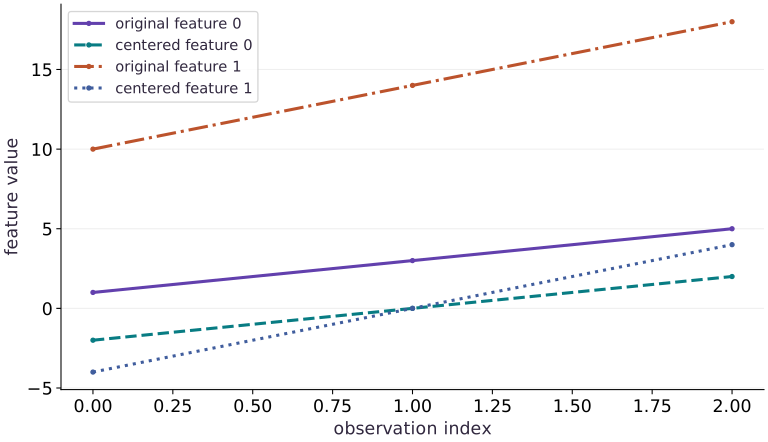
Read the figure
The horizontal axis indexes the three observations; the vertical axis gives feature values. Compare each original feature with its centered version in the legend. The connecting lines help you follow corresponding entries; they are not a time series.
Feature changes from to , a downward shift of . Feature changes from to , a downward shift of . Both centered series pass through zero at the middle observation.
Connect it to the computation
Those shifts are the separate column means. Subtracting a mean moves a whole feature without changing the gaps between its observations: feature still increases by , while feature still increases by . That is why each centered line stays parallel to its original line.
Centering makes each column’s mean zero, but does not give the columns the same spread. The wider range of centered feature remains visible. To check your axis choice, add the centered entries in each column: each sum should be zero.
Open full-size figureDownload data and provenance
The notebook contains the data experiment, plotting code, and recorded figure output. Rerun it to test your changes.
Where to put & run this code: Work in phases/01-arrays/01-from-numpy-to-jax-numpy/code/main.py (or downloaded exercises/arrays-01.py / exercises/arrays-01.ipynb) and execute from the repository root with python3 phases/01-arrays/01-from-numpy-to-jax-numpy/code/main.py.
1 Step 1: Set up imports and input tensors
Import the required JAX modules and define the initial inputs for from numpy to jax.numpy.
import jax.numpy as jnp
x = jnp.array([[1., 10.], [3., 14.], [5., 18.]])
Code building blocks in this step
jnp.array(values, dtype=...)— Constructs an immutable device-backed JAX array from Python/NumPy values.
Establishing explicit input shapes and dtypes first makes the downstream transformation contract deterministic.
2 Step 2: Apply the core JAX transformation
Write the core computation and transformation step over the initialized inputs.
mean = x.mean(axis=0)
centered = x - mean
Code building blocks in this step
x.sum(axis=...) / x.mean(axis=..., keepdims=...)— Reduces values along the namedaxis(the axis you name is collapsed unlesskeepdims=True).
This stage executes the primary numerical transformation and binds the intermediate outputs.
3 Step 3: Verify shapes and numerical invariants
Check that the resulting arrays satisfy the expected shape, dtype, and numerical tolerances.
assert jnp.allclose(mean, jnp.array([3., 14.]))
assert jnp.allclose(centered.mean(axis=0), jnp.zeros(2))
Code building blocks in this step
jnp.array(values, dtype=...)— Constructs an immutable device-backed JAX array from Python/NumPy values.jnp.zeros / jnp.ones(shape, dtype=...)— Allocates a tensor of the givenshapeinitialized with constants.x.sum(axis=...) / x.mean(axis=..., keepdims=...)— Reduces values along the namedaxis(the axis you name is collapsed unlesskeepdims=True).jnp.allclose(actual, expected, rtol=..., atol=...)— Checks that two arrays match elementwise within floating-point tolerance.
These assertions lock in the exact numerical contract before you run the full experiment and variations.
View the cumulative build in main.py
These blocks append in order to the same file.
import jax.numpy as jnp
x = jnp.array([[1., 10.], [3., 14.], [5., 18.]])

mean = x.mean(axis=0)
centered = x - mean

assert jnp.allclose(mean, jnp.array([3., 14.]))
assert jnp.allclose(centered.mean(axis=0), jnp.zeros(2))
Run the example
python3 phases/01-arrays/01-from-numpy-to-jax-numpy/code/main.pyAbout this command
This shortcut uses an activated macOS/Linux course environment in the repository folder. For Windows, use the explicit interpreter command in “Setup help” above. The script includes worked examples and reference solutions.
Inspect the complete assembled example
# From NumPy to jax.numpy: Feature preprocessing answers a specific question: how does each...
import jax.numpy as jnp
x = jnp.array([[1., 10.], [3., 14.], [5., 18.]])
# Reduce along axis=0 to compute `mean`.
mean = x.mean(axis=0)
centered = x - mean
print("Mean:", mean)
print("Centered:\n", centered)
assert jnp.allclose(mean, jnp.array([3., 14.]))
assert jnp.allclose(centered.mean(axis=0), jnp.zeros(2))
Expected result: Mean: [ . .]; centered rows: , , .
Recorded reference execution
Reference output captured from executing the complete lesson script (code/main.py) and its assertions in the course CPU environment.
Mean: [ 3. 14.]
Centered:
 [[-2. -4.]
 [ 0.  0.]
 [ 2.  4.]]
new batch transformed: [[2.4494896 2.4494896]]
PASS: arrays-01
Download execution record · The notebook includes executed cells and figure outputs. Compare your run with these values; timings depend on the machine.
Check the normalization arithmetic
# Experiment — Check the normalization arithmetic: Matching dtype and statistic definition makes this a useful...
import numpy as np
reference_data = np.array([[1., 10.], [3., 14.], [5., 18.]], dtype=np.float32)
# Reduce along axis=0 to compute `reference_mean`.
reference_mean = reference_data.mean(axis=0)
# Reduce along axis=0 to compute `reference_scale`.
reference_scale = reference_data.std(axis=0)
assert jnp.allclose(mean, reference_mean)
assert jnp.allclose(x.std(axis=0), reference_scale)
assert jnp.allclose(x.std(axis=0), jnp.sqrt(jnp.array([8. / 3., 32. / 3.])))
Expected: The feature means are ; standard deviations are approximately .
Matching dtype and statistic definition makes this a useful independent implementation check. It does not test TPU placement or performance.
Observe a new batch in training coordinates
# Experiment — Observe a new batch in training coordinates: The new observation is measured relative to training data.
def fit_standardizer(training_data):
    # Reduce along axis=0 to compute `fitted_mean`.
    fitted_mean = training_data.mean(axis=0)
    # Reduce along axis=0 to compute `fitted_std`.
    fitted_std = training_data.std(axis=0)
    # Combine or mask array elements to form `fitted_scale`.
    fitted_scale = jnp.where(fitted_std == 0., 1., fitted_std)
    return fitted_mean, fitted_scale
def apply_standardizer(data, statistics):
    fitted_mean, fitted_scale = statistics
    return (data - fitted_mean) / fitted_scale
statistics = fit_standardizer(x)
new_batch = jnp.array([[7., 22.]])
new_values = apply_standardizer(new_batch, statistics)
print("new batch transformed:", new_values)
assert jnp.allclose(new_values, jnp.full((1, 2), jnp.sqrt(6.)), atol=1e-6)
Expected: Both transformed features are approximately , not zero.
The new observation is measured relative to training data. Re-fitting on the one-row batch would erase this difference and produce constant-feature statistics.
Make it yours
Where to put your code: Append your solution at the bottom of phases/01-arrays/01-from-numpy-to-jax-numpy/code/main.py (or inside the Make it yours cell of exercises/arrays-01.ipynb) and run python3 phases/01-arrays/01-from-numpy-to-jax-numpy/code/main.py to verify your prediction before opening the reference solution.
Foundation · Standardize the original data using its standard deviation plus epsilon . Predict the transformed rows and check feature means and scales. Explain why the scale is only approximately one with epsilon.
Show a writing guide and starter scaffold
How to write this exercise code: step-by-step recipe & starter scaffold
1. Key functions & syntax to use:
x.sum(axis=...) / x.mean(axis=..., keepdims=...)— Reduces values along the namedaxis(the axis you name is collapsed unlesskeepdims=True).jnp.allclose(actual, expected, rtol=..., atol=...)— Checks that two arrays match elementwise within floating-point tolerance.
2. Step-by-step implementation plan:
- Reduce along axis=0 to compute
standardized.
# Exercise solution: Foundation · Standardize the original data using its standard...
# Reduce along axis=0 to compute `standardized`.
standardized = ...  # TODO: compute standardized
assert jnp.allclose(standardized.mean(axis=0), 0., atol=1e-6)  # TODO: complete assertion check
assert jnp.allclose(standardized.std(axis=0), 1., atol=1e-5)  # TODO: complete assertion check
Reveal the reference solution
# Exercise solution: Foundation · Standardize the original data using its standard...
# Reduce along axis=0 to compute `standardized`.
standardized = centered / (x.std(axis=0) + 1e-6)
assert jnp.allclose(standardized.mean(axis=0), 0., atol=1e-6)
assert jnp.allclose(standardized.std(axis=0), 1., atol=1e-5)
Test the constant-feature policy
Practice
Fit a standardizer to , , . Check the second training column and transform the new row . Explain why its second output is rather than zero.
Show a writing guide and starter scaffold
How to write this practice solution: step-by-step recipe & starter scaffold
1. Key functions & syntax to use:
jnp.array(values, dtype=...)— Constructs an immutable device-backed JAX array from Python/NumPy values.jnp.allclose(actual, expected, rtol=..., atol=...)— Checks that two arrays match elementwise within floating-point tolerance.jnp.isfinite(x)— Returns a boolean mask verifying that no element isNaNorInf.
2. Step-by-step implementation plan:
- Confirm that all computed values remain finite (no NaN or Inf).
# Test the constant-feature policy (Practice): The training feature is constant but the new value differs...
constant_data = jnp.array(...)  # TODO: compute constant_data
constant_statistics = fit_standardizer(...)  # TODO: compute constant_statistics
constant_transformed = apply_standardizer(...)  # TODO: compute constant_transformed
# Confirm that all computed values remain finite (no NaN or Inf).
assert jnp.all(jnp.isfinite(constant_transformed))  # TODO: complete assertion check
assert jnp.allclose(constant_transformed[:, 1], 0.)  # TODO: complete assertion check
assert jnp.allclose(apply_standardizer(jnp.array([[7., 6.]]), constant_statistics)[0, 1], 1.)  # TODO: complete assertion check
Show a hint
Fit uses scale for a constant training feature. Applying statistics does not re-fit them.
Reveal reference solution and reasoning
# Test the constant-feature policy (Practice): The training feature is constant but the new value differs...
constant_data = jnp.array([[1., 5.], [3., 5.], [5., 5.]])
constant_statistics = fit_standardizer(constant_data)
constant_transformed = apply_standardizer(constant_data, constant_statistics)
# Confirm that all computed values remain finite (no NaN or Inf).
assert jnp.all(jnp.isfinite(constant_transformed))
assert jnp.allclose(constant_transformed[:, 1], 0.)
assert jnp.allclose(apply_standardizer(jnp.array([[7., 6.]]), constant_statistics)[0, 1], 1.)
The training feature is constant but the new value differs from its fitted mean. The transformation retains that difference under the documented policy.
Detect accidental batch-dependent preprocessing
Challenge
Transform two new rows together and separately using training statistics. The outputs should agree. Then show that re-fitting on the new batch changes the outputs.
Show a writing guide and starter scaffold
How to write this practice solution: step-by-step recipe & starter scaffold
1. Key functions & syntax to use:
jnp.array(values, dtype=...)— Constructs an immutable device-backed JAX array from Python/NumPy values.jnp.allclose(actual, expected, rtol=..., atol=...)— Checks that two arrays match elementwise within floating-point tolerance.
2. Step-by-step implementation plan:
- Combine or mask array elements to form
separately.
# Detect accidental batch-dependent preprocessing (Challenge): This consistency test expresses an inference boundary: a...
new_rows = jnp.array(...)  # TODO: compute new_rows
together = apply_standardizer(...)  # TODO: compute together
# Combine or mask array elements to form `separately`.
separately = jnp.concatenate(...)  # TODO: compute separately
assert jnp.allclose(together, separately)  # TODO: complete assertion check
refitted = apply_standardizer(...)  # TODO: compute refitted
assert not jnp.allclose(together, refitted)  # TODO: complete assertion check
Show a hint
The application function should depend on each row and fixed statistics, not on which other rows share the request.
Reveal reference solution and reasoning
# Detect accidental batch-dependent preprocessing (Challenge): This consistency test expresses an inference boundary: a...
new_rows = jnp.array([[7., 22.], [9., 26.]])
together = apply_standardizer(new_rows, statistics)
# Combine or mask array elements to form `separately`.
separately = jnp.concatenate([apply_standardizer(new_rows[i:i+1], statistics) for i in range(2)])
assert jnp.allclose(together, separately)
refitted = apply_standardizer(new_rows, fit_standardizer(new_rows))
assert not jnp.allclose(together, refitted)
This consistency test expresses an inference boundary: a fixed preprocessing transform should not change a row because a different neighbor was batched with it.
Diagnose the result
If a statistic has the wrong length, inspect the reduced axis. If normalized values become NaN, check zero scales and finite inputs before increasing epsilon. If a model behaves differently across inference batch sizes, inspect whether preprocessing re-fits statistics on each batch. If JAX and NumPy differ, align dtype, axis, and degrees-of-freedom choices before treating the difference as a library bug.
Carry forward
- Axes need semantic names in your reasoning; legal operations can still answer the wrong question.
- Fit preprocessing statistics on training data and reuse them for new observations.
- Constant and near-constant features need an explicit numerical policy.
- Independent arithmetic and matched NumPy checks establish the intended values.
Keep your evidence
Keep the fitted mean/scale, hand-derived training values, NumPy comparison, constant-feature test, and together-versus-separate new-batch results. Explain why re-fitting on each inference batch changes the problem.
Save your modified code, its output, and an explanation of your prediction. Checkpoint answers and exercise evidence are tracked separately.
Saved in this browser. Export or back up your portfolio anytime in My learning.
Verified on local CPU. Stage to a Cloud TPU VM via Cloud TPU setup to record accelerator execution receipts (TODO: add automated Cloud TPU CI execution receipts).