 JAX Pathways
Phase 01 / Arrays & pure functions
Immutable updates and indexing
Revision v0.7.0 · Updated since your last visit. Review the changes; your progress is saved.
Lesson · about 45 minutes · CPU practice
Implement functional indexed updates and distinguish accumulated contributions from shape-preserving masks.
Phase study guide: preparation, milestones and project evidence
Before you start
Before this: Pure functions and explicit inputs
Hardware: CPU
Setup help: Python, notebook, or Cloud TPU VM
Use the tested CPU packages (the recorded environment uses Python 3.14.3). Other Python versions and accelerator environments require separate checks. The optional Cloud TPU specialization explains the target-specific execution boundaries. Logical CPU devices practice partitioning; they do not simulate TPU performance.
Download the repository ZIP or use your existing checkout. Extract it and open a terminal in the folder containing requirements-cpu.txt. The beginner ZIP is separate; these lessons use the full repository folder.
python3 -m venv .venv
source .venv/bin/activate
python -m pip install -r requirements-cpu.txtpy -3 -m venv .venv
.\.venv\Scripts\python.exe -m pip install -r requirements-cpu.txtAfter activation, run the complete worked example from that same folder:
python phases/01-arrays/04-immutable-updates-and-indexing/code/main.py.\.venv\Scripts\python.exe phases/01-arrays/04-immutable-updates-and-indexing/code/main.pyFor an incremental build, create main.py in your own practice folder, append each build block in order, and run python main.py with this environment active. Keep that file separate from the downloaded reference solution.
Download this lesson’s notebook. Open it with a Python kernel using the course environment. Run cells from the top after restarting the kernel; experiments depend on earlier definitions.
For local Jupyter, first install the course requirements using the Local Python steps, then use your environment’s Python to start Jupyter:
python -m pip install jupyterlab
python -m jupyter lab.\.venv\Scripts\python.exe -m pip install jupyterlab
.\.venv\Scripts\python.exe -m jupyter labSelect the downloaded arrays-04.ipynb file in JupyterLab. The notebook contains reference solutions; make your prediction and attempt each practice task before opening them. Restart the kernel before changing logical device setup.
The worked reference for this lesson is CPU-validated. Some references explicitly configure logical CPU devices; setting JAX_PLATFORMS does not adapt them to a TPU. Follow the execution matrix and reviewed multi-host example before attempting a target run.
For accelerator preparation, study TPU setup, observed runtime receipts, checkpointed jobs and precision and retained traces. These target paths remain unqualified on physical TPU hardware until an actual receipt is recorded. Cloud provisioning is optional for CPU learning.
Check: Original: ; Set: ; Add: .
Revisit the guided CPU setup · Open 19: TPU Setup. Package instructions are CPU instructions; Windows and accelerator environments need their own validation.
What you will be able to do
- Predict the values returned by functional indexed set and add.
- Distinguish array-value semantics from Python name rebinding and compiler storage choices.
- Accumulate repeated-index contributions with an explicit integer reference.
- Choose a fixed-shape mask when output shape must remain stable.
The problem
You want to replace a few array entries, but JAX rejects the NumPy-style assignment. The key idea is small: describe the new array value, then keep the result. We’ll try replacement and addition, check that the original value is still available, and see what happens when an index appears more than once.
The idea
An indexed update in JAX returns an array value. This makes the relationship between old and new state explicit: the caller chooses which result to keep. The programming model describes values; compiler decisions about physical memory reuse are a separate issue.
Separate a new value from a new physical buffer
Start with . Setting the middle entry to produces . Adding at that position produces . Both operations begin from the same original values; the second is not automatically applied to the result of the first.
Draw two arrows from the original array, one labeled set and one labeled add. If you want sequential updates, explicitly feed the first result into the second operation. This is the same state-flow idea we will use in optimization and recurrent loops.
Do not infer allocation cost from that drawing. A compiler may reuse storage when it can preserve the program's semantics. First verify old/new values and duplicate-index behavior for the operation you use, then measure memory behavior separately.
A Python name and an array value are different
After y = x.at[1].set(20), still denotes the original array and denotes the updated value. After x = x.at[1].set(20), the Python name is rebound to the new value. That spelling does not retroactively change another name holding the original value.
Keep original = x before an update when you want a reference for tests. Comparing original and updated makes the semantics visible. Repeatedly inspecting only the newly rebound name can make a functional update look like mutation even though the old value still exists.
Set replaces; add accumulates
Replacing an entry means its old value no longer contributes at that position in the result. Adding a contribution means the old value remains and the contribution is combined with it. Use set for a known replacement and add for a scatter-like accumulation.
Repeated indices need particular care. With add, contributions to the same index are accumulated; their floating-point order may not be guaranteed. With conflicting set values for the same index, do not assume a portable last-write-wins order. Choose unique indices when you need deterministic replacement semantics and test duplicate accumulation with exact small integers before studying floating-point ordering.
Choose a mask when you want to keep the shape
Selecting [ > threshold] extracts a variable number of elements: its output length depends on values. A masked replacement, jnp.where(x > threshold, x, 0), keeps the original shape. They are different calculations even if both are described casually as filtering.
A fixed-shape representation is useful for staged computation. Later lessons will explain why value-dependent output lengths can fail under jit. Decide whether downstream code expects compacted selected data or an array with masked entries before choosing the operation.
Make the index domain part of the contract
Our examples use explicit in-bounds integer indices and ordinary slices. Indexing behavior at out-of-bounds positions is not a substitute for validating bad input. Negative indexing, duplicate indices, masks, and scatter modes all need deliberate interpretation in a real data pipeline.
A small update test should verify unchanged positions as well as changed positions. Testing only the new value at one index could miss an unintended broadcast across a slice or a mistaken axis in a matrix.
Carry functional updates into training state
A model update is a larger version of the same idea: parameters and gradients produce new parameters. The caller retains or checkpoints state. Functional indexed operations let you describe a selective change without mutating an old array value.
This lesson prepares you to reason about optimizer and simulation state. It is separate from memory efficiency or a training algorithm; those require broader computations and measurements.
An update returns a new array
Predict before looking: Which cells change after set, and which after add?
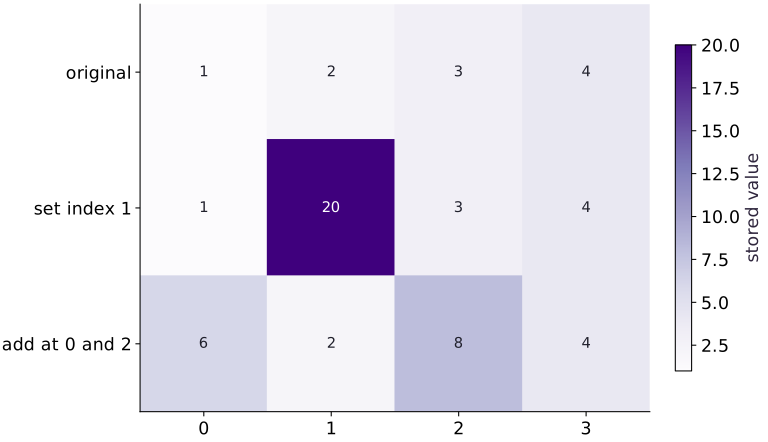
Read the figure
Columns are array indices. The top row is the original array, and each lower row is a separate result created from that original. The cell colors encode stored values; the dark cell containing makes the replacement easy to locate.
The middle row replaces only index : becomes . The bottom row instead adds at indices and , giving .
Connect it to the computation
The bottom row still contains at index . This is the visual clue that the two updates branch from the original; the second operation did not continue from the middle row. In both cases, the top row remains unchanged.
An immutable update returns a new value. To make changes accumulate, pass the returned array into the next update. If these operations were chained, the final array would be , which is deliberately not the bottom row shown here.
Open full-size figureDownload data and provenance
The notebook contains the data experiment, plotting code, and recorded figure output. Rerun it to test your changes.
Where to put & run this code: Work in phases/01-arrays/04-immutable-updates-and-indexing/code/main.py (or downloaded exercises/arrays-04.py / exercises/arrays-04.ipynb) and execute from the repository root with python3 phases/01-arrays/04-immutable-updates-and-indexing/code/main.py.
1 Step 1: Set up imports and input tensors
Import the required JAX modules and define the initial inputs for immutable updates and indexing.
import jax.numpy as jnp
x = jnp.array([1., 2., 3., 4.])
Code building blocks in this step
jnp.array(values, dtype=...)— Constructs an immutable device-backed JAX array from Python/NumPy values.
Establishing explicit input shapes and dtypes first makes the downstream transformation contract deterministic.
2 Step 2: Apply the core JAX transformation
Write the core computation and transformation step over the initialized inputs.
y = x.at[1].set(20.)
z = x.at[jnp.array([0, 2])].add(5.)
Code building blocks in this step
jnp.array(values, dtype=...)— Constructs an immutable device-backed JAX array from Python/NumPy values.
This stage executes the primary numerical transformation and binds the intermediate outputs.
3 Step 3: Verify shapes and numerical invariants
Check that the resulting arrays satisfy the expected shape, dtype, and numerical tolerances.
assert jnp.allclose(x, jnp.array([1.,2.,3.,4.]))
assert jnp.allclose(y, jnp.array([1.,20.,3.,4.]))
assert jnp.allclose(z, jnp.array([6.,2.,8.,4.]))
Code building blocks in this step
jnp.array(values, dtype=...)— Constructs an immutable device-backed JAX array from Python/NumPy values.jnp.allclose(actual, expected, rtol=..., atol=...)— Checks that two arrays match elementwise within floating-point tolerance.
These assertions lock in the exact numerical contract before you run the full experiment and variations.
View the cumulative build in main.py
These blocks append in order to the same file.
import jax.numpy as jnp
x = jnp.array([1., 2., 3., 4.])

y = x.at[1].set(20.)
z = x.at[jnp.array([0, 2])].add(5.)

assert jnp.allclose(x, jnp.array([1.,2.,3.,4.]))
assert jnp.allclose(y, jnp.array([1.,20.,3.,4.]))
assert jnp.allclose(z, jnp.array([6.,2.,8.,4.]))
Run the example
python3 phases/01-arrays/04-immutable-updates-and-indexing/code/main.pyAbout this command
This shortcut uses an activated macOS/Linux course environment in the repository folder. For Windows, use the explicit interpreter command in “Setup help” above. The script includes worked examples and reference solutions.
Inspect the complete assembled example
# Immutable updates and indexing: An indexed update in JAX returns an array value.
import jax.numpy as jnp
x = jnp.array([1., 2., 3., 4.])
y = x.at[1].set(20.)
z = x.at[jnp.array([0, 2])].add(5.)
print("Original:", x)
print("Set:", y)
print("Add:", z)
assert jnp.allclose(x, jnp.array([1.,2.,3.,4.]))
assert jnp.allclose(y, jnp.array([1.,20.,3.,4.]))
assert jnp.allclose(z, jnp.array([6.,2.,8.,4.]))
Expected result: Original: ; Set: ; Add: .
Recorded reference execution
Reference output captured from executing the complete lesson script (code/main.py) and its assertions in the course CPU environment.
Original: [1. 2. 3. 4.]
Set: [ 1. 20.  3.  4.]
Add: [6. 2. 8. 4.]
PASS: arrays-04
Download execution record · The notebook includes executed cells and figure outputs. Compare your run with these values; timings depend on the machine.
See name rebinding without old-value mutation
# Experiment — See name rebinding without old-value mutation: Assigning a result changes the binding, while ignoring a result...
original = x
rebound = x
rebound = rebound.at[1].set(20.)
assert jnp.allclose(original, jnp.array([1., 2., 3., 4.]))
assert jnp.allclose(rebound, jnp.array([1., 20., 3., 4.]))
ignored = x.at[0].set(99.)
assert jnp.allclose(x, original)
assert float(ignored[0]) == 99.
Expected: The original remains ; rebound and ignored hold separate returned values.
Assigning a result changes the binding, while ignoring a result leaves the caller using the old value.
Accumulate repeated integer contributions
# Experiment — Accumulate repeated integer contributions: The integer loop reference makes accumulation explicit.
import numpy as np
indices = jnp.array([1, 1, 3])
contributions = jnp.array([2, 3, 7], dtype=jnp.int32)
base_counts = jnp.zeros(4, dtype=jnp.int32)
counts = base_counts.at[indices].add(contributions)
# Allocate initialized array `reference_counts` with the specified shape and dtype.
reference_counts = np.zeros(4, dtype=np.int32)
for index, contribution in zip([1, 1, 3], [2, 3, 7]):
    # Accumulate the next contribution into `reference_counts[index]`.
    reference_counts[index] += contribution
assert jnp.array_equal(counts, reference_counts)
assert jnp.array_equal(counts, jnp.array([0, 5, 0, 7]))
assert jnp.array_equal(base_counts, jnp.zeros(4, dtype=jnp.int32))
Expected: The counts are ; repeated index receives both contributions.
The integer loop reference makes accumulation explicit. It avoids asserting a floating-point reduction order or conflicting-set behavior.
Make it yours
Where to put your code: Append your solution at the bottom of phases/01-arrays/04-immutable-updates-and-indexing/code/main.py (or inside the Make it yours cell of exercises/arrays-04.ipynb) and run python3 phases/01-arrays/04-immutable-updates-and-indexing/code/main.py to verify your prediction before opening the reference solution.
Replace the last two elements with zero in a new array. Keep unchanged.
Show a writing guide and starter scaffold
How to write this exercise code: step-by-step recipe & starter scaffold
1. Key functions & syntax to use:
jnp.array(values, dtype=...)— Constructs an immutable device-backed JAX array from Python/NumPy values.jnp.allclose(actual, expected, rtol=..., atol=...)— Checks that two arrays match elementwise within floating-point tolerance.
2. Step-by-step implementation plan:
- Set up the changed input or configuration parameters requested in the prompt.
- Run the target function or transformation and assert that the output matches your prediction.
# Exercise solution: Replace the last two elements with zero in a new array.
masked = ...  # TODO: compute masked
assert jnp.allclose(masked, jnp.array([1.,2.,0.,0.]))  # TODO: complete assertion check
assert jnp.allclose(x, jnp.array([1.,2.,3.,4.]))  # TODO: complete assertion check
Reveal the reference solution
# Exercise solution: Replace the last two elements with zero in a new array.
masked = x.at[2:].set(0.)
assert jnp.allclose(masked, jnp.array([1.,2.,0.,0.]))
assert jnp.allclose(x, jnp.array([1.,2.,3.,4.]))
Replace a region of a matrix
Practice
Create a matrix containing through . Set its final column to in a returned value. Verify the whole result and original matrix.
Show a writing guide and starter scaffold
How to write this practice solution: step-by-step recipe & starter scaffold
1. Key functions & syntax to use:
jnp.arange(n, dtype=...)— Creates a 1-D JAX array of evenly spaced values[0, 1, ..., n-1]on the target device.jnp.array(values, dtype=...)— Constructs an immutable device-backed JAX array from Python/NumPy values.array.reshape(new_shape)— Reorganizes tensor axes without changing the total element count (array.size).jnp.allclose(actual, expected, rtol=..., atol=...)— Checks that two arrays match elementwise within floating-point tolerance.
2. Step-by-step implementation plan:
- Construct and reshape
matrixinto the target tensor dimensions.
# Replace a region of a matrix (Practice): Checking the entire matrix verifies both changed and...
# Construct and reshape `matrix` into the target tensor dimensions.
matrix = jnp.arange(...)  # TODO: compute matrix
updated_matrix = ...  # TODO: compute updated_matrix
assert jnp.allclose(updated_matrix, jnp.array([[0., 1., -1.], [3., 4., -1.], [6., 7., -1.]]))  # TODO: complete assertion check
assert jnp.allclose(matrix, jnp.arange(9).reshape(3, 3))  # TODO: complete assertion check
Show a hint
The slice [:, ] selects every row and the last column. A scalar replacement broadcasts across that slice.
Reveal reference solution and reasoning
# Replace a region of a matrix (Practice): Checking the entire matrix verifies both changed and...
# Construct and reshape `matrix` into the target tensor dimensions.
matrix = jnp.arange(9, dtype=jnp.float32).reshape(3, 3)
updated_matrix = matrix.at[:, -1].set(-1.)
assert jnp.allclose(updated_matrix, jnp.array([[0., 1., -1.], [3., 4., -1.], [6., 7., -1.]]))
assert jnp.allclose(matrix, jnp.arange(9).reshape(3, 3))
Checking the entire matrix verifies both changed and unchanged positions; preserving the original checks the update contract.
Keep shape while masking values
Challenge
Keep only values greater than from , replacing other positions with zero. Compare with compact selection and explain the shape difference.
Show a writing guide and starter scaffold
How to write this practice solution: step-by-step recipe & starter scaffold
1. Key functions & syntax to use:
jnp.array(values, dtype=...)— Constructs an immutable device-backed JAX array from Python/NumPy values.jnp.allclose(actual, expected, rtol=..., atol=...)— Checks that two arrays match elementwise within floating-point tolerance.
2. Step-by-step implementation plan:
- Check tensor shape invariant:
fixed_shape.shape == (4,) - Check tensor shape invariant:
selected.shape == (2,)
# Keep shape while masking values (Challenge): Both are useful representations, but they are not...
fixed_shape = jnp.where(...)  # TODO: compute fixed_shape
selected = ...  # TODO: compute selected
# Check tensor shape invariant: `fixed_shape.shape == (4,)`
assert fixed_shape.shape  # TODO: complete assertion check
# Check tensor shape invariant: `selected.shape == (2,)`
assert selected.shape  # TODO: complete assertion check
assert jnp.allclose(fixed_shape, jnp.array([0., 0., 3., 4.]))  # TODO: complete assertion check
assert jnp.allclose(selected, jnp.array([3., 4.]))  # TODO: complete assertion check
Show a hint
Use where for the fixed-shape result. Boolean indexing produces selected values, not a shape-preserving mask.
Reveal reference solution and reasoning
# Keep shape while masking values (Challenge): Both are useful representations, but they are not...
fixed_shape = jnp.where(x > 2., x, 0.)
selected = x[x > 2.]
# Check tensor shape invariant: `fixed_shape.shape == (4,)`
assert fixed_shape.shape == (4,)
# Check tensor shape invariant: `selected.shape == (2,)`
assert selected.shape == (2,)
assert jnp.allclose(fixed_shape, jnp.array([0., 0., 3., 4.]))
assert jnp.allclose(selected, jnp.array([3., 4.]))
Both are useful representations, but they are not interchangeable. The expected downstream shape determines which is appropriate.
Diagnose the result
If nothing changes, check whether the returned update was discarded. If old values seem changed, distinguish name rebinding from mutation and inspect mutable containers around the array. If duplicate replacements are surprising, do not assume last-write-wins order; use an explicit unique-index policy. If a mask later fails under jit, inspect whether its output length depends on runtime values.
Carry forward
- Indexed updates return values; retaining them is the caller’s responsibility.
- Name rebinding and mutation are different operations.
- Repeated-index add accumulates contributions, while conflicting set needs a deliberate policy.
- A shape-preserving mask and compact selection express different computations.
Keep your evidence
Keep original and updated arrays, a repeated-index integer reference, the whole-matrix replacement check, and compact-versus-fixed-shape outputs. Explain replacement, accumulation, and name rebinding.
Save your modified code, its output, and an explanation of your prediction. Checkpoint answers and exercise evidence are tracked separately.
Saved in this browser. Export or back up your portfolio anytime in My learning.
Verified on local CPU. Stage to a Cloud TPU VM via Cloud TPU setup to record accelerator execution receipts (TODO: add automated Cloud TPU CI execution receipts).
Primary references
Phase 01 Integration Project
Bring this phase together: Audit masked batch moments and padding-sensitive denominators
Checkpoint to prove: Predict output shapes and explain why a pure function is easier to transform.
Work in projects/arrays-audit/starter/model.py. Complete stages 1 and 2 for independent calculations and changed-condition diagnosis, then retain the stage 3 evidence with --evidence-dir runs/arrays-audit. Stage 4 integrates the checks. Learner commands explicitly select the starter; --implementation solution is instructor reference execution. This bounded practice does not certify the entire phase or target hardware.