 JAX Pathways
Phase 01 / Arrays & pure functions
Shapes, broadcasting, and dtypes
Revision v0.7.0 · Updated since your last visit. Review the changes; your progress is saved.
Lesson · about 50 minutes · CPU practice
Specify broadcasting contracts and detect silent pairwise-loss and dtype mistakes.
Phase study guide: preparation, milestones and project evidence
Before you start
Before this: From NumPy to jax.numpy
Hardware: CPU
Setup help: Python, notebook, or Cloud TPU VM
Use the tested CPU packages (the recorded environment uses Python 3.14.3). Other Python versions and accelerator environments require separate checks. The optional Cloud TPU specialization explains the target-specific execution boundaries. Logical CPU devices practice partitioning; they do not simulate TPU performance.
Download the repository ZIP or use your existing checkout. Extract it and open a terminal in the folder containing requirements-cpu.txt. The beginner ZIP is separate; these lessons use the full repository folder.
python3 -m venv .venv
source .venv/bin/activate
python -m pip install -r requirements-cpu.txtpy -3 -m venv .venv
.\.venv\Scripts\python.exe -m pip install -r requirements-cpu.txtAfter activation, run the complete worked example from that same folder:
python phases/01-arrays/02-shapes-broadcasting-and-dtypes/code/main.py.\.venv\Scripts\python.exe phases/01-arrays/02-shapes-broadcasting-and-dtypes/code/main.pyFor an incremental build, create main.py in your own practice folder, append each build block in order, and run python main.py with this environment active. Keep that file separate from the downloaded reference solution.
Download this lesson’s notebook. Open it with a Python kernel using the course environment. Run cells from the top after restarting the kernel; experiments depend on earlier definitions.
For local Jupyter, first install the course requirements using the Local Python steps, then use your environment’s Python to start Jupyter:
python -m pip install jupyterlab
python -m jupyter lab.\.venv\Scripts\python.exe -m pip install jupyterlab
.\.venv\Scripts\python.exe -m jupyter labSelect the downloaded arrays-02.ipynb file in JupyterLab. The notebook contains reference solutions; make your prediction and attempt each practice task before opening them. Restart the kernel before changing logical device setup.
The worked reference for this lesson is CPU-validated. Some references explicitly configure logical CPU devices; setting JAX_PLATFORMS does not adapt them to a TPU. Follow the execution matrix and reviewed multi-host example before attempting a target run.
For accelerator preparation, study TPU setup, observed runtime receipts, checkpointed jobs and precision and retained traces. These target paths remain unqualified on physical TPU hardware until an actual receipt is recorded. Cloud provisioning is optional for CPU learning.
Check: Rows: and ; shape , dtype float32.
Revisit the guided CPU setup · Open 19: TPU Setup. Package instructions are CPU instructions; Windows and accelerator environments need their own validation.
What you will be able to do
- Apply the trailing-dimension broadcasting rule before execution.
- Distinguish feature-wise and observation-wise offsets with explicit singleton axes.
- Find a silent pairwise-residual bug using values and shape checks.
- State dtype and precision assumptions for numerical experiments.
The problem
Your code runs, but has it added the bias to the right axis? This is a common array puzzle: a legal operation can still answer the wrong question. We’ll use small tables to see exactly which values combine, then catch a broadcasting mistake that turns one error per example into a whole matrix of errors.
The idea
Before adding or subtracting arrays, name what each axis represents. Broadcasting aligns dimensions from the right and reuses singleton dimensions. A legal broadcast can still answer the wrong question, especially when a final mean hides the resulting shape.
- Batch
x: (2, 3)Two rows, three features per row.
- Shared bias
b: (3,)Align the trailing feature axis.
- Result
x + b: (2, 3)Add the same three bias values to each row.
Conceptual example: broadcasting repeats values logically; it does not add a new example axis. A target (2, 1) and prediction (2,) can accidentally form a (2, 2) result.
Conceptual illustration. Verify the computation in the lesson’s Python experiments.
Catch the scalar that hides a shape mistake
Take predictions and matching targets . The intended residuals are , so mean squared error is zero. If the targets are stored as a column, subtraction instead compares each target against both predictions. The residual matrix has entries , and its mean squared error is .
Both calculations return a scalar after averaging. Looking only at the final loss, or checking that autodiff can differentiate it, will not expose the problem. Inspect the residual shape before reducing it and compare against a known aligned example.
This is also why a reshape should express a data contract. A singleton feature axis can mean one offset per observation; a singleton observation axis can mean one offset per feature. They are different operations even when an unlucky square fixture makes both expressions run.
Align axes before reducing
Predict: Why is checking that the loss is scalar insufficient?
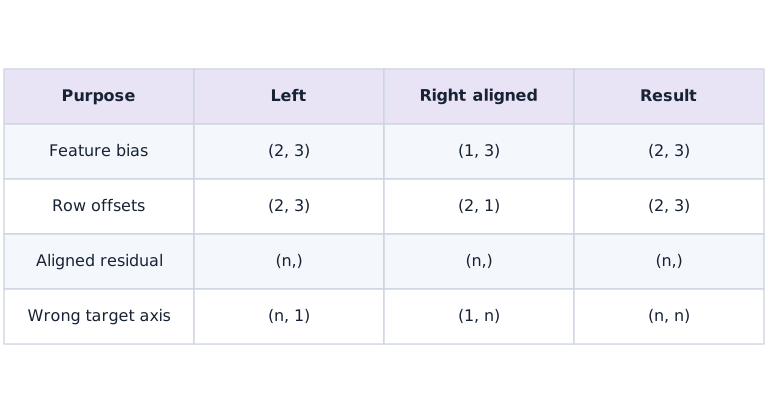
Feature bias reuses a vector across observations; row offsets reuse each scalar across features. The final row creates all-pairs residuals. A mean would hide the unwanted intermediate. Each row describes a different shape contract.
Work the shape rule one dimension at a time
Align and as and . The trailing matches, and the leading can broadcast to . By contrast, aligns as : trailing conflicts with . That expression cannot add one scalar per row without another axis.
Represent row offsets as . The leading matches observations and the trailing broadcasts over the three features. A singleton axis is a statement about how data should be reused, not a random reshape to silence an exception.
feature bias: (2,3) + (1,3) → (2,3)
row offset:  (2,3) + (2,1) → (2,3)
wrong row offset: (2,3) + (2,) → incompatible
Do not test axes with only square arrays
If a batch happens to have , a vector of length can accidentally fit as a feature vector. The expression succeeds while doing the wrong calculation. A test with two observations and three features forces those meanings apart.
Use distinguishable values, such as feature bias and row offsets . Then inspect at least two rows and columns. Shape checks alone do not detect every semantically wrong operation; the values need a known reference too.
A legal broadcast can change your loss
Predictions with shape and targets with shape broadcast to . Each row then compares one target to every prediction. A mean over that matrix is a scalar, so a later gradient transform can accept it even though the objective is wrong.
For predictions and matching targets, the intended residual vector is all zero. A column target produces rows , , , and a positive mean-squared error. Independent expected values expose the bug immediately. Validate prediction/target shape equality at the boundary where aligned examples are required.
(B,) − (B,1) → (B,B)
Intended aligned-example contract: prediction.shape == target.shape
Shape and dtype are separate contracts
Shape says how values are arranged; dtype says how each value is represented. Use explicit float32 inputs for this course experiment so the precision assumption is visible. Default JAX precision and X64 configuration can differ from expectations brought from a NumPy workflow.
A correctly shaped float32 calculation can still lose a small change at large magnitude. That is numerical representation, not an axis error. Record both shape and dtype in debugging output, and choose comparisons appropriate to their scale. Enabling a different dtype is not a substitute for correcting a broadcast.
Make boundary checks before reducing
A reduction often hides shape information. Before averaging residuals, check whether the array is the expected vector or an unintended matrix. Likewise, check that feature statistics have one entry per feature and that row offsets have the observation dimension.
These checks belong at meaningful boundaries, rather than after every elementary addition. A descriptive failure before a loss is calculated is more useful than a plausible scalar whose semantics have already been lost.
Broadcasting repeats the bias across rows
Predict before looking: Why are both rows of the difference equal to ?
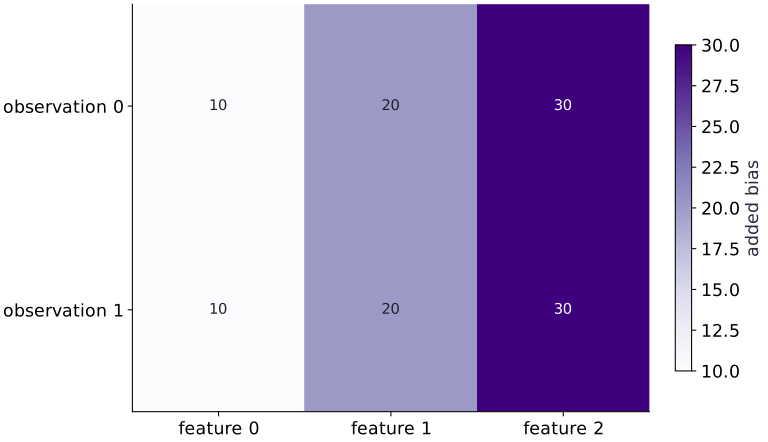
Read the figure
This heatmap shows the added amount, computed as the output minus the input batch. It does not show the final output array. Rows are observations and columns are features; the cell values and color bar measure added bias.
Both rows read . The repeated vertical bands show that feature receives in every observation, feature receives , and feature receives .
Connect it to the computation
The bias has shape , which aligns with the last axis of the batch. Broadcasting applies the same feature-wise addition to both rows. For example, the input becomes , while becomes .
Identical rows in this picture mean identical additions, not identical predictions. If you intended a different offset for each observation, you would need a row-wise bias with a compatible shape, such as ; this figure would then have horizontal bands.
Open full-size figureDownload data and provenance
The notebook contains the data experiment, plotting code, and recorded figure output. Rerun it to test your changes.
Where to put & run this code: Work in phases/01-arrays/02-shapes-broadcasting-and-dtypes/code/main.py (or downloaded exercises/arrays-02.py / exercises/arrays-02.ipynb) and execute from the repository root with python3 phases/01-arrays/02-shapes-broadcasting-and-dtypes/code/main.py.
1 Step 1: Set up imports and input tensors
Import the required JAX modules and define the initial inputs for shapes, broadcasting, and dtypes.
import jax.numpy as jnp
batch = jnp.array([[1., 2., 3.], [4., 5., 6.]], dtype=jnp.float32)
Code building blocks in this step
jnp.array(values, dtype=...)— Constructs an immutable device-backed JAX array from Python/NumPy values.
Establishing explicit input shapes and dtypes first makes the downstream transformation contract deterministic.
2 Step 2: Apply the core JAX transformation
Write the core computation and transformation step over the initialized inputs.
bias = jnp.array([10., 20., 30.], dtype=jnp.float32)
y = batch + bias
Code building blocks in this step
jnp.array(values, dtype=...)— Constructs an immutable device-backed JAX array from Python/NumPy values.
This stage executes the primary numerical transformation and binds the intermediate outputs.
3 Step 3: Verify shapes and numerical invariants
Check that the resulting arrays satisfy the expected shape, dtype, and numerical tolerances.
assert y.shape == (2, 3)
assert jnp.allclose(y[1], jnp.array([14., 25., 36.]))
Code building blocks in this step
jnp.array(values, dtype=...)— Constructs an immutable device-backed JAX array from Python/NumPy values.jnp.allclose(actual, expected, rtol=..., atol=...)— Checks that two arrays match elementwise within floating-point tolerance.
These assertions lock in the exact numerical contract before you run the full experiment and variations.
View the cumulative build in main.py
These blocks append in order to the same file.
import jax.numpy as jnp
batch = jnp.array([[1., 2., 3.], [4., 5., 6.]], dtype=jnp.float32)

bias = jnp.array([10., 20., 30.], dtype=jnp.float32)
y = batch + bias

assert y.shape == (2, 3)
assert jnp.allclose(y[1], jnp.array([14., 25., 36.]))
Run the example
python3 phases/01-arrays/02-shapes-broadcasting-and-dtypes/code/main.pyAbout this command
This shortcut uses an activated macOS/Linux course environment in the repository folder. For Windows, use the explicit interpreter command in “Setup help” above. The script includes worked examples and reference solutions.
Inspect the complete assembled example
# Shapes, broadcasting, and dtypes: Before adding or subtracting arrays, name what each axis represents.
import jax.numpy as jnp
batch = jnp.array([[1., 2., 3.], [4., 5., 6.]], dtype=jnp.float32)
bias = jnp.array([10., 20., 30.], dtype=jnp.float32)
y = batch + bias
print(y)
print("Shape:", y.shape, "dtype:", y.dtype)
# Check tensor shape invariant: `y.shape == (2, 3)`
assert y.shape == (2, 3)
assert jnp.allclose(y[1], jnp.array([14., 25., 36.]))
Expected result: Rows: and ; shape , dtype float32.
Recorded reference execution
Reference output captured from executing the complete lesson script (code/main.py) and its assertions in the course CPU environment.
[[11. 22. 33.]
 [14. 25. 36.]]
Shape: (2, 3) dtype: float32
aligned residuals: [0. 0. 0.]
pairwise residuals: [[ 0.  2.  4.]
 [-2.  0.  2.]
 [-4. -2.  0.]]
float32 large + 1 − large: 0.0
PASS: arrays-02
Download execution record · The notebook includes executed cells and figure outputs. Compare your run with these values; timings depend on the machine.
Make the pairwise bug visible
# Experiment — Make the pairwise bug visible: The final result is scalar in both cases.
predictions = jnp.array([1., 3., 5.])
targets = jnp.array([1., 3., 5.])
correct_residuals = predictions - targets
pairwise_residuals = predictions - targets[:, None]
print("aligned residuals:", correct_residuals)
print("pairwise residuals:", pairwise_residuals)
# Check tensor shape invariant: `correct_residuals.shape == (3,)`
assert correct_residuals.shape == (3,)
# Check tensor shape invariant: `pairwise_residuals.shape == (3, 3)`
assert pairwise_residuals.shape == (3, 3)
assert jnp.allclose(jnp.mean(correct_residuals ** 2), 0.)
assert jnp.allclose(jnp.mean(pairwise_residuals ** 2), 16. / 3.)
Expected: The incorrect broadcast produces shape and loss , despite perfect aligned predictions.
The final result is scalar in both cases. Checking only the final loss shape would miss this objective bug.
Observe a precision limit separately
# Experiment — Observe a precision limit separately: This scalar example isolates precision from broadcasting.
large = jnp.array(100_000_000., dtype=jnp.float32)
print("float32 large + 1 − large:", float((large + 1.) - large))
assert float((large + 1.) - large) == 0.
# Check tensor shape invariant: `large.shape == ()`
assert large.shape == ()
Expected: The recorded difference is zero because the representable spacing at this magnitude exceeds .
This scalar example isolates precision from broadcasting. Autodiff and compilation do not make every arithmetic operation exact.
Make it yours
Where to put your code: Append your solution at the bottom of phases/01-arrays/02-shapes-broadcasting-and-dtypes/code/main.py (or inside the Make it yours cell of exercises/arrays-02.ipynb) and run python3 phases/01-arrays/02-shapes-broadcasting-and-dtypes/code/main.py to verify your prediction before opening the reference solution.
Add a different scalar offset to each row using offsets . Make its shape explicit.
Show a writing guide and starter scaffold
How to write this exercise code: step-by-step recipe & starter scaffold
1. Key functions & syntax to use:
jnp.array(values, dtype=...)— Constructs an immutable device-backed JAX array from Python/NumPy values.jnp.allclose(actual, expected, rtol=..., atol=...)— Checks that two arrays match elementwise within floating-point tolerance.
2. Step-by-step implementation plan:
- Check tensor shape invariant:
offsets.shape == (2, 1)
# Exercise solution: Add a different scalar offset to each row using offsets [100., 200.].
offsets = jnp.array(...)  # TODO: compute offsets
z = ...  # TODO: compute z
# Check tensor shape invariant: `offsets.shape == (2, 1)`
assert offsets.shape  # TODO: complete assertion check
assert jnp.allclose(z, jnp.array([[101.,102.,103.],[204.,205.,206.]]))  # TODO: complete assertion check
Reveal the reference solution
# Exercise solution: Add a different scalar offset to each row using offsets [100., 200.].
offsets = jnp.array([100., 200.])[:, None]
z = batch + offsets
# Check tensor shape invariant: `offsets.shape == (2, 1)`
assert offsets.shape == (2, 1)
assert jnp.allclose(z, jnp.array([[101.,102.,103.],[204.,205.,206.]]))
Use both kinds of offsets together
Practice
Add the feature bias and row offsets to the original batch. Derive every row before running, then check with an explicitly constructed array.
Show a writing guide and starter scaffold
How to write this practice solution: step-by-step recipe & starter scaffold
1. Key functions & syntax to use:
jnp.array(values, dtype=...)— Constructs an immutable device-backed JAX array from Python/NumPy values.jnp.allclose(actual, expected, rtol=..., atol=...)— Checks that two arrays match elementwise within floating-point tolerance.
2. Step-by-step implementation plan:
- Check tensor shape invariant:
combined.shape == (2, 3)
# Use both kinds of offsets together (Practice): The first row receives 100 in every feature and the second...
combined = ...  # TODO: compute combined
# Check tensor shape invariant: `combined.shape == (2, 3)`
assert combined.shape  # TODO: complete assertion check
assert jnp.allclose(combined, jnp.array([[111., 122., 133.], [214., 225., 236.]]))  # TODO: complete assertion check
Show a hint
Use bias shape and offsets shape . Do not swap their semantic roles.
Reveal reference solution and reasoning
# Use both kinds of offsets together (Practice): The first row receives 100 in every feature and the second...
combined = batch + bias + jnp.array([100., 200.])[:, None]
# Check tensor shape invariant: `combined.shape == (2, 3)`
assert combined.shape == (2, 3)
assert jnp.allclose(combined, jnp.array([[111., 122., 133.], [214., 225., 236.]]))
The first row receives in every feature and the second receives , while the feature bias differs by column.
Reject an aligned-loss contract violation
Challenge
Write an MSE function that requires prediction and target shapes to match. Test zero loss for matching vectors and rejection of a column target. Explain why an automatic reshape might hide a data-ordering problem.
Show a writing guide and starter scaffold
How to write this practice solution: step-by-step recipe & starter scaffold
1. Key functions & syntax to use:
x.sum(axis=...) / x.mean(axis=..., keepdims=...)— Reduces values along the namedaxis(the axis you name is collapsed unlesskeepdims=True).jnp.allclose(actual, expected, rtol=..., atol=...)— Checks that two arrays match elementwise within floating-point tolerance.
2. Step-by-step implementation plan:
- Guard input contract (
prediction.shape != target.shape) and fail fast if violated. - Run the boundary check and catch the expected exception:
# Reject an aligned-loss contract violation (Challenge): Fix shapes at the data/model interface according to the...
def aligned_mse(prediction, target):
    # Guard input contract (`prediction.shape != target.shape`) and fail fast if violated.
    if prediction.shape != target.shape:
        raise ValueError("aligned prediction and target shapes must match")
    return ...  # TODO: return computed result
assert jnp.allclose(aligned_mse(predictions, targets), 0.)  # TODO: complete assertion check
# Run the boundary check and catch the expected exception:
try:
    aligned_mse(predictions, targets[:, None])
except ValueError:
    pass
else:
    raise AssertionError("Column targets must be rejected")
Show a hint
Raise a descriptive ValueError before subtracting. The check is based on shape metadata, not array truth values.
Reveal reference solution and reasoning
# Reject an aligned-loss contract violation (Challenge): Fix shapes at the data/model interface according to the...
def aligned_mse(prediction, target):
    # Guard input contract (`prediction.shape != target.shape`) and fail fast if violated.
    if prediction.shape != target.shape:
        raise ValueError("aligned prediction and target shapes must match")
    return jnp.mean((prediction - target) ** 2)
assert jnp.allclose(aligned_mse(predictions, targets), 0.)
# Run the boundary check and catch the expected exception:
try:
    aligned_mse(predictions, targets[:, None])
except ValueError:
    pass
else:
    raise AssertionError("Column targets must be rejected")
Fix shapes at the data/model interface according to the intended example order. Blindly reshaping inside a loss can conceal mismatched semantics.
Diagnose the result
When broadcasting fails, align trailing dimensions on paper. When it succeeds with a surprising loss, inspect the residual shape before reduction and compare with hand-derived values. When a small change disappears, inspect dtype and magnitude. Use asymmetric shape tests so accidentally equal dimension sizes do not conceal a wrong axis.
Carry forward
- Broadcasting compatibility does not imply semantic correctness.
- A singleton axis declares reuse along a particular dimension.
- Prediction/target mismatch can silently create all-pairs residuals.
- Check dtype separately from shape and record numerical scale.
Keep your evidence
Keep an axis sketch, asymmetric offset checks, aligned-versus-pairwise residual arrays, a rejected shape mismatch, and the float32 precision observation. Explain the intended residual contract.
Save your modified code, its output, and an explanation of your prediction. Checkpoint answers and exercise evidence are tracked separately.
Saved in this browser. Export or back up your portfolio anytime in My learning.
Verified on local CPU. Stage to a Cloud TPU VM via Cloud TPU setup to record accelerator execution receipts (TODO: add automated Cloud TPU CI execution receipts).