 JAX Pathways
Phase 09 / Distributed training
Arrays, meshes, and sharding
Revision v0.7.0 · Updated since your last visit. Review the changes; your progress is saved.
Lesson · about 80 minutes · Logical CPU devices
Partition an array over a device mesh and inspect its local shards.
Phase study guide: preparation, milestones and project evidence
Before you start
Before this: Data & checkpoint recovery; Performance diagnosis
Hardware: 4 logical CPU devices on one host
Setup help: Python, notebook, or Cloud TPU VM
Use the tested CPU packages (the recorded environment uses Python 3.14.3). Other Python versions and accelerator environments require separate checks. The optional Cloud TPU specialization explains the target-specific execution boundaries. Logical CPU devices practice partitioning; they do not simulate TPU performance.
Download the repository ZIP or use your existing checkout. Extract it and open a terminal in the folder containing requirements-cpu.txt. The beginner ZIP is separate; these lessons use the full repository folder.
python3 -m venv .venv
source .venv/bin/activate
python -m pip install -r requirements-cpu.txtpy -3 -m venv .venv
.\.venv\Scripts\python.exe -m pip install -r requirements-cpu.txtAfter activation, run the complete worked example from that same folder:
python phases/09-distributed/01-arrays-meshes-and-sharding/code/main.py.\.venv\Scripts\python.exe phases/09-distributed/01-arrays-meshes-and-sharding/code/main.pyFor an incremental build, create main.py in your own practice folder, append each build block in order, and run python main.py with this environment active. Keep that file separate from the downloaded reference solution.
Download this lesson’s notebook. Open it with a Python kernel using the course environment. Run cells from the top after restarting the kernel; experiments depend on earlier definitions.
For local Jupyter, first install the course requirements using the Local Python steps, then use your environment’s Python to start Jupyter:
python -m pip install jupyterlab
python -m jupyter lab.\.venv\Scripts\python.exe -m pip install jupyterlab
.\.venv\Scripts\python.exe -m jupyter labSelect the downloaded distributed-01.ipynb file in JupyterLab. The notebook contains reference solutions; make your prediction and attempt each practice task before opening them. Restart the kernel before changing logical device setup.
The worked reference for this lesson is CPU-validated. Some references explicitly configure logical CPU devices; setting JAX_PLATFORMS does not adapt them to a TPU. Follow the execution matrix and reviewed multi-host example before attempting a target run.
For accelerator preparation, study TPU setup, observed runtime receipts, checkpointed jobs and precision and retained traces. These target paths remain unqualified on physical TPU hardware until an actual receipt is recorded. Cloud provisioning is optional for CPU learning.
Check: Four row shards ; four column shards . Column sums .
Revisit the guided CPU setup · Open 19: TPU Setup. Package instructions are CPU instructions; Windows and accelerator environments need their own validation.
What you will be able to do
- Translate a PartitionSpec into local shard shapes.
- Inspect shard indices and verify values.
- Explain communication needs of a global reduction.
- Repair uneven batch statistics with padding and masks.
The problem
We can split examples across devices, split features across devices, or keep a full copy on each one. Let’s make those choices visible on four logical CPU devices. You’ll inspect the pieces and see why some reductions must combine results. No cluster is needed, and these observations do not measure accelerator performance.
The idea
Sharding places one global array across a named mesh. Global shape, local shard shape and replication describe different views of the same computation. Make ownership explicit before reasoning about communication.
- Global view
rows 0…7The program sees an eight-row array.
- Partition rows
CPU 0: 0–1 | CPU 1: 2–3 | CPU 2: 4–5 | CPU 3: 6–7A four-device mesh splits the chosen axis.
- Global operation
reduce across all rowsLocal storage and global array semantics are different views.
Conceptual layout for eight rows and four logical CPU devices. All devices share one host; this explains partitioning rather than simulating accelerator speed or network behavior.
Conceptual illustration. Verify the computation in the lesson’s Python experiments.
Compare the global array with each local piece
A four-by-four array on two devices can be split into two-by-four row shards or four-by-two column shards. Both layouts contain the same global values. Their local operations and communication requirements differ.
Replication gives each participant the full value instead of a disjoint portion. Use explicit labels so duplicated ownership cannot be mistaken for partitioning.
Connect each PartitionSpec entry to its array axis and named mesh axis. Inspect actual addressable shards and compare reconstructed values with a global reference. Logical CPU devices validate this placement exercise without reproducing a multi-host network.
Read the mapping from left to right
Start with eight rows and four columns. Our one-dimensional mesh contains four devices along data. P("data",None) partitions eight rows into four groups of two and preserves four features per shard. P(None,"data") leaves rows intact and assigns one of four columns to each device. The same global shape supports both arrangements.
None means an array dimension is not partitioned by this specification, not that the values are missing. P() replicates the whole array. A device mesh axis may not be reused across multiple array dimensions within one PartitionSpec. More complex two-dimensional meshes need distinct axis names and a reason for assigning each dimension.
Array (8,4) → P(data,None) → 4 pieces (2,4)
Array (8,4) → P(None,data) → 4 pieces (8,1)
Array (8,4) → P() → 4 full copies (8,4)
Inspect indices rather than guessing ordering
addressable_shards lists pieces this process can access. Each piece carries a device, global index and data. For row partitioning the indices select successive two-row slices; for column partitioning they select individual columns. Compare host[shard.index] with shard.data. This catches a mismatch between the intended assignment and the actual data.
All four devices are addressable here because we have one process. In a multi-process program, the global device set may include devices another process owns. np.asarray on a global array that is not fully addressable is not a general multi-host gathering recipe. This lesson deliberately exercises only the single-process case.
A reduction has a communication requirement
For rows through reshaped to , the first column is ,,,,,,, and sums to . Each row shard can sum its own two rows, but no one shard initially sees all eight. Producing a replicated global column sum requires combining contributions across the data axis.
We use a jitted ordinary sum and declare replicated output. JAX compiles the placement-aware global operation and arranges necessary communication. The source-level need to combine partial sums is a reasoning argument; exact collective lowering is compiler/version dependent and would require lowered code or profiler evidence to characterize. This CPU lesson does not estimate accelerator communication latency.
partial sums device 0: [4,6,8,10]
partial sums device 1: [20,22,24,26]
partial sums device 2: [36,38,40,42]
partial sums device 3: [52,54,56,58]
combine → [112,120,128,136]
Choose placement for the operation you will perform and run it on a TPU mesh
Elementwise functions naturally preserve local independence. Reductions across a partitioned dimension and matrix multiplications can require communication. Choosing columns instead of rows changes which values are locally available; it does not alter the mathematical answer.
device_put from a host NumPy array places that array according to the requested sharding. Moving an already placed JAX array to a different sharding is a resharding operation. Host reconstruction is useful for our tiny verification case but should not be inserted into a real training loop. The experiments compare two layouts for correctness, not speed. Save global shapes, specs and shard tables as the evidence needed to reason about a future workload.
To run this exact mesh and NamedSharding contract on a real 4-chip TPU VM (for example v5litepod-4 or v6e-4, provisioned via lesson-welcome-03.html and tpu-gcp.html), remove the jax_platforms=cpu override so jax.devices() discovers the four physical TPU chips. On a multi-host TPU slice (v5litepod-8 or larger), call jax.distributed.initialize() at process startup and launch across all workers with --worker=all.
Run the 4-device sharding check on a 4-chip TPU VM (single host)
gcloud compute tpus tpu-vm scp exercises/distributed-01.py $TPU_NAME:~/jax-tpu-lab/ --zone=$ZONE
gcloud compute tpus tpu-vm ssh $TPU_NAME --zone=$ZONE \
  --command="sed 's/jax.config.update(\"jax_platforms\", \"cpu\")/# use default TPU backend/; s/jax.devices(\"cpu\")/jax.devices()[:4]/' ~/jax-tpu-lab/distributed-01.py > ~/jax-tpu-lab/distributed-01-tpu.py && JAX_PLATFORMS=tpu ~/jax-tpu-lab/.venv/bin/python ~/jax-tpu-lab/distributed-01-tpu.py"
Expected:
Places the (8, 4) array across four TPU chips, verifies row-shard (2, 4) and column-shard (8, 1) local shapes, and checks the replicated column sum [112, 120, 128, 136].
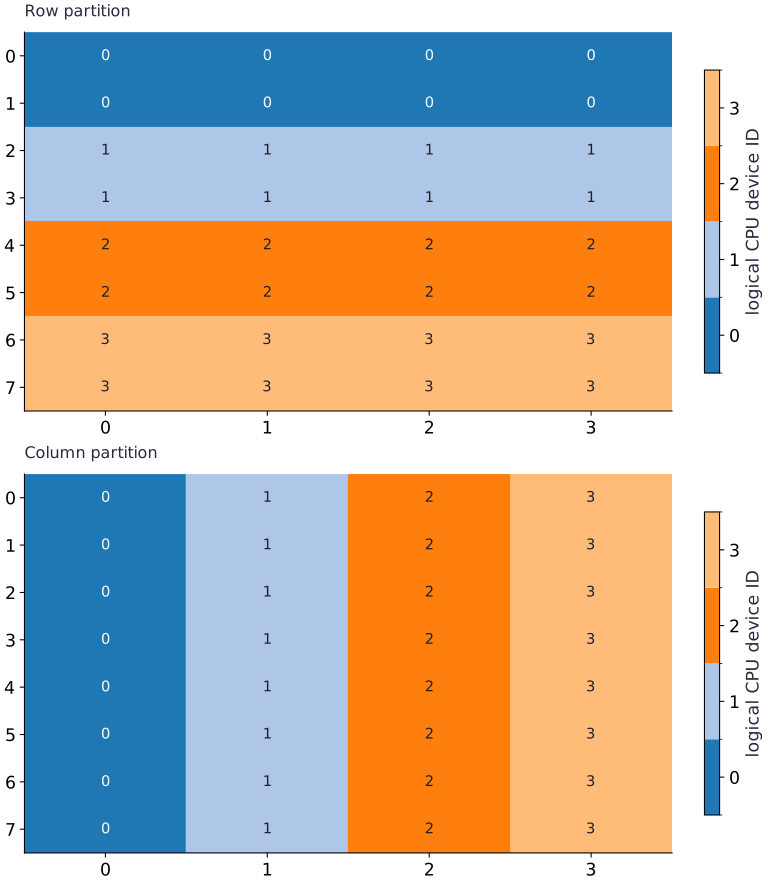
Row sharding and column sharding place the same array differently
Predict before looking: Which dimension is split across devices in each panel?
Read the figure
Both panels represent the same global array with shape . Each cell’s number and color identify its owning logical device, not the array value stored there. Device colors are categorical and do not rank speed or capacity.
In the upper panel, each device owns two complete rows: device owns rows and , for example. In the lower panel, each device owns one complete column across all eight rows. The horizontal bands become vertical bands when the partitioned axis changes.
Connect it to the computation
Each device owns eight scalar entries in either layout, but their local shapes differ: for row partitioning and for column partitioning. Equal local element counts do not mean that the same operations will have the same communication needs.
For example, a whole row is locally available in the upper layout but split across devices in the lower one. A row-wise reduction therefore has different placement implications. The figure establishes ownership only; communication volume and execution time are not measured, and these four logical devices share one CPU host.
Open full-size figureDownload data and provenance
The notebook contains the data experiment, plotting code, and recorded figure output. Rerun it to test your changes.
Where to put & run this code: Work in phases/09-distributed/01-arrays-meshes-and-sharding/code/main.py (or downloaded exercises/distributed-01.py / exercises/distributed-01.ipynb) and execute from the repository root with python3 phases/09-distributed/01-arrays-meshes-and-sharding/code/main.py.
1 Start a fresh CPU runtime
Create main.py in your course workspace. Paste this block first. If using a notebook, restart its kernel before running any cell.
# Step 1 — Start a fresh CPU runtime: Configuration happens before devices() or array creation...
import jax
# Run this file in a fresh process; in a notebook restart the kernel first.
jax.config.update("jax_platforms", "cpu")
# Update state in place with the new values.
jax.config.update("jax_num_cpu_devices", 4)
import jax.numpy as jnp
import numpy as np
from jax.sharding import Mesh, NamedSharding, PartitionSpec as P
# Query the active JAX devices into `devices`.
devices = jax.devices("cpu")
# Guard input contract (`len(devices) != 4`) and fail fast if violated.
if len(devices) != 4:
    raise RuntimeError("Expected four CPU devices. Restart the notebook kernel, then Run all; do not run an earlier JAX cell first.")
# Configure multi-device placement / sharding specification (`mesh`).
mesh = Mesh(np.array(devices), ("data",))
# Configure multi-device placement / sharding specification (`rows`).
rows = NamedSharding(mesh, P("data", None))
# Configure multi-device placement / sharding specification (`replicated`).
replicated = NamedSharding(mesh, P())
Code building blocks in this step
Mesh + PartitionSpec + NamedSharding— Maps logical tensor axes onto physical device mesh axes for SPMD data, tensor, or pipeline parallelism.
Configuration happens before devices() or array creation initializes a backend. This file explicitly chooses CPU even on a GPU machine.
2 Place and compute
Append this block in the same file. Predict the shapes and values before running.
# Step 2 — Place and compute: Mesh axis names describe placement.
# Construct and reshape `host` into the target tensor dimensions.
host = np.arange(32, dtype=np.float32).reshape(8,4)
# Place `x` explicitly onto the target JAX device.
x = jax.device_put(host, rows)
# Configure multi-device placement / sharding specification (`columns`).
columns = NamedSharding(mesh, P(None, "data"))
# Place `x_columns` explicitly onto the target JAX device.
x_columns = jax.device_put(host, columns)
# Wrap with `jax.jit` (`sum_rows`) so XLA traces and compiles the function.
sum_rows = jax.jit(lambda a:a.sum(axis=0), in_shardings=rows, out_shardings=replicated)(x)
# Synchronize host execution until asynchronous device computation completes.
sum_rows.block_until_ready()
Code building blocks in this step
array.reshape(new_shape)— Reorganizes tensor axes without changing the total element count (array.size).x.sum(axis=...) / x.mean(axis=..., keepdims=...)— Reduces values along the namedaxis(the axis you name is collapsed unlesskeepdims=True).jax.jit(fn) / @jax.jit— Tracesfnwith abstract shapes and compiles a fused XLA executable cached by input shape and dtype.Mesh + PartitionSpec + NamedSharding— Maps logical tensor axes onto physical device mesh axes for SPMD data, tensor, or pipeline parallelism.
Mesh axis names describe placement. They are separate from the numerical array dimensions.
3 Inspect and verify
Append the checks, save the file and run python main.py with the setup lesson environment.
# Step 3 — Inspect and verify: Assertions compare against host calculations or hand-derived...
np.testing.assert_array_equal(np.asarray(sum_rows), np.array([112,120,128,136],dtype=np.float32))
for shard in x.addressable_shards:
    # Check tensor shape invariant: `shard.data.shape == (2,4)`
    assert shard.data.shape == (2,4)
    # Convert `` to a host NumPy array for inspection or verification.
    np.testing.assert_array_equal(np.asarray(shard.data), host[shard.index])
for shard in x_columns.addressable_shards:
    # Check tensor shape invariant: `shard.data.shape == (8,1)`
    assert shard.data.shape == (8,1)
    # Convert `` to a host NumPy array for inspection or verification.
    np.testing.assert_array_equal(np.asarray(shard.data), host[shard.index])
print("Row-shard shapes:", [s.data.shape for s in x.addressable_shards])
print("Column-shard shapes:", [s.data.shape for s in x_columns.addressable_shards])
print("Column sums:", np.asarray(sum_rows))
Code building blocks in this step
testing.assert_array_equal(...)— Calltesting.assert_array_equalwith your updated parameters or inputs from this lesson's workspace.np.asarray(...)— Callnp.asarraywith your updated parameters or inputs from this lesson's workspace.assert condition— Verify that the observed output shape, status, or numerical value satisfies the contract.
Assertions compare against host calculations or hand-derived values; printing a sharding object alone is separate from correctness.
View the cumulative build in main.py
These blocks append in order to the same file.
# Step 1 — Start a fresh CPU runtime: Configuration happens before devices() or array creation...
import jax
# Run this file in a fresh process; in a notebook restart the kernel first.
jax.config.update("jax_platforms", "cpu")
# Update state in place with the new values.
jax.config.update("jax_num_cpu_devices", 4)
import jax.numpy as jnp
import numpy as np
from jax.sharding import Mesh, NamedSharding, PartitionSpec as P
# Query the active JAX devices into `devices`.
devices = jax.devices("cpu")
# Guard input contract (`len(devices) != 4`) and fail fast if violated.
if len(devices) != 4:
    raise RuntimeError("Expected four CPU devices. Restart the notebook kernel, then Run all; do not run an earlier JAX cell first.")
# Configure multi-device placement / sharding specification (`mesh`).
mesh = Mesh(np.array(devices), ("data",))
# Configure multi-device placement / sharding specification (`rows`).
rows = NamedSharding(mesh, P("data", None))
# Configure multi-device placement / sharding specification (`replicated`).
replicated = NamedSharding(mesh, P())

# Step 2 — Place and compute: Mesh axis names describe placement.
# Construct and reshape `host` into the target tensor dimensions.
host = np.arange(32, dtype=np.float32).reshape(8,4)
# Place `x` explicitly onto the target JAX device.
x = jax.device_put(host, rows)
# Configure multi-device placement / sharding specification (`columns`).
columns = NamedSharding(mesh, P(None, "data"))
# Place `x_columns` explicitly onto the target JAX device.
x_columns = jax.device_put(host, columns)
# Wrap with `jax.jit` (`sum_rows`) so XLA traces and compiles the function.
sum_rows = jax.jit(lambda a:a.sum(axis=0), in_shardings=rows, out_shardings=replicated)(x)
# Synchronize host execution until asynchronous device computation completes.
sum_rows.block_until_ready()

# Step 3 — Inspect and verify: Assertions compare against host calculations or hand-derived...
np.testing.assert_array_equal(np.asarray(sum_rows), np.array([112,120,128,136],dtype=np.float32))
for shard in x.addressable_shards:
    # Check tensor shape invariant: `shard.data.shape == (2,4)`
    assert shard.data.shape == (2,4)
    # Convert `` to a host NumPy array for inspection or verification.
    np.testing.assert_array_equal(np.asarray(shard.data), host[shard.index])
for shard in x_columns.addressable_shards:
    # Check tensor shape invariant: `shard.data.shape == (8,1)`
    assert shard.data.shape == (8,1)
    # Convert `` to a host NumPy array for inspection or verification.
    np.testing.assert_array_equal(np.asarray(shard.data), host[shard.index])
print("Row-shard shapes:", [s.data.shape for s in x.addressable_shards])
print("Column-shard shapes:", [s.data.shape for s in x_columns.addressable_shards])
print("Column sums:", np.asarray(sum_rows))
Run the example
python3 phases/09-distributed/01-arrays-meshes-and-sharding/code/main.pyAbout this command
This shortcut uses an activated macOS/Linux course environment in the repository folder. For Windows, use the explicit interpreter command in “Setup help” above. The script includes worked examples and reference solutions.
Inspect the complete assembled example
# Step 1 — Start a fresh CPU runtime: Configuration happens before devices() or array creation...
import jax
# Run this file in a fresh process; in a notebook restart the kernel first.
jax.config.update("jax_platforms", "cpu")
# Update state in place with the new values.
jax.config.update("jax_num_cpu_devices", 4)
import jax.numpy as jnp
import numpy as np
from jax.sharding import Mesh, NamedSharding, PartitionSpec as P
# Query the active JAX devices into `devices`.
devices = jax.devices("cpu")
# Guard input contract (`len(devices) != 4`) and fail fast if violated.
if len(devices) != 4:
    raise RuntimeError("Expected four CPU devices. Restart the notebook kernel, then Run all; do not run an earlier JAX cell first.")
# Configure multi-device placement / sharding specification (`mesh`).
mesh = Mesh(np.array(devices), ("data",))
# Configure multi-device placement / sharding specification (`rows`).
rows = NamedSharding(mesh, P("data", None))
# Configure multi-device placement / sharding specification (`replicated`).
replicated = NamedSharding(mesh, P())

# Step 2 — Place and compute: Mesh axis names describe placement.
# Construct and reshape `host` into the target tensor dimensions.
host = np.arange(32, dtype=np.float32).reshape(8,4)
# Place `x` explicitly onto the target JAX device.
x = jax.device_put(host, rows)
# Configure multi-device placement / sharding specification (`columns`).
columns = NamedSharding(mesh, P(None, "data"))
# Place `x_columns` explicitly onto the target JAX device.
x_columns = jax.device_put(host, columns)
# Wrap with `jax.jit` (`sum_rows`) so XLA traces and compiles the function.
sum_rows = jax.jit(lambda a:a.sum(axis=0), in_shardings=rows, out_shardings=replicated)(x)
# Synchronize host execution until asynchronous device computation completes.
sum_rows.block_until_ready()

# Step 3 — Inspect and verify: Assertions compare against host calculations or hand-derived...
np.testing.assert_array_equal(np.asarray(sum_rows), np.array([112,120,128,136],dtype=np.float32))
for shard in x.addressable_shards:
    # Check tensor shape invariant: `shard.data.shape == (2,4)`
    assert shard.data.shape == (2,4)
    # Convert `` to a host NumPy array for inspection or verification.
    np.testing.assert_array_equal(np.asarray(shard.data), host[shard.index])
for shard in x_columns.addressable_shards:
    # Check tensor shape invariant: `shard.data.shape == (8,1)`
    assert shard.data.shape == (8,1)
    # Convert `` to a host NumPy array for inspection or verification.
    np.testing.assert_array_equal(np.asarray(shard.data), host[shard.index])
print("Row-shard shapes:", [s.data.shape for s in x.addressable_shards])
print("Column-shard shapes:", [s.data.shape for s in x_columns.addressable_shards])
print("Column sums:", np.asarray(sum_rows))
Expected result: Four row shards ; four column shards . Column sums .
Recorded reference execution
Reference output captured from executing the complete lesson script (code/main.py) and its assertions in the course CPU environment.
Row-shard shapes: [(2, 4), (2, 4), (2, 4), (2, 4)]
Column-shard shapes: [(8, 1), (8, 1), (8, 1), (8, 1)]
Column sums: [112. 120. 128. 136.]
Row-shard shapes: [(2, 4), (2, 4), (2, 4), (2, 4)]
Column-shard shapes: [(8, 1), (8, 1), (8, 1), (8, 1)]
Column sums: [112. 120. 128. 136.]
Resharded values preserved
Row sums: [  6.  22.  38.  54.  70.  86. 102. 118.]
Expected indivisible batch
Expected indivisible batch
PASS: distributed-01
Download execution record · The notebook includes executed cells and figure outputs. Compare your run with these values; timings depend on the machine.
Reshard the same global values
# Experiment — Reshard the same global values: Resharding changes ownership of values, not their mathematical...
moved = jax.device_put(x, columns)
# Convert `` to a host NumPy array for inspection or verification.
np.testing.assert_array_equal(np.asarray(moved), host)
# Check tensor shape invariant: `all(s.data.shape == (8,1) for s in moved.addressable_shards)`
assert all(s.data.shape == (8,1) for s in moved.addressable_shards)
print("Resharded values preserved")
Expected: Global array unchanged; local shards now .
Resharding changes ownership of values, not their mathematical identity.
Reduce a dimension that is not partitioned
# Experiment — Reduce a dimension that is not partitioned: All four columns for a row are already local in row...
# Configure multi-device placement / sharding specification (`vector_rows`).
vector_rows = NamedSharding(mesh, P("data"))
# Wrap with `jax.jit` (`per_row`) so XLA traces and compiles the function.
per_row = jax.jit(lambda a:a.sum(axis=1), in_shardings=rows, out_shardings=vector_rows)(x)
# Create evenly spaced index values in ``.
np.testing.assert_array_equal(np.asarray(per_row), np.arange(6,119,16,dtype=np.float32))
# Check tensor shape invariant: `all(s.data.shape == (2,) for s in per_row.addressable_shards)`
assert all(s.data.shape == (2,) for s in per_row.addressable_shards)
print("Row sums:", np.asarray(per_row))
Expected: Row sums ; local shapes .
All four columns for a row are already local in row partitioning; this reduction does not mathematically require combining data-axis pieces.
Make it yours
Where to put your code: Append your solution at the bottom of phases/09-distributed/01-arrays-meshes-and-sharding/code/main.py (or inside the Make it yours cell of exercises/distributed-01.ipynb) and run python3 phases/09-distributed/01-arrays-meshes-and-sharding/code/main.py to verify your prediction before opening the reference solution.
Compare row and column layouts of a array, and repair a ten-row mean with padding plus an explicit mask.
Show a writing guide and starter scaffold
How to write this exercise code: step-by-step recipe & starter scaffold
1. Key functions & syntax to use:
array.reshape(new_shape)— Reorganizes tensor axes without changing the total element count (array.size).x.sum(axis=...) / x.mean(axis=..., keepdims=...)— Reduces values along the namedaxis(the axis you name is collapsed unlesskeepdims=True).jnp.allclose(actual, expected, rtol=..., atol=...)— Checks that two arrays match elementwise within floating-point tolerance.jax.jit(fn) / @jax.jit— Tracesfnwith abstract shapes and compiles a fused XLA executable cached by input shape and dtype.
2. Step-by-step implementation plan:
- Construct and reshape
otherinto the target tensor dimensions. - Place
placedexplicitly onto the target JAX device. - Check tensor shape invariant:
shard.data.shape == expected - Convert
to a host NumPy array for inspection or verification. - Construct and reshape
originalinto the target tensor dimensions.
# Exercise solution: Compare row and column layouts of a (12,8) array, and repair a ten-row...
# Construct and reshape `other` into the target tensor dimensions.
other = np.arange(...)  # TODO: compute other
for spec, expected in [(rows,(3,8)),(columns,(12,2))]:
    # Place `placed` explicitly onto the target JAX device.
    placed = jax.device_put(...)  # TODO: compute placed
    for shard in placed.addressable_shards:
        # Check tensor shape invariant: `shard.data.shape == expected`
        assert shard.data.shape  # TODO: complete assertion check
        # Convert `` to a host NumPy array for inspection or verification.
        np.testing.assert_array_equal(np.asarray(shard.data),other[shard.index])

# Construct and reshape `original` into the target tensor dimensions.
original = np.arange(...)  # TODO: compute original
# Run the boundary check and catch the expected exception:
try:
    jax.device_put(original, rows)
except ValueError:
    print("Expected indivisible batch")
else:
    raise AssertionError("Expected divisibility failure")
# Place `padded` explicitly onto the target JAX device.
padded = jax.device_put(...)  # TODO: compute padded
# Configure multi-device placement / sharding specification (`mask_sharding`).
mask_sharding = NamedSharding(...)  # TODO: compute mask_sharding
mask = jax.device_put(...)  # TODO: compute mask
# Wrap with `jax.jit` (`masked_mean`) so XLA traces and compiles the function.
masked_mean = jax.jit(...)  # TODO: compute masked_mean
# Convert `` to a host NumPy array for inspection or verification.
np.testing.assert_allclose(np.asarray(masked_mean),original.mean(axis = ...  # TODO: compute np.testing.assert_allclose(np.asarray(masked_mean),original.mean(axis
assert not np.allclose(np.asarray(padded.mean(axis=0)), original.mean(axis=0))  # TODO: complete assertion check
Reveal the reference solution
# Exercise solution: Compare row and column layouts of a (12,8) array, and repair a ten-row...
# Construct and reshape `other` into the target tensor dimensions.
other = np.arange(96,dtype=np.float32).reshape(12,8)
for spec, expected in [(rows,(3,8)),(columns,(12,2))]:
    # Place `placed` explicitly onto the target JAX device.
    placed = jax.device_put(other,spec)
    for shard in placed.addressable_shards:
        # Check tensor shape invariant: `shard.data.shape == expected`
        assert shard.data.shape == expected
        # Convert `` to a host NumPy array for inspection or verification.
        np.testing.assert_array_equal(np.asarray(shard.data),other[shard.index])

# Construct and reshape `original` into the target tensor dimensions.
original = np.arange(40,dtype=np.float32).reshape(10,4)
# Run the boundary check and catch the expected exception:
try:
    jax.device_put(original, rows)
except ValueError:
    print("Expected indivisible batch")
else:
    raise AssertionError("Expected divisibility failure")
# Place `padded` explicitly onto the target JAX device.
padded = jax.device_put(np.pad(original,((0,2),(0,0))),rows)
# Configure multi-device placement / sharding specification (`mask_sharding`).
mask_sharding = NamedSharding(mesh,P("data"))
mask = jax.device_put(np.array([1]*10+[0]*2,dtype=np.float32),mask_sharding)
# Wrap with `jax.jit` (`masked_mean`) so XLA traces and compiles the function.
masked_mean = jax.jit(lambda a,m:(a*m[:,None]).sum(axis=0)/m.sum(),in_shardings=(rows,mask_sharding),out_shardings=replicated)(padded,mask)
# Convert `` to a host NumPy array for inspection or verification.
np.testing.assert_allclose(np.asarray(masked_mean),original.mean(axis=0),rtol=1e-6)
assert not np.allclose(np.asarray(padded.mean(axis=0)), original.mean(axis=0))
Change both dimensions
Challenge
Use a array. Verify row and column layouts and predict every local shape.
Show a writing guide and starter scaffold
How to write this practice solution: step-by-step recipe & starter scaffold
1. Key functions & syntax to use:
array.reshape(new_shape)— Reorganizes tensor axes without changing the total element count (array.size).Mesh + PartitionSpec + NamedSharding— Maps logical tensor axes onto physical device mesh axes for SPMD data, tensor, or pipeline parallelism.
2. Step-by-step implementation plan:
- Construct and reshape
otherinto the target tensor dimensions. - Place
placedexplicitly onto the target JAX device. - Check tensor shape invariant:
shard.data.shape == expected - Convert
to a host NumPy array for inspection or verification.
# Change both dimensions (Challenge): The row layout owns three complete feature vectors per...
# Construct and reshape `other` into the target tensor dimensions.
other = np.arange(...)  # TODO: compute other
for spec, expected in [(rows,(3,8)),(columns,(12,2))]:
    # Place `placed` explicitly onto the target JAX device.
    placed = jax.device_put(...)  # TODO: compute placed
    for shard in placed.addressable_shards:
        # Check tensor shape invariant: `shard.data.shape == expected`
        assert shard.data.shape  # TODO: complete assertion check
        # Convert `` to a host NumPy array for inspection or verification.
        np.testing.assert_array_equal(np.asarray(shard.data),other[shard.index])
Show a hint
Four devices divide twelve rows or eight columns.
Reveal reference solution and reasoning
# Change both dimensions (Challenge): The row layout owns three complete feature vectors per...
# Construct and reshape `other` into the target tensor dimensions.
other = np.arange(96,dtype=np.float32).reshape(12,8)
for spec, expected in [(rows,(3,8)),(columns,(12,2))]:
    # Place `placed` explicitly onto the target JAX device.
    placed = jax.device_put(other,spec)
    for shard in placed.addressable_shards:
        # Check tensor shape invariant: `shard.data.shape == expected`
        assert shard.data.shape == expected
        # Convert `` to a host NumPy array for inspection or verification.
        np.testing.assert_array_equal(np.asarray(shard.data),other[shard.index])
The row layout owns three complete feature vectors per device; the column layout owns two features for every observation.
Pad an uneven batch without corrupting its mean
Challenge
Ten observations cannot be row-partitioned over four devices. Pad to twelve and use a mask to recover the true column mean. Demonstrate the wrong unmasked mean.
Show a writing guide and starter scaffold
How to write this practice solution: step-by-step recipe & starter scaffold
1. Key functions & syntax to use:
array.reshape(new_shape)— Reorganizes tensor axes without changing the total element count (array.size).x.sum(axis=...) / x.mean(axis=..., keepdims=...)— Reduces values along the namedaxis(the axis you name is collapsed unlesskeepdims=True).jnp.allclose(actual, expected, rtol=..., atol=...)— Checks that two arrays match elementwise within floating-point tolerance.jax.jit(fn) / @jax.jit— Tracesfnwith abstract shapes and compiles a fused XLA executable cached by input shape and dtype.
2. Step-by-step implementation plan:
- Construct and reshape
originalinto the target tensor dimensions. - Run the boundary check and catch the expected exception:
- Place
paddedexplicitly onto the target JAX device. - Configure multi-device placement / sharding specification (
mask_sharding). - Wrap with
jax.jit(masked_mean) so XLA traces and compiles the function.
# Pad an uneven batch without corrupting its mean (Challenge): Padding repairs the shape but adds artificial rows.
# Construct and reshape `original` into the target tensor dimensions.
original = np.arange(...)  # TODO: compute original
# Run the boundary check and catch the expected exception:
try:
    jax.device_put(original, rows)
except ValueError:
    print("Expected indivisible batch")
else:
    raise AssertionError("Expected divisibility failure")
# Place `padded` explicitly onto the target JAX device.
padded = jax.device_put(...)  # TODO: compute padded
# Configure multi-device placement / sharding specification (`mask_sharding`).
mask_sharding = NamedSharding(...)  # TODO: compute mask_sharding
mask = jax.device_put(...)  # TODO: compute mask
# Wrap with `jax.jit` (`masked_mean`) so XLA traces and compiles the function.
masked_mean = jax.jit(...)  # TODO: compute masked_mean
# Convert `` to a host NumPy array for inspection or verification.
np.testing.assert_allclose(np.asarray(masked_mean),original.mean(axis = ...  # TODO: compute np.testing.assert_allclose(np.asarray(masked_mean),original.mean(axis
assert not np.allclose(np.asarray(padded.mean(axis=0)), original.mean(axis=0))  # TODO: complete assertion check
Show a hint
The divisor is the sum of the mask, not padded length.
Reveal reference solution and reasoning
# Pad an uneven batch without corrupting its mean (Challenge): Padding repairs the shape but adds artificial rows.
# Construct and reshape `original` into the target tensor dimensions.
original = np.arange(40,dtype=np.float32).reshape(10,4)
# Run the boundary check and catch the expected exception:
try:
    jax.device_put(original, rows)
except ValueError:
    print("Expected indivisible batch")
else:
    raise AssertionError("Expected divisibility failure")
# Place `padded` explicitly onto the target JAX device.
padded = jax.device_put(np.pad(original,((0,2),(0,0))),rows)
# Configure multi-device placement / sharding specification (`mask_sharding`).
mask_sharding = NamedSharding(mesh,P("data"))
mask = jax.device_put(np.array([1]*10+[0]*2,dtype=np.float32),mask_sharding)
# Wrap with `jax.jit` (`masked_mean`) so XLA traces and compiles the function.
masked_mean = jax.jit(lambda a,m:(a*m[:,None]).sum(axis=0)/m.sum(),in_shardings=(rows,mask_sharding),out_shardings=replicated)(padded,mask)
# Convert `` to a host NumPy array for inspection or verification.
np.testing.assert_allclose(np.asarray(masked_mean),original.mean(axis=0),rtol=1e-6)
assert not np.allclose(np.asarray(padded.mean(axis=0)), original.mean(axis=0))
Padding repairs the shape but adds artificial rows. The mask keeps them out of both numerator and denominator. Checking only divisibility would miss this statistical error.
Diagnose the result
Padding repairs the shape but adds artificial rows. The mask keeps them out of both numerator and denominator. Checking only divisibility would miss this statistical error.
Carry forward
- Read the mapping from left to right
- Inspect indices rather than guessing ordering
- A reduction has a communication requirement
- Choose placement for the operation you will perform
Keep your evidence
Padding repairs the shape but adds artificial rows. The mask keeps them out of both numerator and denominator. Checking only divisibility would miss this statistical error.
Save your modified code, its output, and an explanation of your prediction. Checkpoint answers and exercise evidence are tracked separately.
Saved in this browser. Export or back up your portfolio anytime in My learning.
Verified on local CPU. Stage to a Cloud TPU VM via Cloud TPU setup to record accelerator execution receipts (TODO: add automated Cloud TPU CI execution receipts).