 JAX Pathways
Phase 06 / Data & checkpoint recovery
Design an input pipeline
Revision v0.7.0 · Updated since your last visit. Review the changes; your progress is saved.
Lesson · about 70 minutes · CPU practice
Build and audit a deterministic batched host pipeline.
Phase study guide: preparation, milestones and project evidence
Before you start
Before this: Neural network training
Hardware: CPU
Setup help: Python, notebook, or Cloud TPU VM
Use the tested CPU packages (the recorded environment uses Python 3.14.3). Other Python versions and accelerator environments require separate checks. The optional Cloud TPU specialization explains the target-specific execution boundaries. Logical CPU devices practice partitioning; they do not simulate TPU performance.
Download the repository ZIP or use your existing checkout. Extract it and open a terminal in the folder containing requirements-cpu.txt. The beginner ZIP is separate; these lessons use the full repository folder.
python3 -m venv .venv
source .venv/bin/activate
python -m pip install -r requirements-cpu.txtpy -3 -m venv .venv
.\.venv\Scripts\python.exe -m pip install -r requirements-cpu.txtAfter activation, run the complete worked example from that same folder:
python phases/06-recovery/01-design-an-input-pipeline/code/main.py.\.venv\Scripts\python.exe phases/06-recovery/01-design-an-input-pipeline/code/main.pyFor an incremental build, create main.py in your own practice folder, append each build block in order, and run python main.py with this environment active. Keep that file separate from the downloaded reference solution.
Download this lesson’s notebook. Open it with a Python kernel using the course environment. Run cells from the top after restarting the kernel; experiments depend on earlier definitions.
For local Jupyter, first install the course requirements using the Local Python steps, then use your environment’s Python to start Jupyter:
python -m pip install jupyterlab
python -m jupyter lab.\.venv\Scripts\python.exe -m pip install jupyterlab
.\.venv\Scripts\python.exe -m jupyter labSelect the downloaded recovery-01.ipynb file in JupyterLab. The notebook contains reference solutions; make your prediction and attempt each practice task before opening them. Restart the kernel before changing logical device setup.
The worked reference for this lesson is CPU-validated. Some references explicitly configure logical CPU devices; setting JAX_PLATFORMS does not adapt them to a TPU. Follow the execution matrix and reviewed multi-host example before attempting a target run.
For accelerator preparation, study TPU setup, observed runtime receipts, checkpointed jobs and precision and retained traces. These target paths remain unqualified on physical TPU hardware until an actual receipt is recorded. Cloud provisioning is optional for CPU learning.
Check: Batch sizes ; eleven distinct IDs exactly once, aligned labels and repeated order. Preparation time and digest are local observed values.
Revisit the guided CPU setup · Open 19: TPU Setup. Package instructions are CPU instructions; Windows and accelerator environments need their own validation.
What you will be able to do
- Build and audit a deterministic batched host pipeline.
- Distinguish membership, order, alignment and final-batch policies.
- Use masks to preserve statistics after padding.
- State what a preparation timing does and does not measure.
The problem
Your dataset has eleven examples, but your model takes batches of four. What happens to the last three? We’ll build a small input pipeline and follow example IDs through shuffling and batching. That lets us catch missing examples or mismatched labels before a model’s loss hides the problem.
The idea
An input pipeline decides which examples reach the model and in what order. Preserve example identities so duplication, omission and split leakage remain detectable. Shapes alone cannot tell us whether the intended data was used.
Preserve identity through shuffling and batching
Imagine IDs A, B, C, D shuffled into C, A, D, B. Membership stays the same while order changes. A batch size of three leaves one example after the first batch. Dropping it, padding it or emitting a smaller batch are different policies.
Padding requires a validity mask so an artificial slot does not become another observation. Dropping requires acknowledging the lost coverage. Fixed shape should not silently choose the statistical meaning of an epoch.
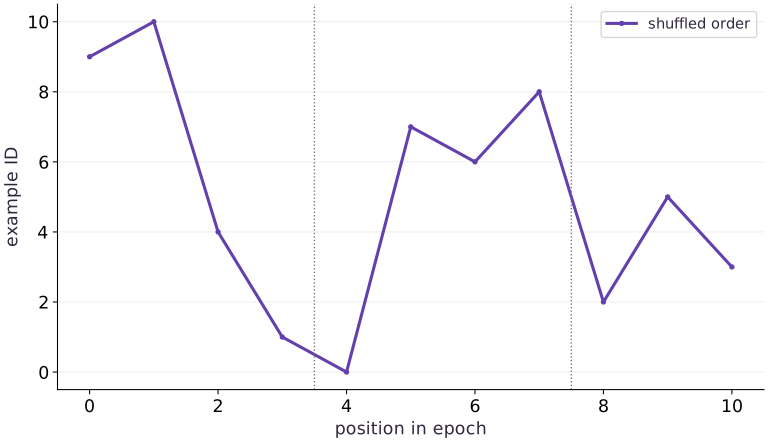
Read the existing sample-ID plot as an ordering check. The height of an ID is not a physical measurement. Compare membership and multiplicities, then inspect exact order where continuation requires it.
Preserve identity across every transformation
The dataset has IDs through . Each ID maps to and , giving a direct alignment reference. Shuffle indices, then use the same indices for IDs, features and labels. Shuffling feature and target arrays separately creates plausible shapes with the wrong learning problem.
An ID can identify an original record even when a transform changes its values. For a real dataset, choose stable identifiers and retain the data revision. Our digest includes shape, dtype and bytes of features and labels. It detects changes to this exact tiny dataset; it is not a substitute for a versioned data source contract.
record identity → shared index → {id,x,y}
shuffle index, not independent x and y arrays
Make epoch ordering a pure decision
epoch_order takes seed and epoch as inputs. SeedSequence([seed,epoch]) supplies a deterministic generator state for that epoch. Reconstructing epoch with the same versions gives the same permutation; epoch is a separate decision. We do not hardcode a specific permutation as a cross-version promise.
A seed alone cannot express how much of an epoch has been consumed. To resume mid-epoch, you also need position or a stateful iterator snapshot. Changing batch size changes how a position measured in batches maps to records. The final recovery lesson saves the actual Grain iterator state and checks the next IDs rather than guessing from step count.
Choose a deliberate policy for the last batch
Eleven observations grouped by four produce lengths ,,. Keeping the final partial batch preserves all examples but changes its shape, which can matter for compilation caching. drop_last instead produces , and omits three examples. Neither policy is automatically correct: choose based on training/evaluation needs and report what was excluded.
Another option pads the last batch to a fixed shape and carries a mask. A mean must then divide by the number of real observations, not padded length. The practice checks this with known labels. Do not introduce artificial repeated examples without accounting for their statistical weight.
11 records → [4] [4] [3]
drop remainder → [4] [4] + 3 omitted
pad/mask → [4] [4] [3 real + 1 masked]
Measure what the stopwatch surrounds
The local perf_counter interval covers shuffling, host indexing and materializing three NumPy batches. It does not include compilation, device execution, storage I/O, decoding or asynchronous transfer. This microsecond-scale toy observation may be dominated by overhead and is not a throughput benchmark.
For a useful pipeline benchmark, first define a representative dataset and transforms. Warm up caches deliberately, measure multiple windows, and report examples per second together with batch shapes, worker settings and storage conditions. Here the useful result is the audited membership and order, not a claim that this sampler is fast.
Shuffling changes order, not dataset membership
Predict before looking: Where does the short final batch begin?
Read the figure
The horizontal axis is position within a shuffled epoch. The vertical axis is the example ID encountered at that position. The line begins with IDs ; its zigzags show a changed ordering, not increases and decreases in loss or example quality.
The dotted separators fall between positions and , and between and . They divide the sequence into batches of sizes , , and . The final, shorter batch contains IDs .
Connect it to the computation
All IDs from through appear once, so shuffling preserves membership while changing order. The final batch is shorter because examples do not divide evenly into groups of . Dropping that batch would omit three examples from this epoch.
The connected segments are a visual aid for following the sequence; an ID halfway between two plotted IDs is not a generated example. For recovery, record the ordering rule and the iterator’s position, so the resumed run consumes the same remaining examples.
Open full-size figureDownload data and provenance
The notebook contains the data experiment, plotting code, and recorded figure output. Rerun it to test your changes.
Where to put & run this code: Work in phases/06-recovery/01-design-an-input-pipeline/code/main.py (or downloaded exercises/recovery-01.py / exercises/recovery-01.ipynb) and execute from the repository root with python3 phases/06-recovery/01-design-an-input-pipeline/code/main.py.
1 Prepare the data and state
Create main.py in your course workspace. Use the tested course environment and add this block first.
# Step 1 — Prepare the data and state: This setup makes the dataset and software assumptions explicit.
import numpy as np
import hashlib
import time
ids = np.arange(11,dtype=np.int64)
features = (ids/10).astype(np.float32)
labels = (2*features-1).astype(np.float32)
def dataset_digest(x,y):
    # Compute deterministic cryptographic digest `digest` for provenance verification.
    digest = hashlib.sha256()
    for array in (x,y):
        # Update state in place with the new values.
        digest.update(str(array.dtype).encode())
        # Update state in place with the new values.
        digest.update(str(array.shape).encode())
        # Update state in place with the new values.
        digest.update(array.tobytes())
    return digest.hexdigest()
fingerprint = dataset_digest(features,labels)
def epoch_order(seed,epoch):
    return np.random.default_rng(np.random.SeedSequence([seed,epoch])).permutation(len(ids))
Code building blocks in this step
np.arange(...)— Callnp.arangewith your updated parameters or inputs from this lesson's workspace.astype(...)— Callastypewith your updated parameters or inputs from this lesson's workspace.
This setup makes the dataset and software assumptions explicit. No external dataset or accelerator is required.
2 Build the pipeline or state transition
Append this block to the same file; follow the named state objects through each function.
# Step 2 — Build the pipeline or state transition: The function boundaries expose which inputs determine the next...
def make_batches(seed,epoch,batch_size=4,drop_last=False):
    # Guard input contract (`batch_size <= 0`) and fail fast if violated.
    if batch_size <= 0:
        raise ValueError("batch_size must be positive")
    order = epoch_order(seed,epoch)
    for start in range(0,len(order),batch_size):
        chosen = order[start:start+batch_size]
        if drop_last and len(chosen) < batch_size:
            break
        # Execute `yield {"id":ids[chosen],"x":features[chosen],"y":labels[chosen]}`.
        yield {"id":ids[chosen],"x":features[chosen],"y":labels[chosen]}
start_time = time.perf_counter()
batches = list(make_batches(seed=17,epoch=0))
elapsed = time.perf_counter()-start_time
# Combine or mask array elements to form `seen`.
seen = np.concatenate([b["id"] for b in batches])
Code building blocks in this step
make_batches(...)— Callmake_batcheswith your updated parameters or inputs from this lesson's workspace.contract(...)— Callcontractwith your updated parameters or inputs from this lesson's workspace.
The function boundaries expose which inputs determine the next output and which state must be preserved.
3 Run the comparison
Append the checks, save main.py and run python main.py. Predict what should agree before running.
# Step 3 — Run the comparison: The comparison checks the next behavior, not merely whether a save...
assert [len(b["id"]) for b in batches] == [4,4,3]
# Execute `np.testing.assert_array_equal(np.sort(seen),ids)`
np.testing.assert_array_equal(np.sort(seen),ids)
assert len(np.unique(seen)) == len(ids)
for batch in batches:
    np.testing.assert_allclose(batch["y"],2*batch["x"]-1,atol=1e-7)
# Combine or mask array elements to form `repeated`.
repeated = np.concatenate([b["id"] for b in make_batches(17,0)])
# Execute `np.testing.assert_array_equal(seen,repeated)`
np.testing.assert_array_equal(seen,repeated)
print("Batch sizes:",[len(b["id"]) for b in batches])
print("Example order:",seen.tolist())
print("Preparation seconds (local observation only):",elapsed)
print("Dataset SHA256:",fingerprint)
Code building blocks in this step
jnp.allclose(actual, expected, rtol=..., atol=...)— Checks that two arrays match elementwise within floating-point tolerance.
The comparison checks the next behavior, not merely whether a save call succeeded.
View the cumulative build in main.py
These blocks append in order to the same file.
# Step 1 — Prepare the data and state: This setup makes the dataset and software assumptions explicit.
import numpy as np
import hashlib
import time
ids = np.arange(11,dtype=np.int64)
features = (ids/10).astype(np.float32)
labels = (2*features-1).astype(np.float32)
def dataset_digest(x,y):
    # Compute deterministic cryptographic digest `digest` for provenance verification.
    digest = hashlib.sha256()
    for array in (x,y):
        # Update state in place with the new values.
        digest.update(str(array.dtype).encode())
        # Update state in place with the new values.
        digest.update(str(array.shape).encode())
        # Update state in place with the new values.
        digest.update(array.tobytes())
    return digest.hexdigest()
fingerprint = dataset_digest(features,labels)
def epoch_order(seed,epoch):
    return np.random.default_rng(np.random.SeedSequence([seed,epoch])).permutation(len(ids))

# Step 2 — Build the pipeline or state transition: The function boundaries expose which inputs determine the next...
def make_batches(seed,epoch,batch_size=4,drop_last=False):
    # Guard input contract (`batch_size <= 0`) and fail fast if violated.
    if batch_size <= 0:
        raise ValueError("batch_size must be positive")
    order = epoch_order(seed,epoch)
    for start in range(0,len(order),batch_size):
        chosen = order[start:start+batch_size]
        if drop_last and len(chosen) < batch_size:
            break
        # Execute `yield {"id":ids[chosen],"x":features[chosen],"y":labels[chosen]}`.
        yield {"id":ids[chosen],"x":features[chosen],"y":labels[chosen]}
start_time = time.perf_counter()
batches = list(make_batches(seed=17,epoch=0))
elapsed = time.perf_counter()-start_time
# Combine or mask array elements to form `seen`.
seen = np.concatenate([b["id"] for b in batches])

# Step 3 — Run the comparison: The comparison checks the next behavior, not merely whether a save...
assert [len(b["id"]) for b in batches] == [4,4,3]
# Execute `np.testing.assert_array_equal(np.sort(seen),ids)`
np.testing.assert_array_equal(np.sort(seen),ids)
assert len(np.unique(seen)) == len(ids)
for batch in batches:
    np.testing.assert_allclose(batch["y"],2*batch["x"]-1,atol=1e-7)
# Combine or mask array elements to form `repeated`.
repeated = np.concatenate([b["id"] for b in make_batches(17,0)])
# Execute `np.testing.assert_array_equal(seen,repeated)`
np.testing.assert_array_equal(seen,repeated)
print("Batch sizes:",[len(b["id"]) for b in batches])
print("Example order:",seen.tolist())
print("Preparation seconds (local observation only):",elapsed)
print("Dataset SHA256:",fingerprint)
Run the example
python3 phases/06-recovery/01-design-an-input-pipeline/code/main.pyAbout this command
This shortcut uses an activated macOS/Linux course environment in the repository folder. For Windows, use the explicit interpreter command in “Setup help” above. The script includes worked examples and reference solutions.
Inspect the complete assembled example
# Step 1 — Prepare the data and state: This setup makes the dataset and software assumptions explicit.
import numpy as np
import hashlib
import time
ids = np.arange(11,dtype=np.int64)
features = (ids/10).astype(np.float32)
labels = (2*features-1).astype(np.float32)
def dataset_digest(x,y):
    # Compute deterministic cryptographic digest `digest` for provenance verification.
    digest = hashlib.sha256()
    for array in (x,y):
        # Update state in place with the new values.
        digest.update(str(array.dtype).encode())
        # Update state in place with the new values.
        digest.update(str(array.shape).encode())
        # Update state in place with the new values.
        digest.update(array.tobytes())
    return digest.hexdigest()
fingerprint = dataset_digest(features,labels)
def epoch_order(seed,epoch):
    return np.random.default_rng(np.random.SeedSequence([seed,epoch])).permutation(len(ids))

# Step 2 — Build the pipeline or state transition: The function boundaries expose which inputs determine the next...
def make_batches(seed,epoch,batch_size=4,drop_last=False):
    # Guard input contract (`batch_size <= 0`) and fail fast if violated.
    if batch_size <= 0:
        raise ValueError("batch_size must be positive")
    order = epoch_order(seed,epoch)
    for start in range(0,len(order),batch_size):
        chosen = order[start:start+batch_size]
        if drop_last and len(chosen) < batch_size:
            break
        # Execute `yield {"id":ids[chosen],"x":features[chosen],"y":labels[chosen]}`.
        yield {"id":ids[chosen],"x":features[chosen],"y":labels[chosen]}
start_time = time.perf_counter()
batches = list(make_batches(seed=17,epoch=0))
elapsed = time.perf_counter()-start_time
# Combine or mask array elements to form `seen`.
seen = np.concatenate([b["id"] for b in batches])

# Step 3 — Run the comparison: The comparison checks the next behavior, not merely whether a save...
assert [len(b["id"]) for b in batches] == [4,4,3]
# Execute `np.testing.assert_array_equal(np.sort(seen),ids)`
np.testing.assert_array_equal(np.sort(seen),ids)
assert len(np.unique(seen)) == len(ids)
for batch in batches:
    np.testing.assert_allclose(batch["y"],2*batch["x"]-1,atol=1e-7)
# Combine or mask array elements to form `repeated`.
repeated = np.concatenate([b["id"] for b in make_batches(17,0)])
# Execute `np.testing.assert_array_equal(seen,repeated)`
np.testing.assert_array_equal(seen,repeated)
print("Batch sizes:",[len(b["id"]) for b in batches])
print("Example order:",seen.tolist())
print("Preparation seconds (local observation only):",elapsed)
print("Dataset SHA256:",fingerprint)
Expected result: Batch sizes ; eleven distinct IDs exactly once, aligned labels and repeated order. Preparation time and digest are local observed values.
Recorded reference execution
Reference output captured from executing the complete lesson script (code/main.py) and its assertions in the course CPU environment.
Batch sizes: [4, 4, 3]
Example order: [9, 10, 4, 1, 0, 7, 6, 8, 2, 5, 3]
Preparation seconds (local observation only): 0.00836424995213747
Dataset SHA256: 1a81451a8fb32a1bf0ad6307ea19198153ab1603b37174c76c4d498e343e6892
Batch sizes: [4, 4, 3]
Example order: [9, 10, 4, 1, 0, 7, 6, 8, 2, 5, 3]
Preparation seconds (local observation only): 1.874985173344612e-05
Dataset SHA256: 1a81451a8fb32a1bf0ad6307ea19198153ab1603b37174c76c4d498e343e6892
Epoch one order: [4, 0, 5, 10, 6, 2, 1, 9, 7, 3, 8]
Omitted IDs: [2, 3, 5]
Copy preserves fingerprint; reordered source and edited labels invalidate it.
PASS: recovery-01
Download execution record · The notebook includes executed cells and figure outputs. Compare your run with these values; timings depend on the machine.
Compare epochs without a hard-coded order
# Experiment — Compare epochs without a hard-coded order: Coverage is an invariant; ordering is a deterministic...
epoch_one = np.concatenate([b["id"] for b in make_batches(17,1)])
# Execute `np.testing.assert_array_equal(np.sort(epoch_one),ids)`
np.testing.assert_array_equal(np.sort(epoch_one),ids)
assert not np.array_equal(epoch_one,seen)
print("Epoch one order:",epoch_one.tolist())
Expected: Same eleven IDs exactly once, different ordering for this tested seed/dataset.
Coverage is an invariant; ordering is a deterministic epoch-specific output. A changed order alone does not imply data loss.
Expose dropped records
# Experiment — Expose dropped records: Logging just the number of batches hides exclusions.
dropped = list(make_batches(17,0,drop_last=True))
# Combine or mask array elements to form `dropped_ids`.
dropped_ids = np.concatenate([b["id"] for b in dropped])
assert len(dropped_ids)==8
omitted = np.setdiff1d(ids,dropped_ids)
assert len(omitted)==3
print("Omitted IDs:",omitted.tolist())
Expected: Eight retained IDs and three explicitly identified omissions.
Logging just the number of batches hides exclusions. An ID audit exposes which observations were not processed.
Make it yours
Where to put your code: Append your solution at the bottom of phases/06-recovery/01-design-an-input-pipeline/code/main.py (or inside the Make it yours cell of exercises/recovery-01.ipynb) and run python3 phases/06-recovery/01-design-an-input-pipeline/code/main.py to verify your prediction before opening the reference solution.
Pad the final three-label batch to four elements with zero. Show that an unmasked mean differs, then derive the correct masked mean.
Show a writing guide and starter scaffold
How to write this exercise code: step-by-step recipe & starter scaffold
1. Key functions & syntax to use:
x.sum(axis=...) / x.mean(axis=..., keepdims=...)— Reduces values along the namedaxis(the axis you name is collapsed unlesskeepdims=True).jnp.allclose(actual, expected, rtol=..., atol=...)— Checks that two arrays match elementwise within floating-point tolerance.
2. Step-by-step implementation plan:
- Combine or mask array elements to form
padded_labels. - Aggregate array values to compute
masked.
# Exercise solution: Pad the final three-label batch to four elements with zero.
last = ...  # TODO: compute last
# Combine or mask array elements to form `padded_labels`.
padded_labels = np.pad(...)  # TODO: compute padded_labels
mask = np.array(...)  # TODO: compute mask
# Aggregate array values to compute `masked`.
masked = ...  # TODO: compute masked
np.testing.assert_allclose(masked,last.mean(),atol = ...  # TODO: compute np.testing.assert_allclose(masked,last.mean(),atol
assert not np.isclose(padded_labels.mean(),last.mean())  # TODO: complete assertion check
Reveal the reference solution
# Exercise solution: Pad the final three-label batch to four elements with zero.
last = batches[-1]["y"]
# Combine or mask array elements to form `padded_labels`.
padded_labels = np.pad(last,(0,4-len(last)))
mask = np.array([1]*len(last)+[0]*(4-len(last)),dtype=np.float32)
# Aggregate array values to compute `masked`.
masked = (padded_labels*mask).sum()/mask.sum()
np.testing.assert_allclose(masked,last.mean(),atol=1e-7)
assert not np.isclose(padded_labels.mean(),last.mean())
Fingerprint meaning, not just a row count
Transfer
Reorder features and labels together, then change one label without changing any shape. Verify that both changes alter the dataset fingerprint while copying unchanged arrays preserves it. Explain why a new iterator order differs from a changed source dataset.
Show a writing guide and starter scaffold
How to write this practice solution: step-by-step recipe & starter scaffold
1. Key functions & syntax to use:
count(...)— Callcountwith your updated parameters or inputs from this lesson's workspace.dataset_digest(...)— Calldataset_digestwith your updated parameters or inputs from this lesson's workspace.assert condition— Verify that the observed output shape, status, or numerical value satisfies the contract.
2. Step-by-step implementation plan:
- Accumulate the next contribution into
changed_labels[0].
# Fingerprint meaning, not just a row count (Transfer): A sampler permutation can be reproduced against a fixed source.
same = dataset_digest(...)  # TODO: compute same
reversed_digest = dataset_digest(...)  # TODO: compute reversed_digest
# Accumulate the next contribution into `changed_labels[0]`.
changed_labels = labels.copy(...)  # TODO: compute changed_labels
changed_labels[0]+=0.1
changed_digest = dataset_digest(...)  # TODO: compute changed_digest
assert same  # TODO: complete assertion check
assert reversed_digest  # TODO: complete assertion check
print('Copy preserves fingerprint; reordered source and edited labels invalidate it.')
Show a hint
The fingerprint includes dtype, shape and array bytes.
Reveal reference solution and reasoning
# Fingerprint meaning, not just a row count (Transfer): A sampler permutation can be reproduced against a fixed source.
same=dataset_digest(features.copy(),labels.copy())
reversed_digest=dataset_digest(features[::-1],labels[::-1])
# Accumulate the next contribution into `changed_labels[0]`.
changed_labels=labels.copy()
changed_labels[0]+=0.1
changed_digest=dataset_digest(features,changed_labels)
assert same==fingerprint
assert reversed_digest!=fingerprint and changed_digest!=fingerprint
print('Copy preserves fingerprint; reordered source and edited labels invalidate it.')
A sampler permutation can be reproduced against a fixed source. Reordering the source changes which example an index identifies, so restoring only the sampler position would no longer have the same meaning.
Catch a feature/label shuffle mismatch
Challenge
Reverse the target order inside a batch but keep features unchanged. Reject this batch with an independent alignment check, then repair shared indexing.
Show a writing guide and starter scaffold
How to write this practice solution: step-by-step recipe & starter scaffold
1. Key functions & syntax to use:
jnp.allclose(actual, expected, rtol=..., atol=...)— Checks that two arrays match elementwise within floating-point tolerance.
2. Step-by-step implementation plan:
- Accumulate the next contribution into
changed_labels[0].
# Catch a feature/label shuffle mismatch (Challenge): Wrong alignment can preserve shapes and numeric ranges.
batch = ...  # TODO: compute batch
wrong_labels = ...  # TODO: compute wrong_labels
assert not np.allclose(wrong_labels,2*batch["x"]-1)  # TODO: complete assertion check
fixed = ...  # TODO: compute fixed
np.testing.assert_allclose(fixed,2*batch["x"]-1,atol=1e-7)
# Accumulate the next contribution into `changed_labels[0]`.
changed_labels = labels.copy(...)  # TODO: compute changed_labels
changed_labels[0]+=1
assert dataset_digest(features,changed_labels)  # TODO: complete assertion check
Show a hint
The known relation provides a stronger oracle than a falling training loss.
Reveal reference solution and reasoning
# Catch a feature/label shuffle mismatch (Challenge): Wrong alignment can preserve shapes and numeric ranges.
batch = batches[0]
wrong_labels = batch["y"][::-1]
assert not np.allclose(wrong_labels,2*batch["x"]-1)
fixed = labels[batch["id"]]
np.testing.assert_allclose(fixed,2*batch["x"]-1,atol=1e-7)
# Accumulate the next contribution into `changed_labels[0]`.
changed_labels = labels.copy()
changed_labels[0]+=1
assert dataset_digest(features,changed_labels)!=fingerprint
Wrong alignment can preserve shapes and numeric ranges. Keep common record IDs through transformations, and record dataset identity so restoring an old cursor does not silently select new content.
Diagnose the result
Wrong alignment can preserve shapes and numeric ranges. Keep common record IDs through transformations, and record dataset identity so restoring an old cursor does not silently select new content.
Carry forward
- Preserve identity across every transformation
- Make epoch ordering a pure decision
- Choose a deliberate policy for the last batch
- Measure what the stopwatch surrounds
Keep your evidence
Keep the exact epoch/example ID order, uneven final-batch sizes, hand-derived masked versus unmasked label mean, changed seed order and duplicate/drop audit.
Save your modified code, its output, and an explanation of your prediction. Checkpoint answers and exercise evidence are tracked separately.
Saved in this browser. Export or back up your portfolio anytime in My learning.
Verified on local CPU. Stage to a Cloud TPU VM via Cloud TPU setup to record accelerator execution receipts (TODO: add automated Cloud TPU CI execution receipts).