 JAX Pathways
Phase 06 / Data & checkpoint recovery
Track experiments and lineage with MLflow
Revision v0.7.0 · Updated since your last visit. Review the changes; your progress is saved.
Lesson · about 70 minutes · CPU practice
Track, retrieve and compare two JAX experiments using explicit data identity, metric steps and downloaded model artifacts.
Phase study guide: preparation, milestones and project evidence
Before you start
Before this: Asynchronous checkpoints and failure boundaries
Hardware: CPU
Setup help: Python, notebook, or Cloud TPU VM
Use the tested CPU packages (the recorded environment uses Python 3.14.3). Other Python versions and accelerator environments require separate checks. The optional Cloud TPU specialization explains the target-specific execution boundaries. Logical CPU devices practice partitioning; they do not simulate TPU performance.
Download the repository ZIP or use your existing checkout. Extract it and open a terminal in the folder containing requirements-cpu.txt. The beginner ZIP is separate; these lessons use the full repository folder.
python3 -m venv .venv
source .venv/bin/activate
python -m pip install -r requirements-cpu.txtpy -3 -m venv .venv
.\.venv\Scripts\python.exe -m pip install -r requirements-cpu.txtAfter activation, run the complete worked example from that same folder:
python phases/06-recovery/06-track-experiments-and-lineage-with-mlflow/code/main.py.\.venv\Scripts\python.exe phases/06-recovery/06-track-experiments-and-lineage-with-mlflow/code/main.pyFor an incremental build, create main.py in your own practice folder, append each build block in order, and run python main.py with this environment active. Keep that file separate from the downloaded reference solution.
Download this lesson’s notebook. Open it with a Python kernel using the course environment. Run cells from the top after restarting the kernel; experiments depend on earlier definitions.
For local Jupyter, first install the course requirements using the Local Python steps, then use your environment’s Python to start Jupyter:
python -m pip install jupyterlab
python -m jupyter lab.\.venv\Scripts\python.exe -m pip install jupyterlab
.\.venv\Scripts\python.exe -m jupyter labSelect the downloaded recovery-06.ipynb file in JupyterLab. The notebook contains reference solutions; make your prediction and attempt each practice task before opening them. Restart the kernel before changing logical device setup.
The worked reference for this lesson is CPU-validated. Some references explicitly configure logical CPU devices; setting JAX_PLATFORMS does not adapt them to a TPU. Follow the execution matrix and reviewed multi-host example before attempting a target run.
For accelerator preparation, study TPU setup, observed runtime receipts, checkpointed jobs and precision and retained traces. These target paths remain unqualified on physical TPU hardware until an actual receipt is recorded. Cloud provisioning is optional for CPU learning.
Check: Validation MSE by learning rate: {0.02: 0.1199446..., 0.15: 5.04947...e-10} Verified 30 logged steps per run; selected and reloaded the better validation candidate.
Revisit the guided CPU setup · Open 19: TPU Setup. Package instructions are CPU instructions; Windows and accelerator environments need their own validation.
What you will be able to do
- Decide what makes runs comparable
- Give data and code an identity
- Use a database and a deliberate artifact location
- Log at a useful boundary
The problem
You ran two training configurations yesterday. Today you remember which curve looked better, but not which dataset, preprocessing or checkpoint produced it. Let’s make the comparison reproducible: train two small JAX models, log them to a real local MLflow database, then retrieve the selected run and its artifact.
The idea
A tracker is useful when a plotted point leads back to the data, source, configuration and artifact that produced it. A run name or best label is not enough to identify a deployable checkpoint or reproduce its evaluation.
Make every metric point traceable
Two runs may log validation loss at step 100 using different splits or denominators. The matching metric name and step do not make the values comparable. Record what was averaged and which examples contributed.
Link a selection decision to the precise checkpoint and evaluation. A run often contains many checkpoints, so selecting a run is not the same as selecting weights. Keep the model artifact's identity even if a dashboard display name changes.
The MLflow curves are recorded observations. Read configuration and metric definitions before ranking them. Tracking preserves a comparison's evidence; it cannot repair incompatible evaluation contracts. The same principle applies to Weights & Biases and other experiment trackers.
Decide what makes runs comparable
We reuse a known regression problem so the engineering does not hide behind model complexity. Training inputs and validation inputs are separate. The target is , and the learned parameters are a weight and bias. Both runs start from zero, use the same examples and receive updates. Only the learning rate changes. Log those choices as parameters. Never compare two metrics with the same name when one is a sum and the other a mean, or one was measured before the update and the other afterward.
Give data and code an identity
A path such as data.csv is a location, not a version. Hash the actual bytes, record the split IDs, and preserve preprocessing configuration. For this tiny fixture the hash covers the training arrays; a real dataset manifest should additionally identify schema, split/group rules and transformations. A Git commit is useful for clean code, but uncommitted edits require a source hash or captured diff. A checkpoint and an MLflow run should refer to the same identities; neither replaces the other.
Use a database and a deliberate artifact location
The companion creates a temporary SQLite database and local artifact directory. SQLite stores run metadata; the artifacts contain the learned coefficients and preprocessing note. MlflowClient reads the records back, so a print statement is not our only evidence that logging occurred. These local examples use MLflow 3.16.1. A shared server needs supported database storage, artifact access, authentication, backup and retention; do not expose this local exercise as a public service.
From the course workspace, install the tested CPU dependencies
# Run from the course workspace, install the tested cpu dependencies using the course Python environment
python -m pip install -r requirements-cpu.txt
Expected:
MLflow 3.16.1 and the course numerical packages are installed in the selected environment.
Log at a useful boundary
JAX dispatch is asynchronous. Converting a scalar loss to a Python float waits for it; logging every update is acceptable for this small demonstration but can slow a real training loop. Choose a reporting cadence, log the completed step, and separate checkpoint cadence from logging cadence. Here every training MSE is measured after its update. The validation MSE is computed on a fixed four-row set, with a second Python calculation checking the denominator.
Retrieve before trusting the dashboard
The checker fetches all thirty metric steps, compares their stored values with the actual trajectory, checks the data tag and queries runs ordered by validation MSE. The faster-learning candidate wins this fixture. That is validation selection, not a final test result or a universal learning-rate recommendation. Finally we download the selected artifact and inspect its coefficients. Autologging can help supported frameworks, but explicit logging makes the boundary of this custom JAX loop visible.
Continue into a real registry
Run the connected project lab to log two pyfunc models, register immutable versions, move a champion alias, reload the selected version and retain prompt/trace evidence. An alias is a mutable lookup; resolve it to a version for a deployment record. Setting champion does not roll out a service and MLflow does not enforce this course’s quality policy for you.
Keep the local database and artifacts in a new output folder
# Run keep the local database and artifacts in a new output folder using the course Python environment
python projects/engineering-release/mlflow_lab.py --output ./engineering-run
Expected:
Two training runs, two registered versions, one prompt version, one three-span trace and a model.json artifact are written. Use a fresh folder for another independent run.
Compare the runs that MLflow actually recorded
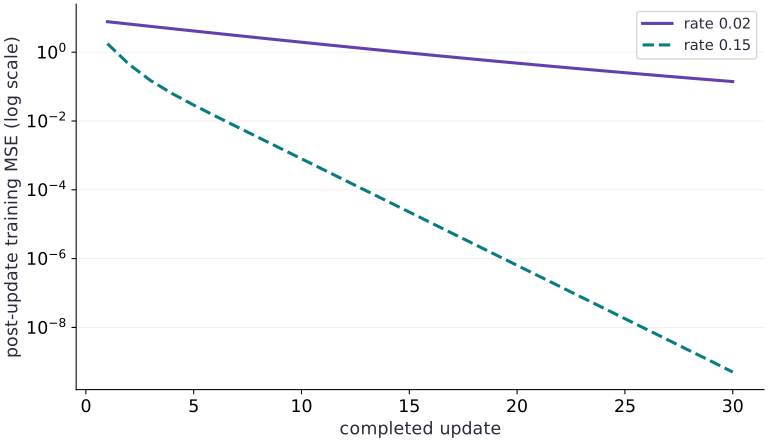
Predict before looking: Do the two runs improve at the same rate, and can these training curves select a release by themselves?
Read the figure
The horizontal axis counts completed updates, from to . The vertical axis is post-update training MSE on a logarithmic scale: equal vertical distances represent ratios. The rate curve drops more quickly and ends far below the rate curve. The companion independently retrieves every plotted metric from MLflow. The final validation errors are about and , respectively; they are not plotted as a fabricated validation trajectory.
Connect it to the computation
The comparison is controlled by shared data, initialization and update budget. It illustrates tracking and retrieval of evidence, not a general optimizer ranking. A separately held-out test and release checks still belong after validation selection.
Open full-size figureDownload data and provenance
The notebook contains the data experiment, plotting code, and recorded figure output. Rerun it to test your changes.
Where to put & run this code: Work in phases/06-recovery/06-track-experiments-and-lineage-with-mlflow/code/main.py (or downloaded exercises/recovery-06.py / exercises/recovery-06.ipynb) and execute from the repository root with python3 phases/06-recovery/06-track-experiments-and-lineage-with-mlflow/code/main.py.
1 Step 1: Set up imports and input tensors
Import the required JAX modules and define the initial inputs for track experiments and lineage with mlflow.
import os
# Configure environment variable before initializing the runtime.
os.environ['MLFLOW_DISABLE_AGENT_HINT'] = '1'
# Configure environment variable before initializing the runtime.
os.environ['MLFLOW_ENABLE_TELEMETRY'] = 'false'
# Import required JAX, NumPy, and standard-library modules.
import hashlib, json, tempfile
from pathlib import Path
import numpy as np
Establishing explicit input shapes and dtypes first makes the downstream transformation contract deterministic.
2 Step 2: Apply the core JAX transformation
Write the core computation and transformation step over the initialized inputs.
import jax
import jax.numpy as jnp
import mlflow
from mlflow import MlflowClient
x = jnp.array([-2., -1., 0., 1., 2.])
y = 2 * x + 1
Code building blocks in this step
jnp.array(values, dtype=...)— Constructs an immutable device-backed JAX array from Python/NumPy values.
This stage executes the primary numerical transformation and binds the intermediate outputs.
3 Step 3: Verify shapes and numerical invariants
Check that the resulting arrays satisfy the expected shape, dtype, and numerical tolerances.
vx = jnp.array([-1.5, -.5, .5, 1.5])
vy = 2 * vx + 1
# Aggregate array values to compute `objective`.
objective = lambda p: jnp.mean((p[0] * x + p[1] - y) ** 2)
# Differentiate the objective to obtain `update` via automatic differentiation.
update = jax.jit(lambda p, rate: p - rate * jax.grad(objective)(p))
# Convert `data_hash` to a host NumPy array for inspection or verification.
data_hash = hashlib.sha256(np.asarray(x).tobytes() + np.asarray(y).tobytes()).hexdigest()
curves, validation, run_ids = [], [], []
# Create an isolated temporary directory to run and inspect artifacts safely:
with tempfile.TemporaryDirectory(prefix='tracking-lesson-') as folder:
    root = Path(folder)
    mlflow.set_tracking_uri('sqlite:///' + str(root / 'tracking.db'))
    client = MlflowClient()
    experiment = client.create_experiment('two-rates', artifact_location=(root / 'artifacts').as_uri())
    for rate in [.02, .15]:
        # Allocate initialized array `p` with the specified shape and dtype.
        p = jnp.zeros(2)
        history = []
        with mlflow.start_run(experiment_id=experiment) as run:
            mlflow.log_params({'rate': rate, 'updates': 30})
            # Check which hardware backend (`cpu`, `gpu`, or `tpu`) JAX selected for ``.
            mlflow.set_tags({'data_sha256': data_hash, 'jax': jax.__version__, 'backend': jax.default_backend(), 'metric_boundary': 'after update'})
            for step in range(1, 31):
                p = update(p, rate)
                metric = float(objective(p))
                history.append(metric)
                mlflow.log_metric('train_mse', metric, step=step)
            held = float(jnp.mean((p[0] * vx + p[1] - vy) ** 2))
            # Independent host arithmetic checks what the reported validation metric means.
            oracle = sum((float(p[0]) * t + float(p[1]) - (2 * t + 1)) ** 2 for t in [-1.5, -.5, .5, 1.5]) / 4
            assert abs(held - oracle) < 1e-6
            mlflow.log_metric('validation_mse', held, step=30)
            mlflow.log_dict({'weight': float(p[0]), 'bias': float(p[1]), 'preprocessing': 'one unscaled scalar feature'}, 'model.json')
            run_ids.append(run.info.run_id)
        curves.append(history)
        validation.append(held)
        saved = client.get_metric_history(run_ids[-1], 'train_mse')
        assert [m.step for m in saved] == list(range(1, 31))
        # Execute `np.testing.assert_allclose([m.value for m in saved], history`
        np.testing.assert_allclose([m.value for m in saved], history)
        assert client.get_run(run_ids[-1]).data.tags['data_sha256'] == data_hash
    selected = client.search_runs([experiment], order_by=['metrics.validation_mse ASC'])[0]
    assert selected.info.run_id == run_ids[int(np.argmin(validation))]
    artifact = client.download_artifacts(selected.info.run_id, 'model.json')
    restored = json.loads(Path(artifact).read_text())
    assert abs(restored['weight'] - 2) < .001 and abs(restored['bias'] - 1) < .001
Code building blocks in this step
jnp.array(values, dtype=...)— Constructs an immutable device-backed JAX array from Python/NumPy values.jnp.zeros / jnp.ones(shape, dtype=...)— Allocates a tensor of the givenshapeinitialized with constants.x.sum(axis=...) / x.mean(axis=..., keepdims=...)— Reduces values along the namedaxis(the axis you name is collapsed unlesskeepdims=True).jnp.allclose(actual, expected, rtol=..., atol=...)— Checks that two arrays match elementwise within floating-point tolerance.
These assertions lock in the exact numerical contract before you run the full experiment and variations.
View the cumulative build in main.py
These blocks append in order to the same file.
import os
# Configure environment variable before initializing the runtime.
os.environ['MLFLOW_DISABLE_AGENT_HINT'] = '1'
# Configure environment variable before initializing the runtime.
os.environ['MLFLOW_ENABLE_TELEMETRY'] = 'false'
# Import required JAX, NumPy, and standard-library modules.
import hashlib, json, tempfile
from pathlib import Path
import numpy as np

import jax
import jax.numpy as jnp
import mlflow
from mlflow import MlflowClient
x = jnp.array([-2., -1., 0., 1., 2.])
y = 2 * x + 1

vx = jnp.array([-1.5, -.5, .5, 1.5])
vy = 2 * vx + 1
# Aggregate array values to compute `objective`.
objective = lambda p: jnp.mean((p[0] * x + p[1] - y) ** 2)
# Differentiate the objective to obtain `update` via automatic differentiation.
update = jax.jit(lambda p, rate: p - rate * jax.grad(objective)(p))
# Convert `data_hash` to a host NumPy array for inspection or verification.
data_hash = hashlib.sha256(np.asarray(x).tobytes() + np.asarray(y).tobytes()).hexdigest()
curves, validation, run_ids = [], [], []
# Create an isolated temporary directory to run and inspect artifacts safely:
with tempfile.TemporaryDirectory(prefix='tracking-lesson-') as folder:
    root = Path(folder)
    mlflow.set_tracking_uri('sqlite:///' + str(root / 'tracking.db'))
    client = MlflowClient()
    experiment = client.create_experiment('two-rates', artifact_location=(root / 'artifacts').as_uri())
    for rate in [.02, .15]:
        # Allocate initialized array `p` with the specified shape and dtype.
        p = jnp.zeros(2)
        history = []
        with mlflow.start_run(experiment_id=experiment) as run:
            mlflow.log_params({'rate': rate, 'updates': 30})
            # Check which hardware backend (`cpu`, `gpu`, or `tpu`) JAX selected for ``.
            mlflow.set_tags({'data_sha256': data_hash, 'jax': jax.__version__, 'backend': jax.default_backend(), 'metric_boundary': 'after update'})
            for step in range(1, 31):
                p = update(p, rate)
                metric = float(objective(p))
                history.append(metric)
                mlflow.log_metric('train_mse', metric, step=step)
            held = float(jnp.mean((p[0] * vx + p[1] - vy) ** 2))
            # Independent host arithmetic checks what the reported validation metric means.
            oracle = sum((float(p[0]) * t + float(p[1]) - (2 * t + 1)) ** 2 for t in [-1.5, -.5, .5, 1.5]) / 4
            assert abs(held - oracle) < 1e-6
            mlflow.log_metric('validation_mse', held, step=30)
            mlflow.log_dict({'weight': float(p[0]), 'bias': float(p[1]), 'preprocessing': 'one unscaled scalar feature'}, 'model.json')
            run_ids.append(run.info.run_id)
        curves.append(history)
        validation.append(held)
        saved = client.get_metric_history(run_ids[-1], 'train_mse')
        assert [m.step for m in saved] == list(range(1, 31))
        # Execute `np.testing.assert_allclose([m.value for m in saved], history`
        np.testing.assert_allclose([m.value for m in saved], history)
        assert client.get_run(run_ids[-1]).data.tags['data_sha256'] == data_hash
    selected = client.search_runs([experiment], order_by=['metrics.validation_mse ASC'])[0]
    assert selected.info.run_id == run_ids[int(np.argmin(validation))]
    artifact = client.download_artifacts(selected.info.run_id, 'model.json')
    restored = json.loads(Path(artifact).read_text())
    assert abs(restored['weight'] - 2) < .001 and abs(restored['bias'] - 1) < .001
Run the example
python3 phases/06-recovery/06-track-experiments-and-lineage-with-mlflow/code/main.pyAbout this command
This shortcut uses an activated macOS/Linux course environment in the repository folder. For Windows, use the explicit interpreter command in “Setup help” above. The script includes worked examples and reference solutions.
Inspect the complete assembled example
# Track experiments and lineage with MLflow: A tracker is useful when a plotted point leads back to the data,...
import os
# Configure environment variable before initializing the runtime.
os.environ['MLFLOW_DISABLE_AGENT_HINT'] = '1'
# Configure environment variable before initializing the runtime.
os.environ['MLFLOW_ENABLE_TELEMETRY'] = 'false'
# Import required JAX, NumPy, and standard-library modules.
import hashlib, json, tempfile
from pathlib import Path
import numpy as np
import jax
import jax.numpy as jnp
import mlflow
from mlflow import MlflowClient
x = jnp.array([-2., -1., 0., 1., 2.])
y = 2 * x + 1
vx = jnp.array([-1.5, -.5, .5, 1.5])
vy = 2 * vx + 1
# Aggregate array values to compute `objective`.
objective = lambda p: jnp.mean((p[0] * x + p[1] - y) ** 2)
# Differentiate the objective to obtain `update` via automatic differentiation.
update = jax.jit(lambda p, rate: p - rate * jax.grad(objective)(p))
# Convert `data_hash` to a host NumPy array for inspection or verification.
data_hash = hashlib.sha256(np.asarray(x).tobytes() + np.asarray(y).tobytes()).hexdigest()
curves, validation, run_ids = [], [], []
# Create an isolated temporary directory to run and inspect artifacts safely:
with tempfile.TemporaryDirectory(prefix='tracking-lesson-') as folder:
    root = Path(folder)
    mlflow.set_tracking_uri('sqlite:///' + str(root / 'tracking.db'))
    client = MlflowClient()
    experiment = client.create_experiment('two-rates', artifact_location=(root / 'artifacts').as_uri())
    for rate in [.02, .15]:
        # Allocate initialized array `p` with the specified shape and dtype.
        p = jnp.zeros(2)
        history = []
        with mlflow.start_run(experiment_id=experiment) as run:
            mlflow.log_params({'rate': rate, 'updates': 30})
            # Check which hardware backend (`cpu`, `gpu`, or `tpu`) JAX selected for ``.
            mlflow.set_tags({'data_sha256': data_hash, 'jax': jax.__version__, 'backend': jax.default_backend(), 'metric_boundary': 'after update'})
            for step in range(1, 31):
                p = update(p, rate)
                metric = float(objective(p))
                history.append(metric)
                mlflow.log_metric('train_mse', metric, step=step)
            held = float(jnp.mean((p[0] * vx + p[1] - vy) ** 2))
            # Independent host arithmetic checks what the reported validation metric means.
            oracle = sum((float(p[0]) * t + float(p[1]) - (2 * t + 1)) ** 2 for t in [-1.5, -.5, .5, 1.5]) / 4
            assert abs(held - oracle) < 1e-6
            mlflow.log_metric('validation_mse', held, step=30)
            mlflow.log_dict({'weight': float(p[0]), 'bias': float(p[1]), 'preprocessing': 'one unscaled scalar feature'}, 'model.json')
            run_ids.append(run.info.run_id)
        curves.append(history)
        validation.append(held)
        saved = client.get_metric_history(run_ids[-1], 'train_mse')
        assert [m.step for m in saved] == list(range(1, 31))
        # Execute `np.testing.assert_allclose([m.value for m in saved], history`
        np.testing.assert_allclose([m.value for m in saved], history)
        assert client.get_run(run_ids[-1]).data.tags['data_sha256'] == data_hash
    selected = client.search_runs([experiment], order_by=['metrics.validation_mse ASC'])[0]
    assert selected.info.run_id == run_ids[int(np.argmin(validation))]
    artifact = client.download_artifacts(selected.info.run_id, 'model.json')
    restored = json.loads(Path(artifact).read_text())
    assert abs(restored['weight'] - 2) < .001 and abs(restored['bias'] - 1) < .001
print('Validation MSE by learning rate:', dict(zip([.02, .15], validation)))
print('Verified 30 logged steps per run; selected and reloaded the better validation candidate.')
Expected result: Validation MSE by learning rate: {0.02: 0.1199446..., 0.15: 5.04947...e-10} Verified 30 logged steps per run; selected and reloaded the better validation candidate.
Recorded reference execution
Reference output captured from executing the complete lesson script (code/main.py) and its assertions in the course CPU environment.
Validation MSE by learning rate: {0.02: 0.11994461715221405, 0.15: 5.049471951679152e-10}
Verified 30 logged steps per run; selected and reloaded the better validation candidate.
Validation difference: 0.11994461664726686
Wrong zero model validation MSE: 6.0
Changed target changes dataset identity.
PASS: recovery-06
Download execution record · The notebook includes executed cells and figure outputs. Compare your run with these values; timings depend on the machine.
Check the stored comparison
# Experiment — Check the stored comparison: Both runs share initialization, data and update count.
assert validation[1] < validation[0]
print('Validation difference:',validation[0]-validation[1])
Expected: The rate 0.15 run has smaller validation MSE than the rate 0.02 run.
Both runs share initialization, data and update count. This isolates a configuration comparison; it does not compare equal wall-clock budgets or establish an optimal rate.
Make it yours
Where to put your code: Append your solution at the bottom of phases/06-recovery/06-track-experiments-and-lineage-with-mlflow/code/main.py (or inside the Make it yours cell of exercises/recovery-06.ipynb) and run python3 phases/06-recovery/06-track-experiments-and-lineage-with-mlflow/code/main.py to verify your prediction before opening the reference solution.
Add a third, deliberately wrong model artifact and show why the smallest training loss alone is insufficient to select a release.
Show a writing guide and starter scaffold
How to write this exercise code: step-by-step recipe & starter scaffold
1. Key functions & syntax to use:
sum(...)— Callsumwith your updated parameters or inputs from this lesson's workspace.min(...)— Callminwith your updated parameters or inputs from this lesson's workspace.assert condition— Verify that the observed output shape, status, or numerical value satisfies the contract.
2. Step-by-step implementation plan:
- Set up the changed input or configuration parameters requested in the prompt.
- Run the target function or transformation and assert that the output matches your prediction.
# Exercise solution: Add a third, deliberately wrong model artifact and show why the...
bad_validation = sum(...)  # TODO: compute bad_validation
assert bad_validation  # TODO: complete assertion check
print('Wrong zero model validation MSE:',bad_validation)
Reveal the reference solution
# Exercise solution: Add a third, deliberately wrong model artifact and show why the...
bad_validation = sum((0. * t + 0. - (2*t+1))**2 for t in [-1.5,-.5,.5,1.5])/4
assert bad_validation > min(validation)
print('Wrong zero model validation MSE:',bad_validation)
Change a data value
transfer
Change one training target and compute the data fingerprint again without overwriting the original record.
Show a writing guide and starter scaffold
How to write this practice solution: step-by-step recipe & starter scaffold
1. Key functions & syntax to use:
value(...)— Callvaluewith your updated parameters or inputs from this lesson's workspace.np.asarray(...)— Callnp.asarraywith your updated parameters or inputs from this lesson's workspace.assert condition— Verify that the observed output shape, status, or numerical value satisfies the contract.
2. Step-by-step implementation plan:
- Change a data value (transfer): Identical filenames or shapes do not imply identical data.
- Convert
changed_hashto a host NumPy array for inspection or verification.
# Change a data value (transfer): Identical filenames or shapes do not imply identical data.
changed_y = np.asarray(...)  # TODO: compute changed_y
changed_y[0]+=.1
# Convert `changed_hash` to a host NumPy array for inspection or verification.
changed_hash = hashlib.sha256(...)  # TODO: compute changed_hash
assert changed_hash  # TODO: complete assertion check
print('Changed target changes dataset identity.')
Show a hint
Hash the same input bytes plus changed target bytes.
Reveal reference solution and reasoning
# Change a data value (transfer): Identical filenames or shapes do not imply identical data.
changed_y=np.asarray(y).copy()
changed_y[0]+=.1
# Convert `changed_hash` to a host NumPy array for inspection or verification.
changed_hash=hashlib.sha256(np.asarray(x).tobytes()+changed_y.tobytes()).hexdigest()
assert changed_hash != data_hash
print('Changed target changes dataset identity.')
Identical filenames or shapes do not imply identical data. A changed target creates a different experiment contract.
Diagnose the result
If a run is missing, inspect the tracking URI and experiment ID before repeating training. If metrics disagree, compare step and reduction conventions. If recovery changes the next batch, fix checkpoint state; MLflow logging does not restore it.
Carry forward
- Decide what makes runs comparable
- Log at a useful boundary
- Continue into a real registry
Keep your evidence
Keep both MLflow run IDs, source/data hashes, complete loss histories, the selection metric and predictions independently recomputed from the downloaded artifact.
Save your modified code, its output, and an explanation of your prediction. Checkpoint answers and exercise evidence are tracked separately.
Saved in this browser. Export or back up your portfolio anytime in My learning.
Verified on local CPU. Stage to a Cloud TPU VM via Cloud TPU setup to record accelerator execution receipts (TODO: add automated Cloud TPU CI execution receipts).
Primary references
Phase 06 Integration Project
Bring this phase together: Resume optimizer and PRNG state across an interrupted training update
Checkpoint to prove: Compare resumed and uninterrupted runs under a stated determinism tolerance.
Work in projects/recovery-audit/starter/model.py. Complete stages 1 and 2 for independent calculations and changed-condition diagnosis, then retain the stage 3 evidence with --evidence-dir runs/recovery-audit. Stage 4 integrates the checks. Learner commands explicitly select the starter; --implementation solution is instructor reference execution. This bounded practice does not certify the entire phase or target hardware.