 JAX Pathways
Phase 06 / Data & checkpoint recovery
Load, batch, and checkpoint order with Grain
Revision v0.7.0 · Updated since your last visit. Review the changes; your progress is saved.
Lesson · about 75 minutes · CPU practice
Build a Grain source/sampler/batch pipeline and verify its record order.
Phase study guide: preparation, milestones and project evidence
Before you start
Before this: Design an input pipeline
Hardware: CPU
Setup help: Python, notebook, or Cloud TPU VM
Use the tested CPU packages (the recorded environment uses Python 3.14.3). Other Python versions and accelerator environments require separate checks. The optional Cloud TPU specialization explains the target-specific execution boundaries. Logical CPU devices practice partitioning; they do not simulate TPU performance.
Download the repository ZIP or use your existing checkout. Extract it and open a terminal in the folder containing requirements-cpu.txt. The beginner ZIP is separate; these lessons use the full repository folder.
python3 -m venv .venv
source .venv/bin/activate
python -m pip install -r requirements-cpu.txtpy -3 -m venv .venv
.\.venv\Scripts\python.exe -m pip install -r requirements-cpu.txtAfter activation, run the complete worked example from that same folder:
python phases/06-recovery/02-load-batch-and-prefetch-with-grain/code/main.py.\.venv\Scripts\python.exe phases/06-recovery/02-load-batch-and-prefetch-with-grain/code/main.pyFor an incremental build, create main.py in your own practice folder, append each build block in order, and run python main.py with this environment active. Keep that file separate from the downloaded reference solution.
Download this lesson’s notebook. Open it with a Python kernel using the course environment. Run cells from the top after restarting the kernel; experiments depend on earlier definitions.
For local Jupyter, first install the course requirements using the Local Python steps, then use your environment’s Python to start Jupyter:
python -m pip install jupyterlab
python -m jupyter lab.\.venv\Scripts\python.exe -m pip install jupyterlab
.\.venv\Scripts\python.exe -m jupyter labSelect the downloaded recovery-02.ipynb file in JupyterLab. The notebook contains reference solutions; make your prediction and attempt each practice task before opening them. Restart the kernel before changing logical device setup.
The worked reference for this lesson is CPU-validated. Some references explicitly configure logical CPU devices; setting JAX_PLATFORMS does not adapt them to a TPU. Follow the execution matrix and reviewed multi-host example before attempting a target run.
For accelerator preparation, study TPU setup, observed runtime receipts, checkpointed jobs and precision and retained traces. These target paths remain unqualified on physical TPU hardware until an actual receipt is recorded. Cloud provisioning is optional for CPU learning.
Check: The restored next IDs, features and labels match. One epoch contains twelve unique IDs. Exact shuffled order is determined by tested Grain version/configuration.
Revisit the guided CPU setup · Open 19: TPU Setup. Package instructions are CPU instructions; Windows and accelerator environments need their own validation.
What you will be able to do
- Build a Grain source/sampler/batch pipeline and verify its record order.
- Restore the next-read boundary rather than restarting from a seed.
- Check each epoch coverage independently.
- Distinguish tested serial iteration from unmeasured worker/prefetch performance.
The problem
Now that you can check example order yourself, let’s use Grain to manage the input pipeline. We’ll shuffle two small epochs, batch the records, save the iterator position, and replay the next batch. Using zero worker processes keeps the sequence easy to inspect; this exercise does not measure prefetch speed.
The idea
A resumable iterator preserves a position in a particular data sequence. Restoring it should reproduce the next batch under the same dataset and configuration. Prefetching makes it especially important to separate requested data from consumed data.
Restore the next batch by identity
Suppose batches are A/B, C/D and E/F. After training completes the C/D update, the next restored batch should be E/F. Returning another two-element array passes a shape check but may repeat or skip data.
Capture the iterator state at the model's completed-update boundary. Do not substitute a guessed offset unless the pipeline contract makes it sufficient. Shuffling, filtering and prefetching can make requested batch counts differ from completed training work.
Compare exact IDs and values before and after restore. Then change the dataset identity deliberately and require the restore process to detect the incompatible sequence. The same numeric cursor can point to different examples in another dataset.
Map a record key to a testable source
TutorialSource implements len and indexing. A request for key i returns the same , and . Its repr includes a version and count because the iterator state records its source configuration. No file I/O, decoder or download is hidden in this example.
In a real corpus, a source key must remain associated with the same record revision. A human-readable repr is only a basic compatibility check; preserve a dataset revision or digest separately. Changing the underlying values without changing the source identity can defeat a cursor restore even if record counts match.
Follow the sampler-to-batch boundary
IndexSampler chooses record keys over two epochs from a fixed seed. DataLoader reads them and applies Batch(4). The ID vector is the evidence of actual record order after these operations; feature shapes alone would not tell you whether the order changed.
We have twelve records, so one epoch contains exactly three full batches. operations order matters: per-example transforms normally precede batching, while a batch transform receives grouped values. Keep an independent relation check on labels to verify that transforms did not break alignment.
IndexSampler → record keys → TutorialSource[key]
             → Batch(4) → iterator → {id[4],x[4],y[4]}
Snapshot the iterator after consumption
After next(iterator) returns the first batch, get_state captures the next-read boundary. We read the second batch as our expected future. A fresh iterator receives set_state(snapshot), then next returns that same second batch. Saving before the first batch would repeat it; saving after the second would skip it on a restore intended for the first boundary.
The snapshot is opaque bytes. Let Grain interpret it rather than editing its internal fields. The two iterators must use compatible sampler, source and worker configuration. The practical check compares all three fields, not only IDs, so deterministic order cannot hide changed content.
Worker and buffer settings are workload choices
worker_count=0 runs in the current process and is convenient for debugging or notebook execution. With workers enabled, decoding/transformation can run in child processes and buffer outputs; top-level source and transform classes must be serializable, and a main guard is important in standalone multiprocessing scripts. The code here deliberately does not start workers.
Prefetching can overlap preparation and consumption, but its benefit depends on storage, transform cost, device demand and memory use. Changing workers or buffers is a new configuration to validate and measure. Do not infer that this small in-memory source needs prefetching, or claim a pipeline speedup without a representative synchronized workload.
Restoring the iterator repeats the next batch
Predict before looking: Does the restored sequence start at the first batch again?
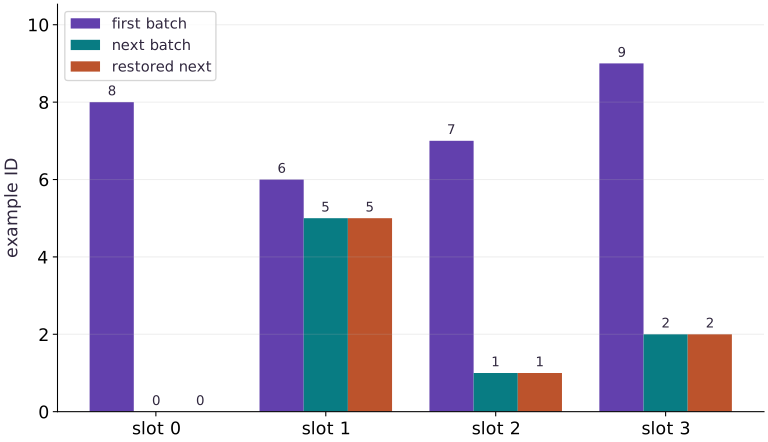
Read the figure
Each group is a slot within a batch, and bar height gives the example ID in that slot. Compare the “next batch” and “restored next” bars beside one another: their heights match at every slot. They are adjacent bars, not overlapping curves.
The first batch contains . The uninterrupted next batch contains , and the restored iterator produces that same sequence. The zero-height bars in the first slot represent example ID ; they are not missing data.
Connect it to the computation
The checkpoint captures the iterator after the first batch. Restoring it therefore resumes at the next batch, rather than replaying the first one. Equal IDs in the same slots establish that both membership and ordering agree at this boundary.
IDs are labels, so a taller bar does not indicate a larger input value or a better batch. This comparison verifies the next batch only. To establish a complete training restart, also restore the matching model, optimizer, random state, and dataset configuration, then compare the next update.
Open full-size figureDownload data and provenance
The notebook contains the data experiment, plotting code, and recorded figure output. Rerun it to test your changes.
Where to put & run this code: Work in phases/06-recovery/02-load-batch-and-prefetch-with-grain/code/main.py (or downloaded exercises/recovery-02.py / exercises/recovery-02.ipynb) and execute from the repository root with python3 phases/06-recovery/02-load-batch-and-prefetch-with-grain/code/main.py.
1 Prepare the data and state
Create main.py in your course workspace. Use the tested course environment and add this block first.
# Step 1 — Prepare the data and state: This setup makes the dataset and software assumptions explicit.
import numpy as np
import grain.python as grain
# Define `TutorialSource` module / container with explicit state and forward pass:
class TutorialSource:
    def __init__(self,count=12):
        self.count = count
    def __len__(self):
        return self.count
    def __getitem__(self,index):
        value = np.float32(index/10)
        return {"id":np.int64(index),"x":value,"y":np.float32(2*value-1)}
    def __repr__(self):
        return f"TutorialSource(v1,n={self.count})"
def make_loader(seed=42,batch_size=4,count=12,drop_remainder=False):
    return grain.DataLoader(
        data_source=TutorialSource(count),
        sampler=grain.IndexSampler(num_records=count,num_epochs=2,shuffle=True,seed=seed),
        operations=[grain.Batch(batch_size,drop_remainder=drop_remainder)],
        worker_count=0)
Code building blocks in this step
__init__(...)— Call__init__with your updated parameters or inputs from this lesson's workspace.__len__(...)— Call__len__with your updated parameters or inputs from this lesson's workspace.
This setup makes the dataset and software assumptions explicit. No external dataset or accelerator is required.
2 Build the pipeline or state transition
Append this block to the same file; follow the named state objects through each function.
# Step 2 — Build the pipeline or state transition: The function boundaries expose which inputs determine the next...
loader = make_loader()
iterator = iter(loader)
first_batch = next(iterator)
snapshot = iterator.get_state()
second_batch = next(iterator)
restored_iterator = iter(make_loader())
restored_iterator.set_state(snapshot)
replayed_batch = next(restored_iterator)
Code building blocks in this step
make_loader(...)— Callmake_loaderwith your updated parameters or inputs from this lesson's workspace.iter(...)— Calliterwith your updated parameters or inputs from this lesson's workspace.
The function boundaries expose which inputs determine the next output and which state must be preserved.
3 Run the comparison
Append the checks, save main.py and run python main.py. Predict what should agree before running.
# Step 3 — Run the comparison: The comparison checks the next behavior, not merely whether a save...
np.testing.assert_array_equal(second_batch["id"],replayed_batch["id"])
for key in ("x","y"):
    # Execute `np.testing.assert_array_equal(second_batch[key],replayed_bat`
    np.testing.assert_array_equal(second_batch[key],replayed_batch[key])
for batch in (first_batch,second_batch):
    np.testing.assert_allclose(batch["y"],2*batch["x"]-1,atol=1e-7)
one_epoch = list(make_loader())[:3]
# Create evenly spaced index values in ``.
np.testing.assert_array_equal(np.sort(np.concatenate([b["id"] for b in one_epoch])),np.arange(12))
print("First IDs:",first_batch["id"].tolist())
print("Next IDs:",second_batch["id"].tolist())
print("Iterator state bytes:",len(snapshot))
print("Restored next batch matches")
Code building blocks in this step
jnp.allclose(actual, expected, rtol=..., atol=...)— Checks that two arrays match elementwise within floating-point tolerance.
The comparison checks the next behavior, not merely whether a save call succeeded.
View the cumulative build in main.py
These blocks append in order to the same file.
# Step 1 — Prepare the data and state: This setup makes the dataset and software assumptions explicit.
import numpy as np
import grain.python as grain
# Define `TutorialSource` module / container with explicit state and forward pass:
class TutorialSource:
    def __init__(self,count=12):
        self.count = count
    def __len__(self):
        return self.count
    def __getitem__(self,index):
        value = np.float32(index/10)
        return {"id":np.int64(index),"x":value,"y":np.float32(2*value-1)}
    def __repr__(self):
        return f"TutorialSource(v1,n={self.count})"
def make_loader(seed=42,batch_size=4,count=12,drop_remainder=False):
    return grain.DataLoader(
        data_source=TutorialSource(count),
        sampler=grain.IndexSampler(num_records=count,num_epochs=2,shuffle=True,seed=seed),
        operations=[grain.Batch(batch_size,drop_remainder=drop_remainder)],
        worker_count=0)

# Step 2 — Build the pipeline or state transition: The function boundaries expose which inputs determine the next...
loader = make_loader()
iterator = iter(loader)
first_batch = next(iterator)
snapshot = iterator.get_state()
second_batch = next(iterator)
restored_iterator = iter(make_loader())
restored_iterator.set_state(snapshot)
replayed_batch = next(restored_iterator)

# Step 3 — Run the comparison: The comparison checks the next behavior, not merely whether a save...
np.testing.assert_array_equal(second_batch["id"],replayed_batch["id"])
for key in ("x","y"):
    # Execute `np.testing.assert_array_equal(second_batch[key],replayed_bat`
    np.testing.assert_array_equal(second_batch[key],replayed_batch[key])
for batch in (first_batch,second_batch):
    np.testing.assert_allclose(batch["y"],2*batch["x"]-1,atol=1e-7)
one_epoch = list(make_loader())[:3]
# Create evenly spaced index values in ``.
np.testing.assert_array_equal(np.sort(np.concatenate([b["id"] for b in one_epoch])),np.arange(12))
print("First IDs:",first_batch["id"].tolist())
print("Next IDs:",second_batch["id"].tolist())
print("Iterator state bytes:",len(snapshot))
print("Restored next batch matches")
Run the example
python3 phases/06-recovery/02-load-batch-and-prefetch-with-grain/code/main.pyAbout this command
This shortcut uses an activated macOS/Linux course environment in the repository folder. For Windows, use the explicit interpreter command in “Setup help” above. The script includes worked examples and reference solutions.
Inspect the complete assembled example
# Step 1 — Prepare the data and state: This setup makes the dataset and software assumptions explicit.
import numpy as np
import grain.python as grain
# Define `TutorialSource` module / container with explicit state and forward pass:
class TutorialSource:
    def __init__(self,count=12):
        self.count = count
    def __len__(self):
        return self.count
    def __getitem__(self,index):
        value = np.float32(index/10)
        return {"id":np.int64(index),"x":value,"y":np.float32(2*value-1)}
    def __repr__(self):
        return f"TutorialSource(v1,n={self.count})"
def make_loader(seed=42,batch_size=4,count=12,drop_remainder=False):
    return grain.DataLoader(
        data_source=TutorialSource(count),
        sampler=grain.IndexSampler(num_records=count,num_epochs=2,shuffle=True,seed=seed),
        operations=[grain.Batch(batch_size,drop_remainder=drop_remainder)],
        worker_count=0)

# Step 2 — Build the pipeline or state transition: The function boundaries expose which inputs determine the next...
loader = make_loader()
iterator = iter(loader)
first_batch = next(iterator)
snapshot = iterator.get_state()
second_batch = next(iterator)
restored_iterator = iter(make_loader())
restored_iterator.set_state(snapshot)
replayed_batch = next(restored_iterator)

# Step 3 — Run the comparison: The comparison checks the next behavior, not merely whether a save...
np.testing.assert_array_equal(second_batch["id"],replayed_batch["id"])
for key in ("x","y"):
    # Execute `np.testing.assert_array_equal(second_batch[key],replayed_bat`
    np.testing.assert_array_equal(second_batch[key],replayed_batch[key])
for batch in (first_batch,second_batch):
    np.testing.assert_allclose(batch["y"],2*batch["x"]-1,atol=1e-7)
one_epoch = list(make_loader())[:3]
# Create evenly spaced index values in ``.
np.testing.assert_array_equal(np.sort(np.concatenate([b["id"] for b in one_epoch])),np.arange(12))
print("First IDs:",first_batch["id"].tolist())
print("Next IDs:",second_batch["id"].tolist())
print("Iterator state bytes:",len(snapshot))
print("Restored next batch matches")
Expected result: The restored next IDs, features and labels match. One epoch contains twelve unique IDs. Exact shuffled order is determined by tested Grain version/configuration.
Recorded reference execution
Reference output captured from executing the complete lesson script (code/main.py) and its assertions in the course CPU environment.
First IDs: [8, 6, 7, 9]
Next IDs: [0, 5, 1, 2]
Iterator state bytes: 329
Restored next batch matches
First IDs: [8, 6, 7, 9]
Next IDs: [0, 5, 1, 2]
Iterator state bytes: 329
Restored next batch matches
Same seed restarts; it does not resume
Each epoch covers all twelve IDs
Next-epoch IDs replayed: [[2, 0, 11, 1], [5, 7, 6, 8]]
Expected sampler compatibility rejection
PASS: recovery-02
Download execution record · The notebook includes executed cells and figure outputs. Compare your run with these values; timings depend on the machine.
A fresh iterator restarts
# Experiment — A fresh iterator restarts: The seed fixes ordering.
fresh_first = next(iter(make_loader()))
# Execute `np.testing.assert_array_equal(fresh_first["id"],first_batch[`
np.testing.assert_array_equal(fresh_first["id"],first_batch["id"])
assert not np.array_equal(fresh_first["id"],second_batch["id"])
print("Same seed restarts; it does not resume")
Expected: The first batch repeats, rather than replaying the saved next batch.
The seed fixes ordering. Position is separate state.
Audit both epochs
# Experiment — Audit both epochs: Across epochs, repeated IDs are intentional.
two_epochs = list(make_loader())
assert len(two_epochs)==6
for start in (0,3):
    # Combine or mask array elements to form `values`.
    values = np.concatenate([b["id"] for b in two_epochs[start:start+3]])
    # Create evenly spaced index values in ``.
    np.testing.assert_array_equal(np.sort(values),np.arange(12))
print("Each epoch covers all twelve IDs")
Expected: Six batches; each set of three covers twelve records exactly once.
Across epochs, repeated IDs are intentional. Check coverage at the correct epoch boundary instead of treating every repeat as a bug.
Make it yours
Where to put your code: Append your solution at the bottom of phases/06-recovery/02-load-batch-and-prefetch-with-grain/code/main.py (or inside the Make it yours cell of exercises/recovery-02.ipynb) and run python3 phases/06-recovery/02-load-batch-and-prefetch-with-grain/code/main.py to verify your prediction before opening the reference solution.
Consume two batches, snapshot, and replay the third batch with a new compatible iterator.
Show a writing guide and starter scaffold
How to write this exercise code: step-by-step recipe & starter scaffold
1. Key functions & syntax to use:
iter(...)— Calliterwith your updated parameters or inputs from this lesson's workspace.make_loader(...)— Callmake_loaderwith your updated parameters or inputs from this lesson's workspace.
2. Step-by-step implementation plan:
- Execute
np.testing.assert_array_equal(next(new_iterator)["id"],expec
# Exercise solution: Consume two batches, snapshot, and replay the third batch with a new...
later = iter(...)  # TODO: compute later
next(later)
next(later)
later_state = later.get_state(...)  # TODO: compute later_state
expected_third = next(...)  # TODO: compute expected_third
new_iterator = iter(...)  # TODO: compute new_iterator
new_iterator.set_state(later_state)
# Execute `np.testing.assert_array_equal(next(new_iterator)["id"],expec`
np.testing.assert_array_equal(next(new_iterator)["id"],expected_third["id"])
Reveal the reference solution
# Exercise solution: Consume two batches, snapshot, and replay the third batch with a new...
later = iter(make_loader())
next(later)
next(later)
later_state = later.get_state()
expected_third = next(later)
new_iterator = iter(make_loader())
new_iterator.set_state(later_state)
# Execute `np.testing.assert_array_equal(next(new_iterator)["id"],expec`
np.testing.assert_array_equal(next(new_iterator)["id"],expected_third["id"])
Replay through an epoch boundary
Transfer
Save the iterator after the third batch and compare the next two batches with a fresh restored iterator. Check IDs and values. Explain why reproducing only the last batch of one epoch is not sufficient.
Show a writing guide and starter scaffold
How to write this practice solution: step-by-step recipe & starter scaffold
1. Key functions & syntax to use:
boundary(...)— Callboundarywith your updated parameters or inputs from this lesson's workspace.iter(...)— Calliterwith your updated parameters or inputs from this lesson's workspace.
2. Step-by-step implementation plan:
- Execute
for _ in range(3):next(boundary).
# Replay through an epoch boundary (Transfer): An epoch boundary changes the sampling context.
boundary = iter(...)  # TODO: compute boundary
# Execute `for _ in range(3):next(boundary)`.
for _ in range(3):next(boundary)
boundary_state = boundary.get_state(...)  # TODO: compute boundary_state
expected = ...  # TODO: compute expected
replay = iter(...)  # TODO: compute replay
replay.set_state(boundary_state)
for reference in expected:
    actual = next(...)  # TODO: compute actual
    for name in ('id','x','y'):np.testing.assert_array_equal(actual[name],reference[name])
print('Next-epoch IDs replayed:',[b['id'].tolist() for b in expected])
Show a hint
The loader has two epochs; the fourth and fifth batches belong to the next epoch.
Reveal reference solution and reasoning
# Replay through an epoch boundary (Transfer): An epoch boundary changes the sampling context.
boundary=iter(make_loader())
# Execute `for _ in range(3):next(boundary)`.
for _ in range(3):next(boundary)
boundary_state=boundary.get_state()
expected=[next(boundary) for _ in range(2)]
replay=iter(make_loader())
replay.set_state(boundary_state)
for reference in expected:
    actual=next(replay)
    for name in ('id','x','y'):np.testing.assert_array_equal(actual[name],reference[name])
print('Next-epoch IDs replayed:',[b['id'].tolist() for b in expected])
An epoch boundary changes the sampling context. Testing across it checks more of the iterator contract than replaying one batch inside an epoch.
Reject a changed sampler
Challenge
Try restoring the original snapshot into a loader with a different seed. Capture the compatibility error, then rebuild the matching loader.
Show a writing guide and starter scaffold
How to write this practice solution: step-by-step recipe & starter scaffold
1. Key functions & syntax to use:
sampler(...)— Callsamplerwith your updated parameters or inputs from this lesson's workspace.iter(...)— Calliterwith your updated parameters or inputs from this lesson's workspace.
2. Step-by-step implementation plan:
- Run the boundary check and catch the expected exception:
- Execute
np.testing.assert_array_equal(next(compatible)["id"],second_
# Reject a changed sampler (Challenge): A snapshot cannot be assumed to apply to a different...
incompatible = iter(...)  # TODO: compute incompatible
# Run the boundary check and catch the expected exception:
try:
    incompatible.set_state(snapshot)
except ValueError:
    print("Expected sampler compatibility rejection")
else:
    raise AssertionError("Expected changed sampler rejection")
compatible = iter(...)  # TODO: compute compatible
compatible.set_state(snapshot)
# Execute `np.testing.assert_array_equal(next(compatible)["id"],second_`
np.testing.assert_array_equal(next(compatible)["id"],second_batch["id"])
Show a hint
Read the restore diagnostic; changing the seed changes sampler identity.
Reveal reference solution and reasoning
# Reject a changed sampler (Challenge): A snapshot cannot be assumed to apply to a different...
incompatible = iter(make_loader(seed=99))
# Run the boundary check and catch the expected exception:
try:
    incompatible.set_state(snapshot)
except ValueError:
    print("Expected sampler compatibility rejection")
else:
    raise AssertionError("Expected changed sampler rejection")
compatible = iter(make_loader(seed=42))
compatible.set_state(snapshot)
# Execute `np.testing.assert_array_equal(next(compatible)["id"],second_`
np.testing.assert_array_equal(next(compatible)["id"],second_batch["id"])
A snapshot cannot be assumed to apply to a different ordering configuration. Recreate the same pipeline configuration before restoring; explicit version/data identity checks remain necessary.
Diagnose the result
A snapshot cannot be assumed to apply to a different ordering configuration. Recreate the same pipeline configuration before restoring; explicit version/data identity checks remain necessary.
Carry forward
- Map a record key to a testable source
- Follow the sampler-to-batch boundary
- Snapshot the iterator after consumption
- Worker and buffer settings are workload choices
Keep your evidence
Keep Grain sampler configuration and exact example IDs for full and partial batches; save iterator bytes, recreate the loader, and compare the next batch before/after restore. Record the incompatible configuration failure.
Save your modified code, its output, and an explanation of your prediction. Checkpoint answers and exercise evidence are tracked separately.
Saved in this browser. Export or back up your portfolio anytime in My learning.
Verified on local CPU. Stage to a Cloud TPU VM via Cloud TPU setup to record accelerator execution receipts (TODO: add automated Cloud TPU CI execution receipts).