 JAX Pathways
Phase 02 / JAX transformations
Your first gradient
Revision v0.7.0 · Updated since your last visit. Review the changes; your progress is saved.
Lesson · about 55 minutes · CPU practice
Explain local sensitivity and the chain rule, then compare analytic, numerical, and automatic derivatives.
Phase study guide: preparation, milestones and project evidence
Before you start
Before this: Arrays & pure functions
Hardware: CPU
Setup help: Python, notebook, or Cloud TPU VM
Use the tested CPU packages (the recorded environment uses Python 3.14.3). Other Python versions and accelerator environments require separate checks. The optional Cloud TPU specialization explains the target-specific execution boundaries. Logical CPU devices practice partitioning; they do not simulate TPU performance.
Download the repository ZIP or use your existing checkout. Extract it and open a terminal in the folder containing requirements-cpu.txt. The beginner ZIP is separate; these lessons use the full repository folder.
python3 -m venv .venv
source .venv/bin/activate
python -m pip install -r requirements-cpu.txtpy -3 -m venv .venv
.\.venv\Scripts\python.exe -m pip install -r requirements-cpu.txtAfter activation, run the complete worked example from that same folder:
python phases/02-transforms/01-your-first-gradient/code/main.py.\.venv\Scripts\python.exe phases/02-transforms/01-your-first-gradient/code/main.pyFor an incremental build, create main.py in your own practice folder, append each build block in order, and run python main.py with this environment active. Keep that file separate from the downloaded reference solution.
Download this lesson’s notebook. Open it with a Python kernel using the course environment. Run cells from the top after restarting the kernel; experiments depend on earlier definitions.
For local Jupyter, first install the course requirements using the Local Python steps, then use your environment’s Python to start Jupyter:
python -m pip install jupyterlab
python -m jupyter lab.\.venv\Scripts\python.exe -m pip install jupyterlab
.\.venv\Scripts\python.exe -m jupyter labSelect the downloaded first-gradient.ipynb file in JupyterLab. The notebook contains reference solutions; make your prediction and attempt each practice task before opening them. Restart the kernel before changing logical device setup.
The worked reference for this lesson is CPU-validated. Some references explicitly configure logical CPU devices; setting JAX_PLATFORMS does not adapt them to a TPU. Follow the execution matrix and reviewed multi-host example before attempting a target run.
For accelerator preparation, study TPU setup, observed runtime receipts, checkpointed jobs and precision and retained traces. These target paths remain unqualified on physical TPU hardware until an actual receipt is recorded. Cloud provisioning is optional for CPU learning.
Check:
Revisit the guided CPU setup · Open 19: TPU Setup. Package instructions are CPU instructions; Windows and accelerator environments need their own validation.
What you will be able to do
- Predict the sign and magnitude of a derivative from a local change.
- Trace the chain rule through a composed numerical function.
- Compare an analytic derivative, a finite-difference estimate, and JAX autodiff.
- Distinguish a stationary point from a minimum and repair scalar-output/input-type errors.
The problem
Imagine that you can turn one dial, and a score tells you how far you are from the result you want. Which way should you turn it? We’ll begin with the curve , where we can check the answer by hand. A derivative tells us how the score changes nearby; then JAX will calculate that derivative for us. You do not need to guess what the tool is doing.
The idea
A derivative tells us how an output changes near a particular input. We can understand it before using autodiff: move the input a small amount, estimate the output change from the local slope, then compare that prediction with the function.
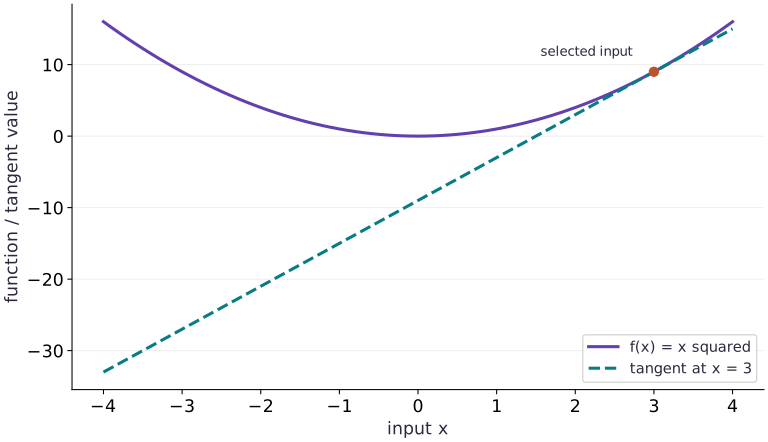
Read left to right as input and upward as function value. The solid curve is ; the dashed straight line touches it at the selected point and has slope . Near that point, the line approximates the curve; farther away, they separate. Negative tangent values extend below this viewing window. Move the input across zero to see the slope change sign. This analytic illustration updates in the browser; the Python exercise computes the derivative with JAX.
Use a slope to predict a nearby change
For a separate hand calculation, let . At , the derivative is . Moving to gives a first-order prediction of . The exact value is ; the small difference comes from curvature.
In the tangent figure, the tangent agrees with the curve at the selected point and has the same local slope. It need not follow the curve far away. Move the point and watch the slope change; then move only a small distance from that point to judge the linear approximation.
Autodiff computes the derivative of the operations you wrote. It does not choose a meaningful objective for you. A gradient of the wrong loss can be numerically correct, which is why later lessons check both the formula and its derivative.
Read a slope before you compute it
Let’s start at . If we move right by , the score changes from to . That is an increase of . The slope predicts an increase of about , which is close.
Here means a small change in the input, and means the slope at that input. Expanding the square gives the exact change below. The term is what the straight-line approximation leaves out. As the change gets smaller, that term becomes small compared with the linear term when the slope is nonzero.
Before running the code, try a negative input. At , moving a little to the right reduces the score. The slope should therefore be negative. At zero, the slope is zero even though moving away in either direction increases the square.
Three ways to obtain a derivative
An analytic derivative comes from reasoning about the mathematical function. A finite difference approximates a derivative by evaluating the function at nearby inputs. Automatic differentiation applies derivative rules to the operations that execute in the program and composes those rules with the chain rule.
Autodiff is not estimating a slope with a hidden step size, and it is not a symbolic algebra system simplifying a formula. Your program still runs floating-point operations. Those operations can overflow, lose precision, or evaluate a function whose mathematical derivative is not well-defined at the chosen point. Agreement among independent approaches is stronger evidence than merely printing one number.
Follow the chain rule through the program
Now split the calculation into two small steps. First compute , then square it to get . A small change in first changes ; that change in then changes . The chain rule multiplies the two local slopes.
The first slope is . The second is . Multiplying gives . At , we have , so the derivative is . This gives us a hand-calculated answer for the JAX check. Autodiff follows the operations in the program; it is not estimating the derivative by repeatedly nudging the input.
Know the contract of grad
The default grad transformation differentiates the first positional argument. Its differentiated inputs must have an appropriate inexact dtype, such as a floating-point array, and its output must be scalar: shape , not shape . A Python float like works; the integer is a different input type.
A vector of residuals is useful model output, but it does not yet specify a single objective. Reducing the residuals to a sum or a mean chooses an objective and its scaling. A Jacobian is the more appropriate object when you really want the derivatives of every vector output. We will first learn scalar objectives, then return to batching and derivative structure.
A zero gradient is a question, not a verdict
Both and have derivative zero at . The square has a minimum there; the cubic keeps decreasing toward the left. The constant function also has zero derivative everywhere. A gradient is local first-order information, so it does not by itself prove optimality, global quality, or a correct implementation.
When a model produces a surprising zero gradient, ask whether the loss actually depends on the parameter, whether you differentiated the intended argument, and whether the chosen point is stationary. Checking nearby points and a simple analytic case is often more informative than immediately changing the optimizer.
A tangent describes local change
Predict before looking: At , is the slope equal to the height of the curve?
Read the figure
The solid curve is . The dashed line is its tangent at the marked point . The horizontal axis measures the input; the vertical axis shows either the function value or the tangent’s predicted value.
Near the marked point the two almost coincide. Farther away they separate: at , the curve is and the tangent is . At , the curve is , but the tangent has fallen to .
Connect it to the computation
The derivative at is , so the local prediction is . The exact value also contains . That omitted term explains why the approximation is good for small changes and increasingly poor for large ones.
The negative part of the dashed line does not mean a square became negative. It means a local linear approximation was extended beyond the neighborhood where it is useful. A gradient describes local change, not the complete function.
Open full-size figureDownload data and provenance
The notebook contains the data experiment, plotting code, and recorded figure output. Rerun it to test your changes.
Where to put & run this code: Work in phases/02-transforms/01-your-first-gradient/code/main.py (or downloaded exercises/first-gradient.py / exercises/first-gradient.ipynb) and execute from the repository root with python3 phases/02-transforms/01-your-first-gradient/code/main.py.
1 Step 1: Set up imports and input tensors
Import the required JAX modules and define the initial inputs for your first gradient.
import jax
import jax.numpy as jnp
Establishing explicit input shapes and dtypes first makes the downstream transformation contract deterministic.
2 Step 2: Apply the core JAX transformation
Write the core computation and transformation step over the initialized inputs.
def f(x):
    return x ** 2
# Differentiate the objective to obtain `derivative` via automatic differentiation.
derivative = jax.grad(f)
Code building blocks in this step
jax.grad(loss_fn)(params, ...)— Transforms a scalar-output function into a function returning the gradient PyTree with the same structure asparams.
This stage executes the primary numerical transformation and binds the intermediate outputs.
3 Step 3: Verify shapes and numerical invariants
Check that the resulting arrays satisfy the expected shape, dtype, and numerical tolerances.
assert jnp.allclose(derivative(3.0), 6.)
assert jnp.allclose(derivative(0.0), 0.)
Code building blocks in this step
jnp.allclose(actual, expected, rtol=..., atol=...)— Checks that two arrays match elementwise within floating-point tolerance.
These assertions lock in the exact numerical contract before you run the full experiment and variations.
View the cumulative build in main.py
These blocks append in order to the same file.
import jax
import jax.numpy as jnp

def f(x):
    return x ** 2
# Differentiate the objective to obtain `derivative` via automatic differentiation.
derivative = jax.grad(f)

assert jnp.allclose(derivative(3.0), 6.)
assert jnp.allclose(derivative(0.0), 0.)
Build a numerical estimate
# Numerical estimate: Approximately 6.0.
def central_difference(function, x, h=1e-3):
    return (function(x + h) - function(x - h)) / (2 * h)

def square(x):
    return x * x

estimate = central_difference(square, 3.0)
print("Finite-difference estimate:", estimate)
assert abs(estimate - 6.0) < 1e-8
Approximately . This estimate evaluates the function at two nearby points; it is not automatic differentiation.
Run the example
python3 phases/02-transforms/01-your-first-gradient/code/main.pyAbout this command
This shortcut uses an activated macOS/Linux course environment in the repository folder. For Windows, use the explicit interpreter command in “Setup help” above. The script includes worked examples and reference solutions.
Inspect the complete assembled example
# Your first gradient: A derivative tells us how an output changes near a particular input.
import jax
import jax.numpy as jnp
def f(x):
    return x ** 2
# Differentiate the objective to obtain `derivative` via automatic differentiation.
derivative = jax.grad(f)
print(float(derivative(3.0)))
assert jnp.allclose(derivative(3.0), 6.)
assert jnp.allclose(derivative(0.0), 0.)
Expected result:
Recorded reference execution
Reference output captured from executing the complete lesson script (code/main.py) and its assertions in the course CPU environment.
Finite-difference estimate: 5.999999999999339
6.0
chain rule: -1.0 -12.0
chain rule: 0.0 6.0
chain rule: 2.0 42.0
h / estimate / error: 0.1 27.009973526000977 0.009973526000976562
h / estimate / error: 0.01 27.000045776367188 4.57763671875e-05
h / estimate / error: 0.001 26.9975643157959 0.0024356842041015625
h / estimate / error: 1e-05 27.0843505859375 0.0843505859375
h / estimate / error: 1e-07 0.0 27.0
PASS: first-gradient
Download execution record · The notebook includes executed cells and figure outputs. Compare your run with these values; timings depend on the machine.
Check the chain rule at three inputs
# Experiment — Check the chain rule at three inputs: The inner derivative contributes a factor of 3.
def composed(x):
    return (3. * x + 1.) ** 2
for point in (-1., 0., 2.):
    # Differentiate the objective to obtain `observed` via automatic differentiation.
    observed = jax.grad(composed)(point)
    expected = 6. * (3. * point + 1.)
    print("chain rule:", point, float(observed))
    assert jnp.allclose(observed, expected)
Expected: The three derivatives are , , and .
The inner derivative contributes a factor of . Omitting that factor is a chain-rule error; matching only one point can hide a wrong expression.
Choose a finite-difference scale
# Experiment — Choose a finite-difference scale: A central difference has truncation error at larger h and...
def cubic32(x):
    return x ** 3
point = jnp.array(3., dtype=jnp.float32)
for step in (1e-1, 1e-2, 1e-3, 1e-5, 1e-7):
    estimate = (cubic32(point + step) - cubic32(point - step)) / (2. * step)
    print("h / estimate / error:", step, float(estimate), float(jnp.abs(estimate - 27.)))
assert jnp.allclose(jax.grad(cubic32)(point), 27.)
Expected: The errors need not decrease monotonically. At sufficiently small , rounding can erase the input change.
A central difference has truncation error at larger and cancellation/rounding error at very small . The original numerical-estimate example used Python floats; this sweep deliberately uses a JAX float32 array. Do not silently compare their precision as if it were identical.
Make it yours
Where to put your code: Append your solution at the bottom of phases/02-transforms/01-your-first-gradient/code/main.py (or inside the Make it yours cell of exercises/first-gradient.ipynb) and run python3 phases/02-transforms/01-your-first-gradient/code/main.py to verify your prediction before opening the reference solution.
Foundation · Define . Derive , predict the values at , , and , then verify every prediction with JAX. Explain why the zero at is separate from a minimum.
Show a writing guide and starter scaffold
How to write this exercise code: step-by-step recipe & starter scaffold
1. Key functions & syntax to use:
jnp.allclose(actual, expected, rtol=..., atol=...)— Checks that two arrays match elementwise within floating-point tolerance.jax.grad(loss_fn)(params, ...)— Transforms a scalar-output function into a function returning the gradient PyTree with the same structure asparams.
2. Step-by-step implementation plan:
- Set up the changed input or configuration parameters requested in the prompt.
- Run the target function or transformation and assert that the output matches your prediction.
# Exercise solution: Foundation · Define f(x)=x^3.
def cubic(x):
    return ...  # TODO: return computed result
for point in (-2., 0., 3.):
    assert jnp.allclose(jax.grad(cubic)(point), 3. * point ** 2)  # TODO: complete assertion check
assert cubic(-0.1)  # TODO: complete assertion check
Reveal the reference solution
# Exercise solution: Foundation · Define f(x)=x^3.
def cubic(x):
    return x ** 3
for point in (-2., 0., 3.):
    assert jnp.allclose(jax.grad(cubic)(point), 3. * point ** 2)
assert cubic(-0.1) < cubic(0.) < cubic(0.1)
Differentiate the parameter you intended
Practice
For the prediction , find the derivative with respect to and then with respect to . Evaluate them at and . Predict both answers before choosing argnums.
Show a writing guide and starter scaffold
How to write this practice solution: step-by-step recipe & starter scaffold
1. Key functions & syntax to use:
jnp.allclose(actual, expected, rtol=..., atol=...)— Checks that two arrays match elementwise within floating-point tolerance.jax.grad(loss_fn)(params, ...)— Transforms a scalar-output function into a function returning the gradient PyTree with the same structure asparams.
2. Step-by-step implementation plan:
- Set up the changed input or configuration parameters requested in the prompt.
- Run the target function or transformation and assert that the output matches your prediction.
# Differentiate the parameter you intended (Practice): A parameter gradient and an input sensitivity answer...
def scalar_prediction(weight, x):
    return ...  # TODO: return computed result
assert jnp.allclose(jax.grad(scalar_prediction, argnums=0)(2., 3.), 3.)  # TODO: complete assertion check
assert jnp.allclose(jax.grad(scalar_prediction, argnums=1)(2., 3.), 2.)  # TODO: complete assertion check
Show a hint
grad defaults to argnums=0. The other input remains an input to the transformed callable.
Reveal reference solution and reasoning
# Differentiate the parameter you intended (Practice): A parameter gradient and an input sensitivity answer...
def scalar_prediction(weight, x):
    return weight * x
assert jnp.allclose(jax.grad(scalar_prediction, argnums=0)(2., 3.), 3.)
assert jnp.allclose(jax.grad(scalar_prediction, argnums=1)(2., 3.), 2.)
A parameter gradient and an input sensitivity answer different questions even when they originate from the same function.
Repair an objective without hiding its meaning
Challenge
A function returns . Explain why ordinary grad rejects it. Build a scalar objective using their mean, derive its derivative, and check , , and . Would a sum have the same derivative magnitude?
Show a writing guide and starter scaffold
How to write this practice solution: step-by-step recipe & starter scaffold
1. Key functions & syntax to use:
jnp.array(values, dtype=...)— Constructs an immutable device-backed JAX array from Python/NumPy values.x.sum(axis=...) / x.mean(axis=..., keepdims=...)— Reduces values along the namedaxis(the axis you name is collapsed unlesskeepdims=True).jnp.allclose(actual, expected, rtol=..., atol=...)— Checks that two arrays match elementwise within floating-point tolerance.jax.grad(loss_fn)(params, ...)— Transforms a scalar-output function into a function returning the gradient PyTree with the same structure asparams.
2. Step-by-step implementation plan:
- Set up the changed input or configuration parameters requested in the prompt.
- Run the target function or transformation and assert that the output matches your prediction.
# Repair an objective without hiding its meaning (Challenge): Mean and sum agree on the minimizer here but differ by a...
def two_costs(x):
    return ...  # TODO: return computed result
def mean_cost(x):
    return ...  # TODO: return computed result
for point in (0., 1., 2.):
    assert jnp.allclose(jax.grad(mean_cost)(point), 2. * point - 2.)  # TODO: complete assertion check
    assert jnp.allclose(jax.grad(lambda z: jnp.sum(two_costs(z)))(point), 2. * jax.grad(mean_cost)(point))  # TODO: complete assertion check
Show a hint
Write the reduction as a mathematical function first: its mean is .
Reveal reference solution and reasoning
# Repair an objective without hiding its meaning (Challenge): Mean and sum agree on the minimizer here but differ by a...
def two_costs(x):
    return jnp.array([x ** 2, (x - 2.) ** 2])
def mean_cost(x):
    return jnp.mean(two_costs(x))
for point in (0., 1., 2.):
    assert jnp.allclose(jax.grad(mean_cost)(point), 2. * point - 2.)
    assert jnp.allclose(jax.grad(lambda z: jnp.sum(two_costs(z)))(point), 2. * jax.grad(mean_cost)(point))
Mean and sum agree on the minimizer here but differ by a factor of two in gradient magnitude. Reducing output is a modeling choice, not just a syntax repair.
Diagnose the result
If grad reports a scalar-output error, inspect the output shape before adding an arbitrary reduction. If it reports an integer-input error, check the dtype of the differentiated argument. If a gradient is unexpectedly zero, evaluate the function at nearby inputs and verify argument selection. If finite differences disagree, record dtype and , sweep , and compare with an analytic test case. Each symptom calls for different evidence.
Carry forward
- A derivative is a local sensitivity; a gradient transformation returns a callable.
- Autodiff applies the chain rule to program operations, while finite differences approximate with input perturbations.
- Scalar objective, input dtype, and differentiated argument are part of the contract.
- A stationary point and a minimum are different claims.
Keep your evidence
Keep predictions and analytic derivations at multiple inputs, the finite-difference step/error sweep with dtype, both argnums checks, and the scalar-objective repair. Explain why a zero gradient need not mark a minimum.
Save your modified code, its output, and an explanation of your prediction. Checkpoint answers and exercise evidence are tracked separately.
Saved in this browser. Export or back up your portfolio anytime in My learning.
Verified on local CPU. Stage to a Cloud TPU VM via Cloud TPU setup to record accelerator execution receipts (TODO: add automated Cloud TPU CI execution receipts).