 JAX Pathways
Phase 08 / Performance diagnosis
Benchmark asynchronous work correctly
Revision v0.7.0 · Updated since your last visit. Review the changes; your progress is saved.
Lesson · about 80 minutes · CPU practice
Warm up a computation and synchronize results before reporting timing.
Phase study guide: preparation, milestones and project evidence
Before you start
Before this: Neural network training
Hardware: CPU
Setup help: Python, notebook, or Cloud TPU VM
Use the tested CPU packages (the recorded environment uses Python 3.14.3). Other Python versions and accelerator environments require separate checks. The optional Cloud TPU specialization explains the target-specific execution boundaries. Logical CPU devices practice partitioning; they do not simulate TPU performance.
Download the repository ZIP or use your existing checkout. Extract it and open a terminal in the folder containing requirements-cpu.txt. The beginner ZIP is separate; these lessons use the full repository folder.
python3 -m venv .venv
source .venv/bin/activate
python -m pip install -r requirements-cpu.txtpy -3 -m venv .venv
.\.venv\Scripts\python.exe -m pip install -r requirements-cpu.txtAfter activation, run the complete worked example from that same folder:
python phases/08-performance/01-benchmark-asynchronous-work-correctly/code/main.py.\.venv\Scripts\python.exe phases/08-performance/01-benchmark-asynchronous-work-correctly/code/main.pyFor an incremental build, create main.py in your own practice folder, append each build block in order, and run python main.py with this environment active. Keep that file separate from the downloaded reference solution.
Download this lesson’s notebook. Open it with a Python kernel using the course environment. Run cells from the top after restarting the kernel; experiments depend on earlier definitions.
For local Jupyter, first install the course requirements using the Local Python steps, then use your environment’s Python to start Jupyter:
python -m pip install jupyterlab
python -m jupyter lab.\.venv\Scripts\python.exe -m pip install jupyterlab
.\.venv\Scripts\python.exe -m jupyter labSelect the downloaded performance-01.ipynb file in JupyterLab. The notebook contains reference solutions; make your prediction and attempt each practice task before opening them. Restart the kernel before changing logical device setup.
The worked reference for this lesson is CPU-validated. Some references explicitly configure logical CPU devices; setting JAX_PLATFORMS does not adapt them to a TPU. Follow the execution matrix and reviewed multi-host example before attempting a target run.
For accelerator preparation, study TPU setup, observed runtime receipts, checkpointed jobs and precision and retained traces. These target paths remain unqualified on physical TPU hardware until an actual receipt is recorded. Cloud provisioning is optional for CPU learning.
Check: A JSON benchmark report: input_shape , weight_shape , dtype float32, seven nonnegative warmed samples, and a checked maximum error. Times vary by run; there is no required speedup.
Revisit the guided CPU setup · Open 19: TPU Setup. Package instructions are CPU instructions; Windows and accelerator environments need their own validation.
What you will be able to do
- Draw the interval a timing actually measures.
- Exclude initial placement from a device-resident benchmark.
- Check an independent NumPy result before comparing timings.
- Produce a report containing first-call and warmed sample distributions.
The problem
A first timing suggests a tenfold speedup. Before celebrating, let’s ask when the timer started and stopped. We’ll separate the first call from warm calls, wait for JAX to finish, and compare numerical results. By the end, you’ll have a timing report another learner can reproduce.
The idea
JAX can return an array handle before device work finishes. A benchmark must define what starts the interval and what counts as completion. First-call preparation, warm execution and end-to-end requests answer different performance questions.
Time a completed result
If a timer stops as soon as dispatch returns, it may exclude most of the computation. Blocking on the result inside the interval includes completion of the work required to produce that result.
Warm up the intended specialization before measuring repeated execution, and retain startup separately if it matters to the application. Include preprocessing and transfers in a separately named end-to-end measurement when they belong to the request.
The first-call and warm bars represent different intervals. Their ratio depends on the workload and environment. A short dispatch time is not evidence of device throughput, and a warm kernel timing does not describe an entire service request.
Time the completed result
Predict: Where should synchronization occur in completed-result latency measurement?
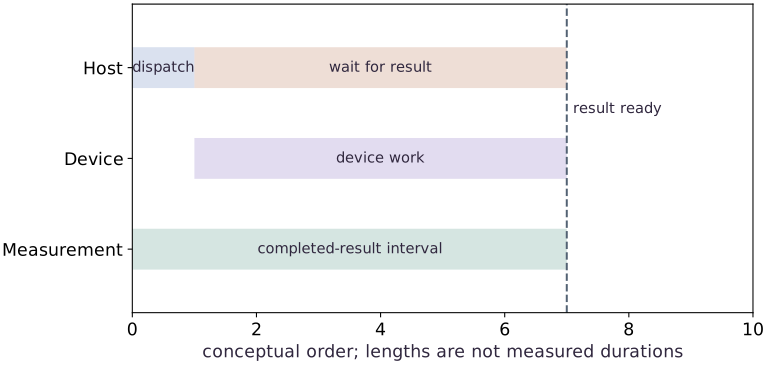
The host dispatches and waits while device work proceeds. The measurement lane includes readiness. Lengths illustrate ordering only and are not measured durations. Compilation and data preparation need separately chosen boundaries when included in a benchmark.
Draw the boundary before starting the clock
For our workload, the input has shape , the weights have shape , and the result has shape . Matrix multiplication contracts the feature dimension, then tanh transforms each prediction. The timer starts after both input arrays are placed on CPU and ready. It stops after the output is ready.
That interval includes Python dispatch, execution and the final wait. It is not an isolated kernel duration. Data generation, initial placement and output conversion to NumPy are outside it. A serving request or data-loading benchmark would deliberately include different boundaries; specify which question your measurement answers.
prepare host arrays → place → wait | start → call → result handle → wait → stop | inspect host valuesA handle is not proof of completion
Python can receive a JAX array before its contents finish computing. Reading shape or dtype can use metadata without reading the values. Calling block_until_ready on the result waits for readiness. Converting it to NumPy also requires the values, but adds a host-materialization boundary.
CPU dispatch behavior and workload size may make the difference difficult to see. If a handle-only interval is close to a synchronized interval on this machine, that does not justify removing synchronization from a portable benchmark. Timing two independent calls cannot be subtracted to obtain an exact queue or execution cost.
First call and steady state answer different questions
A fresh jitted function can trace its Python body, lower the resulting program, obtain an executable and run it. The first-call timer combines these stages. Persistent caches and prior process activity can alter the result, so call it first-call latency for this process rather than an exact compilation measurement.
We then run seven synchronized repeats with identical shapes and dtypes. The list reveals variation; the median gives a compact center. Seven samples are an instructional start, not a confidence interval. Increase repetitions and document contention, power state and process initialization before drawing deployment conclusions.
Correctness comes before a speed ratio
The NumPy reference uses the same float32 inputs and computes the same matrix product and tanh. Floating-point reduction order can vary, so the comparison permits small absolute and relative differences rather than demanding bit equality. We record maximum absolute error as well.
Comparing a float64 reference against an unreported float32 JAX computation, or comparing different matrix sizes, would mix numerical work with implementation differences. A faster answer to a different problem is not evidence of optimization. Retain both workload contracts and both checks in the report.
Separate the first call from warm measurements
Predict before looking: Why should the first call not be averaged into steady-state latency?
Read the figure
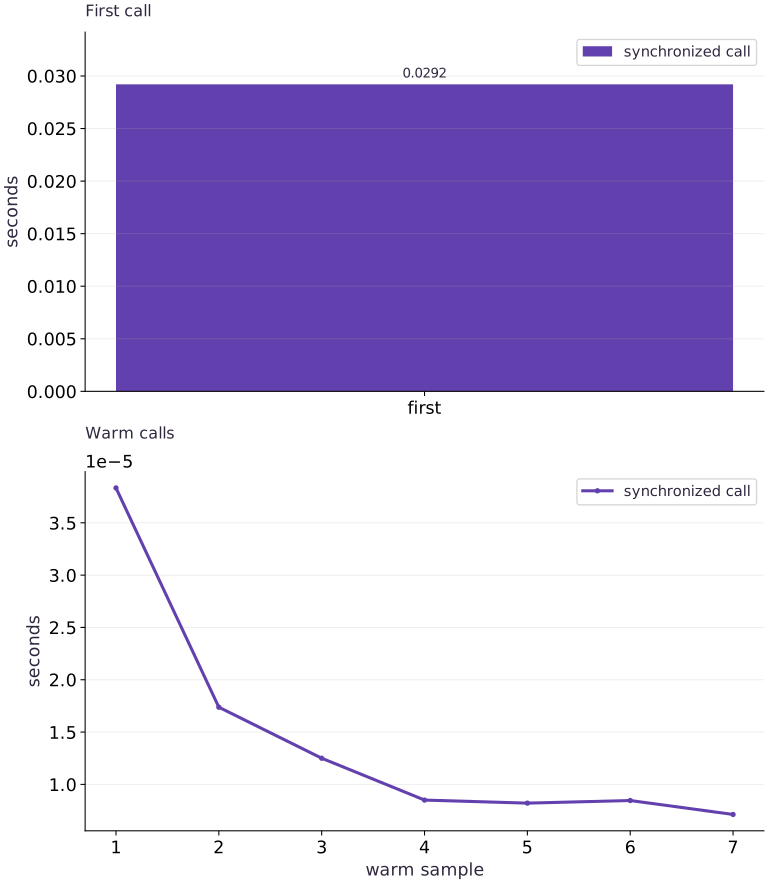
The upper panel measures the first synchronized call. The lower panel measures repeated warm calls, with sample number on the horizontal axis. Both report seconds, but they have independent vertical scales. Compare the tick values and any scientific-notation multiplier, not the physical heights of the panels.
The recorded first call is much longer than the warm calls. For orientation, seconds is milliseconds, while seconds is microseconds. A multiplier printed beside an axis applies to all its tick labels; overlooking it can hide a difference of orders of magnitude.
Connect it to the computation
The first measurement includes work needed to prepare this specialization, including tracing and compilation. Compatible warm calls reuse it. Each measurement waits for the result, so it includes completed computation rather than only the time needed to dispatch work. Inputs are already placed before this measured boundary.
The warm line shows variation between individual samples. An isolated higher point is a slower sample, not proof of recompilation or a changing model. Read the recorded median alongside the full sample list, and rerun before comparing implementations. These measurements describe this small CPU workload; they are separate from accelerator speed or end-to-end request latency.
Open full-size figureDownload data and provenance
The notebook contains the data experiment, plotting code, and recorded figure output. Rerun it to test your changes.
Where to put & run this code: Work in phases/08-performance/01-benchmark-asynchronous-work-correctly/code/main.py (or downloaded exercises/performance-01.py / exercises/performance-01.ipynb) and execute from the repository root with python3 phases/08-performance/01-benchmark-asynchronous-work-correctly/code/main.py.
1 Prepare and place the workload
Create benchmark.py in your activated course environment and add this block.
# Step 1 — Prepare and place the workload: CPU placement and waiting occur before timing.
import json
import platform
import time
import statistics
import numpy as np
import jax
import jax.numpy as jnp
# Query the active JAX devices into `cpu`.
cpu = jax.devices("cpu")[0]
# Draw pseudorandom samples for `rng` using the explicit RNG state.
rng = np.random.default_rng(4)
x_host = rng.normal(size=(64, 32)).astype(np.float32)
w_host = rng.normal(size=(32, 16)).astype(np.float32)
# Place `x` explicitly onto the target JAX device.
x = jax.device_put(x_host, cpu)
# Place `w` explicitly onto the target JAX device.
w = jax.device_put(w_host, cpu)
# Synchronize host execution until asynchronous device computation completes.
jax.block_until_ready((x, w))
Code building blocks in this step
Mesh + PartitionSpec + NamedSharding— Maps logical tensor axes onto physical device mesh axes for SPMD data, tensor, or pipeline parallelism.jax.block_until_ready(output)— Synchronizes with the accelerator/CPU device so asynchronous dispatch finishes before wall-clock timing.
CPU placement and waiting occur before timing. The deterministic host inputs make the numerical check reproducible.
2 Define the contract and timer
Append this block to the same file. Run the assembled file with python benchmark.py.
# Step 2 — Define the contract and timer: The timer accepts arbitrary result pytrees because...
def predict(x, w):
    return jnp.tanh(x @ w)
# Wrap with `jax.jit` (`compiled_predict`) so XLA traces and compiles the function.
compiled_predict = jax.jit(predict)
def synchronized_samples(fn, args, repeats=7):
    # Guard input contract (`repeats < 1`) and fail fast if violated.
    if repeats < 1:
        raise ValueError("at least one repeat is required")
    samples = []
    for _ in range(repeats):
        start = time.perf_counter()
        result = fn(*args)
        # Synchronize host execution until asynchronous device computation completes.
        jax.block_until_ready(result)
        samples.append(time.perf_counter() - start)
    return result, samples
Code building blocks in this step
jax.jit(fn) / @jax.jit— Tracesfnwith abstract shapes and compiles a fused XLA executable cached by input shape and dtype.jax.block_until_ready(output)— Synchronizes with the accelerator/CPU device so asynchronous dispatch finishes before wall-clock timing.
The timer accepts arbitrary result pytrees because jax.block_until_ready waits across their array leaves. It collects observations without asserting which implementation is faster.
3 Separate first call from warm calls
Append this block to the same file. Run the assembled file with python benchmark.py.
# Step 3 — Separate first call from warm calls: The report prints variable measured times.
start = time.perf_counter()
first = compiled_predict(x, w)
# Synchronize host execution until asynchronous device computation completes.
first.block_until_ready()
first_call_seconds = time.perf_counter() - start
result, samples = synchronized_samples(compiled_predict, (x, w))
reference = np.tanh(x_host @ w_host)
# Convert `` to a host NumPy array for inspection or verification.
np.testing.assert_allclose(np.asarray(result), reference, atol=2e-5, rtol=2e-5)
# Aggregate array values to compute `report`.
report = {
    "backend": str(cpu), "jax": jax.__version__, "numpy": np.__version__,
    "python": platform.python_version(), "input_shape": list(x.shape),
    "weight_shape": list(w.shape), "dtype": str(x.dtype),
    "boundary": "input already placed; call plus output synchronization",
    "first_call_seconds": first_call_seconds,
    "warm_samples_seconds": samples, "warm_median_seconds": statistics.median(samples),
    "max_abs_error": float(np.max(np.abs(np.asarray(result) - reference))),
}
assert len(samples) == 7 and all(t >= 0 for t in samples)
print(json.dumps(report, indent=2))
Code building blocks in this step
jnp.allclose(actual, expected, rtol=..., atol=...)— Checks that two arrays match elementwise within floating-point tolerance.jax.block_until_ready(output)— Synchronizes with the accelerator/CPU device so asynchronous dispatch finishes before wall-clock timing.
The report prints variable measured times. Redirect the full run output to a text file and keep the benchmark script with it.
View the cumulative build in main.py
These blocks append in order to the same file.
# Step 1 — Prepare and place the workload: CPU placement and waiting occur before timing.
import json
import platform
import time
import statistics
import numpy as np
import jax
import jax.numpy as jnp
# Query the active JAX devices into `cpu`.
cpu = jax.devices("cpu")[0]
# Draw pseudorandom samples for `rng` using the explicit RNG state.
rng = np.random.default_rng(4)
x_host = rng.normal(size=(64, 32)).astype(np.float32)
w_host = rng.normal(size=(32, 16)).astype(np.float32)
# Place `x` explicitly onto the target JAX device.
x = jax.device_put(x_host, cpu)
# Place `w` explicitly onto the target JAX device.
w = jax.device_put(w_host, cpu)
# Synchronize host execution until asynchronous device computation completes.
jax.block_until_ready((x, w))

# Step 2 — Define the contract and timer: The timer accepts arbitrary result pytrees because...
def predict(x, w):
    return jnp.tanh(x @ w)
# Wrap with `jax.jit` (`compiled_predict`) so XLA traces and compiles the function.
compiled_predict = jax.jit(predict)
def synchronized_samples(fn, args, repeats=7):
    # Guard input contract (`repeats < 1`) and fail fast if violated.
    if repeats < 1:
        raise ValueError("at least one repeat is required")
    samples = []
    for _ in range(repeats):
        start = time.perf_counter()
        result = fn(*args)
        # Synchronize host execution until asynchronous device computation completes.
        jax.block_until_ready(result)
        samples.append(time.perf_counter() - start)
    return result, samples

# Step 3 — Separate first call from warm calls: The report prints variable measured times.
start = time.perf_counter()
first = compiled_predict(x, w)
# Synchronize host execution until asynchronous device computation completes.
first.block_until_ready()
first_call_seconds = time.perf_counter() - start
result, samples = synchronized_samples(compiled_predict, (x, w))
reference = np.tanh(x_host @ w_host)
# Convert `` to a host NumPy array for inspection or verification.
np.testing.assert_allclose(np.asarray(result), reference, atol=2e-5, rtol=2e-5)
# Aggregate array values to compute `report`.
report = {
    "backend": str(cpu), "jax": jax.__version__, "numpy": np.__version__,
    "python": platform.python_version(), "input_shape": list(x.shape),
    "weight_shape": list(w.shape), "dtype": str(x.dtype),
    "boundary": "input already placed; call plus output synchronization",
    "first_call_seconds": first_call_seconds,
    "warm_samples_seconds": samples, "warm_median_seconds": statistics.median(samples),
    "max_abs_error": float(np.max(np.abs(np.asarray(result) - reference))),
}
assert len(samples) == 7 and all(t >= 0 for t in samples)
print(json.dumps(report, indent=2))
Run the example
python3 phases/08-performance/01-benchmark-asynchronous-work-correctly/code/main.pyAbout this command
This shortcut uses an activated macOS/Linux course environment in the repository folder. For Windows, use the explicit interpreter command in “Setup help” above. The script includes worked examples and reference solutions.
Inspect the complete assembled example
# Step 1 — Prepare and place the workload: CPU placement and waiting occur before timing.
import json
import platform
import time
import statistics
import numpy as np
import jax
import jax.numpy as jnp
# Query the active JAX devices into `cpu`.
cpu = jax.devices("cpu")[0]
# Draw pseudorandom samples for `rng` using the explicit RNG state.
rng = np.random.default_rng(4)
x_host = rng.normal(size=(64, 32)).astype(np.float32)
w_host = rng.normal(size=(32, 16)).astype(np.float32)
# Place `x` explicitly onto the target JAX device.
x = jax.device_put(x_host, cpu)
# Place `w` explicitly onto the target JAX device.
w = jax.device_put(w_host, cpu)
# Synchronize host execution until asynchronous device computation completes.
jax.block_until_ready((x, w))
# Step 2 — Define the contract and timer: The timer accepts arbitrary result pytrees because...
def predict(x, w):
    return jnp.tanh(x @ w)
# Wrap with `jax.jit` (`compiled_predict`) so XLA traces and compiles the function.
compiled_predict = jax.jit(predict)
def synchronized_samples(fn, args, repeats=7):
    # Guard input contract (`repeats < 1`) and fail fast if violated.
    if repeats < 1:
        raise ValueError("at least one repeat is required")
    samples = []
    for _ in range(repeats):
        start = time.perf_counter()
        result = fn(*args)
        # Synchronize host execution until asynchronous device computation completes.
        jax.block_until_ready(result)
        samples.append(time.perf_counter() - start)
    return result, samples
# Step 3 — Separate first call from warm calls: The report prints variable measured times.
start = time.perf_counter()
first = compiled_predict(x, w)
# Synchronize host execution until asynchronous device computation completes.
first.block_until_ready()
first_call_seconds = time.perf_counter() - start
result, samples = synchronized_samples(compiled_predict, (x, w))
reference = np.tanh(x_host @ w_host)
# Convert `` to a host NumPy array for inspection or verification.
np.testing.assert_allclose(np.asarray(result), reference, atol=2e-5, rtol=2e-5)
# Aggregate array values to compute `report`.
report = {
    "backend": str(cpu), "jax": jax.__version__, "numpy": np.__version__,
    "python": platform.python_version(), "input_shape": list(x.shape),
    "weight_shape": list(w.shape), "dtype": str(x.dtype),
    "boundary": "input already placed; call plus output synchronization",
    "first_call_seconds": first_call_seconds,
    "warm_samples_seconds": samples, "warm_median_seconds": statistics.median(samples),
    "max_abs_error": float(np.max(np.abs(np.asarray(result) - reference))),
}
assert len(samples) == 7 and all(t >= 0 for t in samples)
print(json.dumps(report, indent=2))
Expected result: A JSON benchmark report: input_shape , weight_shape , dtype float32, seven nonnegative warmed samples, and a checked maximum error. Times vary by run; there is no required speedup.
Recorded reference execution
Reference output captured from executing the complete lesson script (code/main.py) and its assertions in the course CPU environment.
{
  "backend": "TFRT_CPU_0",
  "jax": "0.9.2",
  "numpy": "2.4.4",
  "python": "3.14.3",
  "input_shape": [
    64,
    32
  ],
  "weight_shape": [
    32,
    16
  ],
  "dtype": "float32",
  "boundary": "input already placed; call plus output synchronization",
  "first_call_seconds": 0.051288416143506765,
  "warm_samples_seconds": [
    5.9833284467458725e-05,
    2.5249551981687546e-05,
    1.200009137392044e-05,
    1.429067924618721e-05,
    1.00000761449337e-05,
    8.584000170230865e-06,
    8.875038474798203e-06
  ],
  "warm_median_seconds": 1.200009137392044e-05,
  "max_abs_error": 2.384185791015625e-07
}
{
  "backend": "TFRT_CPU_0",
  "jax": "0.9.2",
  "numpy": "2.4.4",
  "python": "3.14.3",
  "input_shape": [
    64,
    32
  ],
  "weight_shape": [
    32,
    16
  ],
  "dtype": "float32",
  "boundary": "input already placed; call plus output synchronization",
  "first_call_seconds": 0.02849070867523551,
  "warm_samples_seconds": [
    0.00011466676369309425,
    0.0001077083870768547,
    4.1958410292863846e-05,
    3.5458244383335114e-05,
    1.2999866157770157e-05,
    1.1667143553495407e-05,
    1.3041310012340546e-05
  ],
  "warm_median_seconds": 3.5458244383335114e-05,
  "max_abs_error": 2.384185791015625e-07
}
Handle-only seconds: 1.1832918971776962e-05
Complete-call samples: [1.8625054508447647e-05, 1.2416858226060867e-05, 1.2083910405635834e-05]
Structured samples: [6.495881825685501e-05, 3.074994310736656e-05, 3.1624920666217804e-05]
Changed workload: (96, 32) [6.645871326327324e-05, 5.883257836103439e-05, 5.4459087550640106e-05, 2.1249987185001373e-05, 1.1249911040067673e-05]
Energy shape and samples: (64,) [5.758274346590042e-05, 4.183407872915268e-05, 2.150004729628563e-05, 1.8625054508447647e-05, 1.8666032701730728e-05]
{'boundary': 'placed inputs; warm call plus output wait', 'samples': [4.9999915063381195e-05, 5.924981087446213e-05, 5.816575139760971e-05, 5.9042125940322876e-05, 6.141699850559235e-05]}
PASS: performance-01
Download execution record · The notebook includes executed cells and figure outputs. Compare your run with these values; timings depend on the machine.
Compare handle-only and synchronized boundaries
# Experiment — Compare handle-only and synchronized boundaries: The separate intervals have different measurement boundaries and...
start = time.perf_counter()
handle = compiled_predict(x, w)
handle_seconds = time.perf_counter() - start
handle.block_until_ready()  # drain this call before the separate comparison
_, complete_samples = synchronized_samples(compiled_predict, (x, w), repeats=3)
print("Handle-only seconds:", handle_seconds)
print("Complete-call samples:", complete_samples)
Expected: One handle-only interval and three complete-call intervals, all observed rather than fixed.
The separate intervals have different measurement boundaries and noise. Only synchronized samples guarantee completed output before the timer stops; no strict timing ordering is asserted.
Return structured results without host copies
# Experiment — Return structured results without host copies: A tree-level wait makes the benchmark contract explicit for...
# Wrap with `jax.jit` (`structured`) so XLA traces and compiles the function.
structured = jax.jit(lambda a, b: {"prediction": jnp.tanh(a @ b), "mean": jnp.mean(jnp.tanh(a @ b))})
# Synchronize host execution until asynchronous device computation completes.
jax.block_until_ready(structured(x, w))
structured_result, structured_times = synchronized_samples(structured, (x, w), 3)
# Convert `` to a host NumPy array for inspection or verification.
np.testing.assert_allclose(np.asarray(structured_result["prediction"]), reference, atol=2e-5, rtol=2e-5)
# Convert `` to a host NumPy array for inspection or verification.
np.testing.assert_allclose(np.asarray(structured_result["mean"]), reference.mean(), atol=2e-5, rtol=2e-5)
print("Structured samples:", structured_times)
Expected: Three timings and independently verified prediction/mean leaves.
A tree-level wait makes the benchmark contract explicit for every array leaf. Host inspection occurs after the timer, so the report describes device-ready computation rather than transfer-inclusive output consumption.
Make it yours
Where to put your code: Append your solution at the bottom of phases/08-performance/01-benchmark-asynchronous-work-correctly/code/main.py (or inside the Make it yours cell of exercises/performance-01.ipynb) and run python3 phases/08-performance/01-benchmark-asynchronous-work-correctly/code/main.py to verify your prediction before opening the reference solution.
Repeat the benchmark with rows while preserving the feature and output dimensions. Keep a separate report rather than overwriting the original workload label.
Show a writing guide and starter scaffold
How to write this exercise code: step-by-step recipe & starter scaffold
1. Key functions & syntax to use:
jnp.allclose(actual, expected, rtol=..., atol=...)— Checks that two arrays match elementwise within floating-point tolerance.Mesh + PartitionSpec + NamedSharding— Maps logical tensor axes onto physical device mesh axes for SPMD data, tensor, or pipeline parallelism.jax.block_until_ready(output)— Synchronizes with the accelerator/CPU device so asynchronous dispatch finishes before wall-clock timing.
2. Step-by-step implementation plan:
- Place
largerexplicitly onto the target JAX device. - Synchronize host execution until asynchronous device computation completes.
- Synchronize host execution until asynchronous device computation completes.
- Convert
to a host NumPy array for inspection or verification.
# Exercise solution: Repeat the benchmark with 96 rows while preserving the feature and...
larger_host = rng.normal(...)  # TODO: compute larger_host
# Place `larger` explicitly onto the target JAX device.
larger = jax.device_put(...)  # TODO: compute larger
# Synchronize host execution until asynchronous device computation completes.
larger.block_until_ready()
# Synchronize host execution until asynchronous device computation completes.
compiled_predict(larger, w).block_until_ready()
larger_result, larger_times = synchronized_samples(...)  # TODO: compute larger_result, larger_times
# Convert `` to a host NumPy array for inspection or verification.
np.testing.assert_allclose(np.asarray(larger_result), np.tanh(larger_host @ w_host), atol=2e-5, rtol=2e-5)
print("Changed workload:", larger.shape, larger_times)
Reveal the reference solution
# Exercise solution: Repeat the benchmark with 96 rows while preserving the feature and...
larger_host = rng.normal(size=(96, 32)).astype(np.float32)
# Place `larger` explicitly onto the target JAX device.
larger = jax.device_put(larger_host, cpu)
# Synchronize host execution until asynchronous device computation completes.
larger.block_until_ready()
# Synchronize host execution until asynchronous device computation completes.
compiled_predict(larger, w).block_until_ready()
larger_result, larger_times = synchronized_samples(compiled_predict, (larger, w), 5)
# Convert `` to a host NumPy array for inspection or verification.
np.testing.assert_allclose(np.asarray(larger_result), np.tanh(larger_host @ w_host), atol=2e-5, rtol=2e-5)
print("Changed workload:", larger.shape, larger_times)
Benchmark a different equivalent workload
Transfer
Replace tanh with a row-wise sum of squared predictions, returning one scalar per row. Derive the NumPy reference, warm this new function, collect five synchronized samples and record the changed output shape.
Show a writing guide and starter scaffold
How to write this practice solution: step-by-step recipe & starter scaffold
1. Key functions & syntax to use:
x.sum(axis=...) / x.mean(axis=..., keepdims=...)— Reduces values along the namedaxis(the axis you name is collapsed unlesskeepdims=True).jnp.allclose(actual, expected, rtol=..., atol=...)— Checks that two arrays match elementwise within floating-point tolerance.jax.jit(fn) / @jax.jit— Tracesfnwith abstract shapes and compiles a fused XLA executable cached by input shape and dtype.jax.block_until_ready(output)— Synchronizes with the accelerator/CPU device so asynchronous dispatch finishes before wall-clock timing.
2. Step-by-step implementation plan:
- Wrap with
jax.jit(energy) so XLA traces and compiles the function. - Synchronize host execution until asynchronous device computation completes.
- Reduce along axis=1 to compute
energy_reference. - Check tensor shape invariant:
energy_result.shape == (64,) - Convert
to a host NumPy array for inspection or verification.
# Benchmark a different equivalent workload (Transfer): Changing the computation changes the performance question.
# Wrap with `jax.jit` (`energy`) so XLA traces and compiles the function.
energy = jax.jit(...)  # TODO: compute energy
# Synchronize host execution until asynchronous device computation completes.
energy(x, w).block_until_ready()
energy_result, energy_times = synchronized_samples(...)  # TODO: compute energy_result, energy_times
# Reduce along axis=1 to compute `energy_reference`.
energy_reference = np.sum(...)  # TODO: compute energy_reference
# Check tensor shape invariant: `energy_result.shape == (64,)`
assert energy_result.shape  # TODO: complete assertion check
# Convert `` to a host NumPy array for inspection or verification.
np.testing.assert_allclose(np.asarray(energy_result), energy_reference, atol = ...  # TODO: compute np.testing.assert_allclose(np.asarray(energy_result), energy_reference, atol
print("Energy shape and samples:", energy_result.shape, energy_times)
Show a hint
Square before reducing the output-feature axis; the result has shape .
Reveal reference solution and reasoning
# Benchmark a different equivalent workload (Transfer): Changing the computation changes the performance question.
# Wrap with `jax.jit` (`energy`) so XLA traces and compiles the function.
energy = jax.jit(lambda a, b: jnp.sum((a @ b)**2, axis=1))
# Synchronize host execution until asynchronous device computation completes.
energy(x, w).block_until_ready()
energy_result, energy_times = synchronized_samples(energy, (x, w), 5)
# Reduce along axis=1 to compute `energy_reference`.
energy_reference = np.sum((x_host @ w_host)**2, axis=1)
# Check tensor shape invariant: `energy_result.shape == (64,)`
assert energy_result.shape == (64,)
# Convert `` to a host NumPy array for inspection or verification.
np.testing.assert_allclose(np.asarray(energy_result), energy_reference, atol=2e-3, rtol=2e-5)
print("Energy shape and samples:", energy_result.shape, energy_times)
Changing the computation changes the performance question. The shape and independent numerical check prevent a benchmark from accidentally timing an unrelated scalar reduction.
Repair a timer that includes setup but omits completion
Diagnosis
Inspect the broken timer below conceptually: start; create inputs; call jit(predict)(inputs); stop. Write a repaired runner and show its explicit boundary. Explain which stages the broken interval mixes and misses.
Show a writing guide and starter scaffold
How to write this practice solution: step-by-step recipe & starter scaffold
1. Key functions & syntax to use:
jnp.allclose(actual, expected, rtol=..., atol=...)— Checks that two arrays match elementwise within floating-point tolerance.jax.block_until_ready(output)— Synchronizes with the accelerator/CPU device so asynchronous dispatch finishes before wall-clock timing.
2. Step-by-step implementation plan:
- Repair a timer that includes setup but omits completion (Diagnosis): The repaired boundary excludes setup, separates warmup and...
- Synchronize host execution until asynchronous device computation completes.
- Synchronize host execution until asynchronous device computation completes.
- Convert
to a host NumPy array for inspection or verification.
# Repair a timer that includes setup but omits completion (Diagnosis): The repaired boundary excludes setup, separates warmup and...
def repaired_benchmark(fn, args):
    # Synchronize host execution until asynchronous device computation completes.
    jax.block_until_ready(args)
    # Synchronize host execution until asynchronous device computation completes.
    jax.block_until_ready(fn(*args))
    result, measured = synchronized_samples(...)  # TODO: compute result, measured
    return ...  # TODO: return computed result
fixed_report, fixed_result = repaired_benchmark(...)  # TODO: compute fixed_report, fixed_result
# Convert `` to a host NumPy array for inspection or verification.
np.testing.assert_allclose(np.asarray(fixed_result), reference, atol = ...  # TODO: compute np.testing.assert_allclose(np.asarray(fixed_result), reference, atol
assert len(fixed_report["samples"])  # TODO: complete assertion check
print(fixed_report)
Show a hint
Prepare and wait for inputs, reuse one compiled callable, warm it, then synchronize the returned output inside every measured interval.
Reveal reference solution and reasoning
# Repair a timer that includes setup but omits completion (Diagnosis): The repaired boundary excludes setup, separates warmup and...
def repaired_benchmark(fn, args):
    # Synchronize host execution until asynchronous device computation completes.
    jax.block_until_ready(args)
    # Synchronize host execution until asynchronous device computation completes.
    jax.block_until_ready(fn(*args))
    result, measured = synchronized_samples(fn, args, 5)
    return {"boundary": "placed inputs; warm call plus output wait", "samples": measured}, result
fixed_report, fixed_result = repaired_benchmark(compiled_predict, (x, w))
# Convert `` to a host NumPy array for inspection or verification.
np.testing.assert_allclose(np.asarray(fixed_result), reference, atol=2e-5, rtol=2e-5)
assert len(fixed_report["samples"]) == 5
print(fixed_report)
The repaired boundary excludes setup, separates warmup and waits before stopping. A speedup cannot be reconstructed from the flawed interval; rerun both implementations under the same contract.
Diagnose the result
If samples vary, first check workload identity, dtype, the warmup call, where synchronization occurs and system contention. Do not change a timer until its start/stop boundary answers the intended question.
Carry forward
- Keep first-call latency separate from warmed samples.
- Wait for results before reporting completed computation.
- Report numerical equivalence and workload details beside times.
Keep your evidence
Keep benchmark.py, complete observed JSON/sample output, workload shapes/dtypes, numerical tolerance/error, first-call versus warmed boundaries, changed-workload report and repaired timer explanation.
Save your modified code, its output, and an explanation of your prediction. Checkpoint answers and exercise evidence are tracked separately.
Saved in this browser. Export or back up your portfolio anytime in My learning.
Verified on local CPU. Stage to a Cloud TPU VM via Cloud TPU setup to record accelerator execution receipts (TODO: add automated Cloud TPU CI execution receipts).