 JAX Pathways
Phase 10 / Scientific computing
A functional physical simulation
Revision v0.7.0 · Updated since your last visit. Review the changes; your progress is saved.
Lesson · about 85 minutes · CPU practice
Implement a pure scalar state transition with units and a fixed time grid. Separate a discrete implementation oracle from continuous approximation error.
Phase study guide: preparation, milestones and project evidence
Before you start
Before this: Math & optimization
Hardware: CPU
Setup help: Python, notebook, or Cloud TPU VM
Use the tested CPU packages (the recorded environment uses Python 3.14.3). Other Python versions and accelerator environments require separate checks. The optional Cloud TPU specialization explains the target-specific execution boundaries. Logical CPU devices practice partitioning; they do not simulate TPU performance.
Download the repository ZIP or use your existing checkout. Extract it and open a terminal in the folder containing requirements-cpu.txt. The beginner ZIP is separate; these lessons use the full repository folder.
python3 -m venv .venv
source .venv/bin/activate
python -m pip install -r requirements-cpu.txtpy -3 -m venv .venv
.\.venv\Scripts\python.exe -m pip install -r requirements-cpu.txtAfter activation, run the complete worked example from that same folder:
python phases/10-science/01-a-functional-physical-simulation/code/main.py.\.venv\Scripts\python.exe phases/10-science/01-a-functional-physical-simulation/code/main.pyFor an incremental build, create main.py in your own practice folder, append each build block in order, and run python main.py with this environment active. Keep that file separate from the downloaded reference solution.
Download this lesson’s notebook. Open it with a Python kernel using the course environment. Run cells from the top after restarting the kernel; experiments depend on earlier definitions.
For local Jupyter, first install the course requirements using the Local Python steps, then use your environment’s Python to start Jupyter:
python -m pip install jupyterlab
python -m jupyter lab.\.venv\Scripts\python.exe -m pip install jupyterlab
.\.venv\Scripts\python.exe -m jupyter labSelect the downloaded science-01.ipynb file in JupyterLab. The notebook contains reference solutions; make your prediction and attempt each practice task before opening them. Restart the kernel before changing logical device setup.
The worked reference for this lesson is CPU-validated. Some references explicitly configure logical CPU devices; setting JAX_PLATFORMS does not adapt them to a TPU. Follow the execution matrix and reviewed multi-host example before attempting a target run.
For accelerator preparation, study TPU setup, observed runtime receipts, checkpointed jobs and precision and retained traces. These target paths remain unqualified on physical TPU hardware until an actual receipt is recorded. Cloud provisioning is optional for CPU learning.
Check: Euler final 0.3570125; analytic final 0.49319393. The endpoint errors decrease as the step is halved.
Revisit the guided CPU setup · Open 19: TPU Setup. Package instructions are CPU instructions; Windows and accelerator environments need their own validation.
What you will be able to do
- Implement a pure scalar state transition with units and a fixed time grid.
- Separate a discrete implementation oracle from continuous approximation error.
- Demonstrate convergence and diagnose loss of stability.
The problem
A hot object cools toward its surroundings. Can we predict its remaining excess temperature two seconds later, and tell a coding bug from a time-step error? We will build a small physical simulation, compare it with two independent references, and deliberately choose an unstable step.
The idea
A numerical solver approximates a continuous process with discrete steps. A program can implement its update rule correctly and still differ from the physical solution. Check implementation error and discretization error separately.
Separate a correct program from an accurate solver
For , start at . One Euler step of size gives . The exact value at that time is . The difference is expected discretization error, not necessarily an indexing bug.
Two Euler steps of size give at the same final time. Comparing at equal physical time matters: taking the same number of smaller steps would change the question.
Read the trajectory plot by matching time coordinates and the analytic reference. Then reduce the step size and inspect the error trend. A finer step often improves this example, but stability, precision and compute cost still constrain a useful solver.
Start with units and one step
The derivative gives change per second. Multiplying by a time step in seconds produces a change in temperature, which can be added to the current state. With , and , the first change is , so Euler predicts . The exact value at that time is about : the slope becomes less negative as the object cools, but Euler holds the initial slope for the whole step.
Keep state explicit and keep the initial observation
The transition receives rate, current state and step length. It never changes a global variable. scan carries the state through time and saves the returned observations. Our output includes , so its shape is for updates. Forgetting the initial observation shifts every comparison by one time step. Float64 is enabled before array construction to make small numerical differences visible on CPU; this lesson makes no accelerator throughput claim.
Use two references because they answer different questions
Repeated multiplication gives the exact answer for our discrete algorithm: . It detects an implementation error without another loop. The differential equation has the continuous solution . The discrepancy between those references measures discretization error. At two seconds the coarse Euler result is about , while the physical reference is . Both can be correct descriptions of their respective calculations.
Accuracy and stability are different requirements
The multiplier controls every update. Its magnitude must be below one for decay: . To preserve nonnegative temperature excess at every step we need the stronger bound . When , the numerical result alternates sign while its magnitude shrinks. At , its magnitude grows, even though the actual physical solution always decays. A finite output and a differentiable program are separate from a faithful simulation.
Make a convergence table before fitting parameters
Fix the physical horizon at two seconds, halve the time step and double the number of updates. Otherwise you change the question as well as the algorithm. The endpoint error should shrink roughly by a factor of two for this first-order method once the grid is reasonably fine. Convergence toward an analytic solution is evidence for this equation and parameter range; stiff systems, events and discontinuities need different tests.
A correct Euler program still has time-step error
Predict before looking: Will halving the step make the endpoint move toward or away from the analytic curve?
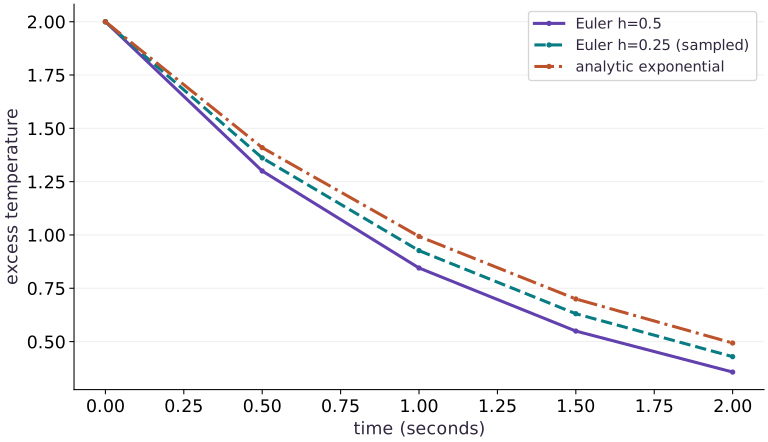
Read the figure
The horizontal axis is time in seconds; the vertical axis is excess temperature. All curves start at . The solid coarse-grid curve takes four steps of seconds; the finer curve takes eight steps of seconds. The analytic exponential is evaluated at the same displayed times.
At two seconds, coarse Euler ends at , finer Euler at , and the analytic model at . Both discrete curves lie below the exponential here. A larger step keeps an overly negative slope active for longer, so the object appears to cool too quickly.
Connect it to the computation
The code checks the coarse curve against the exact geometric sequence for Euler. That comparison passes even though the plot shows a visible physical approximation error. The separate refinement table quantifies that gap at a fixed endpoint.
These curves describe a stable, positive parameter choice. They are separate from accuracy for every time step or equation. The instability experiment changes the multiplier until the numerical behavior no longer resembles cooling.
Open full-size figureDownload data and provenance
The notebook contains the data experiment, plotting code, and recorded figure output. Rerun it to test your changes.
Where to put & run this code: Work in phases/10-science/01-a-functional-physical-simulation/code/main.py (or downloaded exercises/science-01.py / exercises/science-01.ipynb) and execute from the repository root with python3 phases/10-science/01-a-functional-physical-simulation/code/main.py.
1 Define a state transition
Append this block to main.py in your CPU course environment; for the first block create the file. Run blocks in order.
# Step 1 — Define a state transition: A scalar state enters and a new scalar leaves.
import jax
# Update state in place with the new values.
jax.config.update("jax_enable_x64", True)
import jax.numpy as jnp
import numpy as np

def euler_step(rate, value, dt):
    return value - dt*rate*value

# Define `euler_solve(rate, initial, steps, dt)` to carry state across steps with `jax.lax.scan`:
def euler_solve(rate, initial, steps, dt):
    def advance(value, unused):
        updated = euler_step(rate, value, dt)
        return updated, updated
    # Run compiled structured control flow via `jax.lax` (`(_, tail)`).
    _, tail = jax.lax.scan(advance, initial, None, length=steps)
    return jnp.concatenate((jnp.atleast_1d(initial), tail))
Code building blocks in this step
jax.lax.scan(step_fn, init_carry, xs, length=...)— Compiles a sequential loop wherestep_fn(carry, x)returns(next_carry, y), returning(final_carry, stacked_ys).
A scalar state enters and a new scalar leaves. The initial value is saved explicitly, so a solve with four updates contains five observations. The step count is a Python integer, determining a fixed output shape.
2 Compare the simulation with a physical reference
Append this block to main.py in your CPU course environment; for the first block create the file. Run blocks in order.
# Step 2 — Compare the simulation with a physical reference: The geometric sequence verifies implementation correctness.
rate, initial, dt, steps = 0.7, jnp.array(2.0), 0.5, 4
trajectory = euler_solve(rate, initial, steps, dt)
times = np.arange(steps+1)*dt
continuous = 2.0*np.exp(-rate*times)
discrete = 2.0*(1-rate*dt)**np.arange(steps+1)
np.testing.assert_allclose(trajectory, discrete, rtol=1e-12, atol=1e-12)
assert np.all(np.diff(np.asarray(trajectory)) < 0)
assert abs(float(trajectory[-1])-continuous[-1]) > 0.1
print("Euler final:", float(trajectory[-1]), "analytic final:", continuous[-1])
Code building blocks in this step
jnp.array(values, dtype=...)— Constructs an immutable device-backed JAX array from Python/NumPy values.jnp.allclose(actual, expected, rtol=..., atol=...)— Checks that two arrays match elementwise within floating-point tolerance.
The geometric sequence verifies implementation correctness. The exponential checks approximation error. Passing the first comparison does not make the numerical model exact.
3 Refine the time grid without changing the experiment
Append this block to main.py in your CPU course environment; for the first block create the file. Run blocks in order.
# Step 3 — Refine the time grid without changing the experiment: Every run stops at the same physical time.
grid_sizes = np.array([4, 8, 16, 32])
endpoint_errors = np.array([abs(float(euler_solve(rate, initial, int(n), 2.0/n)[-1])-continuous[-1]) for n in grid_sizes])
assert np.all(np.diff(endpoint_errors) < 0)
assert 1.7 < endpoint_errors[-2]/endpoint_errors[-1] < 2.3
print("Endpoint errors:", endpoint_errors)
print("Last refinement ratio:", endpoint_errors[-2]/endpoint_errors[-1])
Code building blocks in this step
np.array(...)— Callnp.arraywith your updated parameters or inputs from this lesson's workspace.abs(...)— Callabswith your updated parameters or inputs from this lesson's workspace.assert condition— Verify that the observed output shape, status, or numerical value satisfies the contract.
Every run stops at the same physical time. Halving the step approximately halves the global error, as expected for forward Euler on this smooth problem.
View the cumulative build in main.py
These blocks append in order to the same file.
# Step 1 — Define a state transition: A scalar state enters and a new scalar leaves.
import jax
# Update state in place with the new values.
jax.config.update("jax_enable_x64", True)
import jax.numpy as jnp
import numpy as np

def euler_step(rate, value, dt):
    return value - dt*rate*value

# Define `euler_solve(rate, initial, steps, dt)` to carry state across steps with `jax.lax.scan`:
def euler_solve(rate, initial, steps, dt):
    def advance(value, unused):
        updated = euler_step(rate, value, dt)
        return updated, updated
    # Run compiled structured control flow via `jax.lax` (`(_, tail)`).
    _, tail = jax.lax.scan(advance, initial, None, length=steps)
    return jnp.concatenate((jnp.atleast_1d(initial), tail))

# Step 2 — Compare the simulation with a physical reference: The geometric sequence verifies implementation correctness.
rate, initial, dt, steps = 0.7, jnp.array(2.0), 0.5, 4
trajectory = euler_solve(rate, initial, steps, dt)
times = np.arange(steps+1)*dt
continuous = 2.0*np.exp(-rate*times)
discrete = 2.0*(1-rate*dt)**np.arange(steps+1)
np.testing.assert_allclose(trajectory, discrete, rtol=1e-12, atol=1e-12)
assert np.all(np.diff(np.asarray(trajectory)) < 0)
assert abs(float(trajectory[-1])-continuous[-1]) > 0.1
print("Euler final:", float(trajectory[-1]), "analytic final:", continuous[-1])

# Step 3 — Refine the time grid without changing the experiment: Every run stops at the same physical time.
grid_sizes = np.array([4, 8, 16, 32])
endpoint_errors = np.array([abs(float(euler_solve(rate, initial, int(n), 2.0/n)[-1])-continuous[-1]) for n in grid_sizes])
assert np.all(np.diff(endpoint_errors) < 0)
assert 1.7 < endpoint_errors[-2]/endpoint_errors[-1] < 2.3
print("Endpoint errors:", endpoint_errors)
print("Last refinement ratio:", endpoint_errors[-2]/endpoint_errors[-1])
Run the example
python3 phases/10-science/01-a-functional-physical-simulation/code/main.pyAbout this command
This shortcut uses an activated macOS/Linux course environment in the repository folder. For Windows, use the explicit interpreter command in “Setup help” above. The script includes worked examples and reference solutions.
Inspect the complete assembled example
# Step 1 — Define a state transition: A scalar state enters and a new scalar leaves.
import jax
# Update state in place with the new values.
jax.config.update("jax_enable_x64", True)
import jax.numpy as jnp
import numpy as np

def euler_step(rate, value, dt):
    return value - dt*rate*value

# Define `euler_solve(rate, initial, steps, dt)` to carry state across steps with `jax.lax.scan`:
def euler_solve(rate, initial, steps, dt):
    def advance(value, unused):
        updated = euler_step(rate, value, dt)
        return updated, updated
    # Run compiled structured control flow via `jax.lax` (`(_, tail)`).
    _, tail = jax.lax.scan(advance, initial, None, length=steps)
    return jnp.concatenate((jnp.atleast_1d(initial), tail))

# Step 2 — Compare the simulation with a physical reference: The geometric sequence verifies implementation correctness.
rate, initial, dt, steps = 0.7, jnp.array(2.0), 0.5, 4
trajectory = euler_solve(rate, initial, steps, dt)
times = np.arange(steps+1)*dt
continuous = 2.0*np.exp(-rate*times)
discrete = 2.0*(1-rate*dt)**np.arange(steps+1)
np.testing.assert_allclose(trajectory, discrete, rtol=1e-12, atol=1e-12)
assert np.all(np.diff(np.asarray(trajectory)) < 0)
assert abs(float(trajectory[-1])-continuous[-1]) > 0.1
print("Euler final:", float(trajectory[-1]), "analytic final:", continuous[-1])

# Step 3 — Refine the time grid without changing the experiment: Every run stops at the same physical time.
grid_sizes = np.array([4, 8, 16, 32])
endpoint_errors = np.array([abs(float(euler_solve(rate, initial, int(n), 2.0/n)[-1])-continuous[-1]) for n in grid_sizes])
assert np.all(np.diff(endpoint_errors) < 0)
assert 1.7 < endpoint_errors[-2]/endpoint_errors[-1] < 2.3
print("Endpoint errors:", endpoint_errors)
print("Last refinement ratio:", endpoint_errors[-2]/endpoint_errors[-1])
Expected result: Euler final 0.3570125; analytic final 0.49319393. The endpoint errors decrease as the step is halved.
Recorded reference execution
Reference output captured from executing the complete lesson script (code/main.py) and its assertions in the course CPU environment.
Euler final: 0.3570125000000001 analytic final: 0.493193927883213
Endpoint errors: [0.13618143 0.06399208 0.03107265 0.0153167 ]
Last refinement ratio: 2.0286780018480166
Euler final: 0.3570125000000001 analytic final: 0.493193927883213
Endpoint errors: [0.13618143 0.06399208 0.03107265 0.0153167 ]
Last refinement ratio: 2.0286780018480166
Stable but sign-alternating: [ 2.     -0.8     0.32   -0.128   0.0512]
Unstable numerical endpoint: 3.543121999999993
Changed rate, initial state and grid verified
Energy checks distinguish growth, but not sign preservation
Same-horizon errors: [np.float64(0.050590770107151406), np.float64(0.02471618055802971), np.float64(0.012218898970361547)]
PASS: science-01
Download execution record · The notebook includes executed cells and figure outputs. Compare your run with these values; timings depend on the machine.
Stable does not mean physically positive
# Experiment — Stable does not mean physically positive: The magnitude decays because |1-kh|=0.4, but crossing below...
oscillatory = euler_solve(0.7, jnp.array(2.0), 4, 2.0)
np.testing.assert_allclose(oscillatory, [2.0, -0.8, 0.32, -0.128, 0.0512], atol=1e-12)
print("Stable but sign-alternating:", np.asarray(oscillatory))
Expected: [2, -0.8, 0.32, -0.128, 0.0512]
The magnitude decays because , but crossing below ambient repeatedly is an artifact of this explicit update.
Reproduce numerical instability
# Experiment — Reproduce numerical instability: The multiplier is -1.1.
unstable = euler_solve(0.7, jnp.array(2.0), 6, 3.0)
assert abs(float(unstable[-1])) > 2.0
assert 2*np.exp(-0.7*18) < 1e-4
print("Unstable numerical endpoint:", float(unstable[-1]))
Expected: The numerical magnitude grows above its initial value; the analytic endpoint is near zero.
The multiplier is . Reducing the time step repairs this discretization; clipping negative values would hide the defect and change the model.
Make it yours
Where to put your code: Append your solution at the bottom of phases/10-science/01-a-functional-physical-simulation/code/main.py (or inside the Make it yours cell of exercises/science-01.ipynb) and run python3 phases/10-science/01-a-functional-physical-simulation/code/main.py to verify your prediction before opening the reference solution.
Change the rate to , the initial excess to , and use twenty steps of seconds. Verify the full discrete trajectory and bound the endpoint error against the exponential.
Show a writing guide and starter scaffold
How to write this exercise code: step-by-step recipe & starter scaffold
1. Key functions & syntax to use:
jnp.array(values, dtype=...)— Constructs an immutable device-backed JAX array from Python/NumPy values.jnp.allclose(actual, expected, rtol=..., atol=...)— Checks that two arrays match elementwise within floating-point tolerance.
2. Step-by-step implementation plan:
- Set up the changed input or configuration parameters requested in the prompt.
- Run the target function or transformation and assert that the output matches your prediction.
# Exercise solution: Change the rate to 0.3, the initial excess to 5, and use twenty steps...
changed = euler_solve(...)  # TODO: compute changed
reference = ...  # TODO: compute reference
np.testing.assert_allclose(changed, reference, rtol = ...  # TODO: compute np.testing.assert_allclose(changed, reference, rtol
assert float(changed[0])  # TODO: complete assertion check
assert abs(float(changed[-1])-5*np.exp(-0.6))  # TODO: complete assertion check
print("Changed rate, initial state and grid verified")
Reveal the reference solution
# Exercise solution: Change the rate to 0.3, the initial excess to 5, and use twenty steps...
changed = euler_solve(0.3, jnp.array(5.0), 20, 0.1)
reference = 5.0*(1-0.3*0.1)**np.arange(21)
np.testing.assert_allclose(changed, reference, rtol=1e-12)
assert float(changed[0]) == 5.0
assert abs(float(changed[-1])-5*np.exp(-0.6)) < 0.03
print("Changed rate, initial state and grid verified")
Energy does not check every invariant
Practice
Construct an energy diagnostic . Test a monotone stable grid and an unstable grid, and explain why decreasing energy alone does not guarantee a nonnegative state.
Show a writing guide and starter scaffold
How to write this practice solution: step-by-step recipe & starter scaffold
1. Key functions & syntax to use:
jnp.array(values, dtype=...)— Constructs an immutable device-backed JAX array from Python/NumPy values.
2. Step-by-step implementation plan:
- Set up the changed input or configuration parameters requested in the prompt.
- Run the target function or transformation and assert that the output matches your prediction.
# Energy does not check every invariant (Practice): A scalar diagnostic can establish decay without capturing...
for h in (0.5, 2.0):
    u = np.asarray(...)  # TODO: compute u
    assert np.all(np.diff(u*u/2)  # TODO: complete assertion check
u = np.asarray(...)  # TODO: compute u
assert np.all(np.diff(u*u/2)  # TODO: complete assertion check
print("Energy checks distinguish growth, but not sign preservation")
Show a hint
Compare successive squared magnitudes. The sign-alternating case from the experiment still loses energy.
Reveal reference solution and reasoning
# Energy does not check every invariant (Practice): A scalar diagnostic can establish decay without capturing...
for h in (0.5, 2.0):
    u = np.asarray(euler_solve(0.7, jnp.array(2.0), 6, h))
    assert np.all(np.diff(u*u/2) < 0)
u = np.asarray(euler_solve(0.7, jnp.array(2.0), 6, 3.0))
assert np.all(np.diff(u*u/2) > 0)
print("Energy checks distinguish growth, but not sign preservation")
A scalar diagnostic can establish decay without capturing every physical invariant. Preserve sign checks separately.
Keep the physical horizon fixed
Challenge
A colleague reports lower error after reducing both the step and number of updates. Reconstruct the final time for each run and repair the comparison.
Show a writing guide and starter scaffold
How to write this practice solution: step-by-step recipe & starter scaffold
1. Key functions & syntax to use:
jnp.array(values, dtype=...)— Constructs an immutable device-backed JAX array from Python/NumPy values.
2. Step-by-step implementation plan:
- Set up the changed input or configuration parameters requested in the prompt.
- Run the target function or transformation and assert that the output matches your prediction.
# Keep the physical horizon fixed (Challenge): A refinement study must hold the modeled experiment fixed;...
horizon = ...  # TODO: compute horizon
errors = ...  # TODO: compute errors
for n in (10, 20, 40):
    h = ...  # TODO: compute h
    final = euler_solve(...)  # TODO: compute final
    errors.append(abs(float(final)-2*np.exp(-0.7*horizon)))
assert errors[2]  # TODO: complete assertion check
print("Same-horizon errors:", errors)
Show a hint
The horizon is number of updates multiplied by step length.
Reveal reference solution and reasoning
# Keep the physical horizon fixed (Challenge): A refinement study must hold the modeled experiment fixed;...
horizon = 2.0
errors = []
for n in (10, 20, 40):
    h = horizon/n
    final = euler_solve(0.7, jnp.array(2.0), n, h)[-1]
    errors.append(abs(float(final)-2*np.exp(-0.7*horizon)))
assert errors[2] < errors[1] < errors[0]
print("Same-horizon errors:", errors)
A refinement study must hold the modeled experiment fixed; comparing different end times conflates physical change and numerical accuracy.
Diagnose the result
If outputs alternate sign, inspect before editing the physical rate. If the curve has the right shape but every point is shifted, compare the saved initial point and time indexing. If a refinement study improves unpredictably, verify that every run ends at the same physical time.
Carry forward
- Start with units and one step
- Keep state explicit and keep the initial observation
- Use two references because they answer different questions
- Accuracy and stability are different requirements
- Make a convergence table before fitting parameters
Keep your evidence
Full geometric/exponential comparisons, fixed-horizon refinement table, unstable-step failure and repair. Keep the environment, observed outputs and your explanation of the figure.
Save your modified code, its output, and an explanation of your prediction. Checkpoint answers and exercise evidence are tracked separately.
Saved in this browser. Export or back up your portfolio anytime in My learning.
Verified on local CPU. Stage to a Cloud TPU VM via Cloud TPU setup to record accelerator execution receipts (TODO: add automated Cloud TPU CI execution receipts).