 JAX Pathways
Phase 15 / Deployment, interoperability & edge AI
Move models between JAX, Keras, TensorFlow and PyTorch
Revision v0.7.0 · Updated since your last visit. Review the changes; your progress is saved.
Lesson · about 110 minutes · CPU practice
Verify parameter layouts and inference semantics before switching frameworks.
Phase study guide: preparation, milestones and project evidence
Before you start
Before this: Adapt a pretrained model and choose a post-training objective
Hardware: CPU; optional framework and edge-device labs have separate requirements
Setup help: Python, notebook, or Cloud TPU VM
Use the tested CPU packages (the recorded environment uses Python 3.14.3). Other Python versions and accelerator environments require separate checks. The optional Cloud TPU specialization explains the target-specific execution boundaries. Logical CPU devices practice partitioning; they do not simulate TPU performance.
Download the repository ZIP or use your existing checkout. Extract it and open a terminal in the folder containing requirements-cpu.txt. The beginner ZIP is separate; these lessons use the full repository folder.
python3 -m venv .venv
source .venv/bin/activate
python -m pip install -r requirements-cpu.txtpy -3 -m venv .venv
.\.venv\Scripts\python.exe -m pip install -r requirements-cpu.txtAfter activation, run the complete worked example from that same folder:
python phases/15-deployment/01-keras-and-pytorch-bridges-to-explicit-jax/code/main.py.\.venv\Scripts\python.exe phases/15-deployment/01-keras-and-pytorch-bridges-to-explicit-jax/code/main.pyFor an incremental build, create main.py in your own practice folder, append each build block in order, and run python main.py with this environment active. Keep that file separate from the downloaded reference solution.
Download this lesson’s notebook. Open it with a Python kernel using the course environment. Run cells from the top after restarting the kernel; experiments depend on earlier definitions.
For local Jupyter, first install the course requirements using the Local Python steps, then use your environment’s Python to start Jupyter:
python -m pip install jupyterlab
python -m jupyter lab.\.venv\Scripts\python.exe -m pip install jupyterlab
.\.venv\Scripts\python.exe -m jupyter labSelect the downloaded deployment-01.ipynb file in JupyterLab. The notebook contains reference solutions; make your prediction and attempt each practice task before opening them. Restart the kernel before changing logical device setup.
The worked reference for this lesson is CPU-validated. Some references explicitly configure logical CPU devices; setting JAX_PLATFORMS does not adapt them to a TPU. Follow the execution matrix and reviewed multi-host example before attempting a target run.
For accelerator preparation, study TPU setup, observed runtime receipts, checkpointed jobs and precision and retained traces. These target paths remain unqualified on physical TPU hardware until an actual receipt is recorded. Cloud provisioning is optional for CPU learning.
Check: Two rows match; the first is within absolute tolerance .
Revisit the guided CPU setup · Open 19: TPU Setup. Package instructions are CPU instructions; Windows and accelerator environments need their own validation.
What you will be able to do
- Map Dense and Linear weight axes and verify a known output.
- Separate architecture, weights, non-trainable state, optimizer state and preprocessing.
- Run a backend-neutral Keras model and explain the boundaries of tensor exchange and export.
The problem
You have a dense layer in PyTorch and the same model idea in Keras. Can you reuse the weights in JAX? We’ll start with one small layer, work out a prediction by hand, and check the weight axes. From there, you’ll learn which parts of a model can transfer directly and which need separate checks.
The idea
Cross-framework conversion must preserve the meaning of inputs, parameters and outputs. A layout transpose can be necessary, but architecture, preprocessing and arithmetic conventions must agree too. Start by writing the function each framework computes.
Map the function, not just the weight file
For a dense layer, one framework may store weights as input-by-output while another stores output-by-input. The transpose can align the intended multiplication. If both dimensions happen to match, an incorrect mapping may still have a legal shape.
Use unequal dimensions and distinguishable values, then compare intermediate results on the same input. Check bias placement, activation and normalization conventions instead of inferring equivalence from a successful load.
The transpose heatmaps show storage correspondence. They do not demonstrate conversion of an arbitrary Keras, TensorFlow or PyTorch architecture. A supported converter needs an explicit model-family contract, including tokenizer or image/audio processor identity where relevant.
A parameter file is not a model
Our inputs have shape . Keras Dense uses a kernel; PyTorch Linear stores weights and multiplies by their transpose. Bias has shape . For , the first output is . Verify a hand-derived row before comparing whole arrays. Convolution kernels have additional layout conventions; do not apply this dense transpose rule to them.
Use Keras as a shared model vocabulary
Keras can execute models on JAX, TensorFlow or PyTorch. Select KERAS_BACKEND before importing keras, in a fresh process. Use keras.layers and keras.ops in portable model code; a call to tf.* inside a custom layer is a TensorFlow dependency. This does not port arbitrary Python side effects or framework-specific training loops. A .keras archive preserves Keras configuration and weights; an inference export has a different job.
Explicit JAX state is a design decision
Pass parameters and non-trainable state explicitly; return updated state and keep random keys visible. A matched inference result does not show that dropout randomness, BatchNorm moving statistics or optimizer slots were transferred. Start in inference mode with training=False. Compare gradients and an update separately before claiming training equivalence. Reinitializing the optimizer is a new training run, not an exact resume.
Choose the bridge for the destination
NumPy exchange makes a clear host copy and usually breaks autodiff across the boundary. DLPack exchanges supported tensor buffers between frameworks; sharing memory is not model conversion or cross-framework autodiff, and external mutation can violate JAX assumptions. JAX export serializes a staged computation for compatible consumers. jax2tf is a separate, version-sensitive TensorFlow bridge. Keras export can target supported inference formats; inspect the destination operators and signatures. ONNX is a model interchange format, while ONNX Runtime execution providers choose supported execution paths. PyTorch/XLA runs PyTorch through XLA; it does not turn a PyTorch model into an explicit JAX function.
Run the optional real-framework lab
The file labs/keras_backends.py beside this lesson builds the same Dense model, fixes its weights, compares known outputs, and inspects mixed precision policy. From the extracted course workspace root, use an isolated environment with Keras and the backend you want. Run the same file in a new process for each backend; --backend selects it before importing Keras. Tested locally with Keras 3.14.1 on the installed JAX and PyTorch backends. The same companion also passed on TensorFlow 2.21.0 with Keras 3.15.1 in the separate edge-lab environment. These optional backend checks are recorded separately from the core CPU receipt.
Optional Keras environment — macOS/Linux, workspace root
# Run optional keras environment — macos/linux, workspace root using the course Python environment
python3 -m venv .venv-interop
.venv-interop/bin/python -m pip install "keras==3.14.1" "jax==0.9.2" "torch==2.11.0"
Expected:
An isolated environment with the tested Keras/JAX/PyTorch versions. Use .venv-interop/bin/python instead of python3 in the commands below; on Windows use .venv-interop\Scripts\python.exe. TensorFlow is a separate optional backend: use the edge lab environment instructions and record its installed versions.
Optional lab — run from the course workspace root after installing Keras and the selected backend
# Run optional lab — run from the course workspace root after installing keras and the selected backend using the course Python environment
python3 phases/15-deployment/01-keras-and-pytorch-bridges-to-explicit-jax/labs/keras_backends.py --backend jax
python3 phases/15-deployment/01-keras-and-pytorch-bridges-to-explicit-jax/labs/keras_backends.py --backend torch
python3 phases/15-deployment/01-keras-and-pytorch-bridges-to-explicit-jax/labs/keras_backends.py --backend tensorflow
Expected:
Each installed backend prints PASS and measured precision errors. A missing backend must be installed in its isolated environment before running that command.
Write the same dense layer in both layouts
We’ll call the input matrix , the Keras-style kernel , and the PyTorch-style weight . The math agrees when . The transpose changes how weights are arranged, not what the layer means. Bias is added to every output row. Check the known first row before trying a larger model.
A valid shape can still mean the wrong feature
Imagine that the source reads temperature, pressure and humidity in that order. The target reads humidity, pressure and temperature. Both receive three numbers, so a shape assertion passes. But the first coefficient now multiplies the wrong measurement. Write down feature names and units next to each input column before mapping a weight tensor.
For the worked first row, the two scores are and . Swapping the first and last features gives and . These large differences are not floating-point noise. Follow the first mismatch: raw values, normalized values, first layer, activation, then output labels. This order prevents you from adjusting a numerical tolerance to conceal a different function.
Use a small bridge before a complete model
Keep the dense example as a test you can reason through by hand. Then add one operation at a time: a nonlinearity, normalization, and a second layer. Record an intermediate tensor at each boundary. For a convolution, declare both image layout and kernel layout; for attention, declare token order, head order, masks, and how query, key and value weights are packed.
The optional Keras lab runs real backends in separate processes. The default companion below uses NumPy and JAX to expose the mapping arithmetic, so its success alone is verified separately from TensorFlow, PyTorch, or a complete pretrained checkpoint. Carry a table of source names, target names, shapes, axis permutations and test inputs into the model-specific conversion lesson.
A transpose changes storage layout, not the intended model
Predict before looking: Which axis names swap between the two parameter layouts?
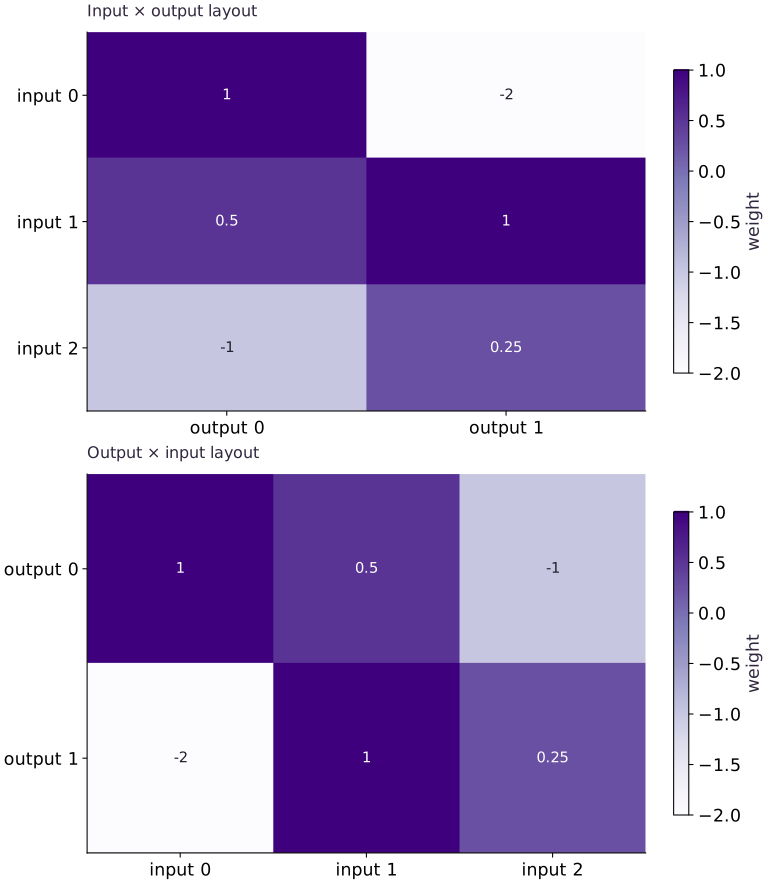
Read the figure
The upper matrix has input features as rows and output features as columns. The lower matrix swaps those axes. The cell values are weights, and the two panels contain the same six numbers in transposed positions.
Track the weight : it moves from input , output in the upper panel to output , input in the lower panel. It still connects the same input feature to the same output feature. The layout changes from shape to .
Connect it to the computation
With the first convention, a row batch computes . With the transposed storage convention, the equivalent calculation uses , where . Transposing storage without adapting the computation would change the meaning or produce a shape error.
The picture explains this layout contract using an explicit numerical reference. It does not demonstrate that every layer or serialized model can be transferred between frameworks by one transpose. Check activations, bias, preprocessing, and layer-specific conventions against an independent output reference as well.
Open full-size figureDownload data and provenance
The notebook contains the data experiment, plotting code, and recorded figure output. Rerun it to test your changes.
Where to put & run this code: Work in phases/15-deployment/01-keras-and-pytorch-bridges-to-explicit-jax/code/main.py (or downloaded exercises/deployment-01.py / exercises/deployment-01.ipynb) and execute from the repository root with python3 phases/15-deployment/01-keras-and-pytorch-bridges-to-explicit-jax/code/main.py.
1 Write the source function and its known input
Create main.py in your lesson workspace and run it with the active course Python environment. Keep feature order fixed while you name the input, kernel and bias.
# Step 1 — Write the source function and its known input: The arrays define a batch of shape (2,3), a kernel of shape (3,2),...
import numpy as np
import jax
import jax.numpy as jnp
# Same dense layer, different parameter layouts.
x = np.array([[1., 2., -1.], [-2., 0., 3.]], np.float32)
keras_kernel = np.array([[1., -2.], [.5, 1.], [-1., .25]], np.float32)
bias = np.array([.1, -.2], np.float32)

np.testing.assert_allclose(x[0] @ keras_kernel + bias, [3.1, -.45], atol=1e-6)
Code building blocks in this step
jnp.allclose(actual, expected, rtol=..., atol=...)— Checks that two arrays match elementwise within floating-point tolerance.
The arrays define a batch of shape , a kernel of shape , and a bias of shape . The first known output is .
2 Map the stored tensor into explicit JAX parameters
Append this block to the same main.py and rerun the whole file. Transpose the stored PyTorch-style weights back into input-by-output order, then define the pure prediction function.
# Step 2 — Map the stored tensor into explicit JAX parameters: The zero-input check returns the bias twice.
torch_weight = keras_kernel.T.copy()  # torch Linear: output, input
# Create device-backed JAX array `params`.
params = {"kernel": jnp.asarray(torch_weight.T), "bias": jnp.asarray(bias)}
def predict(params, inputs):
    return inputs @ params["kernel"] + params["bias"]

# Allocate initialized array `` with the specified shape and dtype.
np.testing.assert_allclose(predict(params, jnp.zeros((2,3))), np.tile(bias,(2,1)), atol=1e-6)
Code building blocks in this step
jnp.zeros / jnp.ones(shape, dtype=...)— Allocates a tensor of the givenshapeinitialized with constants.jnp.allclose(actual, expected, rtol=..., atol=...)— Checks that two arrays match elementwise within floating-point tolerance.
The zero-input check returns the bias twice. If it does not, inspect bias broadcasting before comparing full predictions.
3 Verify values before extending the architecture
Append this block to the same main.py and rerun the whole file. Run both independent checks and inspect the two output rows.
# Step 3 — Verify values before extending the architecture: The first assertion checks hand arithmetic; the second compares...
# Wrap with `jax.jit` (`actual`) so XLA traces and compiles the function.
actual = np.asarray(jax.jit(predict)(params, jnp.asarray(x)))
# A hand-computed first row detects a shared layout mistake.
np.testing.assert_allclose(actual[0], [3.1, -.45], atol=1e-6)
np.testing.assert_allclose(actual, x @ keras_kernel + bias, atol=1e-6)
print("Matched dense outputs:", actual)
Code building blocks in this step
jnp.allclose(actual, expected, rtol=..., atol=...)— Checks that two arrays match elementwise within floating-point tolerance.jax.jit(fn) / @jax.jit— Tracesfnwith abstract shapes and compiles a fused XLA executable cached by input shape and dtype.
The first assertion checks hand arithmetic; the second compares the entire batch with the source-layout calculation. Continue with the feature-order and second-layer experiments below.
View the cumulative build in main.py
These blocks append in order to the same file.
# Step 1 — Write the source function and its known input: The arrays define a batch of shape (2,3), a kernel of shape (3,2),...
import numpy as np
import jax
import jax.numpy as jnp
# Same dense layer, different parameter layouts.
x = np.array([[1., 2., -1.], [-2., 0., 3.]], np.float32)
keras_kernel = np.array([[1., -2.], [.5, 1.], [-1., .25]], np.float32)
bias = np.array([.1, -.2], np.float32)

np.testing.assert_allclose(x[0] @ keras_kernel + bias, [3.1, -.45], atol=1e-6)

# Step 2 — Map the stored tensor into explicit JAX parameters: The zero-input check returns the bias twice.
torch_weight = keras_kernel.T.copy()  # torch Linear: output, input
# Create device-backed JAX array `params`.
params = {"kernel": jnp.asarray(torch_weight.T), "bias": jnp.asarray(bias)}
def predict(params, inputs):
    return inputs @ params["kernel"] + params["bias"]

# Allocate initialized array `` with the specified shape and dtype.
np.testing.assert_allclose(predict(params, jnp.zeros((2,3))), np.tile(bias,(2,1)), atol=1e-6)

# Step 3 — Verify values before extending the architecture: The first assertion checks hand arithmetic; the second compares...
# Wrap with `jax.jit` (`actual`) so XLA traces and compiles the function.
actual = np.asarray(jax.jit(predict)(params, jnp.asarray(x)))
# A hand-computed first row detects a shared layout mistake.
np.testing.assert_allclose(actual[0], [3.1, -.45], atol=1e-6)
np.testing.assert_allclose(actual, x @ keras_kernel + bias, atol=1e-6)
print("Matched dense outputs:", actual)
Run the example
python3 phases/15-deployment/01-keras-and-pytorch-bridges-to-explicit-jax/code/main.pyAbout this command
This shortcut uses an activated macOS/Linux course environment in the repository folder. For Windows, use the explicit interpreter command in “Setup help” above. The script includes worked examples and reference solutions.
Inspect the complete assembled example
# Move models between JAX, Keras, TensorFlow and PyTorch: Cross-framework conversion must preserve the meaning of inputs,...
import numpy as np
import jax
import jax.numpy as jnp
# Same dense layer, different parameter layouts.
x = np.array([[1., 2., -1.], [-2., 0., 3.]], np.float32)
keras_kernel = np.array([[1., -2.], [.5, 1.], [-1., .25]], np.float32)
bias = np.array([.1, -.2], np.float32)
torch_weight = keras_kernel.T.copy()  # torch Linear: output, input
# Create device-backed JAX array `params`.
params = {"kernel": jnp.asarray(torch_weight.T), "bias": jnp.asarray(bias)}
def predict(params, inputs):
    return inputs @ params["kernel"] + params["bias"]
# Wrap with `jax.jit` (`actual`) so XLA traces and compiles the function.
actual = np.asarray(jax.jit(predict)(params, jnp.asarray(x)))
# A hand-computed first row detects a shared layout mistake.
np.testing.assert_allclose(actual[0], [3.1, -.45], atol=1e-6)
np.testing.assert_allclose(actual, x @ keras_kernel + bias, atol=1e-6)
print("Matched dense outputs:", actual)
Expected result: Two rows match; the first is within absolute tolerance .
Recorded reference execution
Reference output captured from executing the complete lesson script (code/main.py) and its assertions in the course CPU environment.
Matched dense outputs: [[ 3.1  -0.45]
 [-4.9   4.55]]
Matched dense outputs: [[ 3.1  -0.45]
 [-4.9   4.55]]
Equal shapes, unequal outputs
Feature order failed, then matched after aligning kernel rows.
Changed batch verified
Two-layer reference scores: [ 6.5  -4.25]
PASS: deployment-01
Download execution record · The notebook includes executed cells and figure outputs. Compare your run with these values; timings depend on the machine.
A square matrix hides a transpose
# Experiment — A square matrix hides a transpose: Check asymmetric values and independently known outputs, not...
square = np.array([[1., 2.], [3., 4.]], np.float32)
z = np.array([[2., -1.]], np.float32)
# Check tensor shape invariant: `(z @ square).shape == (z @ square.T).shape`
assert (z @ square).shape == (z @ square.T).shape
assert not np.allclose(z @ square, z @ square.T)
print("Equal shapes, unequal outputs")
Expected: Both outputs have the same shape but different values.
Check asymmetric values and independently known outputs, not just tensor dimensions.
Reorder features without changing tensor dimensions
# Experiment — Reorder features without changing tensor dimensions: The repair changes the pairing of features and coefficients.
permutation = [2, 1, 0]
reordered = x[:, permutation]
# Convert `wrong_order` to a host NumPy array for inspection or verification.
wrong_order = np.asarray(predict(params, reordered))
np.testing.assert_allclose(wrong_order[0], [-.9, 4.05], atol=1e-6)
assert not np.allclose(wrong_order, actual)
repaired_params = {'kernel': params['kernel'][permutation, :], 'bias': params['bias']}
np.testing.assert_allclose(predict(repaired_params, reordered), actual, atol=1e-6)
print('Feature order failed, then matched after aligning kernel rows.')
Expected: The wrong first row is ; permuting the kernel rows restores both original observations.
The repair changes the pairing of features and coefficients. It does not change the model represented by those pairings. Repeat with asymmetric feature values; repeated values can hide a wrong order.
Make it yours
Where to put your code: Append your solution at the bottom of phases/15-deployment/01-keras-and-pytorch-bridges-to-explicit-jax/code/main.py (or inside the Make it yours cell of exercises/deployment-01.ipynb) and run python3 phases/15-deployment/01-keras-and-pytorch-bridges-to-explicit-jax/code/main.py to verify your prediction before opening the reference solution.
Add a batch with four rows and preserve the same parameters. Verify each row independently using a feature-by-feature sum.
Show a writing guide and starter scaffold
How to write this exercise code: step-by-step recipe & starter scaffold
1. Key functions & syntax to use:
array.reshape(new_shape)— Reorganizes tensor axes without changing the total element count (array.size).jnp.allclose(actual, expected, rtol=..., atol=...)— Checks that two arrays match elementwise within floating-point tolerance.
2. Step-by-step implementation plan:
- Construct and reshape
changedinto the target tensor dimensions. - Combine or mask array elements to form
expected.
# Exercise solution: Add a batch with four rows and preserve the same parameters.
# Construct and reshape `changed` into the target tensor dimensions.
changed = np.arange(...)  # TODO: compute changed
# Combine or mask array elements to form `expected`.
expected = np.stack(...)  # TODO: compute expected
np.testing.assert_allclose(predict(params, changed), expected, atol = ...  # TODO: compute np.testing.assert_allclose(predict(params, changed), expected, atol
print("Changed batch verified")
Reveal the reference solution
# Exercise solution: Add a batch with four rows and preserve the same parameters.
# Construct and reshape `changed` into the target tensor dimensions.
changed = np.arange(12, dtype=np.float32).reshape(4, 3) / 4
# Combine or mask array elements to form `expected`.
expected = np.stack([sum(row[i] * keras_kernel[i] for i in range(3)) + bias for row in changed])
np.testing.assert_allclose(predict(params, changed), expected, atol=2e-6)
print("Changed batch verified")
Detect a preprocessing mismatch
Transfer
Suppose the source model expects inputs divided by , while the target receives raw pixels. Demonstrate why correct weight transfer still fails.
Show a writing guide and starter scaffold
How to write this practice solution: step-by-step recipe & starter scaffold
1. Key functions & syntax to use:
jnp.allclose(actual, expected, rtol=..., atol=...)— Checks that two arrays match elementwise within floating-point tolerance.
2. Step-by-step implementation plan:
- Set up the changed input or configuration parameters requested in the prompt.
- Run the target function or transformation and assert that the output matches your prediction.
# Detect a preprocessing mismatch (Transfer): Input normalization belongs in the deployment contract.
pixels = np.array(...)  # TODO: compute pixels
source = predict(...)  # TODO: compute source
wrong = predict(...)  # TODO: compute wrong
assert not np.allclose(source, wrong)  # TODO: complete assertion check
np.testing.assert_allclose(source, predict(params, pixels / 255.), atol=1e-6)
Show a hint
Compute both predictions from the same raw input: once with the source normalization and once without it. Matching weights cannot cancel an input-scale mismatch.
Reveal reference solution and reasoning
# Detect a preprocessing mismatch (Transfer): Input normalization belongs in the deployment contract.
pixels = np.array([[255., 128., 0.]], np.float32)
source = predict(params, pixels / 255.)
wrong = predict(params, pixels)
assert not np.allclose(source, wrong)
np.testing.assert_allclose(source, predict(params, pixels / 255.), atol=1e-6)
Input normalization belongs in the deployment contract. Matching weights cannot compensate for a different input distribution.
Map a second layer and locate an omitted activation
Transfer / diagnosis
Extend the dense mapping with ReLU and a second dense layer. Use independently computed final scores to catch a converter that forgets ReLU. Then show why an all-positive probe would be a weak test.
Show a writing guide and starter scaffold
How to write this practice solution: step-by-step recipe & starter scaffold
1. Key functions & syntax to use:
jnp.allclose(actual, expected, rtol=..., atol=...)— Checks that two arrays match elementwise within floating-point tolerance.
2. Step-by-step implementation plan:
- Convert
hiddento a host NumPy array for inspection or verification. - Convert
omitted_reluto a host NumPy array for inspection or verification. - Execute
np.testing.assert_array_equal(np.maximum(positive_probe, 0), positive_probe).
# Map a second layer and locate an omitted activation (Transfer / diagnosis): The first dense layer agrees, but the activation is the...
second_kernel = np.array(...)  # TODO: compute second_kernel
second_bias = np.array(...)  # TODO: compute second_bias
# Convert `hidden` to a host NumPy array for inspection or verification.
hidden = np.maximum(...)  # TODO: compute hidden
bridged_scores = ...  # TODO: compute bridged_scores
np.testing.assert_allclose(bridged_scores[:, 0], [6.5, -4.25], atol=2e-6)
# Convert `omitted_relu` to a host NumPy array for inspection or verification.
omitted_relu = np.asarray(...)  # TODO: compute omitted_relu
assert not np.allclose(omitted_relu, bridged_scores)  # TODO: complete assertion check
positive_probe = np.array(...)  # TODO: compute positive_probe
# Execute `np.testing.assert_array_equal(np.maximum(positive_probe, 0), positive_probe)`.
np.testing.assert_array_equal(np.maximum(positive_probe, 0), positive_probe)
print('Two-layer reference scores:', bridged_scores[:, 0])
Show a hint
Compute both first-layer rows by hand, replace negative entries by zero, and apply the new output weights.
Reveal reference solution and reasoning
# Map a second layer and locate an omitted activation (Transfer / diagnosis): The first dense layer agrees, but the activation is the...
second_kernel = np.array([[2.], [-1.]], np.float32)
second_bias = np.array([.3], np.float32)
# Convert `hidden` to a host NumPy array for inspection or verification.
hidden = np.maximum(np.asarray(predict(params, x)), 0.)
bridged_scores = hidden @ second_kernel + second_bias
np.testing.assert_allclose(bridged_scores[:, 0], [6.5, -4.25], atol=2e-6)
# Convert `omitted_relu` to a host NumPy array for inspection or verification.
omitted_relu = np.asarray(predict(params, x)) @ second_kernel + second_bias
assert not np.allclose(omitted_relu, bridged_scores)
positive_probe = np.array([[1., 2.]], np.float32)
# Execute `np.testing.assert_array_equal(np.maximum(positive_probe, 0), positive_probe)`.
np.testing.assert_array_equal(np.maximum(positive_probe, 0), positive_probe)
print('Two-layer reference scores:', bridged_scores[:, 0])
The first dense layer agrees, but the activation is the first divergent boundary. The final reference scores are and . A probe containing only positive hidden values would make an omitted ReLU invisible.
Diagnose the result
If output shapes fail, write the contraction axes. If shapes match but values drift, check layout, preprocessing, bias, inference mode and dtype in that order. A missing TensorFlow import in the optional lab means that backend is not installed; it is not a failure of the JAX core exercise.
Keep your evidence
Keep the layout map, two changed-input comparisons, runtime versions and optional backend-lab output. Identify which model state and preprocessing are not covered by a dense-layer match.
Save your modified code, its output, and an explanation of your prediction. Checkpoint answers and exercise evidence are tracked separately.
Saved in this browser. Export or back up your portfolio anytime in My learning.
Verified on local CPU. Stage to a Cloud TPU VM via Cloud TPU setup to record accelerator execution receipts (TODO: add automated Cloud TPU CI execution receipts).