 JAX Pathways
Phase 15 / Deployment, interoperability & edge AI
Deploy at the edge: conversion, budgets and device checks
Revision v0.7.0 · Updated since your last visit. Review the changes; your progress is saved.
Lesson · about 110 minutes · CPU practice
Define an edge runtime contract and measure an end-to-end batch-one request.
Phase study guide: preparation, milestones and project evidence
Before you start
Before this: Inference capacity, batching, and autoscaling
Hardware: CPU; optional framework and edge-device labs have separate requirements
Setup help: Python, notebook, or Cloud TPU VM
Use the tested CPU packages (the recorded environment uses Python 3.14.3). Other Python versions and accelerator environments require separate checks. The optional Cloud TPU specialization explains the target-specific execution boundaries. Logical CPU devices practice partitioning; they do not simulate TPU performance.
Download the repository ZIP or use your existing checkout. Extract it and open a terminal in the folder containing requirements-cpu.txt. The beginner ZIP is separate; these lessons use the full repository folder.
python3 -m venv .venv
source .venv/bin/activate
python -m pip install -r requirements-cpu.txtpy -3 -m venv .venv
.\.venv\Scripts\python.exe -m pip install -r requirements-cpu.txtAfter activation, run the complete worked example from that same folder:
python phases/15-deployment/06-edge-ai-conversion-and-device-validation/code/main.py.\.venv\Scripts\python.exe phases/15-deployment/06-edge-ai-conversion-and-device-validation/code/main.pyFor an incremental build, create main.py in your own practice folder, append each build block in order, and run python main.py with this environment active. Keep that file separate from the downloaded reference solution.
Download this lesson’s notebook. Open it with a Python kernel using the course environment. Run cells from the top after restarting the kernel; experiments depend on earlier definitions.
For local Jupyter, first install the course requirements using the Local Python steps, then use your environment’s Python to start Jupyter:
python -m pip install jupyterlab
python -m jupyter lab.\.venv\Scripts\python.exe -m pip install jupyterlab
.\.venv\Scripts\python.exe -m jupyter labSelect the downloaded deployment-06.ipynb file in JupyterLab. The notebook contains reference solutions; make your prediction and attempt each practice task before opening them. Restart the kernel before changing logical device setup.
The worked reference for this lesson is CPU-validated. Some references explicitly configure logical CPU devices; setting JAX_PLATFORMS does not adapt them to a TPU. Follow the execution matrix and reviewed multi-host example before attempting a target run.
For accelerator preparation, study TPU setup, observed runtime receipts, checkpointed jobs and precision and retained traces. These target paths remain unqualified on physical TPU hardware until an actual receipt is recorded. Cloud provisioning is optional for CPU learning.
Check: A JSON report with measured warm requests, first-request time, p50/p95 and edge_device_validated=false. Timings depend on this CPU; no device speedup is asserted.
Revisit the guided CPU setup · Open 19: TPU Setup. Package instructions are CPU instructions; Windows and accelerator environments need their own validation.
What you will be able to do
- Trace source model through conversion, runtime and device execution.
- Measure a complete batch-one request separately from first-call overhead.
- Define calibration, held-out quality and device acceptance checks.
- Identify fallback operators and memory costs before claiming edge readiness.
The problem
A model works on your computer, and now you want it to run near the user—perhaps on a phone or an embedded board. Let’s trace the whole request, from raw input to usable output. We’ll check conversion, measure a batch-one CPU request, and write down what still needs to be measured on the real device.
The idea
An edge deployment includes input decoding, preprocessing, transfers, inference and output handling under device constraints. Choose a target and an explicit request contract before claiming that an exported model is ready for that device.
Measure the device path the user actually experiences
A converted operator may run on the intended accelerator while another falls back to the CPU. The end-to-end request can then pay transfer and scheduling costs absent from an isolated kernel measurement. Inspect actual runtime placement and supported operators.
Memory also has several parts: weights, activations, temporary workspace and runtime overhead. A smaller weight file does not guarantee the whole request fits the device's working-memory budget.
The CPU request trace is a useful reference for the interface. It is distinct from phone, browser, NPU or TPU performance. Repeat the same correctness cases on the named target, then measure cold and warm behavior with its runtime and power/thermal conditions recorded when relevant.
Model speed is one part of request speed
Predict: If inference becomes twice as fast, does the whole request become twice as fast?
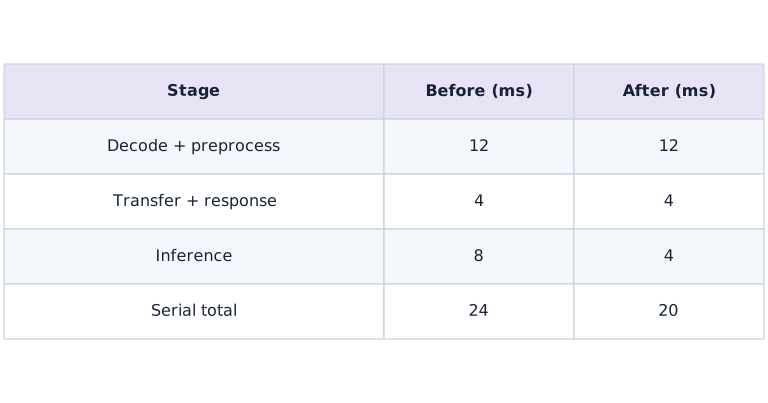
Read the two columns as a hypothetical serial request before and after halving only inference. Preprocessing and transfer/response work remain unchanged. Add down each column: the total moves from to milliseconds, a -fold improvement. These times are analytic teaching values; the separate plot contains actual local CPU request measurements.
Choose a deployment lane
For a phone or Linux edge device, LiteRT is one runtime option; ONNX Runtime offers execution providers for supported targets. Apple deployments may use Core ML after a supported conversion; PyTorch models may use ExecuTorch. Microcontrollers require a runtime and operator set designed for constrained memory, such as LiteRT for Microcontrollers. These are alternatives, not interchangeable file formats. Write down OS, device model, runtime version, operators, input shapes, precision policy and accelerator path before converting.
Follow one concrete TensorFlow-to-LiteRT route
The optional labs/tensorflow_litert.py companion builds the known dense model in TensorFlow, converts float32 and fully integer variants, inspects input/output scale and zero point, quantizes requests and dequantizes outputs, then checks held-out predictions. Representative calibration inputs are preprocessed floats in the exact source-model input domain. Setting integer-only supported ops and int8 input/output requests a strict integer graph; unsupported conversion should fail rather than silently satisfy the contract with float fallback. The lab uses TensorFlow’s interpreter interface as a desktop compatibility check; it is not a device delegate test. Desktop conversion was verified with Python 3.12.13, TensorFlow 2.21.0 and Keras 3.15.1 on macOS arm64. The optional requirements file pins these tested top-level dependencies; other platforms still need a compatible installation.
Optional TensorFlow environment — macOS/Linux, from the workspace root
# Run optional tensorflow environment — macos/linux, from the workspace root using the course Python environment
python3.12 -m venv .venv-tensorflow
.venv-tensorflow/bin/python -m pip install -r phases/15-deployment/06-edge-ai-conversion-and-device-validation/labs/requirements-tensorflow.txt
.venv-tensorflow/bin/python phases/15-deployment/06-edge-ai-conversion-and-device-validation/labs/tensorflow_litert.py --output edge-artifacts
.venv-tensorflow/bin/python -m pip freeze > edge-artifacts/requirements-tested.txt
Expected:
A compatible TensorFlow installation writes two .tflite files and report.json after numerical checks. Desktop float32 and INT8 conversion passed separately from the core CPU receipt; device validation remains unperformed. On Windows use .venv-tensorflow\Scripts\python.exe in place of .venv-tensorflow/bin/python. If no compatible TensorFlow wheel exists, choose a supported Python/platform combination from the official installation guide.
Keep preprocessing attached to the model
Our sample uses three sensor features in the range to and divides by before inference. The JSON request exercises that boundary. A camera model also needs color order, resize/crop behavior and normalization; tokenizer-based models need vocabulary, special tokens and sequence rules. Keep preprocessing versioned with weights and output labels. Run the same raw golden inputs through the source pipeline and the device pipeline.
Budget more than weights
Peak memory includes activations, tensors held by the runtime, workspace, preprocessing buffers and, for autoregressive models, KV cache. A compressed file may expand on load. Batch one often minimizes interaction latency but may reduce throughput. Include cold process startup, model load and runtime initialization in a separate device cold-start measurement; our first-request timing starts after imports and model setup, so it does not cover them. Measure power or energy with an actual target-device tool and record thermal state.
Measure the request the user experiences
The timer includes JSON decoding, normalization, host/device placement, inference completion and response encoding. Thirty warm requests produce an instructional p50 and p95, not a production tail-latency estimate. A device report needs more samples, realistic input variation and sustained runs to reveal thermal throttling. Never reuse a kernel-only time as end-to-end latency. Verify the numerical output before interpreting any timings.
Device acceptance is an experiment
Choose quality, memory, startup and latency thresholds before comparing candidates. Record runtime/delegate logs and partitioning so unsupported operators cannot quietly fall back to CPU. Compare float32, FP16 and calibrated INT8 where that device supports them. Retain the original artifact, hashes, versions, input/output metadata, calibration provenance and failed cases. A conversion failure, regression on rare inputs or memory-budget failure is a result to diagnose. Leave device fields unmeasured until tested on the named hardware.
Declare the raw sensor contract before normalizing
This exercise uses one row of three numeric sensor values in the range . Numeric strings, booleans, missing values, extra fields and out-of-range readings are rejected. That is a deliberately chosen protocol for this fixture, not a rule for every sensor. If a physical device uses a different unit or range, change and version the contract before changing the model.
Check the raw values before converting them to an array. Otherwise a convenient cast may turn a string or boolean into a plausible number, hiding a caller's mistake. After validation, divide by exactly once. Keep that conversion with the model release so the desktop reference and device application see the same numeric inputs.
Spend a latency budget across the whole request
Suppose decoding and preprocessing take milliseconds, transfers and response handling take , and inference takes . The request takes milliseconds if these stages run serially. Halving inference time reduces the total to , not . The model sped up by a factor of two; the request sped up by only .
These are illustrative stage times, not observations from the course device. On a real target, instrument the same request boundary, check whether stages overlap, and record warmup, temperature, power mode and operator fallback. If transfers dominate, a smaller model may help less than reducing transfers. Compare those hypotheses with traces before choosing an intervention.
An end-to-end boundary includes more than inference
Predict before looking: Which parts of a request are included in these samples?
Read the figure
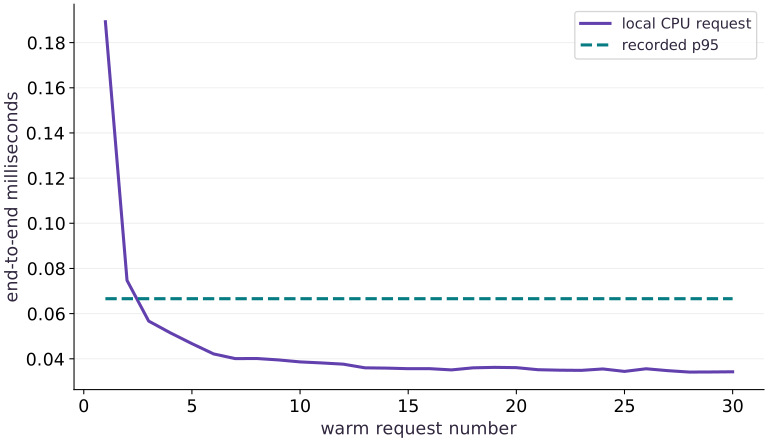
The horizontal axis counts warm requests, and the vertical axis measures end-to-end latency in milliseconds. The solid line joins the measured request times. The dashed horizontal line is the empirical th percentile of those same samples; it is a summary threshold, not a second implementation.
Read a solid point above the dashed line as a request slower than that percentile threshold. The line is not the maximum, so a few points can lie above it. The first cold request is reported separately and is not the first point of this warm-only plot.
Connect it to the computation
Each duration includes JSON decoding, normalization, transfer, inference, waiting for completion, and encoding the response. That boundary explains why the chart should not be read as pure model execution time. An early high warm point or later spike shows variation in the whole request; this plot alone cannot identify its cause.
The percentile is computed from a small sample, with interpolation between ordered values. It does not guarantee that future requests will meet the threshold. Compare the sample distribution, median, and tail across repeated runs on the target device. These are local CPU proxy measurements, not evidence of mobile or edge-device latency.
Open full-size figureDownload data and provenance
The notebook contains the data experiment, plotting code, and recorded figure output. Rerun it to test your changes.
Where to put & run this code: Work in phases/15-deployment/06-edge-ai-conversion-and-device-validation/code/main.py (or downloaded exercises/deployment-06.py / exercises/deployment-06.ipynb) and execute from the repository root with python3 phases/15-deployment/06-edge-ai-conversion-and-device-validation/code/main.py.
1 Keep a known inference function
Create main.py in your lesson workspace and run it with the active course Python environment. Define the fixed dense model and check the parameter shapes without invoking the compiled function.
# Step 1 — Keep a known inference function: A row has three sensor features and the result has two scores.
import json
import time
import numpy as np
import jax
import jax.numpy as jnp
weights = jnp.array([[1., -2.], [.5, 1.], [-1., .25]], jnp.float32)
bias = jnp.array([.1, -.2], jnp.float32)
# Define and JIT-compile `infer(features)` so XLA traces and fuses the operations:
@jax.jit
def infer(features):
    return features @ weights + bias

# Check tensor shape invariant: `weights.shape == (3, 2) and bias.shape == (2,)`
assert weights.shape == (3, 2) and bias.shape == (2,)
Code building blocks in this step
jnp.array(values, dtype=...)— Constructs an immutable device-backed JAX array from Python/NumPy values.jax.jit(fn) / @jax.jit— Tracesfnwith abstract shapes and compiles a fused XLA executable cached by input shape and dtype.
A row has three sensor features and the result has two scores. Leave the compiled function uncalled so the later first-request measurement can include initialization.
2 Build the raw-request boundary
Append this block to the same main.py and rerun the whole file. Validate the raw JSON protocol, normalize once, wait for inference, and encode the result.
# Step 2 — Build the raw-request boundary: This probe checks decoding and raw values without running inference.
payload = json.dumps({"features": [[255., 128., 0.]]})
def validate_sensor_payload(payload):
    document = json.loads(payload)
    # Guard input contract (`not isinstance(document, dict) or set(document) != {'features'}`) and fail fast if violated.
    if not isinstance(document, dict) or set(document) != {'features'}:
        raise ValueError('expected features object')
    rows = document['features']
    # Guard input contract (`not isinstance(rows, list) or len(rows) != 1 or (not isinstance(rows[0], list)) or (len(rows[0]) != 3)`) and fail fast if violated.
    if not isinstance(rows, list) or len(rows) != 1 or not isinstance(rows[0], list) or len(rows[0]) != 3:
        raise ValueError('expected one row of three sensor values')
    # Guard input contract (`any((type(value) not in (int, float) or not 0 <= value <= 255 or (not np.isfinite(value)) for value in rows[0]))`) and fail fast if violated.
    if any(type(value) not in (int, float) or not 0 <= value <= 255 or not np.isfinite(value) for value in rows[0]):
        raise ValueError('expected numeric sensor values in the range 0 through 255')
    return np.asarray(rows, dtype=np.float32)
def request(payload):
    decoded = validate_sensor_payload(payload)
    features = decoded / 255.
    # Synchronize host execution until asynchronous device computation completes.
    output = np.asarray(infer(jnp.asarray(features)).block_until_ready())
    return json.dumps({"scores": output.tolist()})

# Execute `np.testing.assert_array_equal(validate_sensor_payload(payloa`
np.testing.assert_array_equal(validate_sensor_payload(payload), [[255., 128., 0.]])
Code building blocks in this step
jnp.isfinite(x)— Returns a boolean mask verifying that no element isNaNorInf.jax.block_until_ready(output)— Synchronizes with the accelerator/CPU device so asynchronous dispatch finishes before wall-clock timing.
This probe checks decoding and raw values without running inference. Keep normalization inside request so it happens exactly once.
3 Measure cold and warm requests separately
Append this block to the same main.py and rerun the whole file. Time the first request, then retain every warm observation.
# Step 3 — Measure cold and warm requests separately: The first request can include compilation and initialization.
start = time.perf_counter()
first_response = request(payload)
first_ms = (time.perf_counter() - start) * 1000
samples = []
for _ in range(30):
    start = time.perf_counter()
    response = request(payload)
    samples.append((time.perf_counter() - start) * 1000)
Code building blocks in this step
time.perf_counter(...)— Calltime.perf_counterwith your updated parameters or inputs from this lesson's workspace.request(...)— Callrequestwith your updated parameters or inputs from this lesson's workspace.
The first request can include compilation and initialization. The line plot contains only the subsequent warm requests; do not describe its first point as the cold request.
4 Validate outputs and describe measurement scope
Append this block to the same main.py and rerun the whole file. Compare the response with independent NumPy arithmetic and write an honest measurement report.
# Step 4 — Validate outputs and describe measurement scope: The report records local CPU timings and explicitly leaves...
expected = (np.array([[255., 128., 0.]], np.float32) / 255.) @ np.asarray(weights) + np.asarray(bias)
np.testing.assert_allclose(json.loads(response)["scores"], expected, atol=1e-6)
report = {"runtime": "JAX CPU instructional proxy", "jax": jax.__version__,
          "first_request_ms": first_ms, "warm_samples_ms": samples,
          "p50_ms": float(np.percentile(samples, 50)), "p95_ms": float(np.percentile(samples, 95)),
          "boundary": "JSON decode + normalize + transfer + infer + wait + encode",
          "edge_device_validated": False}
assert len(samples) == 30 and all(t >= 0 for t in samples)
print(json.dumps(report, indent=2))

# Convert `` to a host NumPy array for inspection or verification.
np.testing.assert_allclose(json.loads(request(json.dumps({'features':[[0,0,0]]})))['scores'], np.asarray(bias)[None,:], atol=1e-6)
Code building blocks in this step
jnp.allclose(actual, expected, rtol=..., atol=...)— Checks that two arrays match elementwise within floating-point tolerance.
The report records local CPU timings and explicitly leaves edge-device qualification false. Carry the same protocol to a named device before replacing that field.
View the cumulative build in main.py
These blocks append in order to the same file.
# Step 1 — Keep a known inference function: A row has three sensor features and the result has two scores.
import json
import time
import numpy as np
import jax
import jax.numpy as jnp
weights = jnp.array([[1., -2.], [.5, 1.], [-1., .25]], jnp.float32)
bias = jnp.array([.1, -.2], jnp.float32)
# Define and JIT-compile `infer(features)` so XLA traces and fuses the operations:
@jax.jit
def infer(features):
    return features @ weights + bias

# Check tensor shape invariant: `weights.shape == (3, 2) and bias.shape == (2,)`
assert weights.shape == (3, 2) and bias.shape == (2,)

# Step 2 — Build the raw-request boundary: This probe checks decoding and raw values without running inference.
payload = json.dumps({"features": [[255., 128., 0.]]})
def validate_sensor_payload(payload):
    document = json.loads(payload)
    # Guard input contract (`not isinstance(document, dict) or set(document) != {'features'}`) and fail fast if violated.
    if not isinstance(document, dict) or set(document) != {'features'}:
        raise ValueError('expected features object')
    rows = document['features']
    # Guard input contract (`not isinstance(rows, list) or len(rows) != 1 or (not isinstance(rows[0], list)) or (len(rows[0]) != 3)`) and fail fast if violated.
    if not isinstance(rows, list) or len(rows) != 1 or not isinstance(rows[0], list) or len(rows[0]) != 3:
        raise ValueError('expected one row of three sensor values')
    # Guard input contract (`any((type(value) not in (int, float) or not 0 <= value <= 255 or (not np.isfinite(value)) for value in rows[0]))`) and fail fast if violated.
    if any(type(value) not in (int, float) or not 0 <= value <= 255 or not np.isfinite(value) for value in rows[0]):
        raise ValueError('expected numeric sensor values in the range 0 through 255')
    return np.asarray(rows, dtype=np.float32)
def request(payload):
    decoded = validate_sensor_payload(payload)
    features = decoded / 255.
    # Synchronize host execution until asynchronous device computation completes.
    output = np.asarray(infer(jnp.asarray(features)).block_until_ready())
    return json.dumps({"scores": output.tolist()})

# Execute `np.testing.assert_array_equal(validate_sensor_payload(payloa`
np.testing.assert_array_equal(validate_sensor_payload(payload), [[255., 128., 0.]])

# Step 3 — Measure cold and warm requests separately: The first request can include compilation and initialization.
start = time.perf_counter()
first_response = request(payload)
first_ms = (time.perf_counter() - start) * 1000
samples = []
for _ in range(30):
    start = time.perf_counter()
    response = request(payload)
    samples.append((time.perf_counter() - start) * 1000)

# Step 4 — Validate outputs and describe measurement scope: The report records local CPU timings and explicitly leaves...
expected = (np.array([[255., 128., 0.]], np.float32) / 255.) @ np.asarray(weights) + np.asarray(bias)
np.testing.assert_allclose(json.loads(response)["scores"], expected, atol=1e-6)
report = {"runtime": "JAX CPU instructional proxy", "jax": jax.__version__,
          "first_request_ms": first_ms, "warm_samples_ms": samples,
          "p50_ms": float(np.percentile(samples, 50)), "p95_ms": float(np.percentile(samples, 95)),
          "boundary": "JSON decode + normalize + transfer + infer + wait + encode",
          "edge_device_validated": False}
assert len(samples) == 30 and all(t >= 0 for t in samples)
print(json.dumps(report, indent=2))

# Convert `` to a host NumPy array for inspection or verification.
np.testing.assert_allclose(json.loads(request(json.dumps({'features':[[0,0,0]]})))['scores'], np.asarray(bias)[None,:], atol=1e-6)
Run the example
python3 phases/15-deployment/06-edge-ai-conversion-and-device-validation/code/main.pyAbout this command
This shortcut uses an activated macOS/Linux course environment in the repository folder. For Windows, use the explicit interpreter command in “Setup help” above. The script includes worked examples and reference solutions.
Inspect the complete assembled example
# Deploy at the edge: conversion, budgets and device checks: An edge deployment includes input decoding, preprocessing,...
import json
import time
import numpy as np
import jax
import jax.numpy as jnp
weights = jnp.array([[1., -2.], [.5, 1.], [-1., .25]], jnp.float32)
bias = jnp.array([.1, -.2], jnp.float32)
# Define and JIT-compile `infer(features)` so XLA traces and fuses the operations:
@jax.jit
def infer(features):
    return features @ weights + bias
payload = json.dumps({"features": [[255., 128., 0.]]})
def validate_sensor_payload(payload):
    document = json.loads(payload)
    # Guard input contract (`not isinstance(document, dict) or set(document) != {'features'}`) and fail fast if violated.
    if not isinstance(document, dict) or set(document) != {'features'}:
        raise ValueError('expected features object')
    rows = document['features']
    # Guard input contract (`not isinstance(rows, list) or len(rows) != 1 or (not isinstance(rows[0], list)) or (len(rows[0]) != 3)`) and fail fast if violated.
    if not isinstance(rows, list) or len(rows) != 1 or not isinstance(rows[0], list) or len(rows[0]) != 3:
        raise ValueError('expected one row of three sensor values')
    # Guard input contract (`any((type(value) not in (int, float) or not 0 <= value <= 255 or (not np.isfinite(value)) for value in rows[0]))`) and fail fast if violated.
    if any(type(value) not in (int, float) or not 0 <= value <= 255 or not np.isfinite(value) for value in rows[0]):
        raise ValueError('expected numeric sensor values in the range 0 through 255')
    return np.asarray(rows, dtype=np.float32)
def request(payload):
    decoded = validate_sensor_payload(payload)
    features = decoded / 255.
    # Synchronize host execution until asynchronous device computation completes.
    output = np.asarray(infer(jnp.asarray(features)).block_until_ready())
    return json.dumps({"scores": output.tolist()})
start = time.perf_counter()
first_response = request(payload)
first_ms = (time.perf_counter() - start) * 1000
samples = []
for _ in range(30):
    start = time.perf_counter()
    response = request(payload)
    samples.append((time.perf_counter() - start) * 1000)
# Convert `expected` to a host NumPy array for inspection or verification.
expected = (np.array([[255., 128., 0.]], np.float32) / 255.) @ np.asarray(weights) + np.asarray(bias)
np.testing.assert_allclose(json.loads(response)["scores"], expected, atol=1e-6)
report = {"runtime": "JAX CPU instructional proxy", "jax": jax.__version__,
          "first_request_ms": first_ms, "warm_samples_ms": samples,
          "p50_ms": float(np.percentile(samples, 50)), "p95_ms": float(np.percentile(samples, 95)),
          "boundary": "JSON decode + normalize + transfer + infer + wait + encode",
          "edge_device_validated": False}
assert len(samples) == 30 and all(t >= 0 for t in samples)
print(json.dumps(report, indent=2))
Expected result: A JSON report with measured warm requests, first-request time, p50/p95 and edge_device_validated=false. Timings depend on this CPU; no device speedup is asserted.
Recorded reference execution
Reference output captured from executing the complete lesson script (code/main.py) and its assertions in the course CPU environment.
{
  "runtime": "JAX CPU instructional proxy",
  "jax": "0.9.2",
  "first_request_ms": 11.448000092059374,
  "warm_samples_ms": [
    0.15420792624354362,
    0.059125013649463654,
    0.04437519237399101,
    0.03974977880716324,
    0.037208665162324905,
    0.03679096698760986,
    0.033999793231487274,
    0.03370875492691994,
    0.032040756195783615,
    0.032833777368068695,
    0.03237510100007057,
    0.030708033591508865,
    0.030125025659799576,
    0.029750168323516846,
    0.03154110163450241,
    0.029833056032657623,
    0.029833056032657623,
    0.029582995921373367,
    0.028749927878379822,
    0.032541342079639435,
    0.029374845325946808,
    0.029250048100948334,
    0.02966681495308876,
    0.0462094321846962,
    0.029208138585090637,
    0.029792077839374542,
    0.02904096618294716,
    0.028999987989664078,
    0.02895807847380638,
    0.02816738560795784
  ],
  "p50_ms": 0.03041652962565422,
  "p95_ms": 0.053313001990318264,
  "boundary": "JSON decode + normalize + transfer + infer + wait + encode",
  "edge_device_validated": false
}
{
  "runtime": "JAX CPU instructional proxy",
  "jax": "0.9.2",
  "first_request_ms": 9.076584130525589,
  "warm_samples_ms": [
    0.13345805928111076,
    0.06820773705840111,
    0.06900029256939888,
    0.042415689677000046,
    0.035208649933338165,
    0.032833777368068695,
    0.031082890927791595,
    0.03233412280678749,
    0.02950010821223259,
    0.02941582351922989,
    0.03008311614394188,
    0.028708018362522125,
    0.028458889573812485,
    0.028749927878379822,
    0.028332695364952087,
    0.028125010430812836,
    0.028582755476236343,
    0.02837507054209709,
    0.028625130653381348,
    0.028499867767095566,
    0.029124785214662552,
    0.028209295123815536,
    0.02845795825123787,
    0.027582980692386627,
    0.03120768815279007,
    0.028708018362522125,
    0.027917325496673584,
    0.027833040803670883,
    0.028125010430812836,
    0.028541311621665955
  ],
  "p50_ms": 0.028708018362522125,
  "p95_ms": 0.06864364258944988,
  "boundary": "JSON decode + normalize + transfer + infer + wait + encode",
  "edge_device_validated": false
}
Preprocessing mismatch max error 380.5019836425781
Seven malformed or out-of-domain requests rejected; zero input returns the bias.
Changed end-to-end request verified
Not device-validated; missing: device, runtime_version, delegate, quality_metric, p95_ms, peak_memory_bytes, cold_start_ms, fallback_operators
Illustrative request before/after/lower-bound (ms): 24.0 20.0 16.0
PASS: deployment-06
Download execution record · The notebook includes executed cells and figure outputs. Compare your run with these values; timings depend on the machine.
A normalization mismatch survives conversion
# Experiment — A normalization mismatch survives conversion: Conversion checks must start at the raw input boundary when...
raw = np.array([[255., 128., 0.]], np.float32)
# Convert `wrong` to a host NumPy array for inspection or verification.
wrong = np.asarray(infer(raw))
# Convert `right` to a host NumPy array for inspection or verification.
right = np.asarray(infer(raw / 255.))
assert not np.allclose(wrong, right)
print("Preprocessing mismatch max error", float(np.max(np.abs(wrong-right))))
Expected: The mismatch is large despite identical weights.
Conversion checks must start at the raw input boundary when preprocessing is part of the product.
Reject raw inputs before normalization hides their meaning
# Experiment — Reject raw inputs before normalization hides their meaning: The zero-input oracle checks that preprocessing does not add a...
invalid_payloads=[{'features':[['255',128,0]]},{'features':[[True,128,0]]},{'features':[[256,128,0]]},{'features':[[-1,128,0]]},{'features':[[0,1]]},{'features':[[0,1,float('nan')]]},{'features':[[0,1,2]],'extra':1}]
for invalid in invalid_payloads:
    try:
        request(json.dumps(invalid))
    except ValueError:
        pass
    else:
        raise AssertionError('invalid sensor payload accepted')
# Convert `` to a host NumPy array for inspection or verification.
np.testing.assert_allclose(json.loads(request(json.dumps({'features':[[0,0,0]]})))['scores'],np.asarray(bias)[None,:],atol=1e-6)
print('Seven malformed or out-of-domain requests rejected; zero input returns the bias.')
Expected: All seven invalid payloads fail. A valid zero-valued row produces the two bias scores.
The zero-input oracle checks that preprocessing does not add a hidden offset. Rejection tests check input meaning before the model sees an apparently valid float array.
Make it yours
Where to put your code: Append your solution at the bottom of phases/15-deployment/06-edge-ai-conversion-and-device-validation/code/main.py (or inside the Make it yours cell of exercises/deployment-06.ipynb) and run python3 phases/15-deployment/06-edge-ai-conversion-and-device-validation/code/main.py to verify your prediction before opening the reference solution.
Send a second raw input through the full request, and verify its independent normalized NumPy result.
Show a writing guide and starter scaffold
How to write this exercise code: step-by-step recipe & starter scaffold
1. Key functions & syntax to use:
jnp.allclose(actual, expected, rtol=..., atol=...)— Checks that two arrays match elementwise within floating-point tolerance.
2. Step-by-step implementation plan:
- Convert
expected_changedto a host NumPy array for inspection or verification.
# Exercise solution: Send a second raw input [0, 255, 128] through the full request, and...
changed_raw = np.array(...)  # TODO: compute changed_raw
changed_response = json.loads(...)  # TODO: compute changed_response
# Convert `expected_changed` to a host NumPy array for inspection or verification.
expected_changed = ...  # TODO: compute expected_changed
np.testing.assert_allclose(changed_response["scores"], expected_changed, atol = ...  # TODO: compute np.testing.assert_allclose(changed_response["scores"], expected_changed, atol
print("Changed end-to-end request verified")
Reveal the reference solution
# Exercise solution: Send a second raw input [0, 255, 128] through the full request, and...
changed_raw = np.array([[0., 255., 128.]], np.float32)
changed_response = json.loads(request(json.dumps({"features": changed_raw.tolist()})))
# Convert `expected_changed` to a host NumPy array for inspection or verification.
expected_changed = (changed_raw / 255.) @ np.asarray(weights) + np.asarray(bias)
np.testing.assert_allclose(changed_response["scores"], expected_changed, atol=1e-6)
print("Changed end-to-end request verified")
Make incomplete deployment evidence explicit
Transfer
Create a device report template with required hardware and measurement fields. Reject it as ready while those fields are missing.
Show a writing guide and starter scaffold
How to write this practice solution: step-by-step recipe & starter scaffold
1. Key functions & syntax to use:
explicit(...)— Callexplicitwith your updated parameters or inputs from this lesson's workspace.device_report.items(...)— Calldevice_report.itemswith your updated parameters or inputs from this lesson's workspace.assert condition— Verify that the observed output shape, status, or numerical value satisfies the contract.
2. Step-by-step implementation plan:
- Set up the changed input or configuration parameters requested in the prompt.
- Run the target function or transformation and assert that the output matches your prediction.
# Make incomplete deployment evidence explicit (Transfer): Empty evidence stays empty.
device_report = ...  # TODO: compute device_report
                 "quality_metric": None, "p95_ms": None, "peak_memory_bytes": None,
                 "cold_start_ms": None, "fallback_operators": None}
missing = ...  # TODO: compute missing
assert missing  # TODO: complete assertion check
print("Not device-validated; missing:", ", ".join(missing))
Show a hint
List the hardware, runtime, delegate and measurement fields before testing completeness. A missing value is different from a measured zero or an explicitly unsupported capability.
Reveal reference solution and reasoning
# Make incomplete deployment evidence explicit (Transfer): Empty evidence stays empty.
device_report = {"device": None, "runtime_version": None, "delegate": None,
                 "quality_metric": None, "p95_ms": None, "peak_memory_bytes": None,
                 "cold_start_ms": None, "fallback_operators": None}
missing = [key for key, value in device_report.items() if value is None]
assert missing and "device" in missing
print("Not device-validated; missing:", ", ".join(missing))
Empty evidence stays empty. Desktop conversion and simulation cannot populate measurements for hardware that was never used.
Decide whether a model speedup meets the request budget
Transfer / diagnosis
Use the illustrative serial times above. A -millisecond deadline is declared before optimization. Does halving model time meet it? What is the best possible total if model time tends to zero?
Show a writing guide and starter scaffold
How to write this practice solution: step-by-step recipe & starter scaffold
1. Key functions & syntax to use:
jnp.allclose(actual, expected, rtol=..., atol=...)— Checks that two arrays match elementwise within floating-point tolerance.
2. Step-by-step implementation plan:
- Execute
np.testing.assert_allclose([before_ms,after_ms,before_ms/aft
# Decide whether a model speedup meets the request budget (Transfer / diagnosis): Halving model time leaves a 20-millisecond request, so it...
fixed_ms = ...  # TODO: compute fixed_ms
model_ms = ...  # TODO: compute model_ms
deadline_ms = ...  # TODO: compute deadline_ms
before_ms = ...  # TODO: compute before_ms
after_ms = ...  # TODO: compute after_ms
# Execute `np.testing.assert_allclose([before_ms,after_ms,before_ms/aft`
np.testing.assert_allclose([before_ms,after_ms,before_ms/after_ms],[24.,20.,1.2])
assert after_ms  # TODO: complete assertion check
print('Illustrative request before/after/lower-bound (ms):',before_ms,after_ms,fixed_ms)
Show a hint
Keep the fixed work unchanged. Compare the total request with the deadline, not the model-only duration.
Reveal reference solution and reasoning
# Decide whether a model speedup meets the request budget (Transfer / diagnosis): Halving model time leaves a 20-millisecond request, so it...
fixed_ms=12.+4.
model_ms=8.
deadline_ms=19.
before_ms=fixed_ms+model_ms
after_ms=fixed_ms+model_ms/2
# Execute `np.testing.assert_allclose([before_ms,after_ms,before_ms/aft`
np.testing.assert_allclose([before_ms,after_ms,before_ms/after_ms],[24.,20.,1.2])
assert after_ms>deadline_ms and fixed_ms==16.
print('Illustrative request before/after/lower-bound (ms):',before_ms,after_ms,fixed_ms)
Halving model time leaves a -millisecond request, so it misses the stated deadline. The serial fixed work gives a -millisecond lower bound even with zero model time. Replace these illustrative values with measurements before making a device decision.
Diagnose the result
If INT8 quality drops, compare float conversion first, then verify calibration preprocessing, ranges and quantization metadata. If device latency disappoints, inspect fallback partitions, copies, request preprocessing and thermal conditions. If startup dominates, report it separately from warm inference and test the actual loading strategy.
Keep your evidence
Keep the CPU request report, preprocessing equivalence checks, chosen runtime/operator/precision matrix and an unfilled target-device report until actual device measurements exist. For the optional converter, retain the artifact, quantization metadata and held-out comparison.
Save your modified code, its output, and an explanation of your prediction. Checkpoint answers and exercise evidence are tracked separately.
Saved in this browser. Export or back up your portfolio anytime in My learning.
Verified on local CPU. Stage to a Cloud TPU VM via Cloud TPU setup to record accelerator execution receipts (TODO: add automated Cloud TPU CI execution receipts).
Primary references
- LiteRT integer conversion tutorial ↗
- LiteRT float16 conversion ↗
- ONNX Runtime quantization and providers ↗
- ExecuTorch edge runtime ↗
- Core ML Tools overview ↗
- LiteRT for Microcontrollers ↗
- TensorFlow installation and supported platforms ↗
Phase 15 Integration Project
Bring this phase together: Verify an inference artifact and capacity hypothesis
Checkpoint to prove: Verify an exported prediction contract, report weight/activation precision error, and distinguish CPU request measurements from target-device evidence.
Copy projects/deployment-audit/starter/model.py to projects/deployment-audit/my_model.py and write your code in projects/deployment-audit/my_model.py. Run python3 projects/deployment-audit/tests/check.py --implementation projects/deployment-audit/my_model.py --stage 1 from the top-level folder to verify all 3 stages.