 JAX Pathways
Phase 04 / Math & optimization
Optimize with Optax
Revision v0.7.0 · Updated since your last visit. Review the changes; your progress is saved.
Lesson · about 80 minutes · CPU practice
Replace the handwritten update with an optimizer and track its state.
Phase study guide: preparation, milestones and project evidence
Before you start
Before this: Minibatches, expectation, and gradient noise
Hardware: CPU
Setup help: Python, notebook, or Cloud TPU VM
Use the tested CPU packages (the recorded environment uses Python 3.14.3). Other Python versions and accelerator environments require separate checks. The optional Cloud TPU specialization explains the target-specific execution boundaries. Logical CPU devices practice partitioning; they do not simulate TPU performance.
Download the repository ZIP or use your existing checkout. Extract it and open a terminal in the folder containing requirements-cpu.txt. The beginner ZIP is separate; these lessons use the full repository folder.
python3 -m venv .venv
source .venv/bin/activate
python -m pip install -r requirements-cpu.txtpy -3 -m venv .venv
.\.venv\Scripts\python.exe -m pip install -r requirements-cpu.txtAfter activation, run the complete worked example from that same folder:
python phases/04-optimization/04-optimize-with-optax/code/main.py.\.venv\Scripts\python.exe phases/04-optimization/04-optimize-with-optax/code/main.pyFor an incremental build, create main.py in your own practice folder, append each build block in order, and run python main.py with this environment active. Keep that file separate from the downloaded reference solution.
Download this lesson’s notebook. Open it with a Python kernel using the course environment. Run cells from the top after restarting the kernel; experiments depend on earlier definitions.
For local Jupyter, first install the course requirements using the Local Python steps, then use your environment’s Python to start Jupyter:
python -m pip install jupyterlab
python -m jupyter lab.\.venv\Scripts\python.exe -m pip install jupyterlab
.\.venv\Scripts\python.exe -m jupyter labSelect the downloaded optimization-04.ipynb file in JupyterLab. The notebook contains reference solutions; make your prediction and attempt each practice task before opening them. Restart the kernel before changing logical device setup.
The worked reference for this lesson is CPU-validated. Some references explicitly configure logical CPU devices; setting JAX_PLATFORMS does not adapt them to a TPU. Follow the execution matrix and reviewed multi-host example before attempting a target run.
For accelerator preparation, study TPU setup, observed runtime receipts, checkpointed jobs and precision and retained traces. These target paths remain unqualified on physical TPU hardware until an actual receipt is recorded. Cloud provisioning is optional for CPU learning.
Check: Weight approaches , bias approaches , and loss is below .
Revisit the guided CPU setup · Open 19: TPU Setup. Package instructions are CPU instructions; Windows and accelerator environments need their own validation.
What you will be able to do
- Distinguish gradients, updates, and parameters
- Understand the state even when SGD has none
- Make a resumable training transition
- Verify the simpler algorithm before composing one
- Preserve state when a gradient happens to be zero
The problem
An optimizer helps turn gradients into parameter changes. Before introducing a more complicated one, we’ll check that Optax SGD agrees with the update you already know. Then we’ll add momentum and follow the extra state it remembers, so you can explain why resetting that state changes the next step.
The idea
An optimizer transforms gradients into parameter updates and may retain state between steps. Optax makes that state explicit: initialize it, pass it into each update, and keep the returned state together with the new parameters.
- Differentiate
loss, gradientsEvaluate the objective at the current parameters.
- Transform
updates, next_optimizer_stateCombine gradients with optimizer history.
- Apply
next_parameters = apply_updates(parameters, updates)Pass both updated values into the next step.
Optax updates are increments applied to parameters. Adam also carries moments and a count; restoring parameters alone cannot reproduce the same next update.
Conceptual illustration. Verify the computation in the lesson’s Python experiments.
The optimizer has memory of earlier gradients
For plain gradient descent without extra state, the current parameters and gradient can determine the next update. For momentum or Adam, earlier gradients also matter through stored accumulators. Two runs at the same parameters can therefore take different next steps if their optimizer states differ.
Follow the update cycle in order: calculate the loss and gradients from current parameters, ask the optimizer for updates and new state, then apply those updates to the parameters. Keeping only one returned object breaks the cycle.
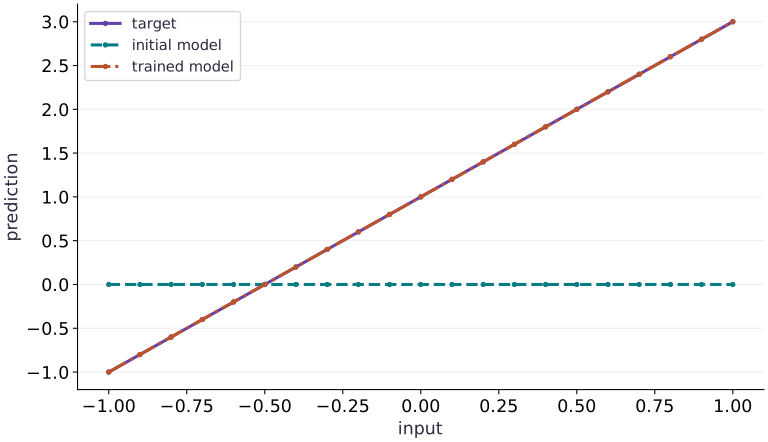
The fitted-line figure shows that the example recovered a useful prediction rule. It does not by itself prove correct state continuation. Save a mid-run state and compare the next update with an uninterrupted run to test that separate capability.
Distinguish gradients, updates, and parameters
A gradient describes local sensitivity; an update is the change the optimizer wants to add to parameters. Optax SGD transforms into . apply_updates adds that update, so subtracting it again would reverse the intended direction. The tree structure of gradients and updates follows the parameter tree.
For our evenly spaced values, and . At zero parameters, the weight derivative is and the bias derivative is . With rate , the first weight becomes and bias . Compute these values before trusting a long run.
params → loss → grads
grads + old optimizer state → updates + new optimizer state
params + updates → next params
Understand the state even when SGD has none
Plain SGD here has no momentum history, so the equality with manual gradient descent is a useful baseline. Momentum adds a trace of prior gradients. Its returned state must be threaded through every call; rebuilding state each step discards that history and gives a different algorithm.
With momentum and gradients then , the trace is first then . At rate the second update is . Reinitializing before the second gradient gives . This two-step example demonstrates the actual state dependence without assuming that the regression fit alone proves it.
Make a resumable training transition
Treat a training step as (params, optimizer_state, batch) → (new_params, new_state, metrics). A checkpoint must preserve the algorithm state as well as parameter values. With a deterministic fixed dataset, replaying the next step from identical saved parameters and state should produce identical results within the same environment.
This lesson performs an in-memory replay; it does not implement file persistence or claim crash recovery. Random keys, data iterator position and distributed topology become additional state in later training systems. A tuple called “checkpoint” is not a resilient checkpoint service.
Verify the simpler algorithm before composing one
Compare one Optax SGD step to a hand-derived tree update before introducing momentum, clipping, schedules or Adam. Composition order matters: transformations operate on the value produced by preceding transformations. Keep loss convention and the rate fixed while comparing algorithms.
The 120-step fit is a small CPU regression example, not a TPU throughput benchmark or evidence that the same rate is suitable for a network. Inspect the parameters, loss, and optimizer transition separately; the final loss alone cannot reveal a reset-state bug in every problem.
Preserve state when a gradient happens to be zero
Momentum remembers earlier gradients. Under the convention , a zero current gradient can still produce a nonzero update. With , a previous trace of becomes when the new gradient is zero. This is why an optimizer’s behavior cannot be reconstructed from the current gradient and weights alone. The next lesson builds on this state model to explain Adam and learning-rate schedules.
The fitted line recovers slope and bias
Predict before looking: What does each learned parameter change in the predictions?
Read the figure
The horizontal axis gives input values and the vertical axis gives predictions. The dashed initial model is flat at zero. The target and trained-model lines rise together from approximately through to .
The trained line lies almost exactly on top of the target, so one can hide the other. This overlap is the intended result, not a missing legend entry. It means the predictions agree to the numerical tolerance used in the example.
Connect it to the computation
Read the learned parameters from the geometry: the intercept is , and increasing the input by raises the prediction by . Training has therefore recovered the target relationship , whereas the initial model used zero slope and zero intercept.
This picture shows the final fit across the displayed inputs, not the optimizer’s path or its runtime. Agreement on an exact synthetic linear target is a useful correctness check. It is separate from performance on noisy data or on a different relationship.
Open full-size figureDownload data and provenance
The notebook contains the data experiment, plotting code, and recorded figure output. Rerun it to test your changes.
Where to put & run this code: Work in phases/04-optimization/04-optimize-with-optax/code/main.py (or downloaded exercises/optimization-04.py / exercises/optimization-04.ipynb) and execute from the repository root with python3 phases/04-optimization/04-optimize-with-optax/code/main.py.
1 Prepare the inputs
Create a file named main.py in your activated learning environment. Add these imports and inputs first. Shapes and numeric types are part of the experiment.
# Step 1 — 1. Prepare the inputs: This block establishes the values used by the following steps; run...
import jax
import jax.numpy as jnp
import optax
This block establishes the values used by the following steps; run the completed file after step .
2 Define the computation
Append this block below the inputs. Before proceeding, trace which values are inputs, predictions, and state.
# Step 2 — 2. Define the computation: loss maps the two parameter leaves to row-wise predictions.
params = {"weight": jnp.array(0.), "bias": jnp.array(0.)}
x = jnp.linspace(-1., 1., 21)
y = 2. * x + 1.
def loss(p):
    return jnp.mean((p["weight"] * x + p["bias"] - y) ** 2)
# Configure or step the Optax optimizer state (`optimizer`).
optimizer = optax.sgd(0.2)
state = optimizer.init(params)
Code building blocks in this step
jnp.linspace(start, stop, num)— Createsnumevenly spaced float points across the closed interval[start, stop].jnp.array(values, dtype=...)— Constructs an immutable device-backed JAX array from Python/NumPy values.x.sum(axis=...) / x.mean(axis=..., keepdims=...)— Reduces values along the namedaxis(the axis you name is collapsed unlesskeepdims=True).optax.adam(lr) / optax.apply_updates(params, updates)— Optax gradient transformations and numerically stable loss functions over parameter PyTrees.
loss maps the two parameter leaves to row-wise predictions. optimizer.init establishes the initial SGD state; retain the update state in the next block.
3 Measure and verify
Append the remaining block, then run python main.py in the terminal. Compare the printed result with the expected output below. Assertions stop execution if the contract fails.
# Step 3 — 3. Measure and verify: Weight approaches 2.0, bias approaches 1.0, and loss is below 10^{-8}.
initial_loss = loss(params)
for _ in range(120):
    # Differentiate the objective to obtain `grads` via automatic differentiation.
    grads = jax.grad(loss)(params)
    # Apply the computed gradient updates to update the model parameters.
    updates, state = optimizer.update(grads, state, params)
    # Configure or step the Optax optimizer state (`params`).
    params = optax.apply_updates(params, updates)
print("Parameters:", params)
print("Loss:", float(loss(params)))
assert loss(params) < 1e-8
assert jnp.allclose(params["weight"], 2., atol=1e-4)
assert jnp.allclose(params["bias"], 1., atol=1e-4)
Code building blocks in this step
jnp.allclose(actual, expected, rtol=..., atol=...)— Checks that two arrays match elementwise within floating-point tolerance.jax.grad(loss_fn)(params, ...)— Transforms a scalar-output function into a function returning the gradient PyTree with the same structure asparams.
Weight approaches , bias approaches , and loss is below .
View the cumulative build in main.py
These blocks append in order to the same file.
# Step 1 — 1. Prepare the inputs: This block establishes the values used by the following steps; run...
import jax
import jax.numpy as jnp
import optax

# Step 2 — 2. Define the computation: loss maps the two parameter leaves to row-wise predictions.
params = {"weight": jnp.array(0.), "bias": jnp.array(0.)}
x = jnp.linspace(-1., 1., 21)
y = 2. * x + 1.
def loss(p):
    return jnp.mean((p["weight"] * x + p["bias"] - y) ** 2)
# Configure or step the Optax optimizer state (`optimizer`).
optimizer = optax.sgd(0.2)
state = optimizer.init(params)

# Step 3 — 3. Measure and verify: Weight approaches 2.0, bias approaches 1.0, and loss is below 10^{-8}.
initial_loss = loss(params)
for _ in range(120):
    # Differentiate the objective to obtain `grads` via automatic differentiation.
    grads = jax.grad(loss)(params)
    # Apply the computed gradient updates to update the model parameters.
    updates, state = optimizer.update(grads, state, params)
    # Configure or step the Optax optimizer state (`params`).
    params = optax.apply_updates(params, updates)
print("Parameters:", params)
print("Loss:", float(loss(params)))
assert loss(params) < 1e-8
assert jnp.allclose(params["weight"], 2., atol=1e-4)
assert jnp.allclose(params["bias"], 1., atol=1e-4)
Run the example
python3 phases/04-optimization/04-optimize-with-optax/code/main.pyAbout this command
This shortcut uses an activated macOS/Linux course environment in the repository folder. For Windows, use the explicit interpreter command in “Setup help” above. The script includes worked examples and reference solutions.
Inspect the complete assembled example
# Step 1 — 1. Prepare the inputs: This block establishes the values used by the following steps; run...
import jax
import jax.numpy as jnp
import optax
# Step 2 — 2. Define the computation: loss maps the two parameter leaves to row-wise predictions.
params = {"weight": jnp.array(0.), "bias": jnp.array(0.)}
x = jnp.linspace(-1., 1., 21)
y = 2. * x + 1.
def loss(p):
    return jnp.mean((p["weight"] * x + p["bias"] - y) ** 2)
# Configure or step the Optax optimizer state (`optimizer`).
optimizer = optax.sgd(0.2)
state = optimizer.init(params)
# Step 3 — 3. Measure and verify: Weight approaches 2.0, bias approaches 1.0, and loss is below 10^{-8}.
initial_loss = loss(params)
for _ in range(120):
    # Differentiate the objective to obtain `grads` via automatic differentiation.
    grads = jax.grad(loss)(params)
    # Apply the computed gradient updates to update the model parameters.
    updates, state = optimizer.update(grads, state, params)
    # Configure or step the Optax optimizer state (`params`).
    params = optax.apply_updates(params, updates)
print("Parameters:", params)
print("Loss:", float(loss(params)))
assert loss(params) < 1e-8
assert jnp.allclose(params["weight"], 2., atol=1e-4)
assert jnp.allclose(params["bias"], 1., atol=1e-4)
Expected result: Weight approaches , bias approaches , and loss is below .
Recorded reference execution
Reference output captured from executing the complete lesson script (code/main.py) and its assertions in the course CPU environment.
Parameters: {'bias': Array(1., dtype=float32), 'weight': Array(1.9999996, dtype=float32)}
Loss: 5.126058404787345e-14
Parameters: {'bias': Array(1., dtype=float32), 'weight': Array(1.9999996, dtype=float32)}
Loss: 5.126058404787345e-14
First parameters: {'bias': Array(0.4, dtype=float32), 'weight': Array(0.29333338, dtype=float32)}
PASS: optimization-04
Download execution record · The notebook includes executed cells and figure outputs. Compare your run with these values; timings depend on the machine.
Check the first update against arithmetic
# Experiment — Check the first update against arithmetic: Independent arithmetic checks the gradient scale and the update...
p0 = {"weight": jnp.array(0.), "bias": jnp.array(0.)}
# Differentiate the objective to obtain `g0` via automatic differentiation.
g0 = jax.grad(loss)(p0)
# Apply the computed gradient updates to update the model parameters.
u0, s0 = optimizer.update(g0, optimizer.init(p0), p0)
# Configure or step the Optax optimizer state (`p1`).
p1 = optax.apply_updates(p0, u0)
assert jnp.allclose(p1["weight"], 22/75)
assert jnp.allclose(p1["bias"], 0.4)
print("First parameters:", p1)
Expected: Weight ≈ ; bias .
Independent arithmetic checks the gradient scale and the update sign.
Observe stateful momentum
# Experiment — Observe stateful momentum: Resetting momentum removes the prior-gradient contribution; it...
# Configure or step the Optax optimizer state (`momentum`).
momentum = optax.sgd(0.1, momentum=0.9)
m0 = momentum.init(jnp.array(0.))
u1, m1 = momentum.update(jnp.array(2.), m0)
u2, m2 = momentum.update(jnp.array(1.), m1)
reset_u2, _ = momentum.update(jnp.array(1.), m0)
assert jnp.allclose(u1, -0.2)
assert jnp.allclose(u2, -0.28)
assert jnp.allclose(reset_u2, -0.1)
Expected: Second update with retained state, after reset.
Resetting momentum removes the prior-gradient contribution; it changes the optimization algorithm.
Coast through a zero-gradient step
# Experiment — Coast through a zero-gradient step: Optimizer state carries information from earlier steps.
# Configure or step the Optax optimizer state (`momentum_tx`).
momentum_tx = optax.sgd(0.1, momentum=0.9)
position = jnp.array(0.)
momentum_state = momentum_tx.init(position)
coast_first, momentum_state = momentum_tx.update(jnp.array(2.),momentum_state,position)
# Configure or step the Optax optimizer state (`position`).
position = optax.apply_updates(position,coast_first)
coast_second, momentum_state = momentum_tx.update(jnp.array(0.),momentum_state,position)
assert jnp.allclose(coast_first,-0.2)
assert jnp.allclose(coast_second,-0.18)
Expected: The second update is , despite a zero current gradient.
Optimizer state carries information from earlier steps. A zero current gradient need not produce a zero update.
Make it yours
Where to put your code: Append your solution at the bottom of phases/04-optimization/04-optimize-with-optax/code/main.py (or inside the Make it yours cell of exercises/optimization-04.ipynb) and run python3 phases/04-optimization/04-optimize-with-optax/code/main.py to verify your prediction before opening the reference solution.
At the original zero parameters, compare the first Optax SGD update with an explicit tree-map gradient descent step.
Show a writing guide and starter scaffold
How to write this exercise code: step-by-step recipe & starter scaffold
1. Key functions & syntax to use:
jnp.array(values, dtype=...)— Constructs an immutable device-backed JAX array from Python/NumPy values.jnp.allclose(actual, expected, rtol=..., atol=...)— Checks that two arrays match elementwise within floating-point tolerance.jax.grad(loss_fn)(params, ...)— Transforms a scalar-output function into a function returning the gradient PyTree with the same structure asparams.jax.tree.map(lambda p, g: ..., params, grads)— Applies a function leaf-by-leaf across matching PyTrees (such as updating every parameter tensor with its gradient).
2. Step-by-step implementation plan:
- Differentiate the objective to obtain
gradsvia automatic differentiation. - Apply the computed gradient updates to update the model parameters.
- Configure or step the Optax optimizer state (
actual). - Transform every leaf of the parameter PyTree (
expected).
# Exercise solution: At the original zero parameters, compare the first Optax SGD update...
start = ...  # TODO: compute start
# Differentiate the objective to obtain `grads` via automatic differentiation.
grads = jax.grad(...)  # TODO: compute grads
# Apply the computed gradient updates to update the model parameters.
updates, _ = optimizer.update(...)  # TODO: compute updates, _
# Configure or step the Optax optimizer state (`actual`).
actual = optax.apply_updates(...)  # TODO: compute actual
# Transform every leaf of the parameter PyTree (`expected`).
expected = jax.tree.map(...)  # TODO: compute expected
assert all(jnp.allclose(a, b) for a, b  # TODO: complete assertion check
Reveal the reference solution
# Exercise solution: At the original zero parameters, compare the first Optax SGD update...
start = {"weight": jnp.array(0.), "bias": jnp.array(0.)}
# Differentiate the objective to obtain `grads` via automatic differentiation.
grads = jax.grad(loss)(start)
# Apply the computed gradient updates to update the model parameters.
updates, _ = optimizer.update(grads, optimizer.init(start), start)
# Configure or step the Optax optimizer state (`actual`).
actual = optax.apply_updates(start, updates)
# Transform every leaf of the parameter PyTree (`expected`).
expected = jax.tree.map(lambda p, g: p - 0.2 * g, start, grads)
assert all(jnp.allclose(a, b) for a, b in zip(jax.tree.leaves(actual), jax.tree.leaves(expected)))
Replay a momentum continuation
Transfer / diagnosis
Save the state after the first update; run the next update twice from that state and compare every state leaf.
Show a writing guide and starter scaffold
How to write this practice solution: step-by-step recipe & starter scaffold
1. Key functions & syntax to use:
jnp.array(values, dtype=...)— Constructs an immutable device-backed JAX array from Python/NumPy values.jnp.allclose(actual, expected, rtol=..., atol=...)— Checks that two arrays match elementwise within floating-point tolerance.
2. Step-by-step implementation plan:
- Set up the changed input or configuration parameters requested in the prompt.
- Run the target function or transformation and assert that the output matches your prediction.
# Replay a momentum continuation (Transfer / diagnosis): This verifies an in-memory optimizer transition.
replay_u, replay_state = momentum.update(...)  # TODO: compute replay_u, replay_state
assert jnp.allclose(replay_u, u2)  # TODO: complete assertion check
assert all(jnp.allclose(a,b) for a,b  # TODO: complete assertion check
Show a hint
Optimizer transformations return new state; reuse the saved value for the replay.
Reveal reference solution and reasoning
# Replay a momentum continuation (Transfer / diagnosis): This verifies an in-memory optimizer transition.
replay_u, replay_state = momentum.update(jnp.array(1.), m1)
assert jnp.allclose(replay_u, u2)
assert all(jnp.allclose(a,b) for a,b in zip(jax.tree.leaves(replay_state), jax.tree.leaves(m2)))
This verifies an in-memory optimizer transition. It does not test serialization or a data-loader resume.
Catch double subtraction
Transfer / diagnosis
At zero parameters, subtract SGD updates by mistake. Show the loss increases; repair using apply_updates.
Show a writing guide and starter scaffold
How to write this practice solution: step-by-step recipe & starter scaffold
1. Key functions & syntax to use:
jax.tree.map(lambda p, g: ..., params, grads)— Applies a function leaf-by-leaf across matching PyTrees (such as updating every parameter tensor with its gradient).
2. Step-by-step implementation plan:
- Transform every leaf of the parameter PyTree (
wrong). - Configure or step the Optax optimizer state (
right).
# Catch double subtraction (Transfer / diagnosis): Comparing identical gradients exposes an update-sign error...
# Transform every leaf of the parameter PyTree (`wrong`).
wrong = jax.tree.map(...)  # TODO: compute wrong
# Configure or step the Optax optimizer state (`right`).
right = optax.apply_updates(...)  # TODO: compute right
assert loss(wrong)  # TODO: complete assertion check
assert loss(right)  # TODO: complete assertion check
Show a hint
SGD updates already contain the minus sign.
Reveal reference solution and reasoning
# Catch double subtraction (Transfer / diagnosis): Comparing identical gradients exposes an update-sign error...
# Transform every leaf of the parameter PyTree (`wrong`).
wrong = jax.tree.map(lambda p,u: p-u, p0,u0)
# Configure or step the Optax optimizer state (`right`).
right = optax.apply_updates(p0,u0)
assert loss(wrong) > loss(p0)
assert loss(right) < loss(p0)
Comparing identical gradients exposes an update-sign error rather than a hyperparameter difference.
Diagnose the result
If an adaptive optimizer behaves differently after restarting, compare both parameter values and optimizer state. Equal parameters alone are separate from an identical continuation.
Carry forward
- Independent arithmetic checks the gradient scale and the update sign.
- Resetting momentum removes the prior-gradient contribution; it changes the optimization algorithm.
Keep your evidence
Save the analytic first update, manual/Optax equivalence, retained/reset momentum comparison, continuation replay and double-subtraction repair. Include the zero-gradient momentum step and explain why retained state still moves the parameter.
Save your modified code, its output, and an explanation of your prediction. Checkpoint answers and exercise evidence are tracked separately.
Saved in this browser. Export or back up your portfolio anytime in My learning.
Verified on local CPU. Stage to a Cloud TPU VM via Cloud TPU setup to record accelerator execution receipts (TODO: add automated Cloud TPU CI execution receipts).