 JAX Pathways
Phase 04 / Math & optimization
Vectors, norms, and projections
Revision v0.7.0 · Updated since your last visit. Review the changes; your progress is saved.
Lesson · about 60 minutes · CPU practice
Read a dot product geometrically and separate a vector into a projection and an orthogonal residual.
Phase study guide: preparation, milestones and project evidence
Before you start
Before this: State, randomness & control flow
Hardware: CPU
Setup help: Python, notebook, or Cloud TPU VM
Use the tested CPU packages (the recorded environment uses Python 3.14.3). Other Python versions and accelerator environments require separate checks. The optional Cloud TPU specialization explains the target-specific execution boundaries. Logical CPU devices practice partitioning; they do not simulate TPU performance.
Download the repository ZIP or use your existing checkout. Extract it and open a terminal in the folder containing requirements-cpu.txt. The beginner ZIP is separate; these lessons use the full repository folder.
python3 -m venv .venv
source .venv/bin/activate
python -m pip install -r requirements-cpu.txtpy -3 -m venv .venv
.\.venv\Scripts\python.exe -m pip install -r requirements-cpu.txtAfter activation, run the complete worked example from that same folder:
python phases/04-optimization/05-vectors-norms-and-projections/code/main.py.\.venv\Scripts\python.exe phases/04-optimization/05-vectors-norms-and-projections/code/main.pyFor an incremental build, create main.py in your own practice folder, append each build block in order, and run python main.py with this environment active. Keep that file separate from the downloaded reference solution.
Download this lesson’s notebook. Open it with a Python kernel using the course environment. Run cells from the top after restarting the kernel; experiments depend on earlier definitions.
For local Jupyter, first install the course requirements using the Local Python steps, then use your environment’s Python to start Jupyter:
python -m pip install jupyterlab
python -m jupyter lab.\.venv\Scripts\python.exe -m pip install jupyterlab
.\.venv\Scripts\python.exe -m jupyter labSelect the downloaded optimization-05.ipynb file in JupyterLab. The notebook contains reference solutions; make your prediction and attempt each practice task before opening them. Restart the kernel before changing logical device setup.
The worked reference for this lesson is CPU-validated. Some references explicitly configure logical CPU devices; setting JAX_PLATFORMS does not adapt them to a TPU. Follow the execution matrix and reviewed multi-host example before attempting a target run.
For accelerator preparation, study TPU setup, observed runtime receipts, checkpointed jobs and precision and retained traces. These target paths remain unqualified on physical TPU hardware until an actual receipt is recorded. Cloud provisioning is optional for CPU learning.
Check: Projection , residual . Both orthogonality and the length identity pass.
Revisit the guided CPU setup · Open 19: TPU Setup. Package instructions are CPU instructions; Windows and accelerator environments need their own validation.
What you will be able to do
- Read a dot product geometrically and separate a vector into a projection and an orthogonal residual.
- Read length and alignment separately
- Find the closest point on a line
- Use orthogonality as an independent check
- Know when the formula is undefined
The problem
When a model multiplies features by weights, what is it measuring? Start with two arrows you can draw on paper. We will measure length, alignment and the part of one arrow that lies along the other. These ideas make regression and gradient directions easier to reason about.
The idea
Projecting a vector onto a direction keeps the part parallel to that direction. The residual is what the direction cannot explain. This small geometric idea will reappear in least squares, gradient components and constrained updates.
A projection explains what remains
Take and direction . The projection is , leaving residual . Their sum recovers , and the residual is perpendicular to . The original norm is , consistent with the right triangle.
Now replace by . The direction has not changed, so the projected vector should not change. The coefficient must adjust for the direction's squared norm. Forgetting that denominator makes the result depend on an arbitrary scaling of the direction.
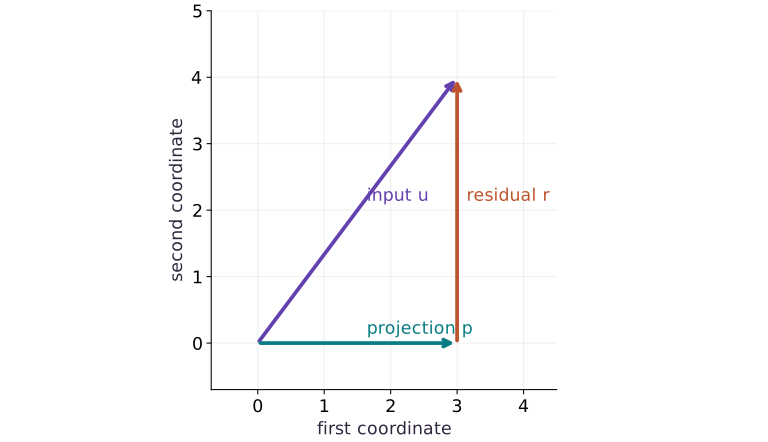
Read the vector figure by following the projection and then the residual to the original endpoint. Use equal axis scale: otherwise a mathematically right angle may not look right on the page.
Read length and alignment separately
Let and . The length of is , and . The dot product is not a distance or a probability: reversing changes its sign. For nonzero vectors, dividing by both lengths gives the cosine of their angle, here . In higher dimensions we use exactly the same sum, even when we cannot draw all the axes.
Find the closest point on a line
Points on the line through have the form , where is a scalar. Choose the point nearest . Its coefficient is . For our axis direction, , so the projection is and the leftover is . Notice that the coefficient depends on how long we draw ; the projected point does not.
Use orthogonality as an independent check
Orthogonal means perpendicular; algebraically, the dot product is zero. Because and are perpendicular, their squared lengths add to the squared length of : . We check both this identity and the leftover dot product. Matching a library projection to a copy of the same formula would give less independent evidence. For float32 calculations, a small absolute tolerance allows rounding near zero.
Know when the formula is undefined
The zero vector has no direction. Projecting onto it would divide by , and cosine similarity with it is also undefined. Our eager teaching helper raises a clear error for that input. A compiled application needs a separately defined policy, such as a validity mask or input validation before compilation. Adding a tiny constant silently changes the mathematical question; explain that policy if you choose it.
Projection and leftover form a right triangle
Predict before looking: Which part of is explained by the horizontal direction?
Read the figure
Both axes are ordinary vector coordinates. The diagonal arrow goes from the origin to . The horizontal arrow reaches the projection , and the vertical arrow then goes from that point up to .
Follow the horizontal and vertical arrows tip to tail: together they reproduce the diagonal arrow. Although the residual arrow is drawn starting at , its displacement is , not .
Connect it to the computation
We projected onto the horizontal direction. The residual is perpendicular to that direction, so its dot product with is zero. This right angle explains why moving the projection along the horizontal line cannot remove the remaining vertical error.
The lengths form a familiar check: , , and , with . Projection separates the part represented by the chosen direction from the part that direction cannot represent.
Open full-size figureDownload data and provenance
The notebook contains the data experiment, plotting code, and recorded figure output. Rerun it to test your changes.
Where to put & run this code: Work in phases/04-optimization/05-vectors-norms-and-projections/code/main.py (or downloaded exercises/optimization-05.py / exercises/optimization-05.ipynb) and execute from the repository root with python3 phases/04-optimization/05-vectors-norms-and-projections/code/main.py.
1 Draw the two vectors
Create main.py in your activated CPU course environment. Add the vectors and verify their lengths before adding a projection.
# Step 1 — Draw the two vectors: The length is 5; the component along the horizontal unit direction...
import jax.numpy as jnp
u = jnp.array([3.0, 4.0])
a = jnp.array([1.0, 0.0])
assert jnp.allclose(jnp.linalg.norm(u), 5.0)
assert jnp.allclose(jnp.dot(u, a), 3.0)
Code building blocks in this step
jnp.array(values, dtype=...)— Constructs an immutable device-backed JAX array from Python/NumPy values.jnp.allclose(actual, expected, rtol=..., atol=...)— Checks that two arrays match elementwise within floating-point tolerance.
The length is ; the component along the horizontal unit direction is .
2 Build the projection
Append this eager helper. Keep the input check outside any jitted function in this exercise.
# Step 2 — Build the projection: The leftover r contains what the chosen direction cannot explain.
def project(u, a):
    denominator = jnp.dot(a, a)
    # Guard input contract (`float(denominator) == 0.0`) and fail fast if violated.
    if float(denominator) == 0.0:
        raise ValueError('Projection needs a nonzero direction')
    return jnp.dot(a, u) / denominator * a
p = project(u, a)
r = u - p
Code building blocks in this step
project(...)— Callprojectwith your updated parameters or inputs from this lesson's workspace.jnp.dot(...)— Calljnp.dotwith your updated parameters or inputs from this lesson's workspace.
The leftover contains what the chosen direction cannot explain.
3 Check with geometry
Append these assertions and run python main.py. Compare with your drawing before reading the experiment.
# Step 3 — Check with geometry: You should see [3,0] and [0,4]; the squared lengths sum to 25.
assert jnp.allclose(p, jnp.array([3.0, 0.0]))
assert jnp.allclose(jnp.dot(a, r), 0.0, atol=1e-06)
assert jnp.allclose(jnp.dot(p, p) + jnp.dot(r, r), jnp.dot(u, u))
print('projection / residual:', p, r)
Code building blocks in this step
jnp.array(values, dtype=...)— Constructs an immutable device-backed JAX array from Python/NumPy values.jnp.allclose(actual, expected, rtol=..., atol=...)— Checks that two arrays match elementwise within floating-point tolerance.
You should see and ; the squared lengths sum to .
View the cumulative build in main.py
These blocks append in order to the same file.
# Step 1 — Draw the two vectors: The length is 5; the component along the horizontal unit direction...
import jax.numpy as jnp
u = jnp.array([3.0, 4.0])
a = jnp.array([1.0, 0.0])
assert jnp.allclose(jnp.linalg.norm(u), 5.0)
assert jnp.allclose(jnp.dot(u, a), 3.0)

# Step 2 — Build the projection: The leftover r contains what the chosen direction cannot explain.
def project(u, a):
    denominator = jnp.dot(a, a)
    # Guard input contract (`float(denominator) == 0.0`) and fail fast if violated.
    if float(denominator) == 0.0:
        raise ValueError('Projection needs a nonzero direction')
    return jnp.dot(a, u) / denominator * a
p = project(u, a)
r = u - p

# Step 3 — Check with geometry: You should see [3,0] and [0,4]; the squared lengths sum to 25.
assert jnp.allclose(p, jnp.array([3.0, 0.0]))
assert jnp.allclose(jnp.dot(a, r), 0.0, atol=1e-06)
assert jnp.allclose(jnp.dot(p, p) + jnp.dot(r, r), jnp.dot(u, u))
print('projection / residual:', p, r)
Run the example
python3 phases/04-optimization/05-vectors-norms-and-projections/code/main.pyAbout this command
This shortcut uses an activated macOS/Linux course environment in the repository folder. For Windows, use the explicit interpreter command in “Setup help” above. The script includes worked examples and reference solutions.
Inspect the complete assembled example
# Step 1 — Draw the two vectors: The length is 5; the component along the horizontal unit direction...
import jax.numpy as jnp
u = jnp.array([3.0, 4.0])
a = jnp.array([1.0, 0.0])
assert jnp.allclose(jnp.linalg.norm(u), 5.0)
assert jnp.allclose(jnp.dot(u, a), 3.0)

# Step 2 — Build the projection: The leftover r contains what the chosen direction cannot explain.
def project(u, a):
    denominator = jnp.dot(a, a)
    # Guard input contract (`float(denominator) == 0.0`) and fail fast if violated.
    if float(denominator) == 0.0:
        raise ValueError('Projection needs a nonzero direction')
    return jnp.dot(a, u) / denominator * a
p = project(u, a)
r = u - p

# Step 3 — Check with geometry: You should see [3,0] and [0,4]; the squared lengths sum to 25.
assert jnp.allclose(p, jnp.array([3.0, 0.0]))
assert jnp.allclose(jnp.dot(a, r), 0.0, atol=1e-06)
assert jnp.allclose(jnp.dot(p, p) + jnp.dot(r, r), jnp.dot(u, u))
print('projection / residual:', p, r)
Expected result: Projection , residual . Both orthogonality and the length identity pass.
Recorded reference execution
Reference output captured from executing the complete lesson script (code/main.py) and its assertions in the course CPU environment.
projection / residual: [3. 0.] [0. 4.]
projection / residual: [3. 0.] [0. 4.]
PASS: optimization-05
Download execution record · The notebook includes executed cells and figure outputs. Compare your run with these values; timings depend on the machine.
Rescale the direction
# Experiment — Rescale the direction: A line does not change when its nonzero direction is rescaled.
assert jnp.allclose(project(u, 2 * a), p)
assert jnp.allclose(project(u, -a), p)
assert jnp.allclose(jnp.dot(u, 2 * a), 2 * jnp.dot(u, a))
Expected: The projection stays fixed; the raw dot product doubles.
A line does not change when its nonzero direction is rescaled. A dot product alone does change.
Rotate the line
# Experiment — Rotate the line: Changing direction changes what can be explained; merely...
diagonal = jnp.array([1.0, 1.0])
p2 = project(u, diagonal)
assert jnp.allclose(p2, jnp.array([3.5, 3.5]))
assert jnp.allclose(jnp.dot(diagonal, u - p2), 0.0, atol=1e-06)
Expected: Projection , residual .
Changing direction changes what can be explained; merely changing its length does not.
Make it yours
Where to put your code: Append your solution at the bottom of phases/04-optimization/05-vectors-norms-and-projections/code/main.py (or inside the Make it yours cell of exercises/optimization-05.ipynb) and run python3 phases/04-optimization/05-vectors-norms-and-projections/code/main.py to verify your prediction before opening the reference solution.
Project onto . Check the residual by hand first.
Show a writing guide and starter scaffold
How to write this exercise code: step-by-step recipe & starter scaffold
1. Key functions & syntax to use:
jnp.array(values, dtype=...)— Constructs an immutable device-backed JAX array from Python/NumPy values.jnp.allclose(actual, expected, rtol=..., atol=...)— Checks that two arrays match elementwise within floating-point tolerance.
2. Step-by-step implementation plan:
- Set up the changed input or configuration parameters requested in the prompt.
- Run the target function or transformation and assert that the output matches your prediction.
# Exercise solution: Project u=(2,-1,2) onto a=(1,0,1).
u3 = jnp.array(...)  # TODO: compute u3
a3 = jnp.array(...)  # TODO: compute a3
p3 = project(...)  # TODO: compute p3
assert jnp.allclose(p3, jnp.array([2.0, 0.0, 2.0]))  # TODO: complete assertion check
assert jnp.allclose(jnp.dot(a3, u3 - p3), 0.0)  # TODO: complete assertion check
Reveal the reference solution
# Exercise solution: Project u=(2,-1,2) onto a=(1,0,1).
u3 = jnp.array([2.0, -1.0, 2.0])
a3 = jnp.array([1.0, 0.0, 1.0])
p3 = project(u3, a3)
assert jnp.allclose(p3, jnp.array([2.0, 0.0, 2.0]))
assert jnp.allclose(jnp.dot(a3, u3 - p3), 0.0)
Handle an undefined direction
Transfer / diagnosis
Show that a zero direction produces a clear input error instead of a misleading projection.
Show a writing guide and starter scaffold
How to write this practice solution: step-by-step recipe & starter scaffold
1. Key functions & syntax to use:
direction(...)— Calldirectionwith your updated parameters or inputs from this lesson's workspace.project(...)— Callprojectwith your updated parameters or inputs from this lesson's workspace.assert condition— Verify that the observed output shape, status, or numerical value satisfies the contract.
2. Step-by-step implementation plan:
- Run the boundary check and catch the expected exception:
# Handle an undefined direction (Transfer / diagnosis): Rejecting an undefined input is part of the function contract.
# Run the boundary check and catch the expected exception:
try:
    project(u, jnp.zeros_like(a))
except ValueError as exc:
    assert 'nonzero'  # TODO: complete assertion check
else:
    raise AssertionError('Zero direction was accepted')
Show a hint
Use a try/except block; a silent successful result should fail the check.
Reveal reference solution and reasoning
# Handle an undefined direction (Transfer / diagnosis): Rejecting an undefined input is part of the function contract.
# Run the boundary check and catch the expected exception:
try:
    project(u, jnp.zeros_like(a))
except ValueError as exc:
    assert 'nonzero' in str(exc)
else:
    raise AssertionError('Zero direction was accepted')
Rejecting an undefined input is part of the function contract.
Use two perpendicular directions
Transfer / diagnosis
Reconstruct from projections onto and . Would adding independent projections still work for arbitrary nonorthogonal directions?
Show a writing guide and starter scaffold
How to write this practice solution: step-by-step recipe & starter scaffold
1. Key functions & syntax to use:
jnp.array(values, dtype=...)— Constructs an immutable device-backed JAX array from Python/NumPy values.jnp.allclose(actual, expected, rtol=..., atol=...)— Checks that two arrays match elementwise within floating-point tolerance.
2. Step-by-step implementation plan:
- Set up the changed input or configuration parameters requested in the prompt.
- Run the target function or transformation and assert that the output matches your prediction.
# Use two perpendicular directions (Transfer / diagnosis): Adding separate projections reconstructs a vector in an...
a1 = jnp.array(...)  # TODO: compute a1
a2 = jnp.array(...)  # TODO: compute a2
assert jnp.allclose(project(u, a1) + project(u, a2), u)  # TODO: complete assertion check
assert not jnp.allclose(project(u, a) + project(u, a1), u)  # TODO: complete assertion check
Show a hint
Check the directions have zero dot product. Nonorthogonal directions can count the same component twice.
Reveal reference solution and reasoning
# Use two perpendicular directions (Transfer / diagnosis): Adding separate projections reconstructs a vector in an...
a1 = jnp.array([1.0, 1.0])
a2 = jnp.array([1.0, -1.0])
assert jnp.allclose(project(u, a1) + project(u, a2), u)
assert not jnp.allclose(project(u, a) + project(u, a1), u)
Adding separate projections reconstructs a vector in an orthogonal basis. Correlated feature directions require a joint least-squares solve.
Diagnose the result
If the leftover is not perpendicular, check the denominator: it is , not the length of . If cosine exceeds its expected range, check normalization and rounding; first reject zero-length inputs.
Carry forward
- A line does not change when its nonzero direction is rescaled. A dot product alone does change.
- Changing direction changes what can be explained; merely changing its length does not.
Keep your evidence
Keep the hand-computed projection, perpendicular-residual check, rescaling experiment, zero-direction repair and changed-basis calculation.
Save your modified code, its output, and an explanation of your prediction. Checkpoint answers and exercise evidence are tracked separately.
Saved in this browser. Export or back up your portfolio anytime in My learning.
Verified on local CPU. Stage to a Cloud TPU VM via Cloud TPU setup to record accelerator execution receipts (TODO: add automated Cloud TPU CI execution receipts).