 JAX Pathways
Phase 04 / Math & optimization
Least squares, rank, and conditioning
Revision v0.7.0 · Updated since your last visit. Review the changes; your progress is saved.
Lesson · about 75 minutes · CPU practice
Fit a linear model with a direct solver and diagnose nonunique or sensitive coefficients.
Phase study guide: preparation, milestones and project evidence
Before you start
Before this: Linear algebra and loss intuition
Hardware: CPU
Setup help: Python, notebook, or Cloud TPU VM
Use the tested CPU packages (the recorded environment uses Python 3.14.3). Other Python versions and accelerator environments require separate checks. The optional Cloud TPU specialization explains the target-specific execution boundaries. Logical CPU devices practice partitioning; they do not simulate TPU performance.
Download the repository ZIP or use your existing checkout. Extract it and open a terminal in the folder containing requirements-cpu.txt. The beginner ZIP is separate; these lessons use the full repository folder.
python3 -m venv .venv
source .venv/bin/activate
python -m pip install -r requirements-cpu.txtpy -3 -m venv .venv
.\.venv\Scripts\python.exe -m pip install -r requirements-cpu.txtAfter activation, run the complete worked example from that same folder:
python phases/04-optimization/06-least-squares-rank-and-conditioning/code/main.py.\.venv\Scripts\python.exe phases/04-optimization/06-least-squares-rank-and-conditioning/code/main.pyFor an incremental build, create main.py in your own practice folder, append each build block in order, and run python main.py with this environment active. Keep that file separate from the downloaded reference solution.
Download this lesson’s notebook. Open it with a Python kernel using the course environment. Run cells from the top after restarting the kernel; experiments depend on earlier definitions.
For local Jupyter, first install the course requirements using the Local Python steps, then use your environment’s Python to start Jupyter:
python -m pip install jupyterlab
python -m jupyter lab.\.venv\Scripts\python.exe -m pip install jupyterlab
.\.venv\Scripts\python.exe -m jupyter labSelect the downloaded optimization-06.ipynb file in JupyterLab. The notebook contains reference solutions; make your prediction and attempt each practice task before opening them. Restart the kernel before changing logical device setup.
The worked reference for this lesson is CPU-validated. Some references explicitly configure logical CPU devices; setting JAX_PLATFORMS does not adapt them to a TPU. Follow the execution matrix and reviewed multi-host example before attempting a target run.
For accelerator preparation, study TPU setup, observed runtime receipts, checkpointed jobs and precision and retained traces. These target paths remain unqualified on physical TPU hardware until an actual receipt is recorded. Cloud provisioning is optional for CPU learning.
Check: Weights near , rank , mean squared error near .
Revisit the guided CPU setup · Open 19: TPU Setup. Package instructions are CPU instructions; Windows and accelerator environments need their own validation.
What you will be able to do
- Fit a linear model with a direct solver and diagnose nonunique or sensitive coefficients.
- Solve a fit you can verify by hand
- Use a solver, not an explicit inverse
- Separate rank from fit quality
- Measure sensitivity rather than guessing
The problem
Before training a linear model step by step, can we solve it directly? A tiny least-squares fit gives us a reference answer. Then we will make two features nearly identical and see why a good prediction can hide unreliable coefficients.
The idea
Least squares finds parameters whose predictions are close to the targets under a squared-error objective. Whether those parameters are uniquely determined and stable is a separate question. Nearly redundant features can make weights sensitive even when predictions look good.
A good fit can hide uncertain parameters
Suppose two feature columns are identical. A prediction using weights and depends only on their sum. The pairs and therefore produce identical predictions. A low residual cannot tell us which pair is the intended explanation.
If the columns are almost, rather than exactly, identical, tiny data changes can lead to large changes in the separate weights. This is conditioning: how strongly the solution responds to perturbations. Inspect parameter changes as well as prediction error.
The geometric view projects the target vector onto the space spanned by the columns. A target component outside that space remains as residual even after a correct solve. A residual and an unstable parameter estimate are different problems and call for different diagnostics.
Solve a fit you can verify by hand
Take rows , , and targets . These targets cannot all be matched. The best weights are , with predictions . The residual has zero dot product with each column. The mean squared error is .
Use a solver, not an explicit inverse
The orthogonality equation implies . This is useful for reasoning, but forming an inverse is not a good default algorithm. Squaring a full-rank matrix into its Gram matrix squares its condition number in the Euclidean norm. Use jnp.linalg.lstsq for the direct reference; it also reports numerical rank and singular values. We recompute the residual so its meaning is explicit.
Separate rank from fit quality
Rank counts independent column directions. If both columns are the same vector , then predictions depend only on . Infinitely many weight pairs give the same prediction. The least-squares solver chooses a minimum-length solution; that convention is separate from which feature caused the target. A zero residual is therefore not evidence that the individual coefficients are identifiable.
Measure sensitivity rather than guessing
Singular values measure how strongly a matrix stretches different unit directions. For a full-column-rank matrix, the ratio is its condition number. A tiny smallest singular value means some weight changes barely affect predictions. The inverse question—recovering weights from targets—can then amplify small disturbances. Our perturbation experiment is deliberately aligned with such a weak direction. It illustrates sensitivity, not a universal noise model. Rank decisions also depend on the solver cutoff and dtype.
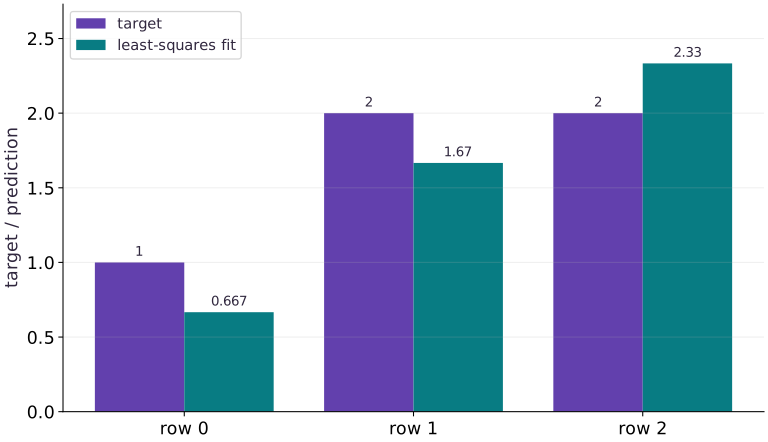
Least squares balances unavoidable residuals
Predict before looking: Can every target be matched at the same time?
Read the figure
For each observation, compare the target bar with the least-squares prediction beside it. Targets are ; predictions are approximately . The fitted model falls short on the first two rows and exceeds the target on the third.
Each vertical gap has magnitude , but the signs differ. Using prediction minus target, the residual vector is . The mean squared error is therefore , despite no bar pair matching exactly.
Connect it to the computation
The feature matrix makes the third prediction equal the sum of the first two. Matching the first two targets exactly would force the third prediction to be , not its target . An exact fit is impossible with these features.
Least squares balances this conflict. For each feature column, the residual contributions cancel, giving . That orthogonality, rather than zero residual on every row, is the optimality condition. The unequal bar heights are an unavoidable limitation of this model, not evidence that the solver failed.
Open full-size figureDownload data and provenance
The notebook contains the data experiment, plotting code, and recorded figure output. Rerun it to test your changes.
Where to put & run this code: Work in phases/04-optimization/06-least-squares-rank-and-conditioning/code/main.py (or downloaded exercises/optimization-06.py / exercises/optimization-06.ipynb) and execute from the repository root with python3 phases/04-optimization/06-least-squares-rank-and-conditioning/code/main.py.
1 Construct an imperfect fit
Create main.py and add this small matrix and target. Work out the proposed weights on paper.
# Step 1 — Construct an imperfect fit: No weights can match all three targets, so a nonzero residual is...
import jax.numpy as jnp
import numpy as np
X = jnp.array([[1.0, 0.0], [0.0, 1.0], [1.0, 1.0]])
y = jnp.array([1.0, 2.0, 2.0])
expected = jnp.array([2 / 3, 5 / 3])
Code building blocks in this step
jnp.array(values, dtype=...)— Constructs an immutable device-backed JAX array from Python/NumPy values.
No weights can match all three targets, so a nonzero residual is expected.
2 Solve and inspect the residual
Append the direct solve and compute the error from the actual predictions.
# Step 2 — Solve and inspect the residual: Perpendicular residuals verify optimality for this unconstrained...
w, _, rank, singular = jnp.linalg.lstsq(X, y, rcond=None)
r = X @ w - y
assert int(rank) == 2
assert jnp.allclose(w, expected, atol=2e-06)
assert jnp.allclose(X.T @ r, jnp.zeros(2), atol=2e-06)
Code building blocks in this step
jnp.zeros / jnp.ones(shape, dtype=...)— Allocates a tensor of the givenshapeinitialized with constants.jnp.allclose(actual, expected, rtol=..., atol=...)— Checks that two arrays match elementwise within floating-point tolerance.
Perpendicular residuals verify optimality for this unconstrained least-squares problem.
3 Compare independent references
Append the mean loss and a NumPy float64 solve; run python main.py.
# Step 3 — Compare independent references: The hand result and a separate numerical implementation agree...
assert jnp.allclose(jnp.mean(r * r), 1 / 9, atol=2e-06)
# Convert `np_w` to a host NumPy array for inspection or verification.
np_w = np.linalg.lstsq(np.asarray(X, dtype=np.float64), np.asarray(y, dtype=np.float64), rcond=None)[0]
assert np.allclose(np.asarray(w), np_w, atol=2e-06)
print('weights / rank / MSE:', w, rank, jnp.mean(r * r))
Code building blocks in this step
x.sum(axis=...) / x.mean(axis=..., keepdims=...)— Reduces values along the namedaxis(the axis you name is collapsed unlesskeepdims=True).jnp.allclose(actual, expected, rtol=..., atol=...)— Checks that two arrays match elementwise within floating-point tolerance.
The hand result and a separate numerical implementation agree within float32 tolerance.
View the cumulative build in main.py
These blocks append in order to the same file.
# Step 1 — Construct an imperfect fit: No weights can match all three targets, so a nonzero residual is...
import jax.numpy as jnp
import numpy as np
X = jnp.array([[1.0, 0.0], [0.0, 1.0], [1.0, 1.0]])
y = jnp.array([1.0, 2.0, 2.0])
expected = jnp.array([2 / 3, 5 / 3])

# Step 2 — Solve and inspect the residual: Perpendicular residuals verify optimality for this unconstrained...
w, _, rank, singular = jnp.linalg.lstsq(X, y, rcond=None)
r = X @ w - y
assert int(rank) == 2
assert jnp.allclose(w, expected, atol=2e-06)
assert jnp.allclose(X.T @ r, jnp.zeros(2), atol=2e-06)

# Step 3 — Compare independent references: The hand result and a separate numerical implementation agree...
assert jnp.allclose(jnp.mean(r * r), 1 / 9, atol=2e-06)
# Convert `np_w` to a host NumPy array for inspection or verification.
np_w = np.linalg.lstsq(np.asarray(X, dtype=np.float64), np.asarray(y, dtype=np.float64), rcond=None)[0]
assert np.allclose(np.asarray(w), np_w, atol=2e-06)
print('weights / rank / MSE:', w, rank, jnp.mean(r * r))
Run the example
python3 phases/04-optimization/06-least-squares-rank-and-conditioning/code/main.pyAbout this command
This shortcut uses an activated macOS/Linux course environment in the repository folder. For Windows, use the explicit interpreter command in “Setup help” above. The script includes worked examples and reference solutions.
Inspect the complete assembled example
# Step 1 — Construct an imperfect fit: No weights can match all three targets, so a nonzero residual is...
import jax.numpy as jnp
import numpy as np
X = jnp.array([[1.0, 0.0], [0.0, 1.0], [1.0, 1.0]])
y = jnp.array([1.0, 2.0, 2.0])
expected = jnp.array([2 / 3, 5 / 3])

# Step 2 — Solve and inspect the residual: Perpendicular residuals verify optimality for this unconstrained...
w, _, rank, singular = jnp.linalg.lstsq(X, y, rcond=None)
r = X @ w - y
assert int(rank) == 2
assert jnp.allclose(w, expected, atol=2e-06)
assert jnp.allclose(X.T @ r, jnp.zeros(2), atol=2e-06)

# Step 3 — Compare independent references: The hand result and a separate numerical implementation agree...
assert jnp.allclose(jnp.mean(r * r), 1 / 9, atol=2e-06)
# Convert `np_w` to a host NumPy array for inspection or verification.
np_w = np.linalg.lstsq(np.asarray(X, dtype=np.float64), np.asarray(y, dtype=np.float64), rcond=None)[0]
assert np.allclose(np.asarray(w), np_w, atol=2e-06)
print('weights / rank / MSE:', w, rank, jnp.mean(r * r))
Expected result: Weights near , rank , mean squared error near .
Recorded reference execution
Reference output captured from executing the complete lesson script (code/main.py) and its assertions in the course CPU environment.
weights / rank / MSE: [0.6666669 1.6666665] 2 0.11111113
weights / rank / MSE: [0.6666669 1.6666665] 2 0.11111113
condition / target change / weight change: 200.00504 0.0010000002 0.14142144
PASS: optimization-06
Download execution record · The notebook includes executed cells and figure outputs. Compare your run with these values; timings depend on the machine.
Duplicate a feature
# Experiment — Duplicate a feature: Fit quality and coefficient uniqueness are different questions.
a = jnp.array([1.0, 2.0, 3.0])
# Combine or mask array elements to form `duplicate`.
duplicate = jnp.stack([a, a], axis=1)
w_dup, _, rank_dup, _ = jnp.linalg.lstsq(duplicate, 3 * a, rcond=None)
assert int(rank_dup) == 1
assert jnp.allclose(duplicate @ w_dup, 3 * a, atol=3e-06)
assert jnp.allclose(duplicate @ jnp.array([1.0, 2.0]), duplicate @ jnp.array([0.0, 3.0]))
Expected: Rank ; different weight pairs make identical predictions.
Fit quality and coefficient uniqueness are different questions.
Perturb a weak direction
# Experiment — Perturb a weak direction: Nearly dependent columns can amplify target perturbations while...
near = jnp.array([[1.0, 1.0], [0.0, 0.01], [0.0, 0.0]])
base = near @ jnp.array([1.0, 1.0])
changed = base + jnp.array([0.0, 0.001, 0.0])
w0 = jnp.linalg.lstsq(near, base, rcond=None)[0]
w1 = jnp.linalg.lstsq(near, changed, rcond=None)[0]
assert jnp.allclose(w1 - w0, jnp.array([-0.1, 0.1]), atol=5e-05)
print('condition / target change / weight change:', jnp.linalg.cond(near), jnp.linalg.norm(changed - base), jnp.linalg.norm(w1 - w0))
Expected: The target change has length , but the weight change has length about .
Nearly dependent columns can amplify target perturbations while preserving a close prediction fit.
Make it yours
Where to put your code: Append your solution at the bottom of phases/04-optimization/06-least-squares-rank-and-conditioning/code/main.py (or inside the Make it yours cell of exercises/optimization-06.ipynb) and run python3 phases/04-optimization/06-least-squares-rank-and-conditioning/code/main.py to verify your prediction before opening the reference solution.
Add a constant bias column to inputs and fit targets . Recover slope and bias .
Show a writing guide and starter scaffold
How to write this exercise code: step-by-step recipe & starter scaffold
1. Key functions & syntax to use:
jnp.array(values, dtype=...)— Constructs an immutable device-backed JAX array from Python/NumPy values.jnp.allclose(actual, expected, rtol=..., atol=...)— Checks that two arrays match elementwise within floating-point tolerance.
2. Step-by-step implementation plan:
- Set up the changed input or configuration parameters requested in the prompt.
- Run the target function or transformation and assert that the output matches your prediction.
# Exercise solution: Add a constant bias column to inputs (-1,0,1) and fit targets (-1,1,3).
x = jnp.array(...)  # TODO: compute x
design = jnp.stack(...)  # TODO: compute design
fit = jnp.linalg.lstsq(...)  # TODO: compute fit
assert jnp.allclose(fit, jnp.array([2.0, 1.0]), atol=2e-06)  # TODO: complete assertion check
Reveal the reference solution
# Exercise solution: Add a constant bias column to inputs (-1,0,1) and fit targets (-1,1,3).
x = jnp.array([-1.0, 0.0, 1.0])
design = jnp.stack([x, jnp.ones_like(x)], axis=1)
fit = jnp.linalg.lstsq(design, 2 * x + 1, rcond=None)[0]
assert jnp.allclose(fit, jnp.array([2.0, 1.0]), atol=2e-06)
Change feature units
Transfer / diagnosis
Multiply the first feature of by . Predict the new weights and compare predictions.
Show a writing guide and starter scaffold
How to write this practice solution: step-by-step recipe & starter scaffold
1. Key functions & syntax to use:
jnp.array(values, dtype=...)— Constructs an immutable device-backed JAX array from Python/NumPy values.jnp.allclose(actual, expected, rtol=..., atol=...)— Checks that two arrays match elementwise within floating-point tolerance.
2. Step-by-step implementation plan:
- Set up the changed input or configuration parameters requested in the prompt.
- Run the target function or transformation and assert that the output matches your prediction.
# Change feature units (Transfer / diagnosis): Feature units affect coefficients and conditioning.
scaled = ...  # TODO: compute scaled
ws = jnp.linalg.lstsq(...)  # TODO: compute ws
assert jnp.allclose(ws, expected / jnp.array([100.0, 1.0]), atol=3e-06)  # TODO: complete assertion check
assert jnp.allclose(scaled @ ws, X @ w, atol=3e-06)  # TODO: complete assertion check
Show a hint
The first weight must divide by to represent the same model.
Reveal reference solution and reasoning
# Change feature units (Transfer / diagnosis): Feature units affect coefficients and conditioning.
scaled = X * jnp.array([100.0, 1.0])
ws = jnp.linalg.lstsq(scaled, y, rcond=None)[0]
assert jnp.allclose(ws, expected / jnp.array([100.0, 1.0]), atol=3e-06)
assert jnp.allclose(scaled @ ws, X @ w, atol=3e-06)
Feature units affect coefficients and conditioning. They need not change the fitted prediction space.
Explain the squared conditioning
Transfer / diagnosis
Compare the condition numbers of the diagonal matrix with entries and its Gram matrix. Why is a solver preferable to forming the inverse?
Show a writing guide and starter scaffold
How to write this practice solution: step-by-step recipe & starter scaffold
1. Key functions & syntax to use:
jnp.array(values, dtype=...)— Constructs an immutable device-backed JAX array from Python/NumPy values.jnp.allclose(actual, expected, rtol=..., atol=...)— Checks that two arrays match elementwise within floating-point tolerance.
2. Step-by-step implementation plan:
- Set up the changed input or configuration parameters requested in the prompt.
- Run the target function or transformation and assert that the output matches your prediction.
# Explain the squared conditioning (Transfer / diagnosis): The normal equations can worsen numerical sensitivity.
D = jnp.diag(...)  # TODO: compute D
assert jnp.allclose(jnp.linalg.cond(D), 10.0)  # TODO: complete assertion check
assert jnp.allclose(jnp.linalg.cond(D.T @ D), 100.0, rtol=2e-06)  # TODO: complete assertion check
Show a hint
The diagonal entries are singular values here; squaring them changes the ratio from to .
Reveal reference solution and reasoning
# Explain the squared conditioning (Transfer / diagnosis): The normal equations can worsen numerical sensitivity.
D = jnp.diag(jnp.array([1.0, 0.1]))
assert jnp.allclose(jnp.linalg.cond(D), 10.0)
assert jnp.allclose(jnp.linalg.cond(D.T @ D), 100.0, rtol=2e-06)
The normal equations can worsen numerical sensitivity. A small residual alone is verified separately from coefficient accuracy.
Diagnose the result
If a fit changes sharply after a small target perturbation, inspect singular values and feature units. If rank drops, inspect duplicate columns and the cutoff. Compare residuals and predictions as well as coefficients.
Carry forward
- Fit quality and coefficient uniqueness are different questions.
- Nearly dependent columns can amplify target perturbations while preserving a close prediction fit.
Keep your evidence
Save the hand solution, residual orthogonality, duplicate-column ambiguity, perturbation table and NumPy comparison.
Save your modified code, its output, and an explanation of your prediction. Checkpoint answers and exercise evidence are tracked separately.
Saved in this browser. Export or back up your portfolio anytime in My learning.
Verified on local CPU. Stage to a Cloud TPU VM via Cloud TPU setup to record accelerator execution receipts (TODO: add automated Cloud TPU CI execution receipts).