 JAX Pathways
Phase 04 / Math & optimization
Adam, clipping, and learning-rate schedules
Revision v0.7.0 · Updated since your last visit. Review the changes; your progress is saved.
Lesson · about 90 minutes · CPU practice
Explain Adam’s moments, inspect clipping and schedule order, and compare optimizers with a controlled update budget.
Phase study guide: preparation, milestones and project evidence
Before you start
Before this: Optimize with Optax
Hardware: CPU
Setup help: Python, notebook, or Cloud TPU VM
Use the tested CPU packages (the recorded environment uses Python 3.14.3). Other Python versions and accelerator environments require separate checks. The optional Cloud TPU specialization explains the target-specific execution boundaries. Logical CPU devices practice partitioning; they do not simulate TPU performance.
Download the repository ZIP or use your existing checkout. Extract it and open a terminal in the folder containing requirements-cpu.txt. The beginner ZIP is separate; these lessons use the full repository folder.
python3 -m venv .venv
source .venv/bin/activate
python -m pip install -r requirements-cpu.txtpy -3 -m venv .venv
.\.venv\Scripts\python.exe -m pip install -r requirements-cpu.txtAfter activation, run the complete worked example from that same folder:
python phases/04-optimization/12-adam-clipping-and-learning-rate-schedules/code/main.py.\.venv\Scripts\python.exe phases/04-optimization/12-adam-clipping-and-learning-rate-schedules/code/main.pyFor an incremental build, create main.py in your own practice folder, append each build block in order, and run python main.py with this environment active. Keep that file separate from the downloaded reference solution.
Download this lesson’s notebook. Open it with a Python kernel using the course environment. Run cells from the top after restarting the kernel; experiments depend on earlier definitions.
For local Jupyter, first install the course requirements using the Local Python steps, then use your environment’s Python to start Jupyter:
python -m pip install jupyterlab
python -m jupyter lab.\.venv\Scripts\python.exe -m pip install jupyterlab
.\.venv\Scripts\python.exe -m jupyter labSelect the downloaded optimization-12.ipynb file in JupyterLab. The notebook contains reference solutions; make your prediction and attempt each practice task before opening them. Restart the kernel before changing logical device setup.
The worked reference for this lesson is CPU-validated. Some references explicitly configure logical CPU devices; setting JAX_PLATFORMS does not adapt them to a TPU. Follow the execution matrix and reviewed multi-host example before attempting a target run.
For accelerator preparation, study TPU setup, observed runtime receipts, checkpointed jobs and precision and retained traces. These target paths remain unqualified on physical TPU hardware until an actual receipt is recorded. Cloud provisioning is optional for CPU learning.
Check: Two Adam updates match the manual moment calculation; the clipped SGD update is .
Revisit the guided CPU setup · Open 19: TPU Setup. Package instructions are CPU instructions; Windows and accelerator environments need their own validation.
What you will be able to do
- Explain Adam’s moments, inspect clipping and schedule order, and compare optimizers with a controlled update budget.
- Calculate the first two Adam steps
- Clip a direction without rotating it
- Make the schedule clock explicit
- Compare decisions with evidence
- Bring the phase together in a training audit
The problem
An optimizer can lower the loss while hiding several choices: how it averages gradients, rescales coordinates, clips large values, and changes the step size. We will expose those choices one at a time before running a controlled comparison. The goal is to explain a training decision, not to crown a universal winner.
The idea
Adam combines gradient history with coordinatewise scaling. Clipping limits a gradient or update according to a chosen rule, while a learning-rate schedule changes scale over training. These mechanisms interact, but we should inspect each separately before interpreting their combined loss curve.
Clipping changes a vector; a schedule changes a clocked scale
Use the analytic gradient , whose norm is . Global-norm clipping at scales the entire vector to , preserving its direction. Clipping each coordinate to the interval instead produces , whose direction and norm differ.
Now consider four microbatches accumulated into one optimizer update. A schedule indexed by optimizer updates should advance once for that group, not four times. The schedule's clock is part of the algorithm and should be restored with optimizer state.
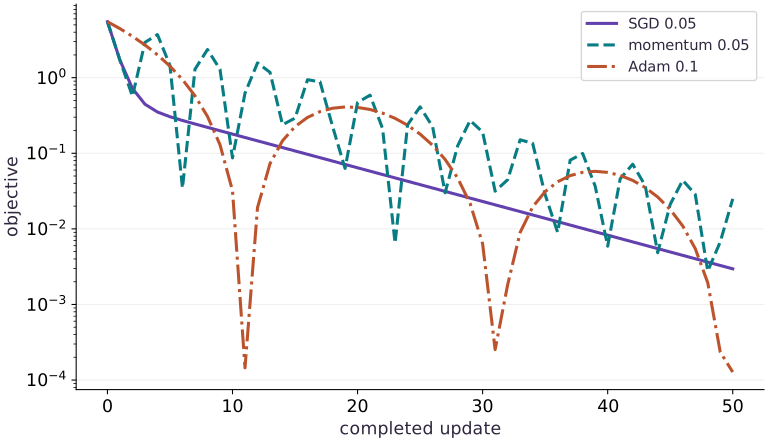
The existing optimizer plot uses its labeled learning rates and shows nonmonotone trajectories, including rebounds. It compares that specific fixture; it does not demonstrate clipping or scheduling. Use the separate clipping diagram to understand the geometry, then test each mechanism with its own controlled change.
A norm ball and a coordinate box
Predict: Does coordinate clipping at guarantee that the whole gradient norm is at most ?
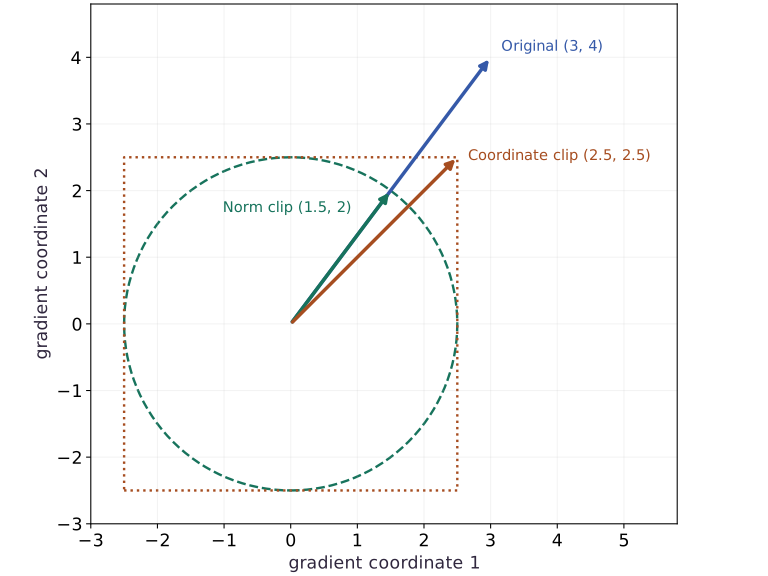
The blue arrow is . Green scales it to norm along the same ray. Orange clips each coordinate to , landing at the box corner with norm . The circle and box are analytic constraints, not training measurements.
Calculate the first two Adam steps
Let be the gradient at update . Adam tracks a first moment and a second raw moment , using decay rates and . Starting at zero makes the early averages small; divide by and to correct that bias. At the first step, corrected moments are and . With a small , each nonzero coordinate initially moves close to the learning rate in the opposite sign direction. This does not mean later steps ignore magnitude.
Clip a direction without rotating it
Global norm clipping rescales a gradient only when its length exceeds a threshold . For , the norm is , so clipping at gives . Coordinate-wise clipping to the same threshold instead gives , changing direction. Clipping before Adam limits the gradient entering its moments; it does not impose that same bound on the final parameter update. Clipping cannot repair NaNs, wrong labels or a wrong objective.
Make the schedule clock explicit
A schedule maps an optimizer update count to a learning rate. Our linear example goes from at count to at count , then stays there. Count is the first update, not an epoch. Gradient accumulation changes how many optimizer updates occur per data pass. Restoring only model weights loses the moments and schedule position; retain optimizer state to continue the same run.
Compare decisions with evidence
Use the same objective, initialization, data and number of updates when comparing SGD, momentum and Adam. Report the loss history and chosen rates; equal updates are not equal wall-clock time, and one rate per method is not a thorough tuning study. An adaptive method does not make scaling or validation irrelevant. Adding an penalty to an Adam loss also differs from decoupled weight decay in AdamW: the penalty gradient is transformed by Adam’s moments, while decoupled decay acts separately on the weights.
Bring the phase together in a training audit
For the regression audit project, first document feature and target shapes, loss reduction and dtype. Use a direct least-squares fit as a reference when its assumptions match. Check gradients at more than one point, inspect feature scales, and preserve optimizer state for replay. If you introduce a penalty or change the batch size, state how that changes the objective or noise. Finish with separate training and held-out losses, an unstable run, and a short explanation of your choice. The existing project checks a subset of these skills; keep the new lesson evidence alongside it rather than treating a project pass as assessment of all twelve lessons.
Compare optimizer paths under a fixed update budget
Predict before looking: Will equal update counts produce equal loss histories?
Read the figure
Start with the axes. The horizontal axis counts completed parameter updates; is the shared starting point. The vertical axis is the objective , so lower is better. It is logarithmic: falling from to means a tenfold reduction, not a decrease of one unit. Zero cannot appear on this scale.
All three methods begin at , with loss . The solid SGD curve drops smoothly and then develops a slower tail. With learning rate , each update multiplies the two coordinates by and . The steep direction shrinks quickly; the flatter direction accounts for the slow remaining progress.
Connect it to the computation
Now follow the dashed momentum curve. Its loss falls to about at update , then rises to about at update . Momentum retains past gradients, so a favorable current position does not guarantee a favorable next step: the accumulated update can carry the parameters past the minimum. The repeated dips and rebounds occur under a generally declining envelope. They are deterministic optimizer behavior in this example, not noise from shuffled minibatches.
The dash-dot Adam curve makes the same caution especially clear. It reaches about at update , then rises to about by update . Adam adapts coordinate-wise update sizes using gradient history, but that history can still move parameters away after a close approach. A deep dip means the current parameters are near the minimum; it does not mean subsequent updates will stay there. The scalar loss alone does not tell us which side of the minimum each coordinate occupies.
At update , the losses are approximately for Adam, for SGD, and for momentum. Adam finishes lowest under these settings, although it was not lowest at every earlier update. Compare the same update budget, read the endpoint as well as the dips, and remember that equal update counts do not imply equal runtime. This figure uses fixed rates without clipping or a schedule; the later experiments examine those separate choices.
Open full-size figureDownload data and provenance
The notebook contains the data experiment, plotting code, and recorded figure output. Rerun it to test your changes.
Where to put & run this code: Work in phases/04-optimization/12-adam-clipping-and-learning-rate-schedules/code/main.py (or downloaded exercises/optimization-12.py / exercises/optimization-12.ipynb) and execute from the repository root with python3 phases/04-optimization/12-adam-clipping-and-learning-rate-schedules/code/main.py.
1 Build a transparent Adam reference
Create main.py. Use an explicit two-gradient sequence to inspect the optimizer independently of a training loop.
# Step 1 — Build a transparent Adam reference: The supplied gradients isolate optimizer arithmetic; they are not...
import jax
import jax.numpy as jnp
import optax
params = jnp.zeros(2)
# Configure or step the Optax optimizer state (`adam`).
adam = optax.adam(0.1, b1=0.9, b2=0.99, eps=1e-08)
state = adam.init(params)
m = jnp.zeros(2)
v = jnp.zeros(2)
gradients = [jnp.array([2.0, -4.0]), jnp.array([1.0, 3.0])]
Code building blocks in this step
jnp.array(values, dtype=...)— Constructs an immutable device-backed JAX array from Python/NumPy values.jnp.zeros / jnp.ones(shape, dtype=...)— Allocates a tensor of the givenshapeinitialized with constants.optax.adam(lr) / optax.apply_updates(params, updates)— Optax gradient transformations and numerically stable loss functions over parameter PyTrees.
The supplied gradients isolate optimizer arithmetic; they are not presented as a model’s measured training gradients.
2 Verify both moment updates
Append the manual recurrences and compare each update with Optax.
# Step 2 — Verify both moment updates: The first update is near (-0.1,0.1); the next depends on both...
for t, g in enumerate(gradients, start=1):
    m = 0.9 * m + 0.1 * g
    v = 0.99 * v + 0.01 * g * g
    expected = -0.1 * (m / (1 - 0.9 ** t)) / (jnp.sqrt(v / (1 - 0.99 ** t)) + 1e-08)
    update, state = adam.update(g, state, params)
    assert jnp.allclose(update, expected, atol=2e-06, rtol=2e-06)
    # Apply the computed gradient updates to update the model parameters.
    params = optax.apply_updates(params, update)
    print('step / update:', t, update)
Code building blocks in this step
jnp.allclose(actual, expected, rtol=..., atol=...)— Checks that two arrays match elementwise within floating-point tolerance.
The first update is near ; the next depends on both gradients.
3 Inspect one clipped update
Append a global clipping plus SGD chain and run python main.py.
# Step 3 — Inspect one clipped update: For this SGD chain, the update norm is 0.1.
g = jnp.array([3.0, 4.0])
# Configure or step the Optax optimizer state (`clip`).
clip = optax.clip_by_global_norm(1.0)
clipped, _ = clip.update(g, clip.init(jnp.zeros(2)))
assert jnp.allclose(clipped, jnp.array([0.6, 0.8]), atol=1e-06)
# Configure or step the Optax optimizer state (`chain`).
chain = optax.chain(optax.clip_by_global_norm(1.0), optax.sgd(0.1))
update, _ = chain.update(g, chain.init(jnp.zeros(2)))
assert jnp.allclose(update, jnp.array([-0.06, -0.08]), atol=1e-06)
Code building blocks in this step
jnp.array(values, dtype=...)— Constructs an immutable device-backed JAX array from Python/NumPy values.jnp.zeros / jnp.ones(shape, dtype=...)— Allocates a tensor of the givenshapeinitialized with constants.jnp.allclose(actual, expected, rtol=..., atol=...)— Checks that two arrays match elementwise within floating-point tolerance.optax.adam(lr) / optax.apply_updates(params, updates)— Optax gradient transformations and numerically stable loss functions over parameter PyTrees.
For this SGD chain, the update norm is . That bound does not automatically apply to a chain containing Adam.
View the cumulative build in main.py
These blocks append in order to the same file.
# Step 1 — Build a transparent Adam reference: The supplied gradients isolate optimizer arithmetic; they are not...
import jax
import jax.numpy as jnp
import optax
params = jnp.zeros(2)
# Configure or step the Optax optimizer state (`adam`).
adam = optax.adam(0.1, b1=0.9, b2=0.99, eps=1e-08)
state = adam.init(params)
m = jnp.zeros(2)
v = jnp.zeros(2)
gradients = [jnp.array([2.0, -4.0]), jnp.array([1.0, 3.0])]

# Step 2 — Verify both moment updates: The first update is near (-0.1,0.1); the next depends on both...
for t, g in enumerate(gradients, start=1):
    m = 0.9 * m + 0.1 * g
    v = 0.99 * v + 0.01 * g * g
    expected = -0.1 * (m / (1 - 0.9 ** t)) / (jnp.sqrt(v / (1 - 0.99 ** t)) + 1e-08)
    update, state = adam.update(g, state, params)
    assert jnp.allclose(update, expected, atol=2e-06, rtol=2e-06)
    # Apply the computed gradient updates to update the model parameters.
    params = optax.apply_updates(params, update)
    print('step / update:', t, update)

# Step 3 — Inspect one clipped update: For this SGD chain, the update norm is 0.1.
g = jnp.array([3.0, 4.0])
# Configure or step the Optax optimizer state (`clip`).
clip = optax.clip_by_global_norm(1.0)
clipped, _ = clip.update(g, clip.init(jnp.zeros(2)))
assert jnp.allclose(clipped, jnp.array([0.6, 0.8]), atol=1e-06)
# Configure or step the Optax optimizer state (`chain`).
chain = optax.chain(optax.clip_by_global_norm(1.0), optax.sgd(0.1))
update, _ = chain.update(g, chain.init(jnp.zeros(2)))
assert jnp.allclose(update, jnp.array([-0.06, -0.08]), atol=1e-06)
Run the example
python3 phases/04-optimization/12-adam-clipping-and-learning-rate-schedules/code/main.pyAbout this command
This shortcut uses an activated macOS/Linux course environment in the repository folder. For Windows, use the explicit interpreter command in “Setup help” above. The script includes worked examples and reference solutions.
Inspect the complete assembled example
# Step 1 — Build a transparent Adam reference: The supplied gradients isolate optimizer arithmetic; they are not...
import jax
import jax.numpy as jnp
import optax
params = jnp.zeros(2)
# Configure or step the Optax optimizer state (`adam`).
adam = optax.adam(0.1, b1=0.9, b2=0.99, eps=1e-08)
state = adam.init(params)
m = jnp.zeros(2)
v = jnp.zeros(2)
gradients = [jnp.array([2.0, -4.0]), jnp.array([1.0, 3.0])]

# Step 2 — Verify both moment updates: The first update is near (-0.1,0.1); the next depends on both...
for t, g in enumerate(gradients, start=1):
    m = 0.9 * m + 0.1 * g
    v = 0.99 * v + 0.01 * g * g
    expected = -0.1 * (m / (1 - 0.9 ** t)) / (jnp.sqrt(v / (1 - 0.99 ** t)) + 1e-08)
    update, state = adam.update(g, state, params)
    assert jnp.allclose(update, expected, atol=2e-06, rtol=2e-06)
    # Apply the computed gradient updates to update the model parameters.
    params = optax.apply_updates(params, update)
    print('step / update:', t, update)

# Step 3 — Inspect one clipped update: For this SGD chain, the update norm is 0.1.
g = jnp.array([3.0, 4.0])
# Configure or step the Optax optimizer state (`clip`).
clip = optax.clip_by_global_norm(1.0)
clipped, _ = clip.update(g, clip.init(jnp.zeros(2)))
assert jnp.allclose(clipped, jnp.array([0.6, 0.8]), atol=1e-06)
# Configure or step the Optax optimizer state (`chain`).
chain = optax.chain(optax.clip_by_global_norm(1.0), optax.sgd(0.1))
update, _ = chain.update(g, chain.init(jnp.zeros(2)))
assert jnp.allclose(update, jnp.array([-0.06, -0.08]), atol=1e-06)
Expected result: Two Adam updates match the manual moment calculation; the clipped SGD update is .
Recorded reference execution
Reference output captured from executing the complete lesson script (code/main.py) and its assertions in the course CPU environment.
step / update: 1 [-0.09999993  0.09999993]
step / update: 2 [-0.09334469  0.00893815]
step / update: 1 [-0.09999993  0.09999993]
step / update: 2 [-0.09334469  0.00893815]
schedule rates: [0.1    0.0775 0.055  0.0325 0.01   0.01  ]
sgd initial / final loss: 5.5 0.0029602647
momentum initial / final loss: 5.5 0.024945451
adam initial / final loss: 5.5 0.00012754407
PASS: optimization-12
Download execution record · The notebook includes executed cells and figure outputs. Compare your run with these values; timings depend on the machine.
Inspect the schedule boundary
# Experiment — Inspect the schedule boundary: A schedule is indexed by optimizer updates.
# Configure or step the Optax optimizer state (`schedule`).
schedule = optax.linear_schedule(init_value=0.1, end_value=0.01, transition_steps=4)
rates = jnp.array([schedule(i) for i in range(6)])
assert jnp.allclose(rates, jnp.array([0.1, 0.0775, 0.055, 0.0325, 0.01, 0.01]), atol=1e-06)
# Configure or step the Optax optimizer state (`tx`).
tx = optax.sgd(schedule)
p = jnp.array(0.0)
s = tx.init(p)
for _ in range(5):
    delta, s = tx.update(jnp.array(1.0), s, p)
    # Configure or step the Optax optimizer state (`p`).
    p = optax.apply_updates(p, delta)
assert jnp.allclose(p, -0.275, atol=1e-06)
print('schedule rates:', rates)
Expected: The fifth update uses count and rate .
A schedule is indexed by optimizer updates. Recording only the number of epochs leaves its behavior ambiguous.
Compare a fixed update budget
# Experiment — Compare a fixed update budget: This is a controlled demonstration at stated rates and update...
def bowl(w):
    return 0.5 * (w[0] ** 2 + 10 * w[1] ** 2)
start = jnp.array([1.0, 1.0])
# Configure or step the Optax optimizer state (`optimizers`).
optimizers = {'sgd': optax.sgd(0.05), 'momentum': optax.sgd(0.05, momentum=0.9), 'adam': optax.adam(0.1)}
traces = {}
for name, tx in optimizers.items():

    # Define `step(carry, _)` to evaluate the objective and its automatic derivatives:
    def step(carry, _):
        p, s = carry
        # Differentiate the objective to obtain `(delta, s)` via automatic differentiation.
        delta, s = tx.update(jax.grad(bowl)(p), s, p)
        # Configure or step the Optax optimizer state (`p`).
        p = optax.apply_updates(p, delta)
        return ((p, s), bowl(p))
    # Run compiled structured control flow via `jax.lax` (`((_, _), history)`).
    (_, _), history = jax.lax.scan(step, (start, tx.init(start)), None, length=50)
    # Confirm that all computed values remain finite (no NaN or Inf).
    assert jnp.all(jnp.isfinite(history))
    assert history[-1] < bowl(start)
    traces[name] = history
    print(name, 'initial / final loss:', bowl(start), history[-1])
assert not jnp.allclose(traces['sgd'], traces['adam'])
Expected: All three reduce the loss for these specified settings; the trajectories differ.
This is a controlled demonstration at stated rates and update counts, not evidence that one optimizer universally wins.
Make it yours
Where to put your code: Append your solution at the bottom of phases/04-optimization/12-adam-clipping-and-learning-rate-schedules/code/main.py (or inside the Make it yours cell of exercises/optimization-12.ipynb) and run python3 phases/04-optimization/12-adam-clipping-and-learning-rate-schedules/code/main.py to verify your prediction before opening the reference solution.
Compare global norm clipping with coordinate-wise clipping on . Check which preserves the ratio of the coordinates.
Show a writing guide and starter scaffold
How to write this exercise code: step-by-step recipe & starter scaffold
1. Key functions & syntax to use:
jnp.array(values, dtype=...)— Constructs an immutable device-backed JAX array from Python/NumPy values.jnp.allclose(actual, expected, rtol=..., atol=...)— Checks that two arrays match elementwise within floating-point tolerance.
2. Step-by-step implementation plan:
- Set up the changed input or configuration parameters requested in the prompt.
- Run the target function or transformation and assert that the output matches your prediction.
# Exercise solution: Compare global norm clipping with coordinate-wise clipping on (3,4).
coordinate = jnp.clip(...)  # TODO: compute coordinate
assert jnp.allclose(coordinate, jnp.array([1.0, 1.0]))  # TODO: complete assertion check
assert jnp.allclose(clipped[0] / clipped[1], g[0] / g[1])  # TODO: complete assertion check
assert not jnp.allclose(coordinate[0] / coordinate[1], g[0] / g[1])  # TODO: complete assertion check
Reveal the reference solution
# Exercise solution: Compare global norm clipping with coordinate-wise clipping on (3,4).
coordinate = jnp.clip(g, -1.0, 1.0)
assert jnp.allclose(coordinate, jnp.array([1.0, 1.0]))
assert jnp.allclose(clipped[0] / clipped[1], g[0] / g[1])
assert not jnp.allclose(coordinate[0] / coordinate[1], g[0] / g[1])
Catch schedule restart
Transfer / diagnosis
After five scheduled SGD steps with constant gradient , compare a retained optimizer state with a freshly initialized state for the next update.
Show a writing guide and starter scaffold
How to write this practice solution: step-by-step recipe & starter scaffold
1. Key functions & syntax to use:
jnp.array(values, dtype=...)— Constructs an immutable device-backed JAX array from Python/NumPy values.jnp.allclose(actual, expected, rtol=..., atol=...)— Checks that two arrays match elementwise within floating-point tolerance.optax.adam(lr) / optax.apply_updates(params, updates)— Optax gradient transformations and numerically stable loss functions over parameter PyTrees.
2. Step-by-step implementation plan:
- Configure or step the Optax optimizer state (
tx). - Configure or step the Optax optimizer state (
p).
# Catch schedule restart (Transfer / diagnosis): Restoring weights without optimizer state can silently...
# Configure or step the Optax optimizer state (`tx`).
tx = optax.sgd(...)  # TODO: compute tx
p = jnp.array(...)  # TODO: compute p
s = tx.init(...)  # TODO: compute s
for _ in range(5):
    delta, s = tx.update(...)  # TODO: compute delta, s
    # Configure or step the Optax optimizer state (`p`).
    p = optax.apply_updates(...)  # TODO: compute p
continued, _ = tx.update(...)  # TODO: compute continued, _
restarted, _ = tx.update(...)  # TODO: compute restarted, _
assert jnp.allclose(continued, -0.01, atol=1e-06)  # TODO: complete assertion check
assert jnp.allclose(restarted, -0.1, atol=1e-06)  # TODO: complete assertion check
Show a hint
The retained count has reached the final rate; a reset count starts at .
Reveal reference solution and reasoning
# Catch schedule restart (Transfer / diagnosis): Restoring weights without optimizer state can silently...
# Configure or step the Optax optimizer state (`tx`).
tx = optax.sgd(schedule)
p = jnp.array(0.0)
s = tx.init(p)
for _ in range(5):
    delta, s = tx.update(jnp.array(1.0), s, p)
    # Configure or step the Optax optimizer state (`p`).
    p = optax.apply_updates(p, delta)
continued, _ = tx.update(jnp.array(1.0), s, p)
restarted, _ = tx.update(jnp.array(1.0), tx.init(p), p)
assert jnp.allclose(continued, -0.01, atol=1e-06)
assert jnp.allclose(restarted, -0.1, atol=1e-06)
Restoring weights without optimizer state can silently restart the learning-rate schedule.
Check transformation order
Transfer / diagnosis
For gradient , compare clipping before SGD at rate with clipping after it. Write a decision memo explaining which quantity you intended to bound.
Show a writing guide and starter scaffold
How to write this practice solution: step-by-step recipe & starter scaffold
1. Key functions & syntax to use:
jnp.zeros / jnp.ones(shape, dtype=...)— Allocates a tensor of the givenshapeinitialized with constants.jnp.allclose(actual, expected, rtol=..., atol=...)— Checks that two arrays match elementwise within floating-point tolerance.optax.adam(lr) / optax.apply_updates(params, updates)— Optax gradient transformations and numerically stable loss functions over parameter PyTrees.
2. Step-by-step implementation plan:
- Configure or step the Optax optimizer state (
before). - Configure or step the Optax optimizer state (
after).
# Check transformation order (Transfer / diagnosis): Transformation order changes the algorithm.
# Configure or step the Optax optimizer state (`before`).
before = optax.chain(...)  # TODO: compute before
# Configure or step the Optax optimizer state (`after`).
after = optax.chain(...)  # TODO: compute after
u_before, _ = before.update(...)  # TODO: compute u_before, _
u_after, _ = after.update(...)  # TODO: compute u_after, _
assert jnp.allclose(jnp.linalg.norm(u_before), 0.1, atol=1e-06)  # TODO: complete assertion check
assert jnp.allclose(jnp.linalg.norm(u_after), 0.5, atol=1e-06)  # TODO: complete assertion check
Show a hint
The un-clipped SGD update already has norm , below the threshold .
Reveal reference solution and reasoning
# Check transformation order (Transfer / diagnosis): Transformation order changes the algorithm.
# Configure or step the Optax optimizer state (`before`).
before = optax.chain(optax.clip_by_global_norm(1.0), optax.sgd(0.1))
# Configure or step the Optax optimizer state (`after`).
after = optax.chain(optax.sgd(0.1), optax.clip_by_global_norm(1.0))
u_before, _ = before.update(g, before.init(jnp.zeros(2)))
u_after, _ = after.update(g, after.init(jnp.zeros(2)))
assert jnp.allclose(jnp.linalg.norm(u_before), 0.1, atol=1e-06)
assert jnp.allclose(jnp.linalg.norm(u_after), 0.5, atol=1e-06)
Transformation order changes the algorithm. State whether the bound applies to the raw gradient or the parameter update, and retain the observed evidence.
Diagnose the result
If a restart changes the trajectory, compare optimizer moments and schedule count. If a clipped run still jumps, measure both gradient and update norms and inspect transformation order. Record rates, reductions, dtype and validation behavior before recommending a method.
Carry forward
- A schedule is indexed by optimizer updates. Recording only the number of epochs leaves its behavior ambiguous.
- This is a controlled demonstration at stated rates and update counts, not evidence that one optimizer universally wins.
Keep your evidence
Keep two hand-checked Adam steps, clipping-direction checks, schedule values and boundary, equal-budget loss traces, and the optimization decision memo.
Save your modified code, its output, and an explanation of your prediction. Checkpoint answers and exercise evidence are tracked separately.
Saved in this browser. Export or back up your portfolio anytime in My learning.
Verified on local CPU. Stage to a Cloud TPU VM via Cloud TPU setup to record accelerator execution receipts (TODO: add automated Cloud TPU CI execution receipts).
Primary references
Phase 04 Integration Project
Bring this phase together: A fitted regression model
Checkpoint to prove: Explain prediction geometry and loss assumptions; verify derivatives; diagnose conditioning, curvature and gradient noise; justify an optimizer using held-out evidence.
Complete the regression audit after the four core lessons. This deeper project follows all twelve optimization lessons and connects curvature, conditioning, gradient noise, optimizer state and regularization. Copy projects/optimizer-audit/starter/optimization.py to projects/optimizer-audit/my_optimization.py and write your code in projects/optimizer-audit/my_optimization.py. Run python3 projects/optimizer-audit/tests/check.py --implementation projects/optimizer-audit/my_optimization.py --stage 1 from the top-level folder to verify stages 1, 2, 3, 4, 5.